
In this brief tutorial, we will learn how to restore or recover deleted commands in Linux using coreutils and busybox.
Table of Contents
Introduction
We usually use rm command to remove stuffs in Linux, right? Yes. What if we use rm to rm rm? In other words, what if we remove /bin/rm file using rm command? I always wondered what would happen if I actually do this in a Linux machine. So I quickly spin up a Ubuntu VM and deleted the /bin/rm file by running the following command:
$ sudo rm /bin/rm
I thought I could easily recover the deleted rm command by reinstalling the Gnu coreutils package, because rm command is part of coreutils package, isn't?
So I tried to reinstall coreutils package using apt package manager like below:
$ sudo apt install --reinstall coreutils
Oh man, I was wrong! The apt package manager requires rm, so it can't reinstall the coreutils package.
Reading package lists... Done
Building dependency tree
Reading state information... Done
0 upgraded, 0 newly installed, 1 reinstalled, 0 to remove and 0 not upgraded.
Need to get 1249 kB of archives.
After this operation, 0 B of additional disk space will be used.
Get:1 http://in.archive.ubuntu.com/ubuntu focal/main amd64 coreutils amd64 8.30-3ubuntu2 [1249 kB]
Fetched 1249 kB in 2s (747 kB/s)
dpkg: warning: 'rm' not found in PATH or not executable
dpkg: error: 1 expected program not found in PATH or not executable
Note: root's PATH should usually contain /usr/local/sbin, /usr/sbin and /sbin
E: Sub-process /usr/bin/dpkg returned an error code (2)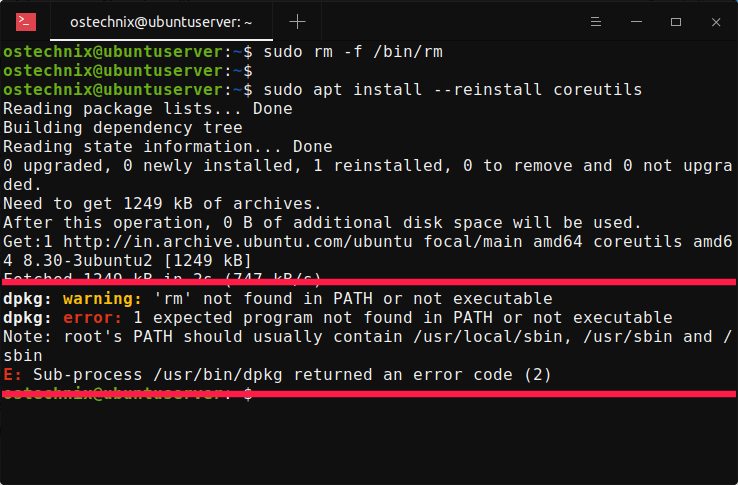
I also tried to compile it from source, but it doesn't work either, because the Makefile uses rm. Up until now, I didn't know that the reinstallation is not possible without rm command.
I thought restoring deleted commands is trivial. However, in this particular case I couldn't restore the rm command. Eventually I found the solution after couple web searches. If you've ever accidentally removed rm command (I hope you won't), you could use any one of the following methods to recover it. Not just rm command, you could use this procedure to recover almost all deleted core commands provided by the coreutils package.
Disclaimer:
You MUST NOT DO THIS ON A PRODUCTION SYSTEM. It is strictly for education purpose only!.
Recover deleted commands in Linux using coreutils
For those who don't know, the Gnu coreutils package provides essential core commands such as cat, ls, rm, mkdir, rmdir, touch, and many more. It comes pre-installed with most GNU/Linux distributions.
To recover the deleted rm command, first create an empty binary file with name "rm" under /bin/ location:
$ sudo touch /bin/rm
Make it executable:
$ sudo chmod +x /bin/rm
Download the coreutils package using command:
$ apt download coreutils
Please note that we can't reinstall coreutils but download it. Also, we don't need to use sudo privileges to download a package.
Unpack the downloaded package with the following dpkg command:
$ sudo dpkg --unpack coreutils_8.30-3ubuntu2_amd64.deb
The above command simply unpacks the coreutils package, but will not configure it.
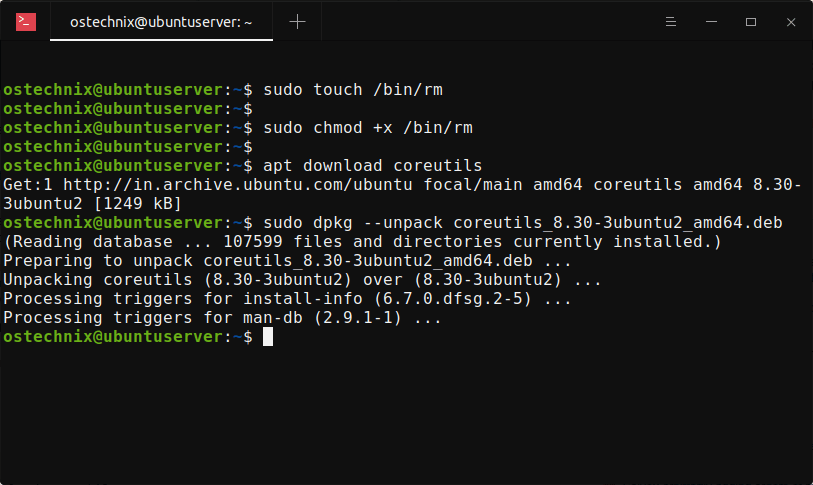
Done! Now, you can start using the rm command. To verify if the functionality of the rm command is restored, simply delete any unwanted file. For example, I deleted coreutils package which I downloaded earlier:
$ rm coreutils_8.30-3ubuntu2_amd64.deb
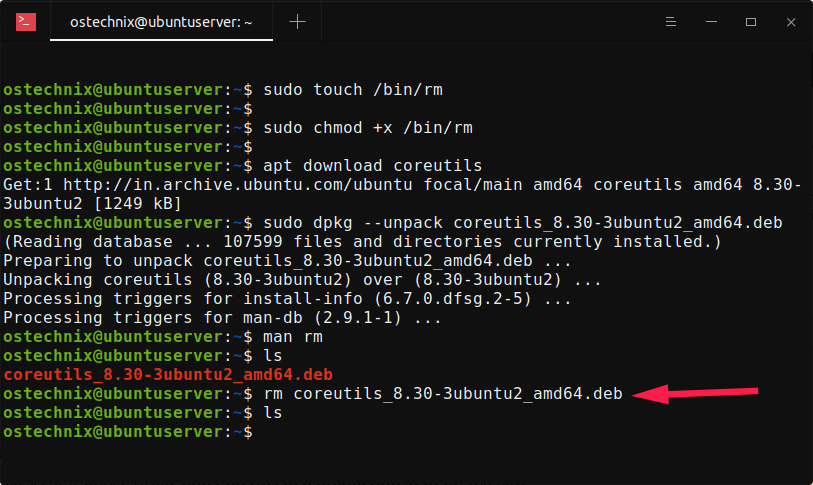
Great! It works!
And, please don't ever do this on a production system!!
Restore deleted commands using busybox in Linux
BusyBox is software suite that provides many common UNIX utilities into a single small executable. It provides replacements for most of the utilities you usually find in GNU fileutils, shellutils, etc. It is available by default in Debian and its derivatives like Ubuntu and many other Linux distributions.
You can view the list of core commandline utilities provided by busybox using command:
$ busybox --list
Sample output:
[
[[
acpid
adjtimex
ar
arch
arp
arping
ash
awk
basename
bc
blkdiscard
blockdev
brctl
bunzip2
busybox
bzcat
bzip2
cal
cat
[..]
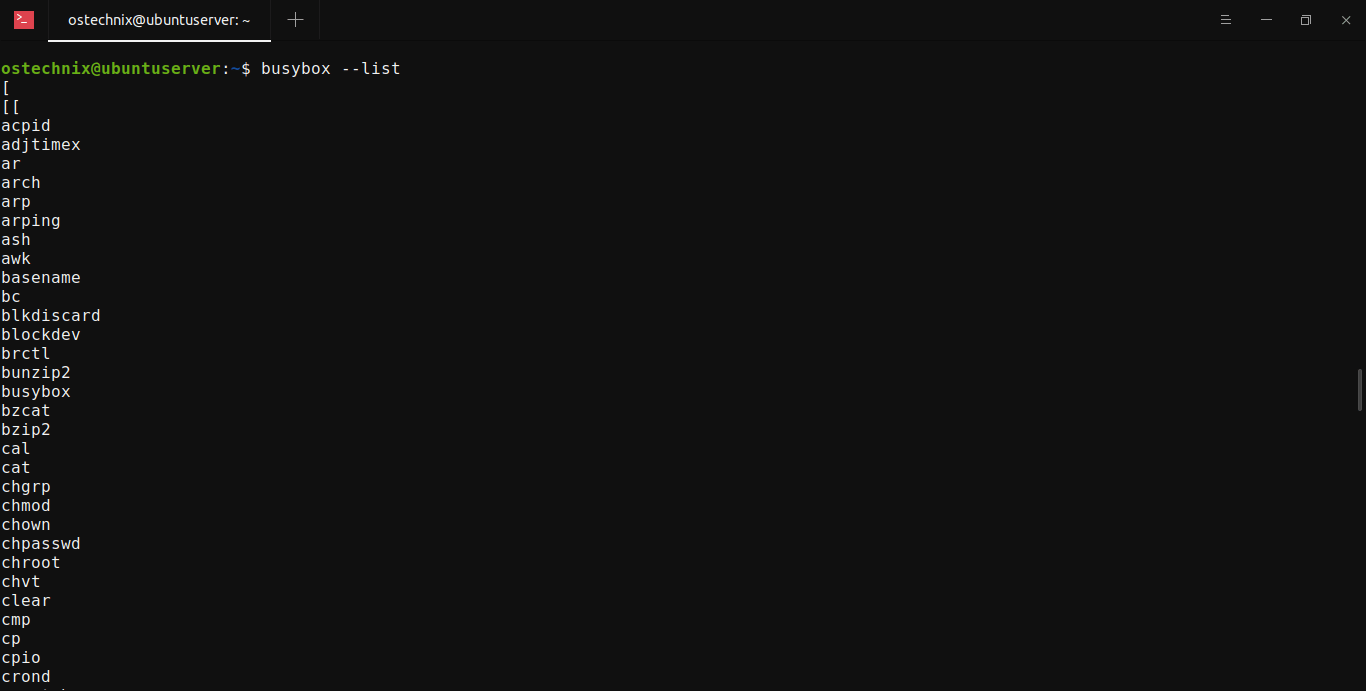
In my Ubuntu 20.04 LTS desktop, busybox provides around 263 command line utilities.
Now let us restore the deleted rm command by temporarily creating a symlink to it. Run the following command to temporarily symlink /bin/rm to /bin/busybox:
$ ln -s busybox /bin/rm
Then reinstall coreutils package using command:
$ sudo apt install --reinstall coreutils
That's it. The above command will restore the rm command.
As stated earlier, this procedure is not just for recovering rm command. I guess we can recover almost all Linux commands using these methods. Check it yourself on a VM and see it it works! Again, don't do this in a production system. You have been warned!

2 comments
If the only problem was a missing rm command, you could simply create a new rm executable which would only need the system function call unlink, assuming you have a working toolchain. Alternatively create a shell script called /bin/rm which just renames the “file_name” parameters to “file_name.DELETED” and clean them up later when rm has been reinstalled.
Where you are really messed up is if you have deleted the perl executable because apt will not work without perl.
The best way to solve major crises with missing system files is to have a bootable rescue CD or USB stick of the same distribution version which can then be used to do repairs.
The greatest single point of failure is in fact the /lib/your_archiitecture/libc*.so library file since nothing will work without that.
Thanks. Today I learned Apt requires Perl to work.