
In this guide, we will discuss how to select data from a table using MySQL LIKE operator and WHERE clause along with the SELECT command in a particular database using PHP in XAMPP.
If you haven't already created database and table, please refer the following guide:
For demonstration purpose, I created a table named "sales" in a MySQL database called "my_company" database with the below schema and records.
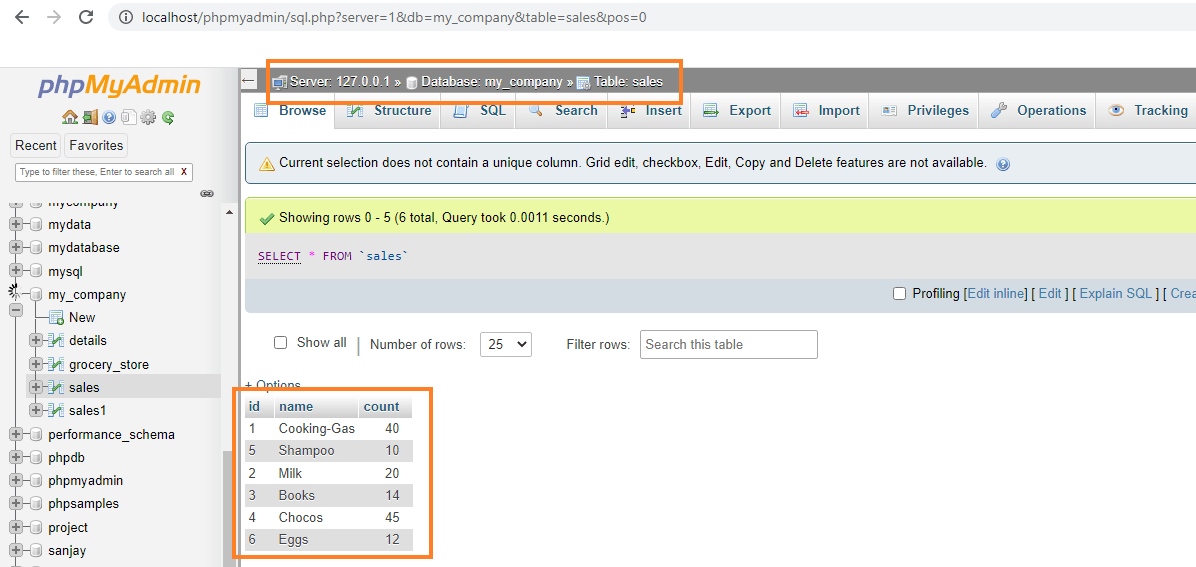
Heads Up: In XAMPP, the database and table names are case insensitive. It will consider upper/lower case as lowercase only.
Table of Contents
Filtering Data From MySQL Table With LIKE Operator
The MySQL LIKE operator checks whether a specific character string matches a specified pattern.
In other words, the LIKE is the operator applied on string values in a column to get the values based on the given expression condition.
We specify an expression after the LIKE operator. The expression is used to compare the strings in a column. If the expression is present in the string, it will be displayed.
The supported expressions are given below:
%character- Return the value from the column if it ends with the specified character.character%- Return the value from the column if it starts with the specified character.character% character- Return the value from the column if it starts and ends with the specified character.%sub-string%- Return the value if it contains the given substring at any position in the value.character__ ( 2 underscores) - Return the value from the column if it starts with the specified character and the length of the character is 3. Please note that the length depends upon underscores with a character.__character( 2 underscores) - Return the value from the column if it ends with the specified character and the length of the character is 3.
MySQL LIKE Operator Syntax:
SELECT column1,column2,.,column n from table_name WHERE column_name LIKE expression
Steps
1. Specify the servername (E.g. localhost), database username (E.g. root), root user password and the database name (E.g. my_company). Here, my root user's password is empty.
2. Establish a connection using the mysqli_connect() function.
3. Write the SQL Query to filter data from MySQL database using WHERE clause and LIKE operator.
Code:
$query = "SELECT column1,…. from Sales where column_name LIKE expression";
4. Store the selected results into a variable called "final" using mysqli_query() function. It will take connection and query as parameters.
Code:
mysqli_query($connection, $query);
5. Get the rows one by one from the "final" variable using mysqli_num_rows() function. Then fetch the results by iterating through a while loop using mysqli_fetch_assoc() function.
Code:
if (mysqli_num_rows($final) > 0) {
 //get the output of each row
  while($i = mysqli_fetch_assoc($final)) {
    echo $i["column1”],…………..;
  }
} else {
  echo "No results";
}
6. Finally, we will close the connection by using the mysqli_close() function.
Syntax:
mysqli_close($connection);
Now, let us write a sample PHP code based on the above steps.
PHP code To Select Data From MySQL Database Using LIKE Operator
Example Code 1:
In this example, we will select all columns from the "sales" table where the values in name column,
- starts with letter 'E',
- ends with 's',
- and contains letters 'gg'.
Create a new file named select.php under the /htdocs folder with the following contents in it.
Heads Up: If you use Linux, the htdocs folder will be under /opt/lampp/ directory. If you're on Windows, the htdocs will be usually in C:\xampp\ folder.
<?php
//specify the server name and here it is localhost
$server_name = "localhost";

//specify the username - here it is root
$user_name = "root";

//specify the password - it is empty
$password = "";

//specify the database name
$database_name = "my_company";

// Creating the connection by specifying the connection details
$connection = mysqli_connect($server_name, $user_name, $password,$database_name);

//select all columns such that name column starts with 'E'
$query = "SELECT * from sales where name like 'E%'";

#get the result
$final = mysqli_query($connection, $query);

if (mysqli_num_rows($final) > 0) {
 //get the output of each row
  while($i = mysqli_fetch_assoc($final)) {
      //get all columns
    echo "id: " . $i["id"]. "  ----> name: " . $i["name"]."  ----> count: " . $i["count"]. "<br>";
  }
} else {
  echo "No results";
}

//take a new line
echo "<br>";
echo "<br>";

//select all columns such that name column ends with 's'
$query1 = "SELECT * from sales where name like '%s'";

#get the result
$final1 = mysqli_query($connection, $query1);

if (mysqli_num_rows($final1) > 0) {
 //get the output of each row
  while($j = mysqli_fetch_assoc($final1)) {
      //get all columns
    echo "id: " . $j["id"]. "  ----> name: " . $j["name"]."  ----> count: " . $j["count"]. "<br>";
  }
} else {
  echo "No results";
}

//take a new line
echo "<br>";
echo "<br>";
//select all columns such that name column  contains 'gg'
$query2 = "SELECT * from sales where name like '%gg%'";

#get the result
$final2 = mysqli_query($connection, $query2);

if (mysqli_num_rows($final2) > 0) {
 //get the output of each row
  while($k = mysqli_fetch_assoc($final2)) {
      //get all columns
    echo "id: " . $k["id"]. "  ----> name: " . $k["name"]."  ----> count: " . $k["count"]. "<br>";
  }
} else {
  echo "No results";
}

//close the connection
mysqli_close($connection);
?>
Open your web browser and point it to http://localhost/select.php URL.

Example Code 2:
In this example, we will select all columns from the Sales table while filtering the values in the name column that only start with 'C' and end with 's'.
<?php
//specify the server name and here it is localhost
$server_name = "localhost";

//specify the username - here it is root
$user_name = "root";

//specify the password - it is empty
$password = "";

//specify the database name
$database_name = "my_company";

// Creating the connection by specifying the connection details
$connection = mysqli_connect($server_name, $user_name, $password, $database_name);

//select all columns such that name column starts with 'C' and ends with 's'
$query = "SELECT * from sales where name like 'C%s'";

#get the result
$final = mysqli_query($connection, $query);

if (mysqli_num_rows($final) > 0) {
 //get the output of each row
  while($i = mysqli_fetch_assoc($final)) {
      //get all columns
    echo "id: " . $i["id"]. "  ----> name: " . $i["name"]."  ----> count: " . $i["count"]. "<br>";
  }
} else {
  echo "No results";
}


//close the connection
mysqli_close($connection);
?>
Open your web browser and navigate to http://localhost/select.php URL.

Example Code 3:
In this example, we will select all columns from the "sales" table where values in the name column,
- start with 'C' and length - 6 (Here we need to place 5 underscores after 'C'),
- end with 's' and length - 4 (Here we need to place 3 underscores before 's').
<?php
//specify the server name and here it is localhost
$server_name = "localhost";

//specify the username - here it is root
$user_name = "root";

//specify the password - it is empty
$password = "";

//specify the database name
$database_name = "my_company";

// Creating the connection by specifying the connection details
$connection = mysqli_connect($server_name, $user_name, $password,$database_name);

// name  starts with 'C' and length - 6
$query = "SELECT * from sales where name like 'C_____'";

#get the result
$final = mysqli_query($connection, $query);

if (mysqli_num_rows($final) > 0) {
 //get the output of each row
  while($i = mysqli_fetch_assoc($final)) {
      //get all columns
    echo "id: " . $i["id"]. "  ----> name: " . $i["name"]."  ----> count: " . $i["count"]. "<br>";
  }
} else {
  echo "No results";
}

//new line
echo "<br>";
echo "<br>";

// name  ends  with 's' and length - 4
$query1 = "SELECT * from sales where name like '___s'";

#get the result
$final1 = mysqli_query($connection, $query1);

if (mysqli_num_rows($final1) > 0) {
 //get the output of each row
  while($j = mysqli_fetch_assoc($final1)) {
      //get all columns
    echo "id: " . $j["id"]. "  ----> name: " . $j["name"]."  ----> count: " . $j["count"]. "<br>";
  }
} else {
  echo "No results";
}

//close the connection
mysqli_close($connection);
?>
Open your web browser and point it to http://localhost/select.php URL.

Conclusion
In this guide, we discussed how to select particular column or all columns from a MySQL table by specifying an expression through LIKE operator using PHP with 3 different examples.
