
System76 has released the Pop!_OS 24.04 LTS beta, featuring the completely rewritten, Wayland-native COSMIC Desktop Environment built with Rust, powered by Linux Kernel 6.16.
COSMIC is the centerpiece of this major update. The developers designed COSMIC DE as foundational software for creating beautiful user experiences. You can download this beta right now and try out this new desktop built from scratch.
What's New in Pop!_OS 24.04 LTS Beta
The beta release, which System76 is using to fine-tune for the final release, brings numerous updates centered around the COSMIC desktop environment.
COSMIC DE, an in-house Product of System76
The primary and most significant new feature in Pop!_OS 24.04 LTS Beta is the introduction of the completely new COSMIC Desktop Environment (DE). COSMIC is designed and engineered in-house by System76.
COSMIC is not just another desktop environment; indeed, it represents System76’s vision for a highly customizable and user-friendly Linux desktop.
Unlike older environments with decades of history, COSMIC has been built from scratch.
Built for Speed and Safety with Rust
The core of the excitement lies in the programming language. COSMIC is built in Rust. Rust is a memory-safe programming language known for its speed, stability, and security. Consequently, this design ensures low memory usage and fast performance.
Furthermore, the modern compositor and Rust-based design help COSMIC feel fast. You will notice smooth animations and minimal input lag, even when using multiple monitors.
A Secure, Wayland-Native Desktop
Because COSMIC is a Wayland-native desktop environment built in Rust, it significantly improves security. The design eliminates vulnerabilities such as keylogging and input spoofing.
Moreover, Rust's memory safety guarantees dramatically reduce common attack surfaces, including buffer overflows.
Integrated Features Mean No Extensions Needed
COSMIC integrates powerful features directly into its core. This means you do not need unsafe JS injections (extensions) just to make the desktop usable.
For instance, COSMIC includes automatic tiling, stacking, and floating modes. This excellent built-in tiling makes multitasking easy and smooth.
Customization:
You gain control over your desktop’s appearance. COSMIC uses a custom theming system, making it simple to create a default theme using your desired color palette without compromising on readability.
Modular Elements:
The design uses modular elements, including applets, panels, the launcher, and dynamic workspaces. This ensures customization is easy.
Replacement of Core GNOME Applications
The Pop!_OS 24.04 LTS Beta desktop features its own suite of essential apps. These apps match the desktop’s style and run efficiently.
The beta replaces several older GNOME apps with new COSMIC versions. Key replacements include:
- COSMIC Files replaces GNOME Files (Nautilus).
- COSMIC Terminal replaces GNOME Terminal.
- COSMIC Text Editor replaces GNOME Text Editor
- COSMIC Media Player replaces Totem
- COSMIC Store replaces the Pop!_Shop.
Accessibility
Built-in features include high contrast mode, color filters, and improved keyboard navigation to enhance usability for individuals with visual or mobility challenges
Updated Core System Components
Pop!_OS 24.04 LTS Beta includes updated components in the underlying operating system:
- Linux Kernel: Includes Linux kernel 6.16.3.
- Graphics and Drivers: Features Mesa 25.1.5-1 and NVIDIA Driver 580.
- Wayland Components: Uses libwayland/libwayland-client 1.23.1-3 and libdrm 2.4.125-1
- And more.
Upgrade from Pop!_OS 22.04 LTS to 24.04 LTS Beta
Users upgrading from Pop!_OS 22.04 LTS should note specific changes related to the transition to COSMIC:
- Dock Favourites: Favorites previously saved in the Pop!_OS 22.04 LTS dock are not saved after the upgrade. Adding apps to the new COSMIC dock is done via “Pin to app tray”, which you access by right-clicking on them in the Dock or Application Library.
- PPAs: PPA's are disabled during the upgrade process because they can lead to errors; users must re-enable them after upgrading.
If you are upgrading from Pop!_OS 22.04 LTS to the Pop!_OS 24.04 LTS Beta, you should first back up your important data.
Then, start the upgrade by running the following command from the terminal:
sudo pop-upgrade release upgrade -f
Follow the on-screen instructions. Once the upgrade task complete, reboot your system.
Upon first login after new installation or upgrade from previous version, you will be greeted with a welcome screen.
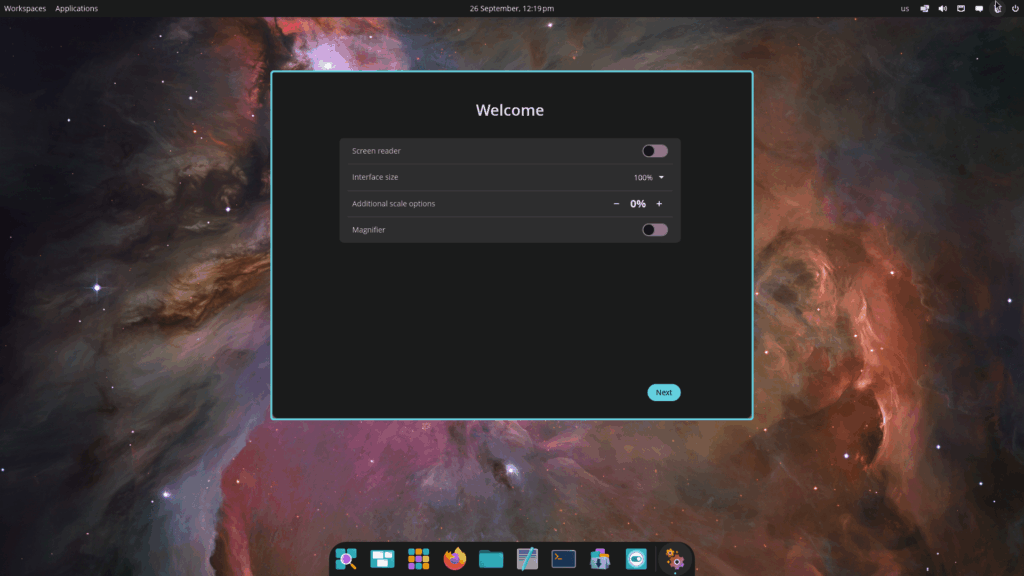
Click next. You will be asked a series of questions, such as preferred language, keyboard, timezone, and a few more. Just answer your questions and complete this step.
Start using the new Pop!_OS 24.04 LTS desktop!

COSMIC DE Availability Across Linux Distributions
COSMIC is designed as foundational software for creating user experiences that can be utilized by a wide variety of users and products.
System76 lists multiple distributions where the desktop environment is currently available or has an official spin:
- Fedora COSMIC Spin
- Fedora COSMIC ATOMIC
- CachyOS
- NixOS
- Arch Linux
- openSUSE
- AerynOS
- Redox OS
- Slackware
System76 encourages further adoption and community involvement, providing a form for "Distro Maintainers" whose distribution is not yet listed to request being featured.
Current Status
When running COSMIC on distributions other than Pop!_OS, some configurations may be necessary for full compatibility and proper theming:
- Firefox may require setting the configuration flag
widget.gtk.libadwaita-colors.enabledtofalseinabout:configto match COSMIC theming. - Google Chrome-based browsers (versions prior to 140, or other non-updated Chrome-based browsers) may need the
ozone-platform-hintflag set to "auto".
Test Pop!_OS 24.04 LTS Beta Today
You can download the Pop!_OS 24.04 LTS Beta to test out the COSMIC DE now. System76 encourages users to test the beta as they work to fine-tune it for the stable release.
To install Pop!_OS, you need a 64-bit processor, 4 GB of RAM, and 16 GB of storage. Also, you must disable Secure Boot in your BIOS to install Pop!_OS.
Grab the Pop!_OS 24.04 LTS Beta and explore all the features that make COSMIC one of the most exciting developments in the Linux desktop space in years.
Keep in mind: This is a beta release, so some bugs are expected.
