
Most developers overcomplicate speech synthesis. You likely think you must choose between leasing "intelligence" from a cloud provider—which costs money, adds latency, and leaks data—or wrestling with massive AI models that demand a dedicated, power-hungry GPU.
Kyutai Labs built Pocket TTS because they realized this hardware barrier is unnecessary for high-quality speech.
Here's what actually matters when you strip away the noise:
- Hardware Independence: You can run high-quality TTS on a standard laptop with zero GPU requirements.
- Instant Voice Cloning: You can mimic any voice by simply providing a plain .wav file as a reference.
- Low Latency: The ~200ms "time to first chunk" makes it viable for interactive assistants where waiting two seconds for a cloud response would feel broken.
Table of Contents
What is Pocket TTS?
Pocket TTS is a 100-million parameter, CPU-only text-to-speech model that delivers high-fidelity speech and zero-shot voice cloning at 6x real-time speed—no GPU required.
Pocket TTS is developed by Kyutai Labs. It is open-source under the MIT license and runs on most devices.
Efficiency Over Brute Force
The industry has a bad habit of throwing more hardware at every problem. Pocket TTS takes the opposite approach.
- The Old Way: You either send text to a web API and wait for the round-trip or you load a multi-gigabyte model onto a GPU. Even then, the system often waits to process the entire sentence before playing a single sound.
- The New Way: You run a 100M parameter model that uses only two CPU cores. Because the model is so lean, Kyutai found that running it on a GPU provides zero speedup. You get a ~200ms response time and generate audio 6x faster than the speaker can talk, all while keeping your data on your own machine.
The Analogy: The Tap vs. The Tanker
Think of traditional TTS like a water tanker. To get a drink, you have to wait for a massive truck to drive from the warehouse (the cloud) to your house. It's a lot of infrastructure for a single glass of water.
Pocket TTS is a tap. It's small, it's already installed in your "plumbing" (your CPU), and the water flows the instant you turn the handle. It doesn't wait to fill a whole bucket; it provides a continuous stream of audio "chunks" so you can start listening immediately.
How is Pocket-TTS so fast?
Most AI audio models (like GPT-4o or traditional TTS) use a "Discrete Token" approach. They treat sound like Legos—chopping it into tiny, individual blocks that the AI must predict one by one. This is computationally "heavy" and often leads to robotic transitions.
Pocket TTS uses CALM (Continuous Audio Language Model).
- The Logic: Instead of blocks, CALM treats audio as a continuous, flowing stream (like a wave).
- The Result: Because it predicts the "flow" of audio directly in one pass (using a one-step consistency model), it removes the massive processing bottleneck. This is why it can run on a MacBook Air CPU using only two cores, whereas other models would crawl.
High-Quality Voice Cloning That Actually Fits in Your CPU: 5 Seconds is All You Need
The standout feature of Pocket TTS is its ability to clone a voice without "training" a new model.
- The Input: You provide a short (~5 second)
.wavfile of a person speaking. - The Process: Pocket-TTS extracts a "voice embedding"—a mathematical fingerprint of the tone, accent, and even the room's reverb.
- The Output: It applies that fingerprint to the text you want to speak.
Note: The model is "English-only" for now, but its ability to capture acoustic conditions means that if your sample has background noise, the output will likely have it too. Always use a "clean" 5-second sample for the best results.
Pocket TTS Feature Summary
If you are deciding whether to use Pocket TTS for your next project, keep these "First Principles" in mind:
| Feature | The Reality |
|---|---|
| Speed | Initial audio starts in 200ms. It is fast enough for real-time assistants. |
| Hardware | CPU-only. No GPU required. Uses ~2 CPU cores. |
| Privacy | 100% Local. No data ever leaves your machine. Perfect for sensitive apps. |
| Limit | English-only. Support for other languages is currently missing from the official repo. |
| Size | ~300MB total. It literally fits "in your pocket" (or a small USB drive). |
Where it Stumbles
Do not expect a polished, multi-lingual product out of the box. We identified these specific friction points:
- Language Barrier: It currently only supports English.
- Rhythm Issues: You cannot manually insert pauses or silences into the text to control the flow of speech.
- Initial Drag: While the audio generation is fast, the setup operations—specifically loading the model and exporting a voice for cloning—are "relatively slow." You must keep the model in memory to maintain performance.
- Rigid Requirements: You are locked into Python 3.10–3.14 and PyTorch 2.5+. If your environment is outdated, it will fail.
Try Pocket TTS Online (Demo)
To try Pocket TTS without any installation, do this:
Open your web browser and navigate to the Kyutai website.
Now input your text, select different voices, and generate speech. You can also download the generated audio.
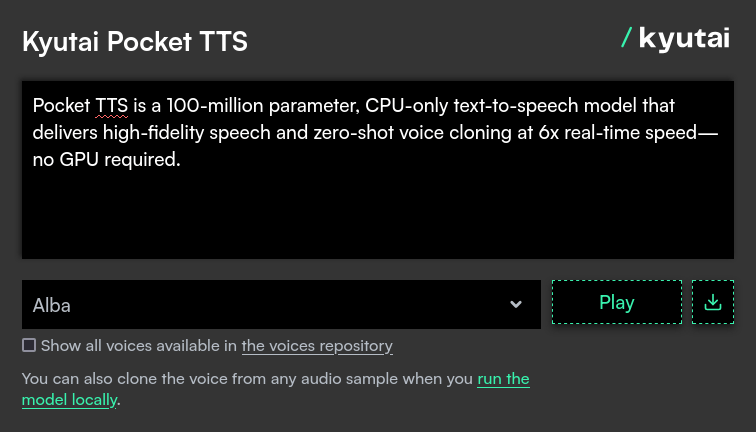
If you're happy with the result, you can deploy Pocket TTS on your local machine.
Run Pocket TTS Locally
Kyutai Labs has optimized the developer experience. You don't need CUDA drivers or complex environments.
The Quick Start (CLI)
The most efficient way to run this is using uv, the fast Python package manager:
To generate a single file, run:
uvx pocket-tts generate --text "Hello world" --voice alba
To run a local web interface (Highly Recommended):
uvx pocket-tts serve
Once you run the serve command, you can navigate to http://localhost:8000 to play with the voices in a visual dashboard.
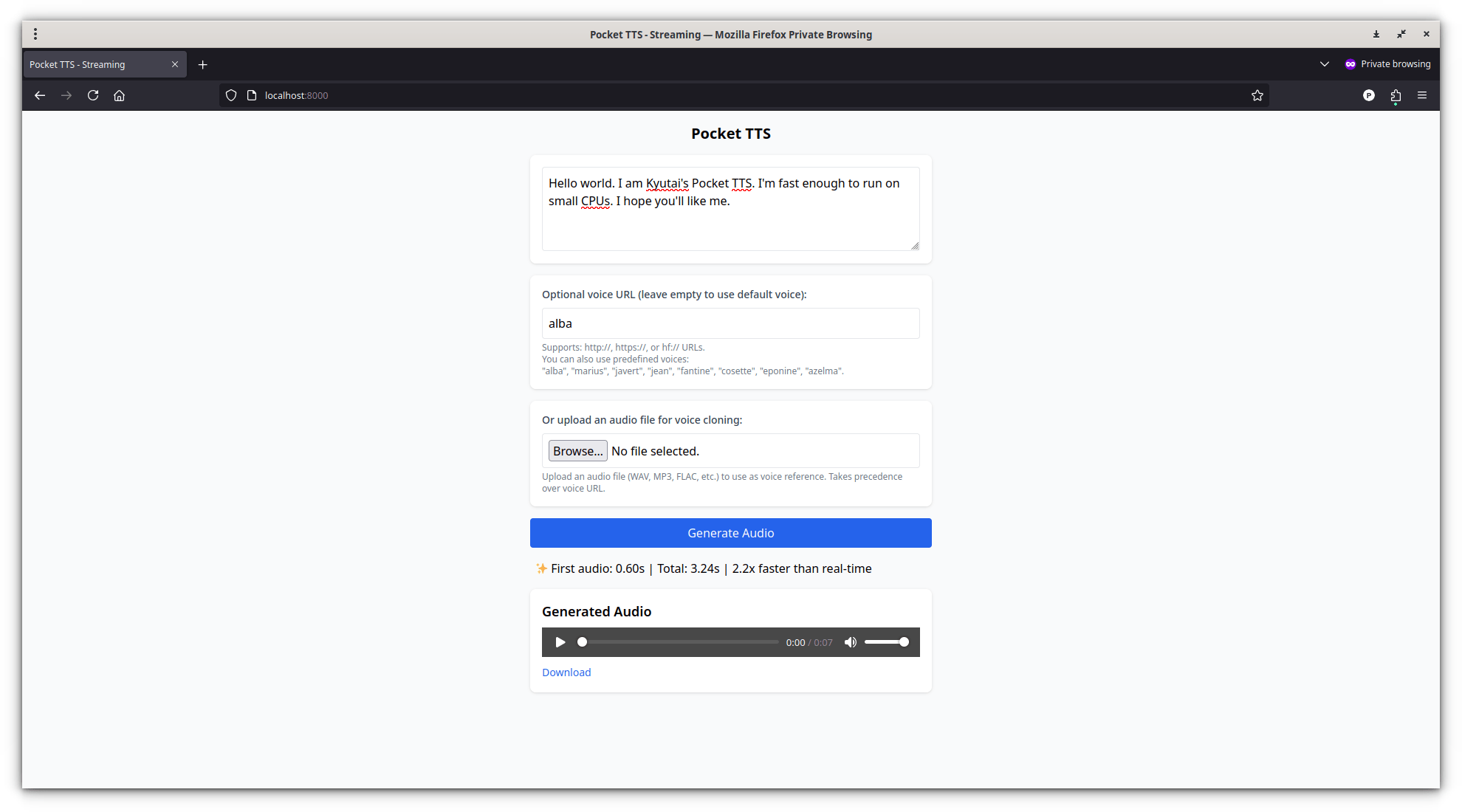
You can also upload your own recorded voice for voice cloning. It is quite useful for those who want to embedded audio posts in their website or blog.
For Developers (Python API)
If you are building an app, the API is remarkably lean:
from pocket_tts import TTSModel

# 1. Load the model (100M parameters)
model = TTSModel.load_model()

# 2. Get the voice (Built-in or your own .wav file)
voice_state = model.get_state_for_audio_prompt("path/to/my_voice.wav")

# 3. Generate
audio = model.generate_audio(voice_state, "This is being generated on my CPU.")
Conclusion
Pocket TTS isn't just another AI model. It represents a shift toward decentralized AI. By moving high-quality voice synthesis off the cloud and onto your local processor, Kyutai Labs is making voice interfaces cheaper, more private, and significantly more accessible.
If you're building anything voice-related locally, this is where you start.
Resource:
Related Read:
- Audiogenipy: Create Audiobooks With Python And gTTS Effortlessly In Linux
- How To Convert Epub Ebooks To Audiobooks Using Audiblez And Kokoro In Linux
- Speech Note - An Offline Speech Recognition, Text-to-Speech, and Translation App for Linux
- eSpeak NG – A Text To Speech Synthesizer For Linux
- How To Use Google Translate From Commandline In Linux
