
Are you using the new Debian 13 trixie or planning to upgrade to Debian 13 from Debian 12? If so, you might have noticed a buzz about deb822, a new way to manage your software sources. In this tutorial, we will explain what deb822 format is, why Debian trixie adopted it, its benefits, and how to migrate from the old sources.list to the new deb822 format in Debian 13 trixie.
Switching to deb822 format is one of the important steps to do after installing Debian 13 trixie. This change brings a number of benefits, making your system more secure and easier to manage.
Table of Contents
What is the Debian deb822 Format?
Simply put, deb822 is a new, structured way to list where your Debian system gets its software updates from.
For years, Debian and its derivations like Ubuntu used a simple one-line format in files like /etc/apt/sources.list. Each line in these files pointed to a software repository.
However, the new deb822 format uses a "key-value pair" structure, much like a recipe list.
Instead of a single, long line, each piece of information (like the type of package, its location, or what components it includes) gets its own clearly labelled line.
These new configuration files typically live in the /etc/apt/sources.list.d/ directory and often end with a .sources extension.
Please note that the deb822 format isn’t new. APT has supported it for quite some time.
In the old format, it was already possible to explicitly specify a signing key. However, with deb822, you can take it a step further by embedding the key directly inside the .sources file.
Why Debian Recommends the New deb822-style Format?
This isn't just a cosmetic update; the deb822 format introduces several significant improvements:
1. Improved Readability and Structure
Imagine a messy, handwritten grocery list versus a neatly typed, itemised one. The deb822 format is much clearer, using key-value pairs that make it easy to see and edit your repository details.
This clarity is especially helpful when you need to add common elements like "contrib" to a source, as it avoids long, hard-to-read lines.
2. Enhanced Security
A major benefit is the explicit definition of trusted keys using the Signed-By field.
Previously, keys for third-party repositories were often added to a global keyring, meaning any package signed by that key was trusted across your entire system.
Now, you can link a specific key to a particular repository, significantly boosting your system's security.
3. Greater Modularity and Flexibility
Each repository's definition now resides in a separate block within the .sources file, separated by a blank line.
This makes it much simpler to enable or disable repositories temporarily without deleting their configurations.
You can even combine both binary (deb) and source (deb-src) packages for a repository within a single entry.
4. Future-Proofing
This structured format allows for the easier addition of new features to APT without breaking existing setups.
It also handles multi-architecture systems more effectively. Notably, field names are not case-sensitive, though common practice capitalises them (e.g., Signed-By).
Understanding the New deb822 Format: A Glimpse
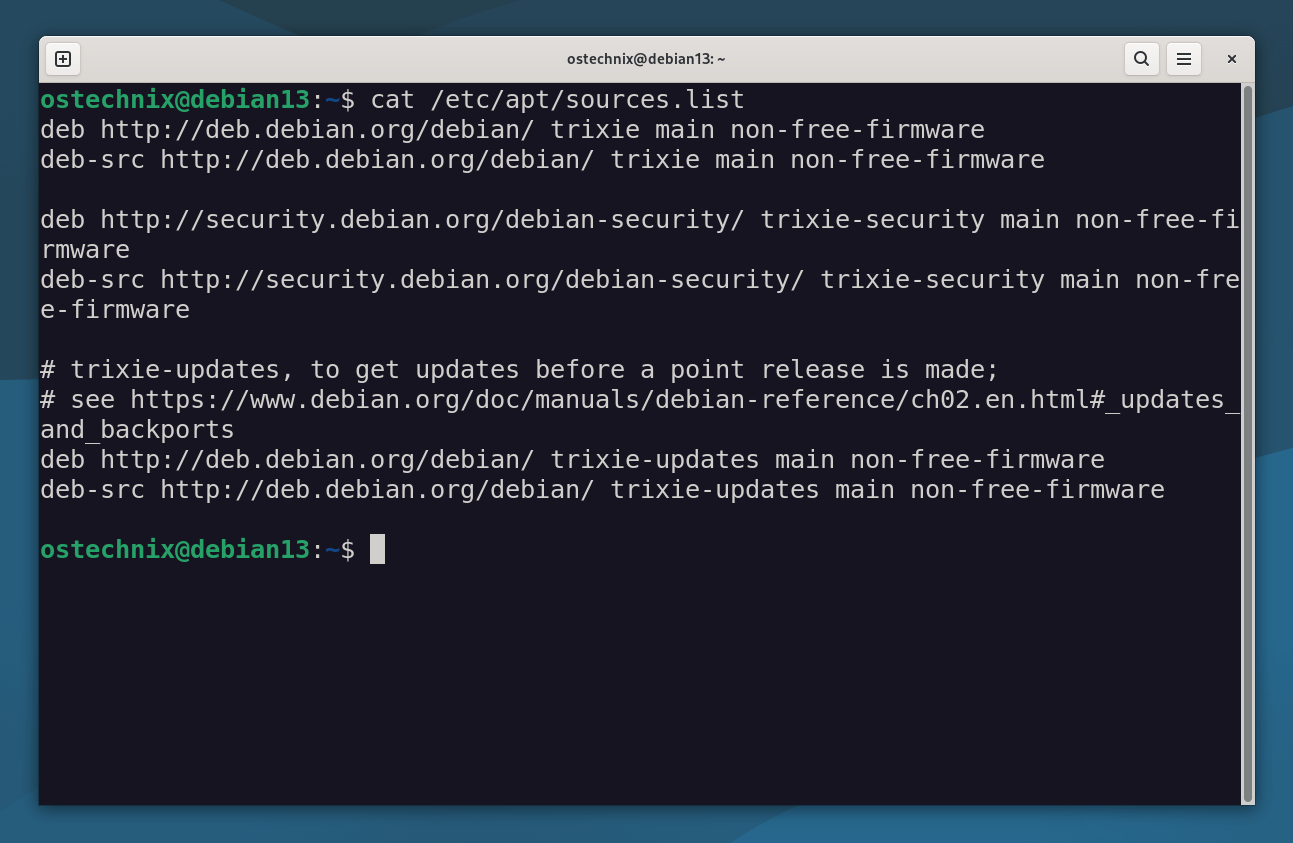
Let's look at a typical Debian source entry in both the old and new formats.
Old Format (e.g., in /etc/apt/sources.list):
deb http://deb.debian.org/debian/ trixie main non-free-firmware
deb-src http://deb.debian.org/debian/ trixie main non-free-firmware
[...]
New deb822 Format (e.g., in /etc/apt/sources.list.d/debian.sources):
Types: deb deb-src
URIs: http://deb.debian.org/debian/
Suites: trixie
Components: main contrib non-free non-free-firmware
Signed-By: /usr/share/keyrings/debian-archive-keyring.gpg
As you can see, the new format lays out the Types, URIs, Suites, and Components very clearly.
Other useful fields you might encounter include Architectures, Enabled (for easy toggling), Languages, and Check-Valid-Until for replay attack detection.
Now let us see how to modernize your Apt sources on Debian 13 trixie from the old format to the new deb822 format.
Migrate to deb822 Format in Debian 13 Trixie
Debian has made the transition straightforward. If you're on Debian 13 (Trixie), you can simply use a command to convert your existing sources.
Step 1: Modernize Apt sources on Debian 13 trixie (Automatic Conversion)
To switch from sources.list to deb822 Format in Debian 13 trixie, run the following command:
sudo apt modernize-sources
Press Y and hit ENTER key to migrate to deb822 format:
The following files need modernizing:
  - /etc/apt/sources.list

Modernizing will replace .list files with the new .sources format,
add Signed-By values where they can be determined automatically,
and save the old files into .list.bak files.

This command supports the 'signed-by' and 'trusted' options. If you
have specified other options inside [] brackets, please transfer them
manually to the output files; see sources.list(5) for a mapping.

For a simulation, respond N in the following prompt.
Rewrite 1 sources? [Y/n] y
Modernizing /etc/apt/sources.list...
- Writing /etc/apt/sources.list.d/debian.sources
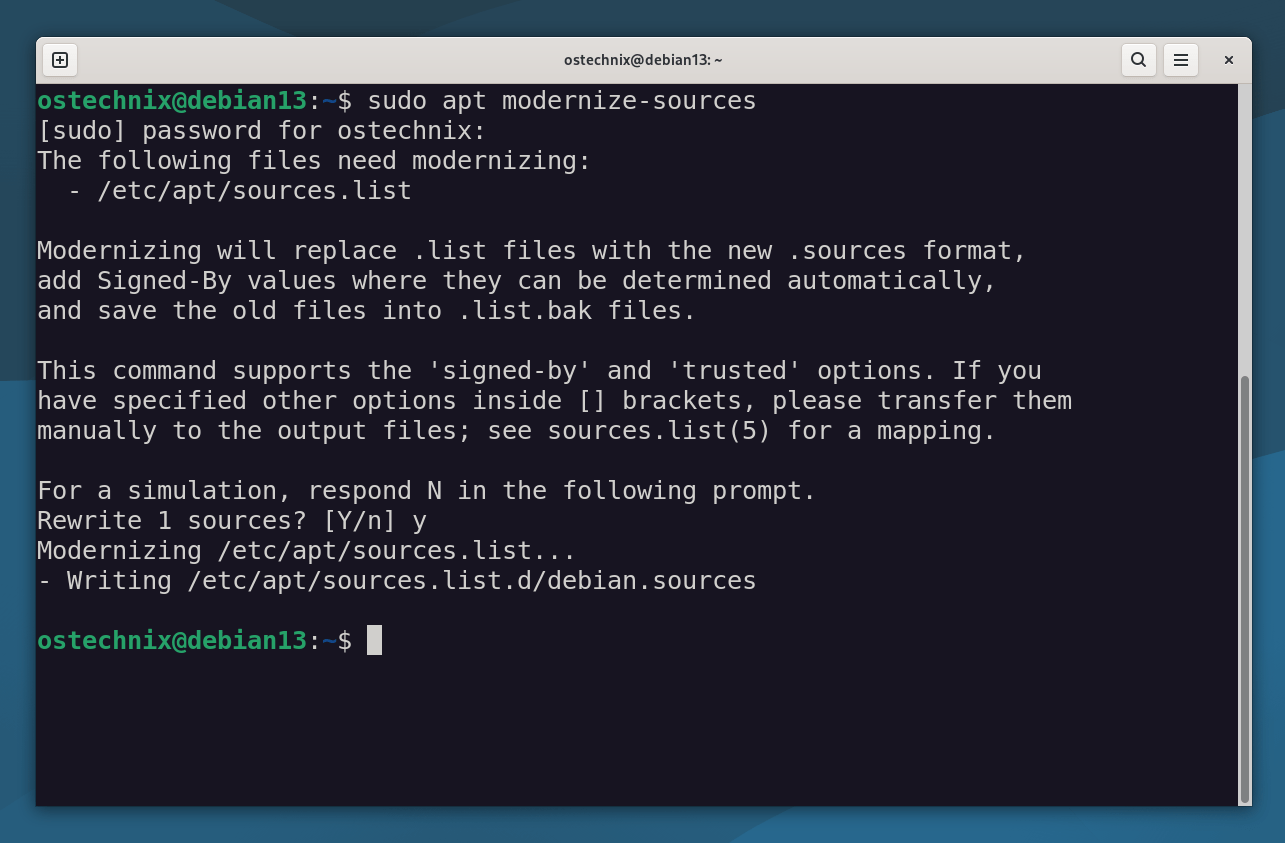
As you see, the apt modernize-sources command automatically converts your old sources.list file into the new deb822 format. It places the new file in /etc/apt/sources.list.d/debian.sources.
More importantly, APT creates backups of your original files (like sources.list.bak and .save), so you can easily revert if anything goes wrong.
Please note: The apt modernize-sources command is currently available in Debian 13 (Trixie) and later, and does not work on Debian 12 (Bookworm) yet. If you're using an older APT version (like 2.3.10), you might need to manually modify your sources files.
Step 2: Verify Your New Configuration
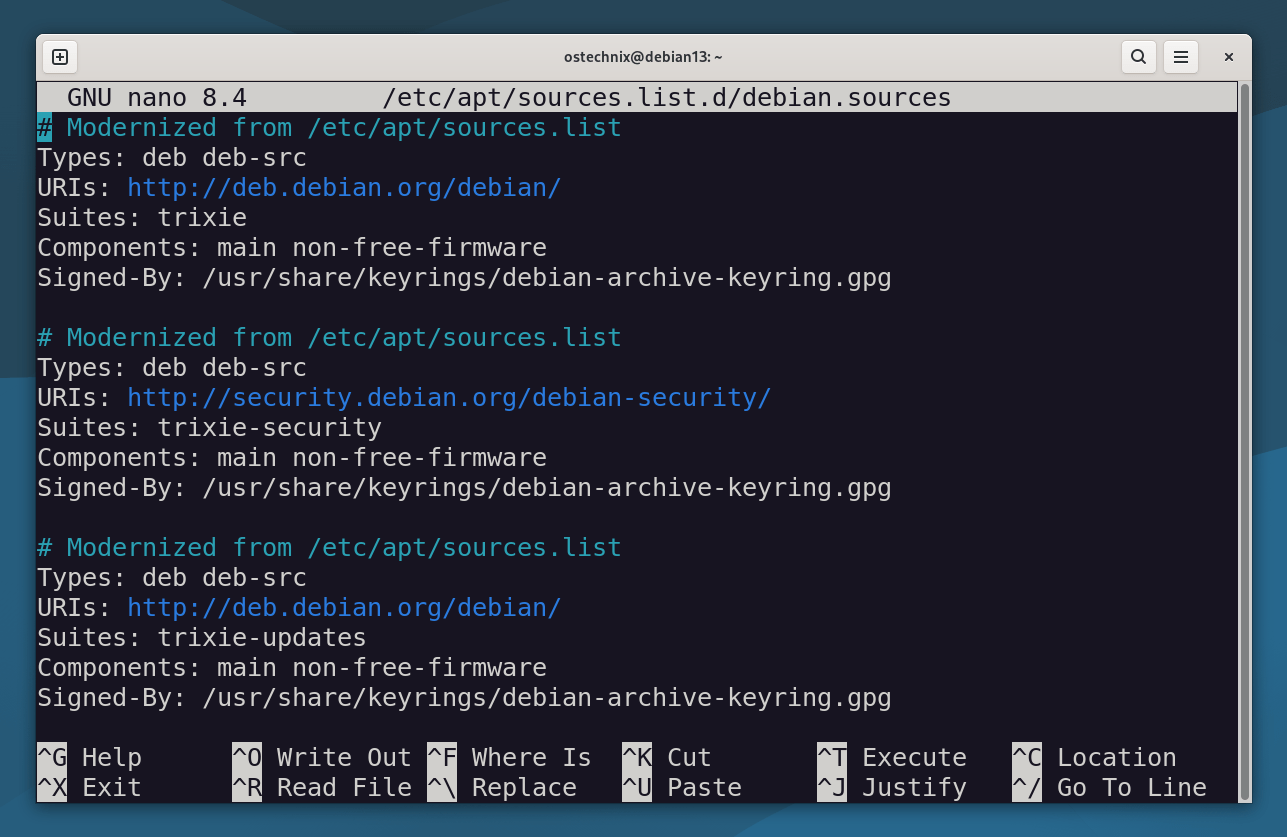
After conversion, always inspect the generated file to ensure everything looks correct:
sudo nano /etc/apt/sources.list.d/debian.sources
Sample Output:
# Modernized from /etc/apt/sources.list
Types: deb deb-src
URIs: http://deb.debian.org/debian/
Suites: trixie
Components: main non-free-firmware
Signed-By: /usr/share/keyrings/debian-archive-keyring.gpg

# Modernized from /etc/apt/sources.list
Types: deb deb-src
URIs: http://security.debian.org/debian-security/
Suites: trixie-security
Components: main non-free-firmware
Signed-By: /usr/share/keyrings/debian-archive-keyring.gpg

# Modernized from /etc/apt/sources.list
Types: deb deb-src
URIs: http://deb.debian.org/debian/
Suites: trixie-updates
Components: main non-free-firmware
Signed-By: /usr/share/keyrings/debian-archive-keyring.gpg
Step 3: Update APT Sources
Finally, refresh your package lists:
sudo apt update
Saying Goodbye to apt-key: Managing Repository Keys Securely
Another significant change accompanying deb822 is the deprecation of apt-key. This command, used for managing public keys, was problematic because any key added with it was globally trusted, posing a security risk.
Now, all third-party keys should reside in /usr/share/keyrings/ and follow a clear naming convention, typically {THE_REPO}-archive-keyring.gpg. You then link this specific key to its corresponding repository within the deb822 .sources file using the Signed-By field.
A fantastic new feature, available since APT version 2.3.10, allows you to embed the entire public key directly within the .sources file itself.
This is often preferred because it keeps all repository information in one place and prevents orphaned keys from being left behind if you remove a repository later.
When embedding a key, remember to indent each line with a single space and represent empty lines with a dot.
Will this Break Anything?
No! APT fully supports this format, and many tools (like apt-add-repository) are adapting to it. Plus, if you ever need to revert, you can always go back to the old style.
The Old Format will be Supported until 2029
While Debian 13 (Trixie) officially introduces and encourages the deb822 format, the old sources.list format will remain supported until at least 2029. However, APT in Debian 13 will start to complain if you're still using the legacy format, even though it still works.
Therefore, migrating to the deb822 format is not strictly mandatory right now, but it's a highly recommended step for improved security, clearer configuration, and a smoother experience with future Debian releases.
Migrating to deb822 format now will undoubtedly enhance your Debian system management. So update your APT sources today for better readability, security, and future compatibility!

2 comments
Not synaptic compatible. It sort of breaks!! Key problems too!!
Thanks, just the right amount of detail I wanted.