
Ubuntu 25.10, code-named Questing Quokka, is bringing exciting advancements in how you can protect your data. One of the notable features for this release is TPM-backed Full Disk Encryption (FDE).
As far as I know, Ubuntu developers began discussing TPM‑backed full disk encryption as an experimental feature in Ubuntu 23.10. Two years later, it looks like they are finally preparing to complete it in Ubuntu 25.10.
In this guide, we will explain what exactly TPM-backed FDE is, and its benefits for the Ubuntu users.
Table of Contents
What is Full Disk Encryption (FDE)?
First, let's talk about FDE.
Full Disk Encryption (FDE) is a powerful way to keep all your data on your computer's disk safe. It ensures that everything on your hard drive is encrypted, making it unreadable if your device is lost or stolen.
Ubuntu has offered a traditional FDE option for years during installation, where you set a passphrase to unlock your disk before the system starts.
Say Hello to the Trusted Platform Module (TPM)
So, what's new with TPM-backed FDE?
TPM, or Trusted Platform Module, is a special chip found in most modern computers. Think of it as a digital guardian for your system's integrity.
Here’s how it works with FDE:
- Integrity Check: The TPM measures the software and firmware that run before your Ubuntu operating system starts. It also checks important parts of Ubuntu's early boot process.
- Smart Unlock: Your encrypted disk will only unlock if the system's state matches what was expected and trusted when you set it up. This ensures your hardware and early software haven't been tampered with.
- Device Specific Security: If you try to read your disk on another device, or if parts of your hardware are swapped, the disk won't be readable. This is where a recovery key comes in handy.
Key Security Enhancements in Ubuntu 25.10
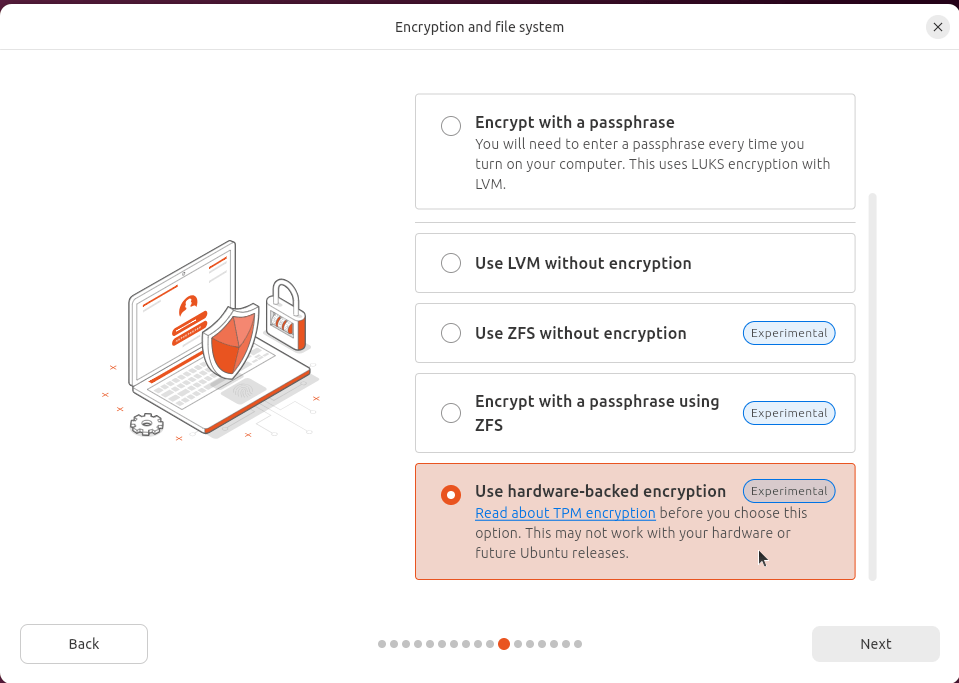
Ubuntu 25.10’s TPM/FDE implementation comes with several user-friendly features designed to enhance your security experience.
1. Smarter Setup Checks
Ubuntu 25.10 includes more precise checks to make sure enabling TPM/FDE is safe. The installer will check if your system is ready, for example, if your TPM version is new enough or if there are any known vulnerabilities.
You’ll only see the "Use hardware-backed encryption" option if your system passes these checks. If there's an issue, you'll see a warning.
2. Essential Recovery Key Management
During installation, a recovery key is generated. This key is vital as it lets you bypass the TPM entirely. It’s extremely useful if you:
- Upgrade your machine's firmware.
- Change critical hardware components.
- Forget your passphrase. The installer will prominently display this key, urging you to write it down, save it as a file (outside the live system), or display it as a QR code. If you happen to lose it later, and you are an administrator, you can regenerate a new recovery key through the Security Centre.
3. Optional Passphrase for Double Protection
You can choose to add a passphrase on top of the TPM protection. This means your disk will only unlock if the TPM confirms your system is trusted AND you provide your passphrase.
This offers a fantastic double layer of security. This passphrase will be prompted every time you boot your machine.
4. Seamless Firmware and Hardware Updates
For some firmware updates, like DBX updates, where the system can predict the TPM’s next state, the process will be fully transparent.
You can upgrade, reboot, and won’t be asked for anything extra. However, for other updates or hardware changes that affect the TPM, you'll need to enter your recovery key to "stamp" the new state as trusted.
This helps protect you by alerting you if anything unexpected happens. Ubuntu 25.10 will even prompt you for your recovery key before applying certain updates to prevent you from getting locked out.
It also warns you if an Ubuntu firmware update might affect another operating system (like Windows BitLocker) on your machine.
5. Proprietary Driver Support (e.g., Nvidia)
Good news for users with proprietary drivers like Nvidia!
Ubuntu is working to support these drivers with TPM/FDE, utilising snap components. This means the kernel itself will be in a snap, making the experience smooth for you.
This support is planned to be available by the end of this development cycle.
TPM/FDE Feature is Experimental in Ubuntu 25.10
Please note that this TPM/FDE feature is considered experimental in Ubuntu 25.10. It’s not yet recommended for production environments where data recovery is critical.
The Ubuntu team plans a call for testing closer to the 25.10 release in October. This will involve extra tools for volunteers to run on their systems, helping the team understand hardware configurations in the wild and ensure confidence for a stable release. You are highly encouraged to try it out and provide feedback.
Ubuntu 25.10 Questing Quokka is set to be released on October 9, 2025.
Get Ready for Enhanced Security!
TPM-backed Full Disk Encryption in Ubuntu 25.10 aims to improve the data security and system integrity.
With features like intelligent installation checks, robust recovery key management, and optional passphrase support, you'll have more control and peace of mind over your digital assets.
The Ubuntu team is incredibly excited about this progress, and we hope you are too! Keep an eye out for the call for testing, and get ready to experience a more secure Ubuntu.
For more details, check the Ubuntu discourse forum discussion:

3 comments
What if the entire computer is stolen? Would that mean the disk would be automatically unlocked when the theft boots the computer? Almost equivalent to no FDE at all?
For a stolen computer, the disk would not automatically unlock due to the TPM’s integrity checks. The FDE protection holds, especially if you have enabled the optional passphrase in addition to TPM. The primary vulnerability would be if the thief also gains access to your recovery key.
If the thief possesses the recovery key, the Full Disk Encryption, while still present, will not prevent them from accessing your data because the key provides the ultimate bypass for the encryption mechanism. This is why securing the recovery key is as critical, if not more critical, than the device itself.