
The Fedora Project announced the Fedora Linux 43 Beta release on Tuesday, 16 September 2025. This is a super exciting moment for everyone who loves a up-to-date, innovative, and user-friendly Linux operating system.
Fedora 43 beta gives you a special chance to try out the upcoming Fedora Linux release and share your thoughts to help make the final F43 version even better.
What's New in Fedora Linux 43 Beta
This beta release truly packs a punch with many exciting improvements. Fedora 43 beta is powered by the latest Linux Kernel 6.17-rc5 and GNOME 49.
A notable change in Fedora Linux 43 Beta is the removal of the GNOME X11 packages from the Fedora repositories. Yes, for the GNOME desktop environment, Fedora 43 Beta is moving towards being Wayland-only.
This means that all users who previously used the GNOME X11 session will now be migrated to the GNOME Wayland session. This change aims to make the GNOME experience exclusively Wayland-based within Fedora.
Let’s look at some of the other important highlights.
Better Installation and Desktop Experience
- Anaconda WebUI for Fedora Spins is now standard: This provides a consistent and modern way to install Fedora across all desktop versions. It also moves us closer to replacing the older GTK installer, ensuring everyone enjoys a polished and easy-to-use setup.
- Anaconda installer now uses DNF5: This change brings better support for package-based applications during installation. Plus, it is a significant step towards removing DNF4, which is currently in maintenance mode.
- Fedora Kinoite automatically updates: Now, Fedora Kinoite users will always run a system with the latest bug fixes and features. Updates apply quietly in the background after a simple reboot.
- Default monospace fallback font is set: This guarantees a consistent font choice if a specific monospace font is missing. Therefore, your font selection remains stable and predictable, avoiding unexpected changes.
Core System Enhancements
- GNU Toolchain Update: Fedora stays modern with the newest features, improvements, and important bug and security fixes from projects like gcc, glibc, binutils, and gdb. This ensures you always have a reliable set of core tools.
- Package-specific RPM Macros for Build Flags: This gives package maintainers a clean and easy way to add custom compiler flags. It simplifies adjustments and helps avoid problems that might come from older manual methods.
- Build Fedora CoreOS using Containerfile: The Fedora CoreOS (FCOS) build process now uses a standard container image. As a result, anyone with Podman installed can build FCOS, making the process much simpler for individuals and automated systems alike.
Key Upgrades and Removals
Fedora 43 Beta also brings many crucial software updates, alongside a few important removals:
- Python 3.14: You get the latest Python version, which helps find and report critical bugs early, benefiting the entire Python community. Plus, developers gain access to brand-new features.
- Golang 1.25: This update gives you the newest Go features, including leak detection for
go build -asanand the ability to use subdirectories as a module root. Fedora aims to provide a robust platform for Go development. - Idris 2: Users can now explore exciting new features like Quantitative Type Theory (QTT) for type-safe concurrent programming and a new target to compile to, Chez Scheme.
- PostgreSQL 18: The default PostgreSQL database stream moves from version 16 to version 18.
- Ruby on Rails 8.0: This release includes the latest version of this popular web framework.
- MySQL 8.4: The distribution switches its default MySQL version from 8.0 to 8.4.
- Deprecate The Gold Linker: This change reduces the number of available linkers, making the developer experience simpler and helping protect the project from "bitrot".
- Retire python-nose: Fedora removes this unmaintained test runner, encouraging developers to switch to active frameworks like
python3-pytestorpython3-nose2.
These are just some of the many wonderful changes landing in Fedora Linux 43. You can find more details on the Fedora 43 Change Set page.
Download Fedora 43 Beta
You are probably eager to try it, right? Happily, you can download Fedora 43 Beta in several different versions right away. Choose from:
- Fedora Workstation 43 Beta
- Fedora KDE Plasma Desktop 43 Beta
- Fedora Server 43 Beta
- Fedora IoT 43 Beta
- Fedora Cloud 43 Beta
Furthermore, if you already run Fedora, you can easily upgrade your current system to the beta version using the DNF system-upgrade tool.
Please note note that a couple of spins, like Mate and i3, are not yet available for all architectures with F43 content.
Ready to Upgrade to Fedora 43 Beta? Here's How You Do It Safely!
Thinking about making the jump? That’s great! First and foremost, always back up your important data before starting any system upgrade.
This simply protects your files in case anything goes wrong, and you might even want to download a Fedora Workstation Live image as a backup plan.
Next, you should make sure your current Fedora system is completely up-to-date.
To do so, simply run:
sudo dnf upgrade --refresh
And then reboot your computer. This step is very important because it brings in the necessary signing keys and fixes for a smooth upgrade.
After that, you can download the new packages. Type this command into your terminal:
sudo dnf system-upgrade download --releasever=43
Sometimes, you might run into dependency issues, especially with third-party software. If that happens, try adding --allowerasing to your command, but always review the list of packages it suggests removing. For more details on any issues, use the --best option. You will also see a prompt to verify a new GPG key; be sure to check its fingerprint.
Finally, you can start the upgrade! The command depends on your DNF version:
If you use DNF 4 (found in older Fedora releases), run:
sudo dnf system-upgrade reboot
This command reboots your machine immediately into a special upgrade environment, so save all your work first.
If you use DNF 5 (which is the default from Fedora 41+), use:
sudo dnf5 offline reboot
This will perform the upgrade offline during the very next boot.
Your system will reboot twice during this process, and then you will launch into your shiny new Fedora Linux 43 Beta.
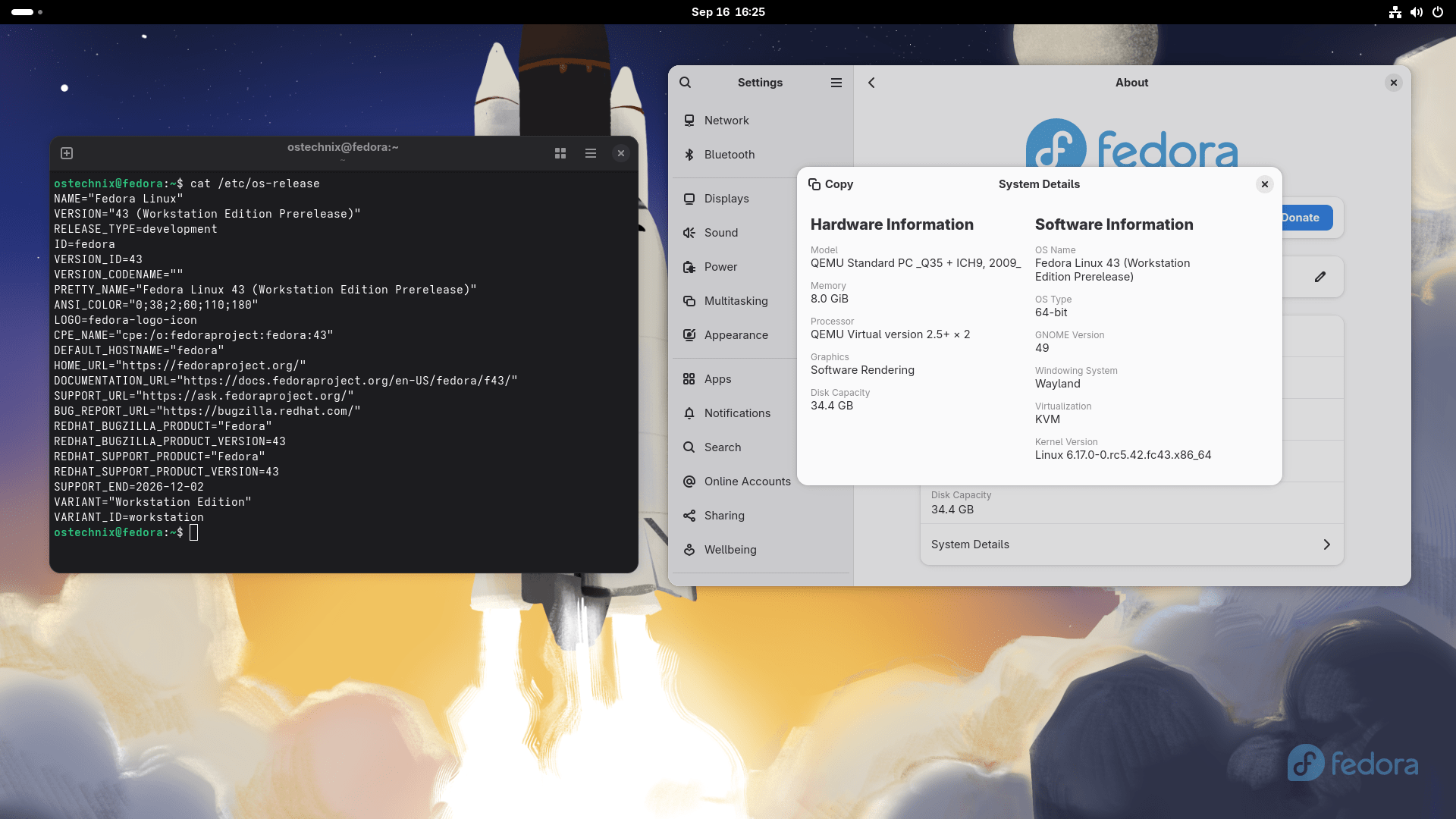
You may also need to do some post-upgrade tasks. For more details, check our detailed Step-by-Step Fedora 43 upgrade guide in the link below:
Report Bugs
Remember, this is a Beta release, so you might find some bugs or features still in progress. Your testing is incredibly valuable!
If you find an issue, please contact the Fedora QA team. You can reach them through the test mailing list or in the #quality:fedoraproject.org channel on Fedora Chat (Matrix). They even track common issues on Ask Fedora, so you can check there too.
