
Zorin OS 18 Beta is finally here! This latest release ships with many improvements like a refreshed visual design, a powerful new window tiling manager, seamless integration with web apps, native OneDrive file access and more!
Based on the solid foundation of Ubuntu 24.04, Zorin OS 18 is a Long-Term Support (LTS) release and will receive software updates and security patches until at least April 2029.
What's New in Zorin OS 18 Beta
1. A Beautiful New Look for Your Desktop
The first thing I noticed is its amazing new look. Developers beautifully redesigned the desktop.
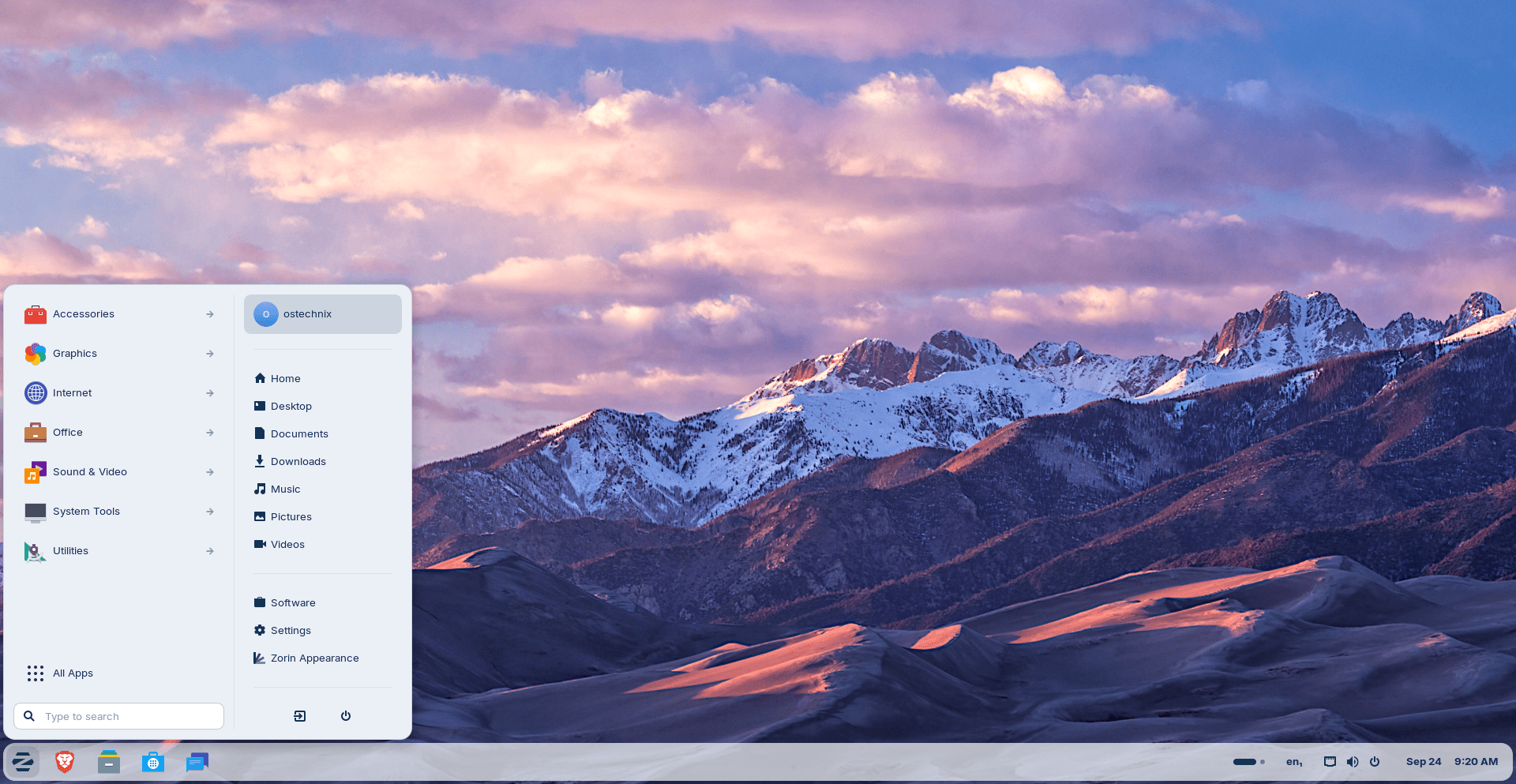
The theme now has a more rounded appearance, which feels sleek and inviting. They even chose a lighter colour palette for certain elements.
Moreover, the bottom panel floats! It has a rounded style that matches the system’s updated visual language perfectly.
You will notice design tweaks across many everyday apps, too. For example, the Files app features an updated sidebar. The Settings app includes redesigned panels. Even the Calendar app gets a new sidebar showing months and events concisely.
I think the Zorin devs truly obsessed over the details, delivering the most beautiful and functional operating system yet.
2. Advanced Window Tiling
Multitasking is improved with a powerful new default window tiling manager. You can simply drag a window to the top of the screen, and a pop-up appears to let you drop it onto predefined layouts to arrange your windows. You can also create custom layouts and enable optional auto tiling.
Because of this, advanced multitasking is simple, boosting your productivity immediately. You don't even need to memorise complex keyboard shortcuts.
3. Web Apps Integration
Zorin OS 18 introduces a newly built-in Web Apps tool that allows you to turn any website into a desktop app.

These web apps appear in the start menu and function like native applications, allowing you to seamlessly run popular services such as Microsoft Office/365, Teams, Google Docs, and Adobe Photoshop.
The system also detects installer files for over 170 popular Windows apps. If you launch a Windows installer, Zorin OS immediately suggests the best way to use that app. This feature gives great, tailored guidance for anyone new to Linux.
Related Read: Turn Your Favorite Websites Into Desktop Apps Using Linux Mint’s Webapp Manager
4. OneDrive Integration
For users migrating from Windows, Zorin OS 18 adds OneDrive file integration to the Online Accounts feature. Once enabled via the Settings app, you can browse and manage your OneDrive files directly from the sidebar in the Files app.
5. Enhanced Audio
You should notice better sound quality with lower latency, particularly on Bluetooth headphones, as Zorin OS 18 uses the PipeWire audio server back-end by default.
6. Performance
Zorin OS 18 is very fast and more responsive due to performance optimisations made throughout the system.
7. New Theme Colours
You can try out the two new theme colours introduced in Zorin OS 18: Yellow and Brown. These expand the selection of accent colours available in the Zorin Appearance app.

Zorin OS is the Perfect Replacement for Windows!
This release is very timely because Windows 10 is reaching its end of life on 14 October 2025. Many people already call Zorin OS the "best Windows 10 alternative".
About 240 million computers will be left behind because they don’t meet Windows 11’s strict hardware requirements. Zorin OS is designed to be the perfect replacement for Windows, and it can even run on computers as old as 15 years.
The improvements in Zorin OS 18 are meant to make the transition from Windows easier than ever. Users should not really anticipate a learning curve because the system is so clean and polished.
Testing the Zorin OS 18 Beta
The latest Zorin OS 18 beta version can be downloaded from the following link:
When testing the Zorin OS 18 Beta, please be aware that there are a few omissions known to be resolved before the final stable release:
- The full selection of default wallpapers is not included yet.
- The Tour welcome video (which appears at first login after installation) still displays Zorin OS 17.
The developers encourage users to provide feedback if any issues are noticed or improvements are suggested. You can submit feedback by launching the "Send Feedback" shortcut in the taskbar or Zorin Menu within the Beta environment.
Although upgrades from Zorin OS 17 to 18 are not yet available, they are expected to be active shortly after the stable release of Zorin OS 18 in the coming weeks.
Resource:
