
If you have ever watched the Sneakers movie starring Robert Redford, you might remember the scene where encrypted text magically turns into readable output. That visual effect became iconic in hacker culture. Now, thanks to a fun open-source project called No More Secrets (nms), you can recreate the famous data decryption effect seen on Sneakers movie in your Linux Terminal.
Table of Contents
A Quick Note About Sneakers Movie
Sneakers (1992) is a comedy and crime-thriller genre movie, starred by Robert Redford among other famous actors named Dan Aykroyd, David Strathairn and Ben Kingsley. This movie is one of the popular hacker movie released in the 1990s.
If you're not aware, there is one famous scene in the Sneakers movie where a group of experts who specialize in testing security systems recover a top secret black box that has the ability to decrypt all existing encryption systems around the world.
The nms utility simply simulates how the data decryption effect scene looks in the Sneakers movie in your Terminal.
What is No More Secrets?
No More Secrets, shortly nms, is a small Linux program written in C that recreates the classic data decryption effect from Sneakers.
Instead of printing text right away, it shows scrambled characters that gradually resolve into readable output. The result looks like you are watching your terminal "decrypt" information in real time.
You can use it with almost any command by piping the output into nms.
Install Nms in Linux
The nms project has no dependencies, but it relies on ANSI/VT100 terminal escape sequences to recreate the effect. Most modern terminal programs support these sequences by default.
Just in case, if your Terminal doesn't support these sequences, install ncurses. Ncurses is available in the default repositories of most Linux distributions.
We are going to compile and install nms from source. So, just make sure you have installed the development tools in your Linux box. If you haven't installed them already, refer the following links.
After installing git, make, and gcc development tools, run the following commands one by one to compile and install nms utility.
git clone https://github.com/bartobri/no-more-secrets.git
cd no-more-secrets
make nms
make sneakers
sudo make install
Finally, check if the installation was successful using command:
$ nms -v
nms version 1.0.1
Alternatively, you can install nms using Linuxbrew package manager as shown below.
brew install no-more-secrets
Now it is time to run nms.
Recreate Famous Data Decryption Effect Seen On Sneakers Movie Using Nms
The nms utility works on piped data. Pipe any Linux command's output to nms tool like below and enjoy the effect right from your Terminal. Have a look at the following command:
ls -l | nms
By default, after the initial encrypted characters are displayed, the nms utility will wait for the user to press a key to start the decryption sequence. This is how it is depicted in the Sneakers movie. Just press any key to start the decryption sequence to reveal the original plaintext characters.
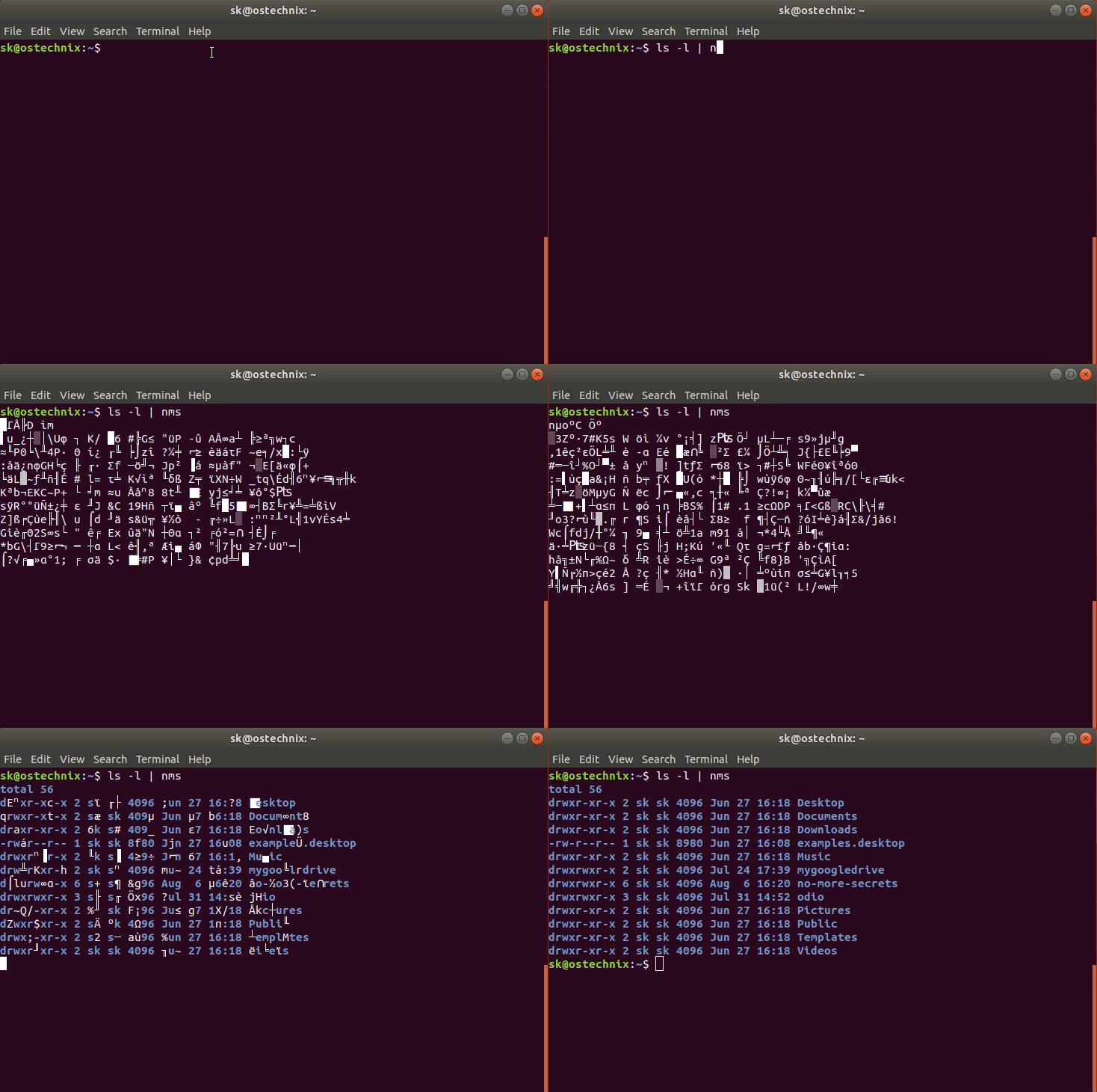
If you don't want to press any key, you can auto-initiate the decryption sequence using -a flag.
ls -l | nms -a
You can also set a foreground color, for example green, use -f <color> option as shown below.
ls -l | nms -f green
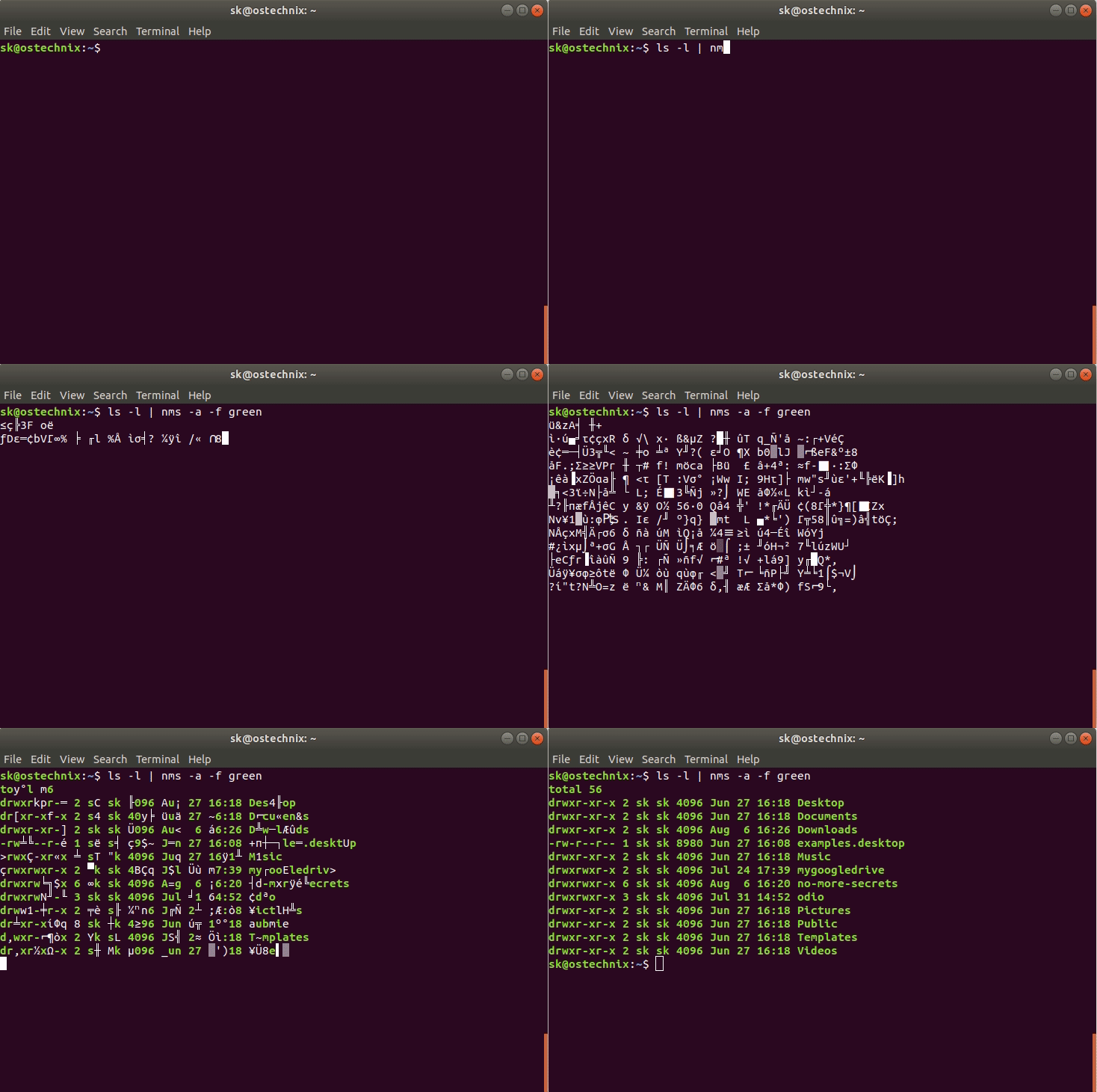
Please note that if you don't add the -a flag, you must press any key to initiate the decryption sequence.
To clear the screen before starting encryption and decryption processes, use -c flag.
ls -l | nms -c
To mask single blank space characters, use -s flag. Please note that other space characters such as tabs and newlines will not be masked.
ls -l | nms -s
You can also view the actual decryption effect scene in the Sneakers movie using the following command:
sneakers

Choose any given option (i.e. 1 to 6) to exit this utility.
Tips for a Better Experience
Combine cat with nms to decrypt files on screen:
cat /etc/passwd | nms
Use with log files or command output for a "Hollywood hacker" vibe.
Adjust your terminal font size and colors for maximum effect.
Try Nms just for Fun!
No More Secrets does not make your system more secure or perform actual decryption. It is purely cosmetic. But it’s a fun way to relive a piece of movie history, entertain yourself, or add flair during a presentation.
If you enjoy small Linux toys and nostalgia for classic films, this tool is worth installing.
Transform Your Terminal into a Hollywood Hacker Interface
This is just another similar fun project. You can turn your Ubuntu Linux console into a veritable Hollywood technical melodrama hacker interface using the Hollywood utility, which is written by Dustin Kirkland from Canonical.
For more details, check the following link:
Remove Nms
Don't like it? Go to the nms project folder and simply run the following command to remove it.
sudo make uninstall
Finally delete the nms project folder as well.
Conclusion
The Sneakers decryption scene inspired a generation of computer enthusiasts, and now you can replay that magic in your own Linux terminal. With No More Secrets, every command can look like it’s coming out of a top-secret spy movie.
Give it a try and watch your Linux shell transform into Hollywood’s vision of hacking.
Resource:
Related Read:
