
Have you ever typed a Linux command only to see "command not found"? Normally, you'd need to search for the right package, install it, and then run the command again. But in latest Fedora, the new DNF5 package manager makes this process smooth and effortless. If you try to run a command that isn't installed, DNF will help you to install the right package automatically and then rerun your command for you.
Let’s see it in action.
Table of Contents
Auto-install Missing Commands with DNF5 in Fedora
Today, I wanted to check which display server my Fedora 33 system was using.
To do so, I ran this command:
xdpyinfo | grep -A 1 version
But instead of getting the version details, I was greeted with the following message:
bash: xdpyinfo: command not found...
Install package 'xdpyinfo' to provide command 'xdpyinfo'? [N/y] y

Proceed with changes? [N/y] y
I chose yes, and something unexpected happened. The dnf5 not only installed the missing xdpyinfo package but also automatically re-ran my original command.
The result? I instantly got the output I was looking for:
[...]
version number:    11.0
vendor string:     The X.Org Foundation
--
X.Org version:     24.1.6
maximum request size:  16777212 bytes.
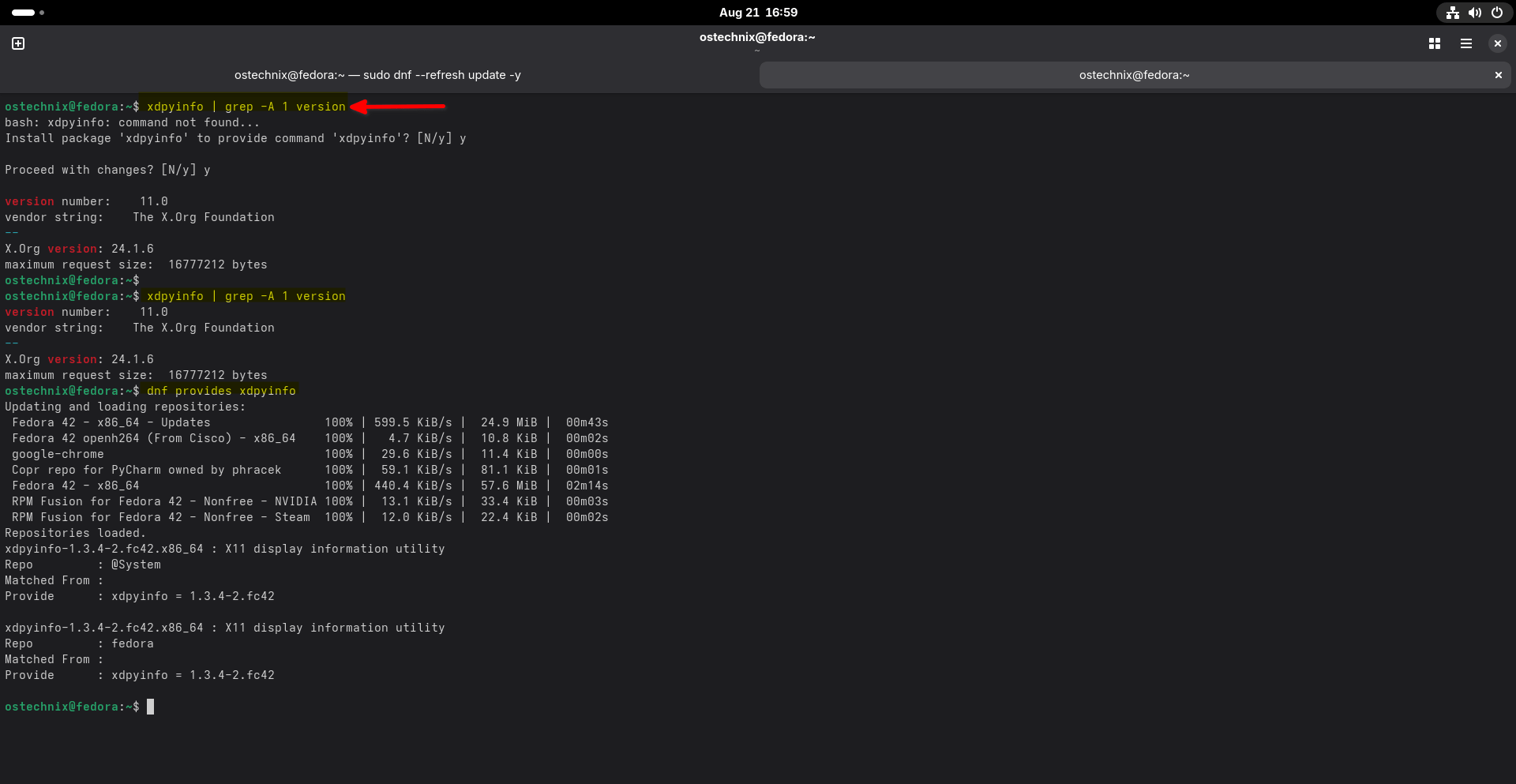
This little feature saved me a couple minutes. It's one of those small but useful improvements in DNF5 that make the package installation much smoother.
How It Works with DNF5
The recent Fedora Linux uses the DNF5 package manager by default. It's tightly integrated with the PackageKit command-not-found plugin, which connects the shell and the package manager.
When Bash encounters a "command not found" situation, it calls this plugin behind the scenes.
Here's what happens step by step:
- You run a command that isn't installed.
- Bash triggers the command-not-found handler.
dnf5checks which package provides the missing command.- Fedora prompts you to confirm the installation.
- Once installed, it automatically reruns your original command.
This means you don’t have to manually:
- Search for the package name.
- Install it yourself.
- Rerun the command.
Fedora's DNF handles it all in one smooth step.
Please note that this feature isn't exclusive to Fedora. It's part of the dnf5 package manager itself, so any Linux distribution using dnf5 and its command-not-found integration can benefit from it.
Why It's Useful
Whether you’re on Fedora, RHEL, or any distro that ships with dnf5, this feature is very useful:
- Saves time: No more Googling "which package provides this command".
- Beginner-friendly: New users don't get stuck on missing tools.
- Smoother workflow: Your command just works after installation.
For experienced Fedora users, this is a quality-of-life improvement. For newcomers, it's a huge usability boost.
Bonus Tip: Manually Find Which Package Provides a Command
If you'd like to check manually which package contains a certain command, you can still use the classic dnf provides command:
dnf provides <command>
For example:
dnf provides xdpyinfo
This will list the package that ships with the binary.
Sample Output:
xdpyinfo-1.3.4-2.fc42.x86_64 : X11 display information utility
Repo         : @System
Matched From :
Provide      : xdpyinfo = 1.3.4-2.fc42

xdpyinfo-1.3.4-2.fc42.x86_64 : X11 display information utility
Repo         : fedora
Matched From :
Provide      : xdpyinfo = 1.3.4-2.fc42
DNF5 is a Beginner-friendly Package Manager
Fedora's dnf5 integration makes working on the terminal faster, smarter, and easier. The ability to auto-install missing commands and rerun them instantly removes a lot of friction for both beginners and advanced users.
Next time you see "command not found", don't worry — DNF5 got your back!
Related Read: How To Find The Package That Provides A Specific File In Linux
