
The Racket programming language isn't interesting because of its syntax. What makes it interesting is that it's designed for building languages, not just writing programs.
This article skips "hello world" and toy exercises like guessing numbers, and goes straight to the ideas that make Racket distinctive, plus some useful systems scripting.
Scope of this guide: This is not a reference manual. It covers a curated set of core ideas, such as expressions, first-class functions, map/filter/fold, pattern matching, macros, contracts, and some Linux scripting. For more detail, read the Racket Guide and the Racket Reference.
A note on require: One example below shows (require racket/contract). If your file starts with #lang racket (rather than the smaller #lang racket/base), this is already included, and the explicit require is redundant. Many people keep it anyway, for clarity about what a file depends on.
Table of Contents
Set Up Racket Programming Environment
You don't need anything fancy, just Racket itself.
1. Install Racket Language
Download the installer for your platform from download.racket-lang.org (the current stable release is v9.2). On Linux, you can also install via your package manager, though the official installer usually gets you a newer version:
We have published a dedicated guide that explains different ways to install Racket in Linux. Check the following link:
Once installed, verify Racket version:
racket --version
2. Two ways to run the code examples below
Option A: as a script file (what most examples in this guide assume):
Save a snippet to a file, starting with the #lang racket line shown in examples that include one (some snippets are fragments meant to be pasted into an existing file, so add #lang racket as the first line yourself if it's missing):
#lang racket
(displayln (+ 2 3))
Then run it from the terminal:
racket my-file.rkt
Option B: in the REPL (fastest for trying single expressions):
racket
This drops you into an interactive prompt (>) where you can paste any single expression from this guide and see its result immediately:
> (map add1 '(1 2 3))
'(2 3 4)
Type (exit) or press Ctrl+D to leave the REPL.
3. Optional: DrRacket (the bundled IDE)
The installer also includes DrRacket, a graphical editor with a built-in "Run" button and an interactions pane below your code. It is often the easiest way to experiment while working through the examples, especially the multi-line ones. Just open it, paste in a snippet with #lang racket at the top, and click Run.
Let us begin.
1. Code Is Data
Unlike C or Python, Racket source code is a data structure, specifically, nested lists. For example, (+ 2 3)
(+ 2 3)
is literally a list whose first element is the symbol + (which refers to a function), and the rest are arguments: +, 2, 3.
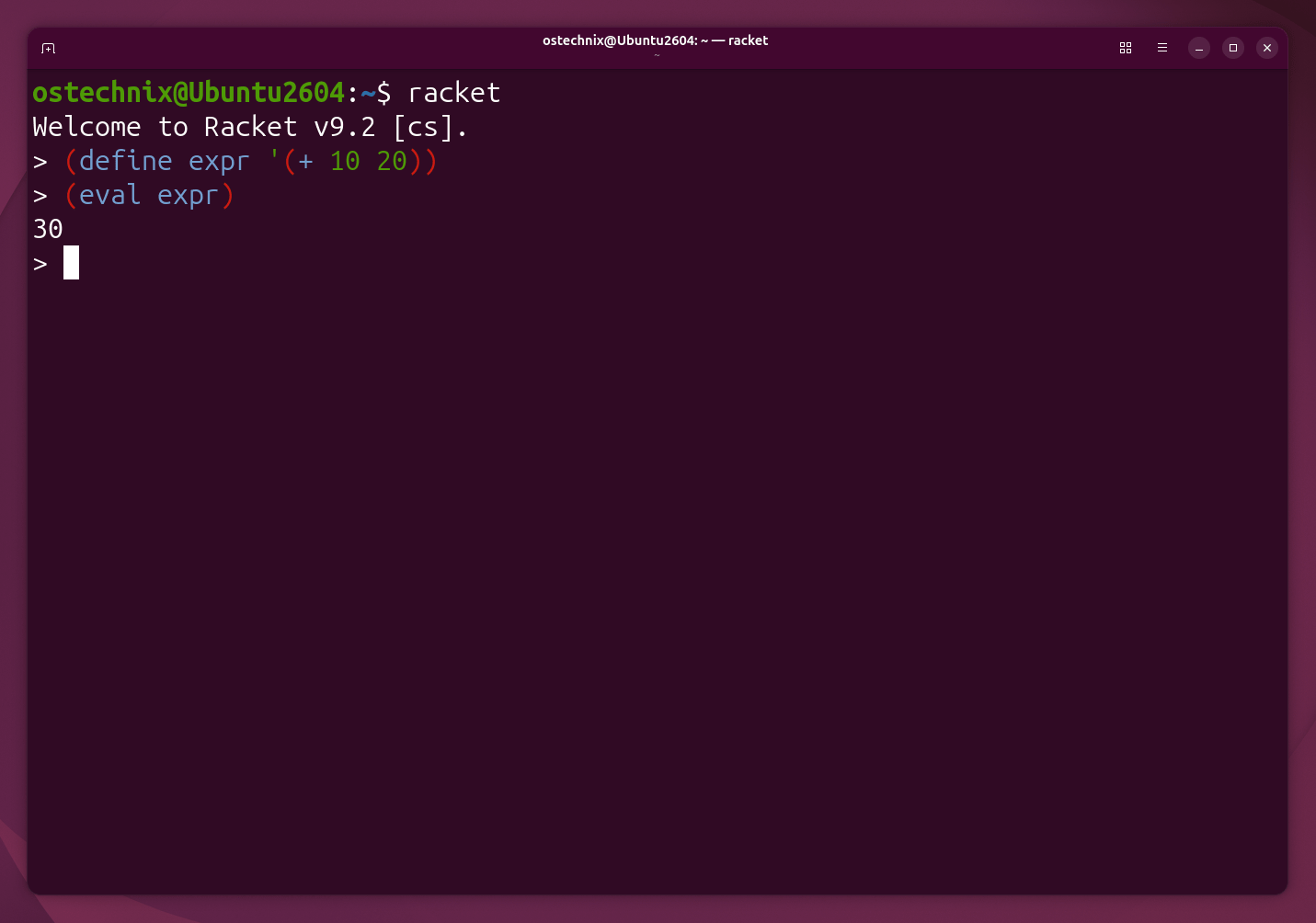
Because code is data, you can build it programmatically and evaluate it. Note that this example needs to run in the REPL, not as a script file. eval uses the current namespace, and a script run with #lang racket starts with an empty one, so this would raise an unbound-identifier error there instead of returning 30.
(define expr '(+ 10 20))
(eval expr)
Sample Output:
30
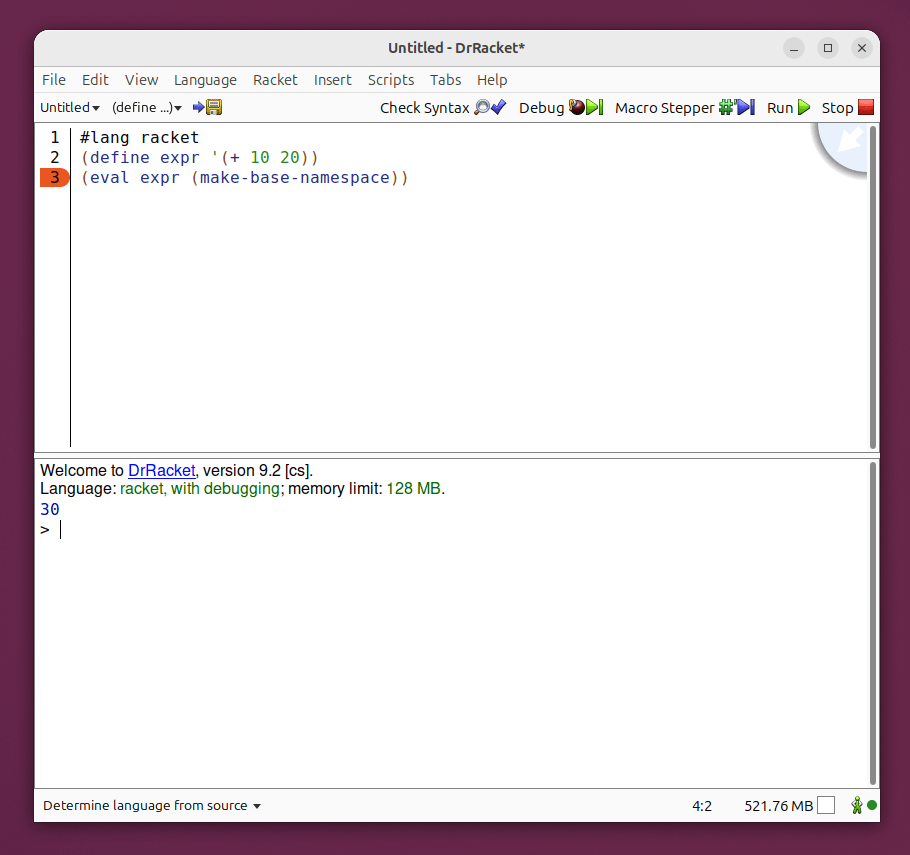
If you'd rather run this as a script instead of in the REPL, give eval an explicit namespace:
#lang racket
(define expr '(+ 10 20))
(eval expr (make-base-namespace))
Copy the above code in a file, for example my-file.rkt and run it using command:
racket my-file.rkt
This will print 30.
This single idea, i.e., code as data, is what makes macros possible later on.
You can also run the code from DrRacket GUI:
2. Everything Is an Expression
Unlike C, C++, or Python, almost every Racket form returns a value. This is true even for if.
# Python
if x > 10:
    y = 5
else:
    y = 20
becomes
(define y (if (> x 10) 5 20))
In the same way, begin runs a list of expressions in order and returns the value of the last one.
(define result
  (begin
    (displayln "Calculating...")
    (+ 4 7)))
Sample Output:
Calculating...
result is now 11. Because every expression returns a value, you can combine expressions directly instead of creating extra variables just to hold a value for one step before using it.
3. Functions Are First-Class Values
Functions can be stored, passed around, and returned like any other value.
(define (square x) (* x x))
(define f square)
(f 8)
64
Anonymous functions work the same way:
(map (lambda (x) (* x x)) '(1 2 3 4 5))
Sample Output:
'(1 4 9 16 25)
You can even put functions in a list:
(list add1 sub1 sqrt)
'(#<procedure:add1> #<procedure:sub1> #<procedure:sqrt>)
Note: the exact text shown for each procedure may look slightly different depending on your Racket version, but it will always show that the list holds functions, not numbers or text.
4. Higher-Order Programming: map, filter, fold
Instead of writing explicit loops, think in terms of transformations over collections. These three operations solve a surprising number of problems.
Map - transform every element:
(map string-length '("Linux" "Kernel" "Racket"))Sample Output:
'(5 6 6)
Filter - keep elements matching a predicate:
(filter even? '(1 2 3 4 5 6 7 8))
Sample Output:
'(2 4 6 8)
Fold - combine elements into a single result:
(foldl + 0 '(1 2 3 4 5))    ; sum      -> 15
(foldl * 1 '(1 2 3 4))      ; product  -> 24
(foldl max 0 '(2 8 5 12 4)) ; maximum  -> 12
5. Recursion and Tail Calls
Racket does have loop forms, such as for and do, but many idiomatic Racket programs use recursion instead of loops, especially when working with lists.
(define (factorial n)
  (if (zero? n)
      1
      (* n (factorial (sub1 n)))))

(factorial 5)
Sample Output:
120
Racket also guarantees proper tail calls. This means that when a function calls itself as the very last step, Racket turns that call into a loop instead of adding a new layer to the call stack. Because of this, the function below can safely process millions of elements without running out of memory.
(define (sum lst)
  (define (loop lst acc)
    (if (empty? lst)
        acc
        (loop (rest lst) (+ acc (first lst)))))
  (loop lst 0))
6. Named Let (Recursion That Reads Like a Loop)
let loop lets you write recursive iteration without a separate top-level function:
(let loop ([i 0])
  (when (< i 5)
    (displayln i)
    (loop (add1 i))))
Sample Output (each displayln call prints its own line):
0
1
2
3
4
This looks like a loop, but underneath it is really recursion. Because the call to loop is in tail position, Racket turns it into a real loop automatically.
7. Pattern Matching
Pattern matching is one of Racket's nicest features. It comes from racket/match, which is already included when you use #lang racket, so you do not need to add an extra require line.
Simple destructuring:
(match '(1 2 3)
  [(list a b c) (+ a b c)])
Sample Output:
6
Nested structures:
(match '((1 2) (3 4))
  [(list (list a b) (list c d)) (+ a b c d)])
Sample Output:
10
Matching on a "command" shape. This is genuinely useful for parsing config files or command-line arguments:
(match '(cp file1 file2)
  [(list 'cp src dst) (printf "Copy ~a -> ~a\n" src dst)]
  [_ "Unknown"])
Sample Output:
Copy file1 -> file2
8. Multiple Return Values
Racket has native support for a function returning more than one value, without packing them into a tuple or list.
(define (divide x y)
  (values (quotient x y) (remainder x y)))

(let-values ([(q r) (divide 20 3)])
  (displayln q)
  (displayln r))
Sample Output:
6
2
9. List Comprehensions
Python's list comprehensions look like [x*x for x in nums], where nums is some list of numbers. Racket's equivalent is for/list:
(for/list ([x '(1 2 3 4)])
  (* x x))
Sample Output:
'(1 4 9 16)
You can add a filter clause using #:when:
(for/list ([i (in-range 20)] #:when (even? i))
  (* i i))
Sample Output:
'(0 4 16 36 64 100 144 196 256 324)
10. Hash Tables
(define h (hash "cpu" 16 "ram" 32))
(hash-ref h "cpu")
Sample Output:
16
Important: (hash ...) creates an immutable hash table. hash-set does not change h in place. Instead, it returns a completely new hash table:
(define h2 (hash-set h "disk" 1000))
h stays the same. h2 is the new table. If you want to change a hash table in place, use make-hash and hash-set! instead:
(define mh (make-hash))
(hash-set! mh "disk" 1000)
11. Structures
A struct is a lightweight, immutable-by-default record. It is Racket's answer to simple classes.
(struct person (name age))

(define p (person "Senthil" 40))

(person-name p) ; "Senthil"
(person-age p)  ; 40
12. Contracts
Contracts let you document and enforce a function's expectations at runtime. They are a practical alternative to a separate static type system, especially at module boundaries.
(require racket/contract)

(define/contract (divide a b)
  (-> number? (and/c number? (not/c zero?)) number?)
  (/ a b))
Calling (divide 5 0) raises a contract violation before the division happens. The error message clearly shows which argument broke which rule.
Sample Output:
divide: contract violation
  expected: (not/c zero?)
  given: 0
  in: an and/c case of
      the 2nd argument of
      (->
       number?
       (and/c number? (not/c zero?))
       number?)
  contract from: (function divide)
  blaming: top-level
   (assuming the contract is correct)
  at: string:1:18
 [,bt for context]
13. Macros: Racket's Real Superpower
A normal function evaluates its arguments before it runs.
(define (twice x) (+ x x))
A macro is different. It transforms source code before that code is ever evaluated. The argument expressions are never evaluated up front.
(define-syntax-rule (unless-again test body)
  (if (not test) body (void)))

(unless-again (> 2 5) (displayln "Hello"))
Sample Output:
Hello
Here is another classic example. It runs an expression twice, and the expression stays unevaluated until the macro expands it.
(define-syntax-rule (twice-run expr)
  (begin expr expr))

(twice-run (displayln "Hello"))
Sample Output:
Hello
Hello
This is why Racket is well known in programming-language circles. Macros let you extend the language itself, not just call functions written in it.
14. Building DSLs
Imagine a configuration file that looks like this:
(server
  port 8080
  ssl yes
  workers 8)
This syntax does not exist in Racket by default. You can build it yourself, using define-syntax-rule, or the more general syntax-rules and syntax-parse forms. Here is a small example:
(define-syntax-rule (repeat n body)
  (for ([i n]) body))

(repeat 5 (displayln "Ostechnix"))
Sample Output:
Ostechnix
Ostechnix
Ostechnix
Ostechnix
Ostechnix
This reads like a built-in language feature, because in Racket you can genuinely add new language features. Few mainstream languages make this as easy or as enjoyable.
15. Lazy Evaluation and Streams
Racket is eager (also called strict) by default. This means it normally computes values right away. But Racket also has built-in support for laziness through racket/stream.
(require racket/stream)
(define nums (stream 1 2 3 4 5))
(stream-first nums)
Sample Output:
1
Streams can be infinite, because their elements are only computed when you actually ask for them:
(define ones (stream-cons 1 ones))
(stream-ref ones 1000000)
Sample Output:
1
Only the part of the stream you actually request is ever computed.
16. Systems Scripting on Linux
Racket can also act as a very capable shell-scripting and text-processing language.
Reading files:
(file->string "/proc/cpuinfo")
or line by line:
(with-input-from-file "/proc/meminfo"
  (lambda ()
    (displayln (read-line))))
Running shell commands:
(system "ls -lh")
Capturing output instead of printing it:
(with-output-to-string
  (lambda () (system "uname -r")))
A small /proc/meminfo filter:
#lang racket
(define text (file->string "/proc/meminfo"))
(for ([line (string-split text "\n")])
  (when (regexp-match? #rx"Mem" line)
    (displayln line)))
This prints the full matching lines, for example:
MemTotal:       11719360 kB
MemFree:         6641244 kB
MemAvailable:    9034448 kB
(The exact numbers depend on your machine. These functions match and print whole lines, not just labels.)
Command-line programs:
#lang racket
(command-line #:args (name)
  (printf "Hello ~a\n" name))
Run it like this:
racket hello.rkt Racket
Sample Output:
Hello Racket
A functional pipeline. This reads a file of numbers, drops blank lines, converts the text to numbers, and adds them all up:
(define total
  (foldl +
         0
         (map string->number
              (filter (lambda (s) (not (string=? s "")))
                      (string-split (file->string "numbers.txt") "\n")))))
Once map, filter, and foldl feel natural, pipelines like this read almost like a plain description of the task instead of a set of implementation steps.
A tiny web server. Racket ships with a full web-application library:
#lang racket
(require web-server/servlet
         web-server/servlet-env)

(define (my-app req)
  (response/xexpr '(html (body "Hello from Racket"))))

(serve/servlet my-app #:servlet-regexp #rx"")
A servlet handler must return a proper response value, not a plain string, so this version wraps the text using response/xexpr. The #:servlet-regexp #rx"" option is also needed so the server answers at the plain address below, instead of only at its default path.
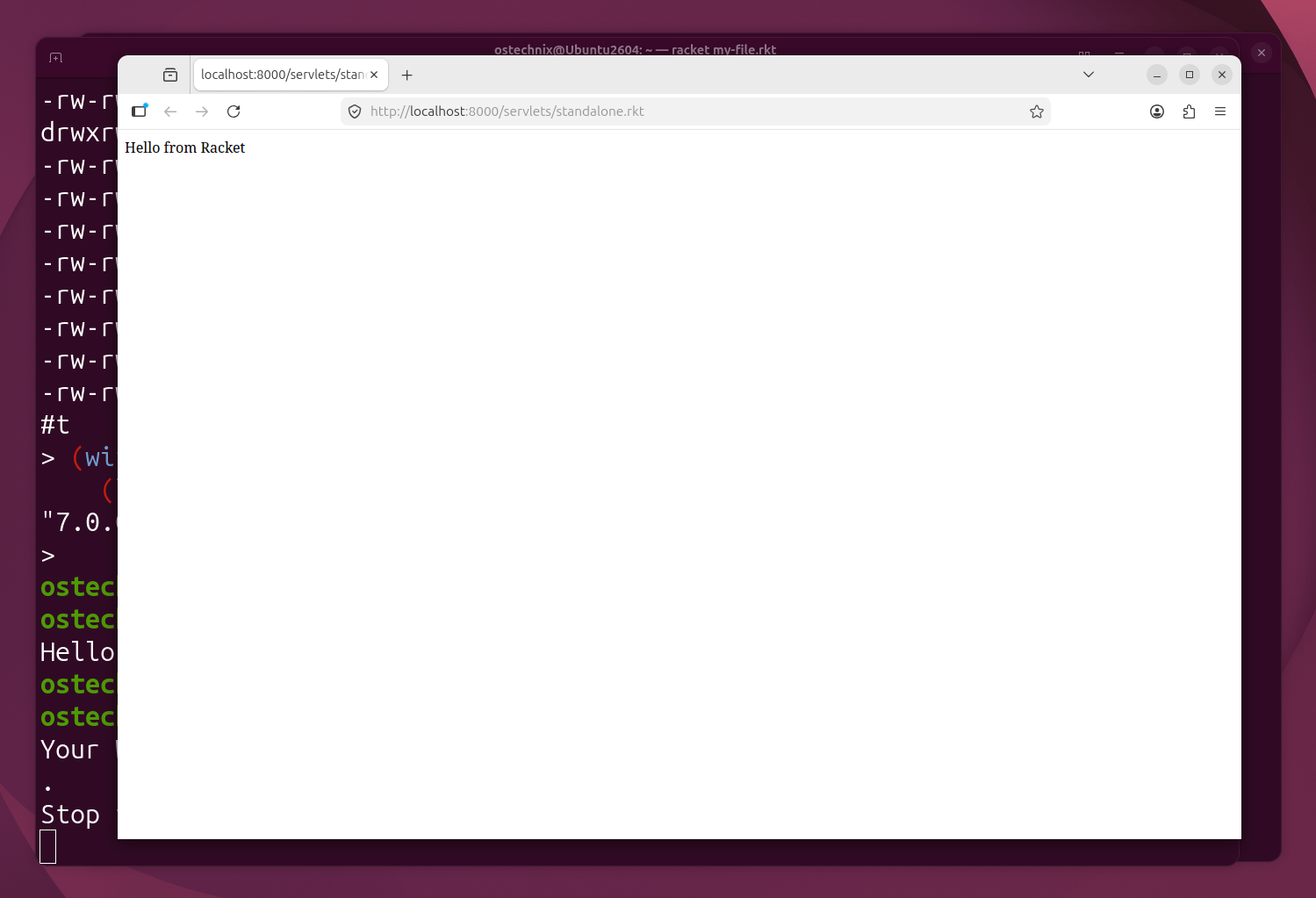
Copy the above code in a file, for example http.rkt and run it:
$ racket http.rkt
Your Web application is running at http://localhost:8000/servlets/standalone.rkt.
Stop this program at any time to terminate the Web Server.
Now, you will see the web server rubbing at http://localhost:8000/. A working web server in a handful of lines.
Press CTRL+C to stop the webserver.
17. cond (Multi-Branch Conditionals)
if only handles two branches. cond handles many, and is what real Racket code uses instead of nested if.
(define (sign n)
  (cond
    [(> n 0) "positive"]
    [(< n 0) "negative"]
    [else "zero"]))

(sign -5)
Sample Output:
"negative"
Each line is checked in order. The first true test wins, and else catches everything else.
18. let and let*
let creates local variables. All values are computed first, so one variable cannot use another.
(let ([x 1] [y 2])
  (+ x y))
Sample Output:
3
let* lets each variable use the ones defined before it.
(let* ([x 1] [y (+ x 1)])
  (+ x y))
Sample Output:
3
Writing (y (+ x 1)) inside plain let would fail, because x is not ready yet.
19. Vectors
Lists are best for adding items one at a time from the front. Vectors are best when you need fast, indexed access, and they can be changed in place.
(define v (vector 1 2 3))
(vector-ref v 0)
Sample Output:
1
(vector-set! v 0 99)
(vector-ref v 0)
Sample Output:
99
20. Basic Error Handling
error raises an exception. with-handlers catches it, so your program can respond instead of crashing.
(with-handlers ([exn:fail? (lambda (e) (displayln (exn-message e)))])
  (error "Something went wrong"))
Sample Output:
Something went wrong
Conclusion
You have now seen the core ideas that shape how Racket code is written: expressions and first-class functions, map/filter/fold, recursion, pattern matching, macros, contracts, and enough Linux scripting to write real tools.
None of this makes you an expert. It gives you a working map of the language, so the Racket Guide and Racket Reference will make more sense when you read them next. From here, the best way to learn more is to write small programs and look things up as you go.
Good luck!

2 comments
That’s a great little write-up and demo of Racket, SK, thanks. Diving into Racket myself! Can’t quite figure out what to make with it yet, though.
(btw, the site’s tacking on the “kiwix guide” after this article… a bit confusing for readers, and I almost skipped the Racket article because I thought it was twice as long as it actually was.)
Thank you for the positive feedback. All credits go to the Racket developers and its community. Our site theme has continuous scroll feature. That’s why you see the next article as you scroll down. If you want to dive deep into Racket, avoid building basic hello world type of programs. Try Domain-Specific Languages (DSLs), interactive graphics or games, automated Web UI generator, traffic light simulator, terminal emulator, static site generator, Robot control server, custom scripting language etc. Especially I recommend DSL. Racket truly shines here. You can create a DSL that extends Racket’s syntax and package it for others to use. Good luck!