
Online registration forms help businesses collect leads, create user accounts, and connect with potential customers. However, these forms are also common targets for bots and fraudulent users.
Attackers can submit fake details, create large numbers of accounts, and send automated requests to overload websites. These activities can fill your customer relationship management (CRM) system with poor-quality data, waste marketing budgets, and make it harder for sales teams to identify genuine prospects.
Protecting registration forms requires more than adding a CAPTCHA. A reliable approach combines several security controls, monitors suspicious activity, and checks submissions on the server.
This guide explains how bots exploit online forms and how you can reduce lead generation fraud with practical security measures.
Table of Contents
What Is Lead Generation Fraud?
Lead generation fraud happens when someone creates false or misleading leads to manipulate a business's lead collection process.
Fraudulent leads may come from automated bots, fake accounts, dishonest affiliates, or people submitting information that does not belong to them.
Common examples include:
- Submitting fake names, phone numbers, or email addresses.
- Creating multiple leads using slightly different details.
- Sending automated registrations to collect incentives or rewards.
- Submitting false information to disrupt a competitor's sales process.
- Using stolen or generated personal details to create fake accounts.
Lead generation fraud can affect both marketing and sales. Marketing teams may spend money on leads that never become customers. Sales teams may waste time contacting people who do not exist. Over time, inaccurate data can also affect campaign reporting and business decisions.
What Are Spam Form Submissions?
Spam form submissions are unwanted entries sent through online forms. They often contain advertisements, irrelevant links, random text, or repeated messages.
Some spam comes from people, but a large amount is generated by automated bots and scripts.
A typical automated attack works like this:
- A bot finds a public registration or contact form.
- It identifies the form's submission endpoint.
- It sends repeated requests with random or generated information.
- The website processes the submissions if it has insufficient protection.
Spam and lead generation fraud are related, but they are not exactly the same. Spam submissions are unwanted form entries. Lead generation fraud focuses on creating false leads or manipulating lead collection.
For example, a message containing an unrelated advertisement is spam. A registration using a fake identity to claim a promotion is also a form of lead fraud.
Common signs include repeated submissions, unusual email addresses, identical messages, invalid phone numbers, and sudden increases in registration activity.
How Bots Exploit Online Registration Forms
Bots use different techniques to submit forms automatically. Understanding these methods helps you choose the right protection.
1. Direct HTTP Requests
A bot does not always need to open a website in a browser. It can send an HTTP POST request directly to the form's backend endpoint.
This allows attackers to bypass many front-end controls, including JavaScript checks and visible form interactions.
For this reason, validation must happen on the server. A form that only checks data in the browser is not properly protected.
2. Headless Browsers
Some attackers use automated browsers such as Playwright, Puppeteer, or Selenium.
These tools can open web pages, fill in fields, click buttons, and submit forms. They can also execute JavaScript, which means they may bypass basic protections designed only for simple scripts.
These tools also have legitimate uses, such as software testing. Their presence alone does not prove that a visitor is malicious.
3. Proxy Networks
Attackers may send requests through different IP addresses using proxy networks. This makes it harder to identify repeated activity from a single source.
Blocking one IP address may not stop an attack if the bot can quickly switch to another address.
4. AI-assisted Attacks
Attackers can use AI tools to generate realistic-looking names, email addresses, messages, and other registration details.
These submissions may look more convincing than random text. As a result, checking only whether a field contains valid-looking information may not be enough.
10 Ways to Protect Online Registration Forms
A strong defense uses multiple layers. No single control can stop every type of bot or fraudulent submission.
A reliable fraud prevention solution combines multiple security measures to identify suspicious activity, block automated submissions, and protect genuine registrations. The following methods can help businesses build a stronger defense against bots and registration fraud.
1. Add CAPTCHA or Managed Challenges
CAPTCHA tools help assess whether a visitor's activity is likely to be automated. Some display a visual challenge, while others use background signals or risk-based checks.
Common options include Google reCAPTCHA and Cloudflare Turnstile.
However, adding a CAPTCHA widget to the page is not enough. Your backend must verify the CAPTCHA token with the provider before accepting the submission.
For example, Cloudflare Turnstile requires server-side verification through its Siteverify API. Its tokens expire after five minutes and are intended for single use. Your server should reject invalid, expired, or previously used tokens. Keep the secret key on the server, not in browser code.
Cloudflare notes that duplicate-token detection can take time to propagate across its network. Therefore, do not assume that every near-simultaneous replay will be rejected immediately.
Google reCAPTCHA v3 works differently. It returns a risk score rather than requiring a visible challenge for every visitor. Your backend should verify the response and expected action, then apply a threshold suited to your website.
2. Apply Rate Limiting
Rate limiting controls how many requests a user or source can make within a specific period.
For example, you might limit how many registration attempts can come from one IP address in a short period.
However, IP-based limits alone are not enough. Attackers can use proxy networks or change IP addresses.
Use multiple rate-limit keys where appropriate:
- IP address: Limits repeated requests from one network address.
- Session: Detects repeated activity within one browsing session.
- Account or identity: Limits attempts associated with the same email address, phone number, or account identifier.
- Endpoint: Protects sensitive routes, such as registration, login, and password reset.
Sliding-window or token-bucket methods can provide better control over request bursts than a simple fixed-window counter. The right method depends on your traffic patterns and application requirements.
Set limits according to normal user behavior. Very strict limits may block legitimate visitors, especially users sharing the same network.
3. Use a Web Application Firewall
A Web Application Firewall (WAF) inspects incoming HTTP traffic and applies security rules before requests reach your application.
It can help identify and block suspicious requests, malicious payloads, and known attack patterns.
A WAF can also apply rules to sensitive endpoints, such as registration and login routes.
Tools such as ModSecurity and managed cloud WAF services can help protect web applications. However, a WAF does not automatically detect every fake lead or fraudulent registration. Many fraud patterns involve valid-looking requests that require application-level or business-level checks.
Use a WAF alongside server-side validation, rate limits, and fraud monitoring.
4. Verify Email Addresses
Email verification helps confirm that a user can access the address they provide.
After registration, send a verification link or code. Do not enable sensitive account features until the user completes verification.
You can also check email formatting and use appropriate validation services to identify invalid or disposable addresses.
Keep in mind that email verification does not prove that a person is genuine. Fraudsters can use real email accounts, so combine this step with other checks.
5. Add Honeypot Fields
A honeypot is a hidden form field designed to catch simple automated bots.
The field remains invisible to normal visitors. If a bot fills it in, your backend can flag or reject the submission.
Honeypots are inexpensive and easy to implement, but advanced bots may detect hidden fields and avoid them.
Use them as one layer of protection, not as your only defense. Make sure the field is also handled in a way that does not confuse assistive technologies or legitimate users.
6. Analyze User Behavior
Behavior analysis looks at how a visitor interacts with a form.
For example, a basic bot may submit the form almost immediately or repeat the same sequence many times. Other useful signals include:
- Time taken to complete the form.
- Unusually fast or repeated submissions.
- Identical patterns across many registrations.
- Repeated activity within one session.
- Repeated failures followed by successful submissions.
Do not reject users based on one signal alone. A fast submission may be legitimate, and some users rely on assistive technologies or browser tools.
Combine behavior signals with other evidence to make better decisions.
7. Check IP Reputation
IP reputation services can help identify traffic associated with known malicious activity, suspicious proxies, or automated networks.
You can use these signals to increase the risk score of a submission or apply additional verification.
Avoid blocking every visitor who uses a VPN, proxy, or shared network. Many legitimate users rely on these services.
IP reputation should support your decision-making, not determine it by itself.
8. Secure Backend APIs
Your registration API should validate every submission, even when the front end already checks the data.
Important protections include:
- Validate and sanitize input on the server.
- Enforce field length and data-type limits.
- Require authentication and authorization for endpoints that need them.
- Apply rate limits to sensitive API routes.
- Set reasonable request-body size limits.
- Use secure session handling.
- Apply CSRF protection where appropriate, particularly when browser requests rely on automatically sent credentials such as cookies.
- Verify CAPTCHA tokens on the server before processing submissions.
Never trust hidden fields, browser-side validation, or client-provided risk scores. Attackers can modify or bypass these controls.
9. Use Fraud Detection and Risk Scoring
Fraud detection systems evaluate several signals to estimate whether a submission is genuine.
Signals may include IP reputation, email validity, device or session patterns, submission frequency, and previous activity.
You can assign a risk score and use it to choose an appropriate response. The score should be based on signals that are relevant to your website and tested against real traffic.
For example:
- Low risk: Accept the registration normally.
- Medium risk: Ask for additional verification, such as email or phone confirmation.
- High risk: Hold the submission for manual review or reject it when there is strong evidence of abuse.
This risk-based approach is often better than blocking every submission that triggers one suspicious signal. It can reduce fraud while limiting problems for genuine users.
10. Monitor Registration Activity
Security controls need regular monitoring. Review registration logs to understand how users and bots interact with your forms.
Track metrics such as:
- Total registration attempts.
- Successful and failed submissions.
- CAPTCHA verification failures.
- Rate-limit triggers.
- Invalid email addresses.
- Repeated submissions.
- Registrations from suspicious IP ranges.
- The percentage of leads later identified as fraudulent.
Set alerts for unusual changes. For example, a sudden increase in registrations from one network or a sharp rise in failed CAPTCHA checks may indicate an attack.
Monitoring helps you identify new patterns and adjust your protection before the problem grows.
Open-Source Tools for Form Protection
Several open-source tools can help protect registration forms and web applications. They serve different purposes, so choose them according to your infrastructure.
ModSecurity

ModSecurity is an open-source Web Application Firewall engine. It inspects HTTP traffic and applies configured rules to detect and help block attacks against web applications.
It needs suitable rules to provide protection. ModSecurity is commonly used with the OWASP Core Rule Set.
OWASP Core Rule Set

The OWASP Core Rule Set (CRS) is a collection of generic attack-detection rules for ModSecurity and compatible WAF engines.
It helps identify common web attacks, including SQL injection and cross-site scripting. It is not a dedicated fake-lead detection system.
CrowdSec
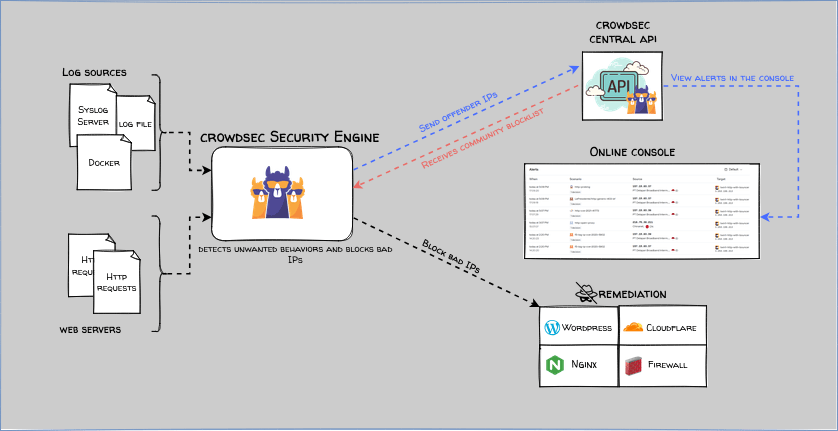
CrowdSec analyzes logs and other supported data sources using behavior-based scenarios to identify suspicious activity.
Its Security Engine generates alerts and decisions. Separate remediation components can enforce blocks through supported firewalls, web servers, or other integrations.
It can help identify repeated abusive traffic, but it needs appropriate data sources, scenarios, and configuration.
Recommended Read: How to Set Up Free Bot and Fake Account Protection with CrowdSec and ALTCHA on Ubuntu
Fail2ban
Fail2ban monitors log files or system journals for patterns that match configured filters. When it detects repeated failures, it can run actions such as temporarily blocking an IP address.
It can help with repeated abusive requests if your application logs the relevant events and you configure suitable filters. It does not automatically recognize every type of fake registration.
Recommended Read:
- How To Prevent SSH Brute Force Attacks Using Fail2ban In Linux
- SSH Hardening Tips to Secure a Linux Server Against Brute-Force Attacks
Nginx
Nginx is a web server and reverse proxy. Its request-limiting module can control request rates using configured keys, such as a client's IP address.
This can help reduce excessive traffic to registration endpoints. Nginx is not a dedicated fraud detection tool, so use it alongside application-level validation and monitoring.
Related Read:
- How to Build a 99.99% Uptime Stack with Keepalived, HAProxy, and NGINX on Ubuntu
- Install Nginx, MariaDB, PHP (LEMP) stack on Arch Linux
- Install Nginx, MySQL, PHP (LEMP Stack) On Ubuntu
- How To Setup Nginx Server Blocks In Ubuntu
How to Monitor Fraudulent Registration Activity
Monitoring helps you understand whether your security controls are working.
Start by recording important events from the registration process. These may include request timestamps, request IDs, endpoint names, validation results, rate-limit events, CAPTCHA verification outcomes, and relevant risk signals.
Look for patterns rather than reviewing every submission manually.
For example, investigate when:
- Many accounts use similar email formats.
- Registration attempts increase suddenly.
- Several submissions share the same device or session signals.
- A large number of leads fail email verification.
- Accounts are created in unusually high numbers but remain unused.
- New accounts show unusual activity soon after registration.
- One campaign produces an unusual amount of low-quality traffic.
Track both security events and lead quality. A high number of successful registrations does not necessarily mean your form is performing well.
Protect the data you collect during monitoring. Store only the information needed for security, restrict access, and define retention periods. Explain relevant data collection in your privacy notice. Avoid detailed device fingerprinting unless there is a clear need and an appropriate legal basis. Privacy requirements vary by location, so review the rules that apply to your business.
Secure Registration Form Architecture
A secure registration process should check submissions at several points.
A practical architecture looks like this:
- Browser: The visitor completes the form and receives basic input guidance.
- Edge protection: A WAF and rate limiter inspect incoming requests.
- Application backend: The server validates the data and checks the session.
- Bot verification: The backend verifies CAPTCHA tokens and evaluates relevant behavior signals.
- Risk assessment: The application assigns a risk level and decides whether to accept, verify, hold, or reject the submission.
- Account or lead processing: Only approved submissions continue into the CRM or account system.
- Monitoring: Security events and registration outcomes are recorded for review.
This approach prevents the application from trusting the browser alone. It also makes it easier to identify where suspicious activity is entering the system.
Common Mistakes to Avoid
Even when a website has security tools, a few common mistakes can leave registration forms exposed.
Relying only on CAPTCHA: CAPTCHA can be bypassed or solved by automated services. Combine it with server-side verification, rate limits, and monitoring.
Blocking only by IP address: Proxy networks and shared networks make IP-only controls unreliable. Use several signals.
Trusting front-end validation: Attackers can send requests directly to backend endpoints. Always validate data on the server.
Blocking users based on one signal: A VPN, fast submission, or shared IP does not automatically mean fraud. Use risk-based checks to reduce false positives.
Ignoring account activity after registration: Some fake accounts pass the initial form checks. Monitor what happens after registration, including repeated actions and unusual account behavior.
Collecting too much tracking data: More data does not always mean better protection. Collect only what is necessary, secure it, and remove it according to a defined retention policy.
Never reviewing security rules: Attack methods change. Review logs, test your controls, and update rules when new patterns appear.
Online Registration Form Security Checklist
Use this checklist when reviewing your registration process:
- CAPTCHA or managed challenges are enabled where appropriate.
- CAPTCHA tokens are verified on the server.
- Rate limits cover IP addresses, sessions, identities, and sensitive endpoints.
- Server-side validation checks every submitted field.
- Email verification is required before sensitive account features are enabled.
- Honeypots or behavior checks are used as supporting controls.
- WAF rules protect public-facing endpoints.
- Suspicious IP and proxy activity is assessed using multiple signals.
- Risk-based responses are used for suspicious submissions.
- Registration activity and lead quality are monitored.
- Security logs and behavioral data are protected.
- Data collection and retention follow applicable privacy requirements.
- Security rules are reviewed and tested regularly.
Conclusion
Online registration forms are common targets for bots, spam, and lead generation fraud. Basic controls may stop simple attacks, but determined attackers can use direct API requests, automated browsers, proxy networks, and realistic generated data.
The best protection comes from using several layers together. Combine CAPTCHA with server-side verification, rate limiting, WAF rules, email checks, secure APIs, and fraud monitoring.
Also, do not treat every suspicious signal as proof of fraud. Use risk-based decisions to protect your business while keeping the registration process accessible for genuine users.
By reviewing registration activity and improving your controls over time, you can reduce spam form submissions, protect lead quality, and make your registration process more reliable.
References:
