
Remember Clippy, the friendly little paperclip who popped up in old Microsoft Office programs to offer help? Well, He is back, but not quite how you remember him! A developer named Felix Rieseberg has created a new app called Clippy Desktop Assistant. But this isn't the same old helper; this new Clippy is powered by modern Artificial Intelligence (AI). In fact, the new Clippy can run large language models (LLMs) locally on your machine!
Table of Contents
What is This New Clippy App?
Imagine running advanced AI models right on your own computer. That's what this new Clippy app lets you do.
Clippy Desktop Assistant is a new desktop application that combines the nostalgic 1990s interface of the original Microsoft Office assistant with the functionality of modern large language models (LLMs), allowing users to run them locally.
Available for various operating systems and supporting different models, Clippy provides a simple, offline chat interface for interacting with local LLMs, intended more as a fun experience than the most advanced chatbot.
It uses llama.cpp and node-llama-cpp to make these large language models work locally. This means everything runs on your computer, without needing to connect to the internet for the AI part.
The only time it might go online is to check for updates, which you can turn off.
The app looks like it's from the 1990s. It brings back that classic computer style, especially the look and feel of the original Clippy era.
It's meant to be a "love letter" to that time and the character designed by Kevan Atteberry.
Clippy is an open-source Electron application developed by Felix Rieseberg. This isn’t Felix’s first project. He also developed the Windows 95 Electron app, which allows users to run Windows 95 on modern operating systems.
Why Did Felix Make Clippy?
The creator, Felix Rieseberg, sees this project as a form of art. He says he made it because building it was enjoyable for him.
It's not trying to be the very best AI chatbot out there. Instead, it's a blend of the old 90s computer feel and the exciting new AI technology we have today.
Some people even call it "software art" or maybe "software satire" if you don't like it.
Key Features of Clippy Desktop Assistant
- Simple Chat: It has an easy-to-use chat window where you can type messages to the AI.
- No Hard Setup: You don't need to be a computer expert to get it working. You just open the app and start chatting.
- Runs Locally: The AI works right on your computer, not in the cloud. This means it works offline.
- Free: You can download and use it without paying.
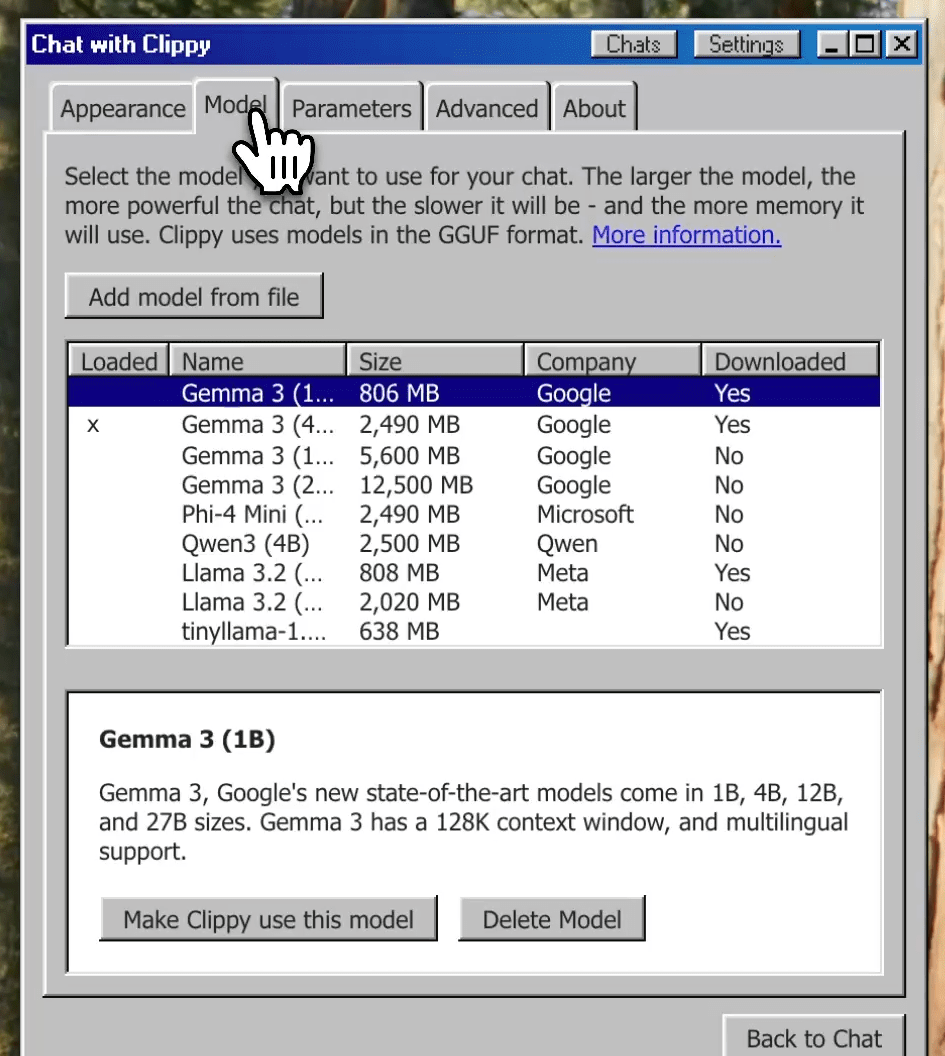
- Use Different AIs: You can load different large language models into the app. It supports many models that use a format called GGUF. It even has easy ways to install models like Google's Gemma3, Meta's Llama 3.2, Microsoft's Phi-4, and Qwen's Qwen3.
- Custom Settings: You can change how the AI models work by playing with settings.
Run LLMs Locally with Clippy Desktop Assistant
If you're interested in seeing modern AI with a retro look, you can download Clippy for different OSes like Linux, macOS, and Windows.
Download the appropriate version for your OS from the official releases page. If you're on Linux, Clippy is packaged for both Debian-based and RPM-based distributions.
Once installed, launch it and start asking your questions!

As you can see in the screenshot, the interface closely resembles the classic Windows user interface from the 1990s.
Having used both Windows 95 and 98, I’d say it most closely matches the look and feel of Windows 95, with its gray window borders, pixelated icons, and familiar system fonts.
It’s a nostalgic design that immediately brings back memories of early desktop computing!
You can customize its appearance, load your own downloaded models, and adjust parameters and other settings through the Settings section.
The new Clippy is a fun mix of computer history and future technology, letting you play with AI in a truly unique way!
Remembering the Original Clippy
The original Clippy (also known as Clippit) was introduced in Microsoft Office in 1997. He was designed by Kevan Atteberry.
I began using Microsoft Office around 2002 and remember having mixed experiences with Clippy. At times, he was genuinely helpful, especially when I was still learning the software.
But often, he would appear unexpectedly and offer suggestions that weren’t relevant, which made the experience frustrating.
Over the years, Clippy became widely known, though not always for the right reasons. Many users saw him as more distracting than helpful, and he was frequently used as a symbol of overly intrusive software design.
Despite that, Clippy remains one of the most iconic figures in computing history.
Please note that this new “Clippy Desktop Assistant” app is not made by or connected to Microsoft. It’s an independent project.
I wonder why Microsoft hasn’t reintroduced the character as part of their modern AI tools like Copilot. It seems like a missed opportunity to reimagine him for a new generation.
You can find the project's code and more information on its website and GitHub repository.
