
Setting up a desktop on FreeBSD usually takes a lot of manual work. You have to install drivers, configure Xorg, and set up a display manager. To solve this, the FreeBSD Foundation is building a tool to make the process much easier. Alfonso Sabato Siciliano is leading an effort to create an automated KDE installer script. This tool is part of the FreeBSD Foundation’s Laptop Support and Usability Project.
Table of Contents
What is the KDE Installer Project?
The project uses a script called kde-installer-dialogs to simplify the setup process. As noted in the project’s repository, the script uses Text User Interface (TUI) dialogs to guide you.
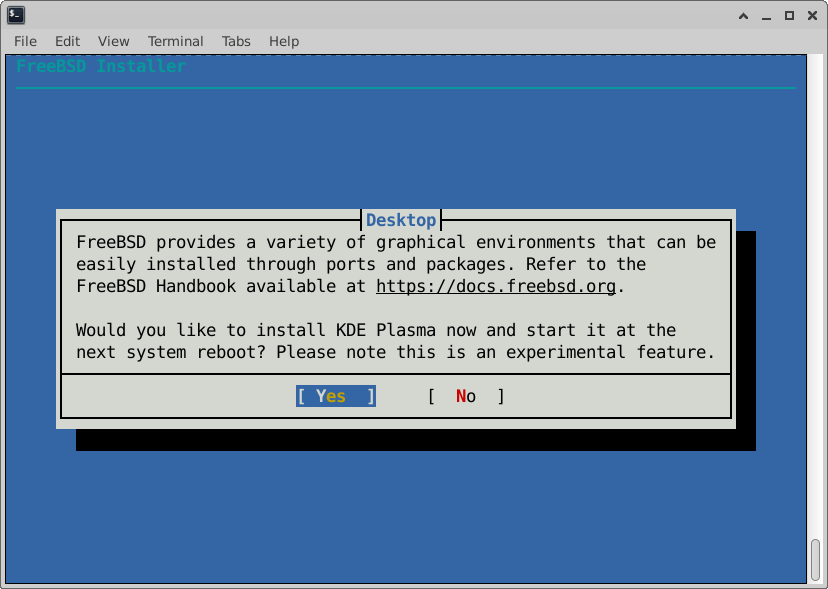
The FreeBSD KDE Installer script handles several big tasks at once:
- GPU Drivers: It identifies and installs the right drivers for your hardware.
- Xorg: It configures the foundational display server.
- KDE Plasma: It installs the actual desktop environment.
- SDDM: It sets up the graphical login screen.
The developers chose to write this entire tool in 100% Shell script. This makes the installer fast, light, and easy to maintain within the FreeBSD base system.
The Goal for FreeBSD 15.1
The team wants this feature to be a highlight of the FreeBSD 15.1 release. The goal is to help users with "new" laptops get running quickly.
In the future, the standard bsdinstall program will simply ask if you want a desktop. If you say yes, the system will handle the rest with little or no intervention. After you reboot, you should see a KDE graphical login screen immediately.
This "out-of-the-box" experience is a huge step forward for the FreeBSD community.
Join the Call for testing KDE installer
On January 20, 2026, Alfonso issued an official Call for Testing (CFT). Because this project is still a Work-in-Progress (WIP), the team needs your help to find bugs.
They specifically want to see how the script handles different types of laptop hardware and GPU configurations.
Who Should Participate?
The developers state that this feature is still experimental. Therefore, they ask that only users who are "familiar with configuring and using FreeBSD" join the testing phase right now. If you know your way around a FreeBSD terminal, your feedback is incredibly valuable.
How to Get Started
You can find the testing instructions in a file called cft.md. This file is available in two places:
- GitLab (Primary): The main home for the project.
- GitHub (Mirror): A copy of the code for those who prefer GitHub.
Simply download the script, run it on your test hardware, and report your results to Alfonso.
Your input will help ensure that the 15.1 release is stable and easy to use for everyone.
Help Test the New FreeBSD KDE Desktop Script
The FreeBSD Foundation wants to make the operating system more accessible for daily use on laptops. By testing this script today, you are helping build a future where any user can enjoy a FreeBSD KDE desktop without a complex setup process. In fact, your bug reports today will save time for thousands of users tomorrow.
Resources:
