
Noteriv is a free, open source markdown notes app for Linux, Windows and macOS. Your notes are plain markdown (.md) files in a folder on your own disk, which Noteriv calls a vault. There is no account to create, and your notes stay on your computer unless you set up sync.
Noteriv can also open an existing Obsidian vault as it is, with no import or conversion step. Version 3.0, released on November 13, 2026, adds database-style views called Bases, typed note properties, a search query language, importers for other note apps, a command line, and optional end-to-end encryption for WebDAV sync.
It is built with Tauri 2, with a Rust backend and a TypeScript interface, and it is released under the MIT license.
In this guide, we will look at what Noteriv can do, how to install it on Linux, and what it does not do yet.
Table of Contents
A First Look at Noteriv
When you start Noteriv for the first time, a short setup wizard asks you to create a new vault or open an existing folder. After that, the main window shows your notes and folders in a sidebar on the left, open notes as tabs, and the editor in the middle.
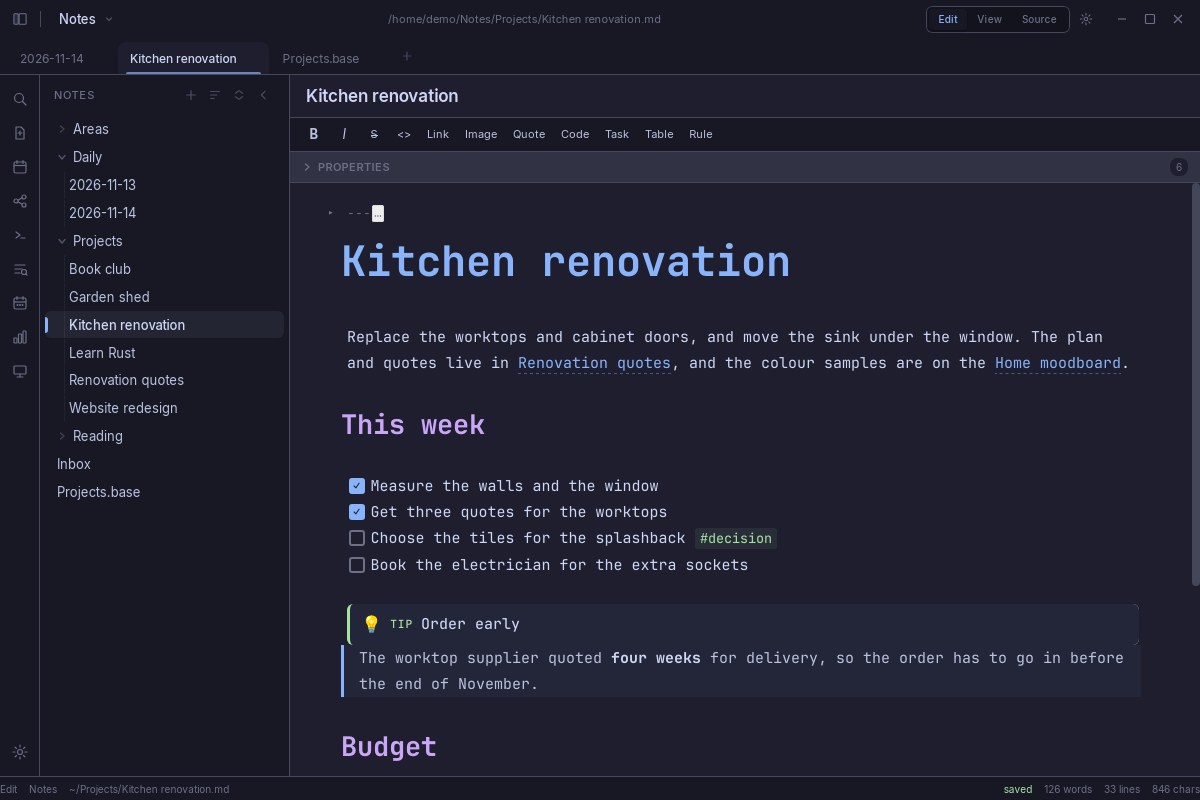
The editor has three modes, and you can switch between them with Ctrl+E:
- Live renders markdown as you type, so headings, links and lists look formatted while you edit.
- Source shows the raw markdown with syntax highlighting.
- View is a read-only rendered page.
Noteriv supports the markdown you would expect: tables, task lists, footnotes, callouts, LaTeX math, Mermaid diagrams and fenced code blocks. Notes link to each other with [[wiki-links]], and a links panel lists the backlinks and outgoing links of the open note. A graph view (Ctrl+G) draws your notes as connected nodes, and it can also show a local graph of just the open note and the notes linked to it.
Almost every action is also available from the command palette (Ctrl+Shift+P).
Using Noteriv with an Existing Obsidian Vault
Because both apps store notes as plain markdown files, you can point Noteriv at your Obsidian vault folder and keep using both apps on the same files.
To open it, click the vault name in the top-left corner, choose New vault, then Open folder, and pick your vault folder.
Nothing is copied or moved. Noteriv keeps its own settings in a .noteriv folder inside the vault, and it leaves the .obsidian folder alone.
Most everyday syntax carries over:
[[Note]],[[Note|alias]],[[Note#Heading]]and[[Note#^block]]links- Embeds such as
![[Note]]and![[image.png]] - Tags, including nested tags like
#parent/child - Callouts, highlights, footnotes and frontmatter properties
.canvasfiles, which Noteriv reads and writes in the JSON Canvas format.basefiles from Obsidian's Bases feature
Some things do not carry over. Obsidian community plugins and themes do not run in Noteriv. Noteriv has its own Dataview-style query block, so existing Dataview queries may give different results. Foldable callouts render but do not fold.
The project documentation has a full page listing what carries over and what does not, and it is worth reading before you rely on a particular feature.
Bases, Properties and Search
Bases turn a set of notes into a table, a list of cards or a plain list. A base can filter notes by tag, folder or property, sort and group them, and work out values with formulas.
You can keep a base in its own .base file, embed it in a note with ![[Projects.base]], or write it straight into a note as a code block:
```base
filters:
  and:
    - file.hasTag("project")
views:
  - type: table
    name: Projects
    order:
      - file.name
      - status
```
There is no visual editor for bases yet. You write and change them as YAML text, as shown above. Views of other kinds, such as maps, are shown as tables.
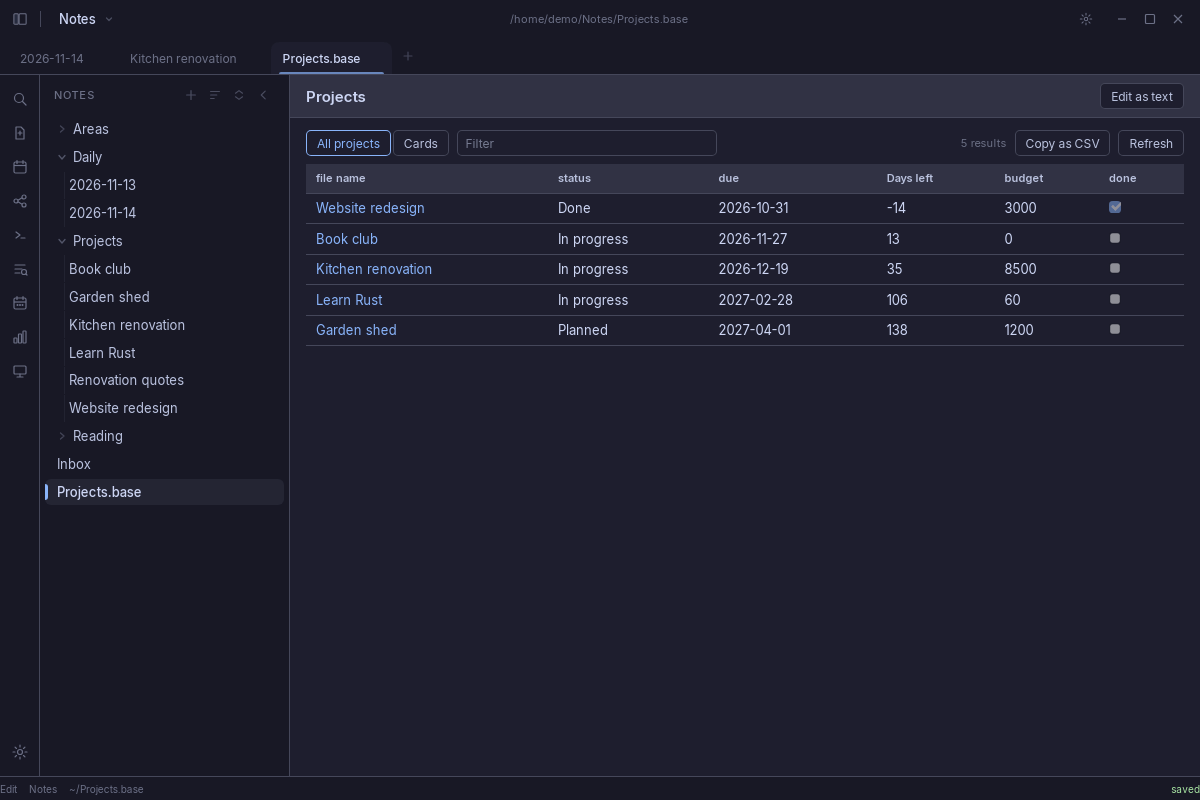
Properties are the values in a note's frontmatter, such as status, due or tags. Noteriv shows them in an editor above the note, with a type for each one: text, list, number, checkbox, date, or date and time. The types are stored per vault, so every note agrees on them. When you edit a property, Noteriv keeps the YAML as you wrote it, including comments and the order of the keys.
Search (Ctrl+Shift+F) understands a query language. Besides plain words and "exact phrases", you can use OR, -word to exclude a word, /regex/, and operators such as file:, path:, tag: and [property:value]. For example, this query finds unfinished tasks containing the word "call" in notes tagged #work:
tag:#work task-todo:call
Sync and Encryption
Noteriv does not run its own sync service. Instead, it can sync a vault in three ways:
- Git, using the git program installed on your system, with any remote such as a GitHub repository.
- WebDAV, for example a Nextcloud or ownCloud server.
- A synced folder, such as a Dropbox, Google Drive or OneDrive folder on your computer.
Since version 3.0, WebDAV sync can encrypt the contents of every file before it leaves your device, using XChaCha20-Poly1305 with a key derived from your password by Argon2id.
There are a few rules to keep in mind. File and folder names stay readable on the server. Encryption has to start on an empty remote folder. Every device needs the same password, and nothing can be recovered if you lose it.
For WebDAV and synced-folder sync, you can also choose what syncs. Images, PDFs, audio and video can each be switched on or off, and folders can be left out entirely.
Importing Notes from Other Apps
Notes from apps that do not store plain markdown files need an import. Noteriv 3.0 can import from Evernote, Notion, Google Keep, Roam Research, Logseq and Bear, as well as Textbundle, HTML and CSV files. Imported notes go into a folder of their own, and nothing already in the vault is replaced.
The release notes point out that the importers were tested against sample exports, not against every app's real output. It is a good idea to import into a new vault first and check the result.
Command line, Links and the MCP Server
Noteriv 3.0 adds a noteriv command. Some commands open things in the app window, and others print results in the terminal without opening a window at all:
noteriv open "Meeting notes"      # open a note in the app
noteriv daily                     # open today's daily note
noteriv search "budget"           # print matching notes in the terminal
noteriv list                      # list the notes in the vault
noteriv append Inbox --content "- [ ] call the plumber"   # add a line to a note
The .deb and .rpm packages put the noteriv command on your PATH. The commands that print work whether or not the app is running.
Noteriv also handles noteriv:// links, so other programs and scripts can open, create or search notes. A link can never replace a note, and the app asks before a link writes anything.
For people who use AI assistants, Noteriv has a separate MCP server that gives an MCP client such as Claude or Cursor read and write access to your vault. It is optional, it needs Node.js, and you run it with npx -y noteriv-mcp. It finds the vault that is open in Noteriv, and the app refreshes when the server changes a note.
How to install Noteriv on Linux
Noteriv is available as a Flatpak, as .deb and .rpm packages, and as an AppImage. The commands below use the files from the 3.0.0 release. The latest release page always has the newest version.
1. Flatpak (any distribution)
The developer runs a Flatpak repository that keeps the app up to date:
flatpak remote-add --if-not-exists --no-gpg-verify noteriv https://flatpak.thejacedev.xyz/noteriv/repo
flatpak install noteriv com.noteriv.Noteriv
Note that this repository is not GPG-signed, which is why the command uses --no-gpg-verify.
Once installed, start the app from your application menu, or run the following command to launch it from terminal:
flatpak run com.noteriv.Noteriv
To update later, run flatpak update.
2. Ubuntu and Ubuntu-based distributions (.deb)
Download the package and install it with APT, which also installs any missing dependencies:
wget https://github.com/thejacedev/Noteriv/releases/download/v3.0.0/Noteriv_3.0.0_amd64.deb
sudo apt install ./Noteriv_3.0.0_amd64.deb
To remove it:
sudo apt remove noteriv
3. Fedora (.rpm)
wget https://github.com/thejacedev/Noteriv/releases/download/v3.0.0/Noteriv-3.0.0-1.x86_64.rpm
sudo dnf install ./Noteriv-3.0.0-1.x86_64.rpm
To remove it:
sudo dnf remove noteriv
4. AppImage (any distribution)
wget https://github.com/thejacedev/Noteriv/releases/download/v3.0.0/Noteriv_3.0.0_amd64.AppImage
chmod +x Noteriv_3.0.0_amd64.AppImage
./Noteriv_3.0.0_amd64.AppImage
The AppImage updates itself through the app's built-in updater. If you installed the .deb or .rpm, download the new package from the release page when a new version comes out.
Windows and macOS
On Windows, there is an .exe installer, an .msi package and a portable .zip. You can also install it with Scoop. On macOS, there is a universal .dmg for Apple silicon and Intel Macs, and a Homebrew cask:
brew install --cask thejacedev/tap/noteriv
The Windows and macOS builds are not signed with a paid certificate. Windows SmartScreen and macOS Gatekeeper will warn you the first time you open the app. The installation guide explains how to get past these warnings.
Keyboard Shortcuts Worth Knowing
| Action | Shortcut |
|---|---|
| Quick open (find a note by name) | Ctrl+P |
| Command palette | Ctrl+Shift+P |
| Search all notes | Ctrl+Shift+F |
| Switch between live, source and view modes | Ctrl+E |
| Graph view | Ctrl+G |
| Open today's daily note | Ctrl+D |
| Split the editor | Ctrl+\ |
| Settings | Ctrl+, |
On macOS, use Cmd instead of Ctrl. Every shortcut can be changed in Settings.
Current Limitations
A few things are worth knowing before you switch:
- Plugins: Noteriv has its own plugin API and a small catalogue of community plugins and themes. Obsidian plugins do not run in it.
- Bases: There is no visual editor for bases, and map and kanban views are shown as tables.
- Mobile: There are Android and iOS apps, but they are a work in progress. New features reach the desktop app first.
- Importers: They were tested against sample exports, so check your imported notes.
- Signing: The Windows and macOS builds are unsigned, and the Flatpak repository is not GPG-signed.
Noteriv is developed in the open, and its developer uses AI coding assistants as part of that work. The source code and its full history are public on GitHub.
If you already use Obsidian, you can open the same vault folder in Noteriv without changing anything, and go back to Obsidian at any time.
If you try Noteriv and run into a problem, you can report it on the project's GitHub issue tracker.
Noteriv Project Details:
- Website: noteriv.com
- Source code: github.com/thejacedev/Noteriv
- Downloads: GitHub releases
- Documentation: thejacedev.github.io/Noteriv
- License: MIT
Related Read:
