
This is a continuation article in bash loop wherein the previous article we have explained about for loop. In this article, we will take a look at two more bash loops namely, while and until loop.
The while loop is mostly used when you have to read the contents of the file and further process it. Reading and writing to a file are common operations when you write bash scripts. We will see how to read files using a while loop.
We already have a very detailed article on how to write to a file using redirection operators.
The functionality of the while loop is similar to for loop. The for loop iterates over a list of items and runs the block of code N a number of times. Here in the while loop, the condition is evaluated first, and if the condition is true, the block of code will be executed until the condition is evaluated to false.
Table of Contents
1. While loop
Below is the while loop syntax. The loop starts with the "while" keyword followed by a condition that should be evaluated to be true. Between do and done block is where your codes will be placed that will be iterated N number of times.
while [[ condition ]]
do
  Command 1
  Command 2
  ....
  Command 3
done
EXAMPLE 1 - Evaluate and iterate
Take a look at the below example. Here I have created a variable "NUM=5" and my condition ($NUM -ne 0) is, the loop will execute if the variable NUM is not equal to zero.
$ NUM=5
while [[ $NUM -ne 0 ]]
do
  printf "Value of NUM = $NUM \n"
  ((--NUM))
done
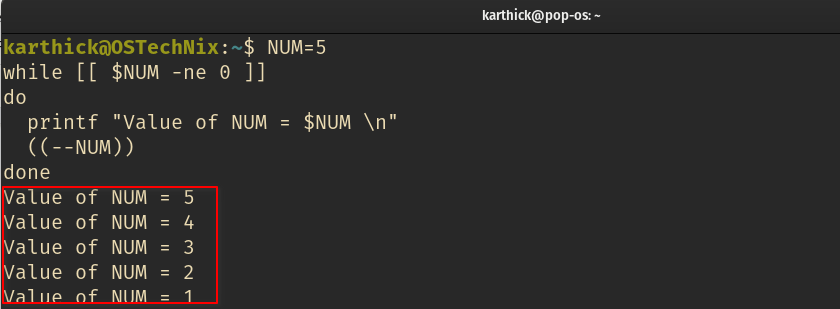
You should use counters to increment or decrement values stored in variables when working with while loops. If not, it will become an infinite loop and NUM will always be set to five. Here I am decrementing the value of NUM in every iteration by running ((--NUM)), so when my variable NUM is set to zero, the loop exit.
((++NUM))  → Increment NUM variable by 1, similar to running NUM=$(( $NUM + 1 ))
((--NUM))  → Decrement NUM variable by 1, similar to running NUM=$(( $NUM - 1 ))
EXAMPLE 2 - Infinite loops
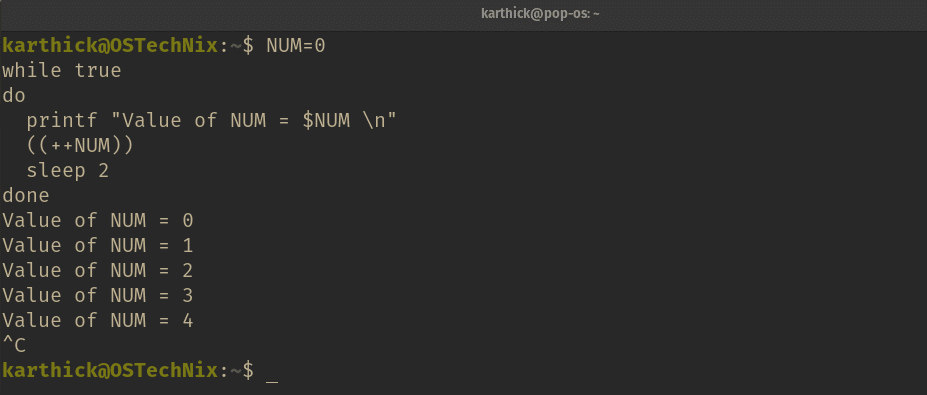
An infinite loop is where your condition is always evaluated to true and the loop will never exit.
To create infinite loops, you can use the bash-builtin true keyword. Also, use the "sleep" command when testing infinite loops which will give you control in stopping the script else your screen will be flooded with fast scrolling outputs.
$ NUM=0
while true
do
  printf "Value of NUM = $NUM \n"
  ((++NUM))
  sleep 2
done
EXAMPLE 3 - Internal field separator (IFS)
IFS is a special shell variable that decides how your word boundaries are handled. By default, IFS is set to space, tab, and a newline character. Open the terminal and run the following commands:
$ var1="foo:bar foo bar"
$ for val in $var1
do
  echo $val
done
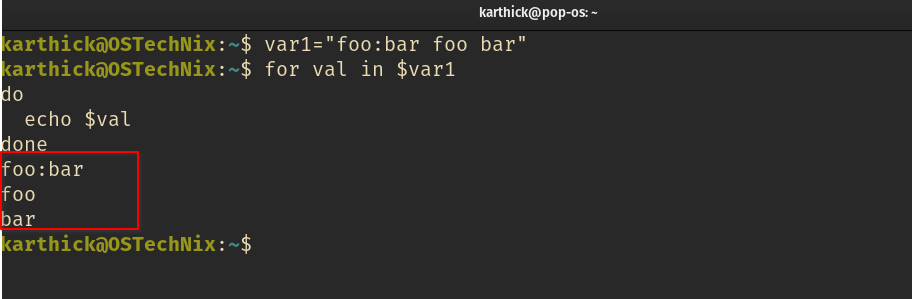
Take a look at the output. The for loop is iterating over a string and it is IFS which decides the word boundaries and considers space as a field separator.
Now run the below code again. Here IFS is set to the colon.
$ var1="foo:bar foo bar"
$ IFS=":"
$ for val in $var1
do
  echo $val
done

From the above output, you can see that the custom field separator colon is used as a word boundary. You can set the IFS back to the default state by running the unset command.
$ unset IFS
EXAMPLE 4 - Read file using while loop
The while loop is recommended when you want to read a file line by line and process it.
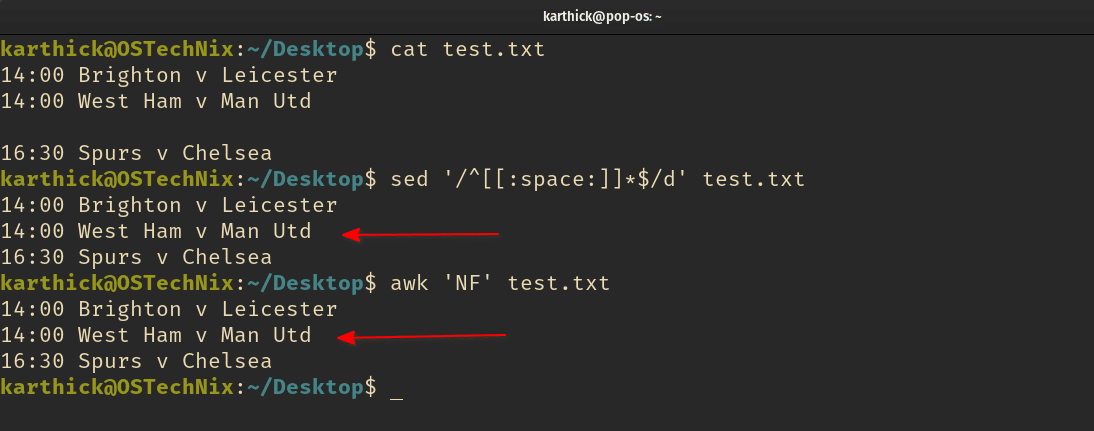
Create a new file called test.txt using the following content. There is an empty line after line 2 to show the behavior of how empty lines are handled.
14:00 Brighton v Leicester
14:00 West Ham v Man Utd

16:30 Spurs v Chelsea
We will use the read command which accepts input from redirection and store it in a variable along with an input redirection operator where the file name will be redirected to the while loop. The read command will use the default IFS to set the word split boundary.
$ while read line
do
  echo $line
done < test.txt

In the above example, test.txt file is redirected to the while loop and read command reads line by line and stores it in the variable "line" and it is further processed within the loop. Empty lines are not skipped when you follow this method and this is not the behavior you might want. So you have to explicitly make empty lines to be skipped.
There are multiple options to trim out empty lines from the input file. You can use sed, awk, and conditional statements, etc. I prefer using both awk and sed to clean up the empty lines before looping them using a while loop.
# USING SED
$ sed -i '/^[[:space:]]*$/d' test.txt
14:00 Brighton v Leicester
14:00 West Ham v Man Utd
16:30 Spurs v Chelsea
# USING AWK
$ awk 'NF' test.txt
As seen in previous examples, you can modify IFS depending upon how you want to read your file. For example, if you are handling a CSV file then the delimiter can be set to a comma. I have modified the same input file to be in CSV format.
14:00,Brighton,Leicester
14:00,West Ham,Man Utd
16:30,Spurs,Chelsea
In the below example, IFS is set to comma (IFS=",") and each field will be stored in a separate variable (time, team1, team2).
while IFS="," read time team1 team2
do
   echo "$team1 is playing against $team2 at $time"
done < test.txt

EXAMPLE 5 - Loop flow control with Break and Continue
If you have read our bash for loop article, you might know what is break and continue used for. Both break and continue are bash builtin keywords that will help you to control the flow of your loop.
The "break" keyword will completely exit the loop and pass control to the next command in the script. In the below example. When the NUM is equal to three, the loop will be exited by the break command.
$ NUM=5
while [[ $NUM -ne 0 ]]
do
  printf "Value of NUM = $NUM \n"
  if [[ $NUM -eq 3 ]]
  then
    break
  fi
((--NUM))
done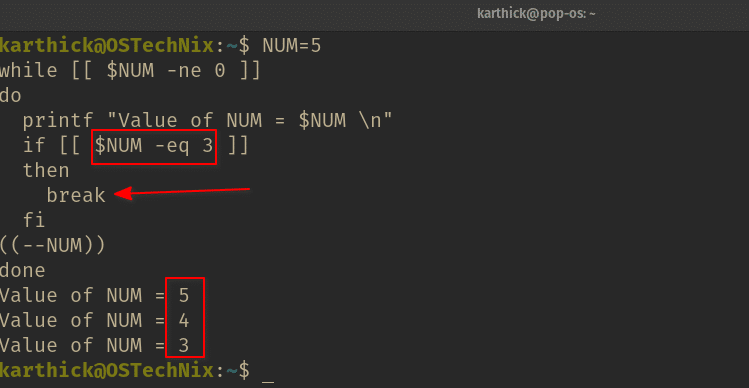
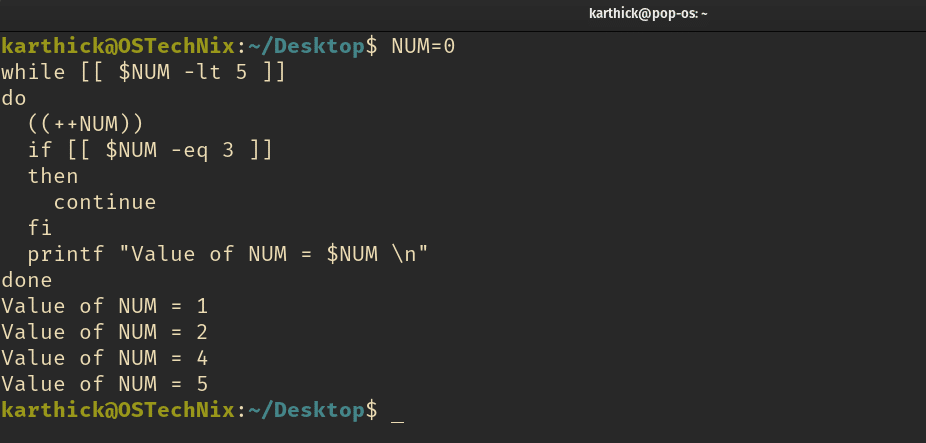
The "continue" keyword will skip the current iteration and give the control back to the while loop and start the next iteration.
$ NUM=0
while [[ $NUM -lt 5 ]]
do
 ((++NUM))
 if [[ $NUM -eq 3 ]]
 then
   continue
 fi
 printf "Value of NUM = $NUM \n"
done
2. Until Loop
The until loop is the exact opposite of the while loop. The while loop evaluates the condition to be true to execute the block of code and the until loop evaluates the condition to be false for the loop to be executed.
The syntax is the same as the while loop but instead of the keyword while, until will be used.
until [[ condition ]]
do
  Command 1
  Command 2
  ....
  Command 3
done
From the below example, you can see until loop evaluates the variable NUM to be greater than equal to five. It is false since NUM is set to zero and will increment in subsequent iterations using ((++NUM)). So when NUM is equal to five the condition is evaluated to be true and until loop will stop executing.
$ NUM=0
$ until [[ $NUM -ge 5 ]]
do
  echo $NUM
  ((++NUM))
done

To create infinite loops, you can use the keyword "false".
$ NUM=0
$ until false
do
  echo $NUM
  ((++NUM))
done
To control the loop flow, you can use the break and continue keywords like as shown in the while loop section above.
Conclusion
In this article, we have seen how to use while loop and until loop in bash scripts. Until loop is least frequently used compared to for and while loops but that is to decide on your script and what types of the loop are required. Be comfortable in using all three loops.
If you've any questions or feedback, feel free to let us know via the comment section below.
Related read:
- Bash Scripting - Select Loop Explained With Examples
- Bash Scripting – Functions Explained With Examples
- Bash Scripting – Variables Explained With Examples
- Bash Echo Command Explained With Examples In Linux
- Bash Heredoc Tutorial For Beginners
- How To Repeat A Command Until It Succeeds In Linux
- Difference Between Defining Bash Variables With And Without export
