
Are you tired of complex infrastructure diagrams that are hard to understand? Do you wish there was an easier, more visually appealing way to map out your systems? Good news! FossFLOW is here to transform how you visualise your architecture. It’s an open-source tool that helps you create beautiful, 3D-style isometric diagrams with incredible ease.
Table of Contents
What is FossFLOW?
FossFLOW is a powerful, open-source Progressive Web App (PWA) designed specifically for creating isometric infrastructure diagrams.
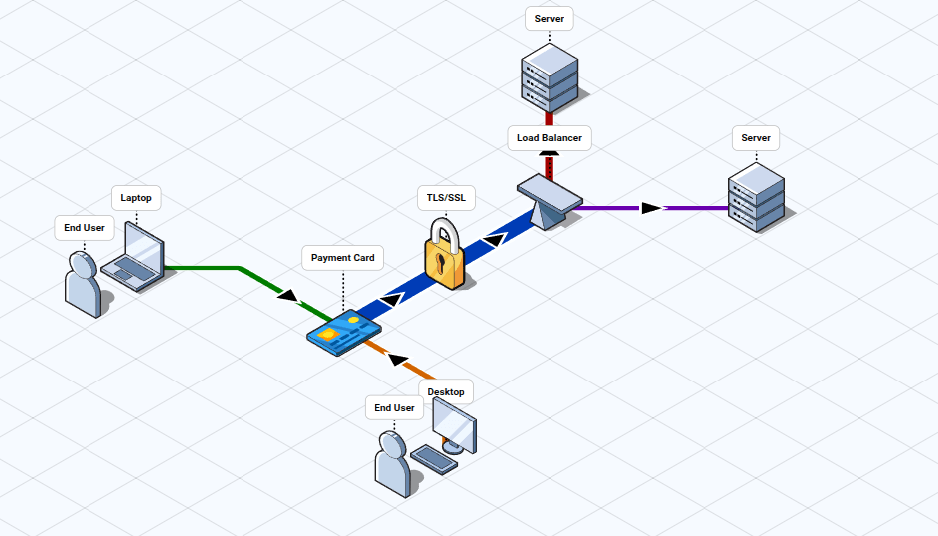
Users can add and connect components, customise diagrams, and manage their work through features like auto-save and import/export.
Built with React and the Isoflow library, FossFLOW offers a fantastic, privacy-first experience where all your diagram data is stored locally in your browser, ensuring your work stays private and accessible offline.
The creator of FossFLOW took the Isoflow Community Edition and made it incredibly easy for anyone to set up and run.
While the core Isoflow library is fantastic, FossFLOW offers direct benefits by letting you export and load JSON backups of your diagrams, a feature that the community version of Isoflow restricts.
It's a completely open-source project released under the Unlicense license, meaning you have full freedom to use and modify it as you wish.
FossFLOW was previously known as OpenFLOW, but it was rebranded to avoid confusion with an existing network telemetry protocol and a product by Snowflake.
Key Features
FossFLOW comes packed with features designed to make diagramming a breeze:
- Stunning Isometric Views: Create eye-catching 3D-style technical diagrams that bring clarity to complex systems.
- Easy Drag-and-Drop Editor: Express your architecture effortlessly using icons, regions, and connectors. Just grab a component from the library and place it on your canvas.
- Extensible Icon System: Use existing icon libraries for major cloud providers like AWS, Azure, and GCP, or even Kubernetes. You can also create your own custom icon sets.
- Automatic Saving & Quick Saves: Your work is automatically saved every 5 seconds directly to your browser storage. Need an instant save? The "Quick Save (Session)" option has you covered without any pop-ups.
- Offline Access: Since it’s a PWA, you can work on your diagrams even without an internet connection.
- Simple Import/Export: Share and back up your diagrams easily as JSON files. This lets you load diagrams from others or save your important work for safekeeping.
- Intuitive Navigation: Pan and zoom around your canvas to focus on different areas of your diagram.
- Keyboard Shortcuts: Speed up your workflow with shortcuts for deleting items, zooming, and panning. Plus, there's even Ctrl+Z for undo and Ctrl+Y for redo!
Install FossFLOW
Ready to visualise your infrastructure like never before? FossFLOW makes it incredibly simple to begin.
You can install it as a native application on your Linux or Mac device, or simply run it directly in your web browser.
Try FossFLOW Online
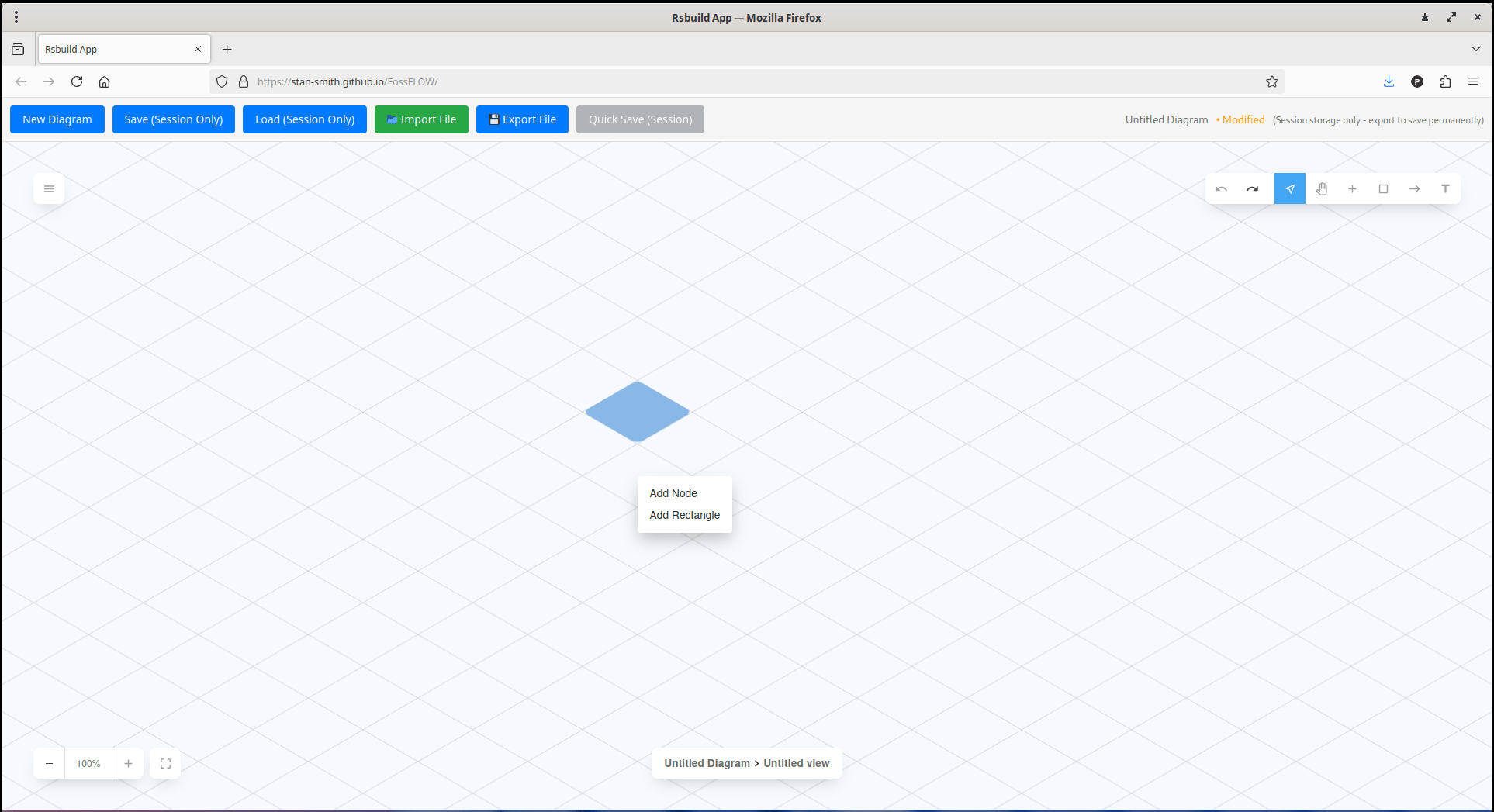
Head over to https://stan-smith.github.io/FossFLOW/ to start creating diagrams instantly.
Run FossFLOW Locally
For those who prefer a local environment, first clone FossFLOW's GitHub repository:
git clone https://github.com/stan-smith/FossFLOW
cd FossFLOW
Next, ensure you have npm installed and Install necessary dependencies with:
npm install
Finally, start the development server:
npm start
Access FossFLOW by opening http://localhost:3000 in your web browser.
FossFLOW runs well on modern browsers like Chrome, Edge, Firefox, and Safari, including mobile browsers with PWA support.
For the best experience, the author recommends Chrome or Edge browsers.
Create Isometric Diagrams with FossFLOW
FossFLOW is designed for isometric diagramming, allowing you to create stunning 3D-style technical diagrams.
Creating Diagrams
Add Items:
- Using the Menu: Press the "+" button on the top right menu to make the library of components appear on the left. You can then drag and drop components from this library onto the canvas.
- Using Right-Click: Alternatively, perform a right-click on the grid and select "Add node". After creating a new node, you can click on it and customise it using the left menu.
- The tool supports an extensible icon system, letting you use existing libraries for AWS, Azure, GCP, Kubernetes, and more, or create your own.
Connect Items:
Use the available connectors to show relationships between components in your diagram.
Customise:
You can change colours, labels, and properties of items to suit your needs.
Navigating and Interacting
Navigate:
You can pan and zoom around the canvas to work on different areas of your diagram.
- Zoom: Use the mouse wheel to zoom in or out.
- Pan: Click and drag to pan around the canvas.
Keyboard Shortcuts:
- Delete: Remove selected items.
- Ctrl+Z: Undo your last action.
- Ctrl+Y: Redo a previously undone action.
Saving and Managing Your Work
FossFLOW prioritizes privacy, with all your diagram data stored locally in your browser.
- Auto-Save: Your diagrams are automatically saved to browser storage every 5 seconds.
- Quick Save (Session): Click "Quick Save (Session)" for instant saves without any pop-up dialogs.
- Save New: Use "Save New" to create a copy of your diagram with a different name.
- Load: Click "Load" to see and access all your previously saved diagrams.
- Import: You can load diagrams from JSON files that have been shared by others.
- Export: Download your diagrams as JSON files for sharing or backing up your work.
- Storage Manager: Use the "Storage Manager" to manage the space used in your browser storage. This is particularly useful as browser
localStoragehas a limit of approximately 5-10MB. It's recommended to regularly export important diagrams as JSON files for backup.
FossFLOW simplifies infrastructure diagramming, making it accessible, beautiful, and private. What are you waiting for? Start mapping out your systems with clarity and style!
Resource:
