
Managing services on a Linux system often means typing long systemctl commands or digging through logs with journalctl. But what if you could do all that from a single, easy-to-use terminal interface? That’s where systemd-manager-tui comes in.
In this guide, you’ll learn how to install and use systemd-manager-tui to simplify Linux service management.
Table of Contents
What is systemd-manager-tui?
systemd-manager-tui is a lightweight terminal user interface (TUI) that helps you manage systemd services with just a few keystrokes. Think of it as a sleek, interactive dashboard for your systemd units, all within your command line.
It allows you to manage services (start, stop, restart, enable, disable), view logs, inspect unit files, and navigate between system and session units, without typing full systemctl or journalctl commands.
It connects directly with systemd through the D-Bus API, ensuring reliable and secure control over your services.
It’s fast, keyboard-friendly, and perfect for sysadmins, developers, and Linux users who prefer working in the command line.
Key Features
The systemd-manager-tui program ships with features designed for managing systemd services quickly and efficiently with keyboard-only navigation.
- Effortless Service Control: Start, stop, restart, enable, or disable any systemd service with just a few keystrokes. No more memorising complex commands!
- Instant Insights: View service logs directly within the TUI. You can also inspect detailed properties of any unit, giving you a quick overview of its status and configuration.
- Flexible Unit Navigation: Easily switch between system and session units. This means you can manage services for your entire system or just those running for your current user.
- Smart Filtering: Choose to list all units or filter them to only show 'service' types. This keeps your view clean and focused.
- Direct Unit File Editing: Need to tweak a service configuration? You can directly edit the selected unit's file from within the interface. This saves you time navigating directories and opening external editors.
- Built for Speed: Developed using Rust, a modern programming language known for its performance and reliability.
- Actively Developed: The project is under active development. The developer is actively listening to community feedback, even promising to add features like listing all installed units (not just loaded ones) and exploring Vim-like navigation options.
Why systemd-manager-tui is Created?
Some Linux users struggle with the default systemctl commands. This tool solves that problem directly.
In fact, the developer built this tool out of a personal need to simplify the often-verbose and hard-to-remember systemctl commands.
It offers a visual and interactive way to manage your system, reducing errors and speeding up your workflow.
While other similar TUI tools exist for systemd, systemd-manager-tui is as a robust, user-friendly, and actively maintained option, which makes the Linux service management genuinely easy.
Install systemd-manager-tui in Linux
Ready to simplify your systemd management? Installing systemd-manager-tui is straightforward:
Arch Linux and its variants:
systemd-manager-tui is available in AUR, You can install it using paru or yay helper programs.
Using paru:
paru -S systemd-manager-tui-bin
Using yay:
yay -S systemd-manager-tui-bin
Ubuntu and its derivatives:
Download the .deb file from the project's Releases page, then install it using command:
sudo dpkg -i systemd-manager-tui_x.x.x-x_amd64.deb
Direct Binary:
Download the pre-compiled binary from Releases page and make it executable:
chmod +x systemd-manager-tui
./systemd-manager-tui
This is a great option for non-Debian systems, for example Fedora.
Cargo (Rust's Package Manager):
If you have Rust and Cargo installed, simply run:
cargo install --locked systemd-manager-tui
After installation, I suggest you to create an alias to make it even easier to use.
Manage Systemd Services using Systemd-manager-tui
Launch systemd-manager-tui tool as root user or with sudo privilege:
sudo systemd-manager-tui
Here is the default interface of systemd-manager-tui, which helps you manage systemd services using your keyboard.
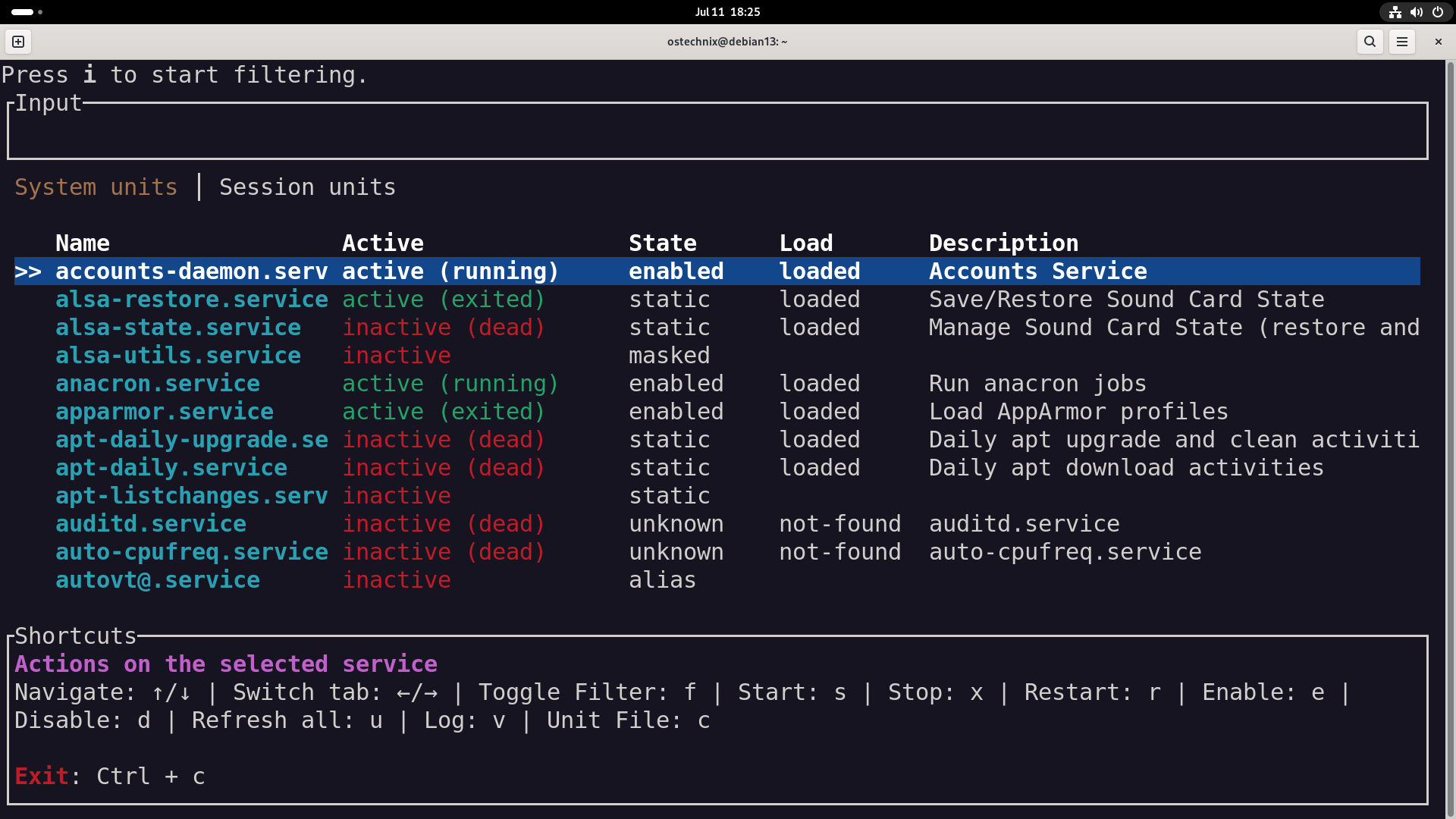
As you can see, it gives you a quick, interactive overview of active and inactive system services.
Overview of the Interface
The screen is split into:
- Input Filter at the top (
Press i to start filtering.) - Tabs for switching between
System unitsandSession units - Service Table showing:
Name– name of the serviceActive– runtime state (running,exited,dead, etc.)State– whether it's enabled, static, or maskedLoad– whether the service unit is loadedDescription– short description of what the service does
- Shortcuts Pane at the bottom
You can press Ctrl + c quit the application safely.
Basic Navigation & Interaction
Navigation
- UP / DOWN Arrows – move up/down the list
- LEFT / RIGHT – switch between System units and Session units tabs
Filtering
Press i to enter filter mode:
- Start typing to search/filter services by name
- Press
Escto exit filter mode
Service Actions
You can perform actions on the selected service:
s– Startx– Stopr– Restarte– Enable (starts on boot)d– Disablev– View logs (usesjournalctl)c– Show the unit file content (*.servicefile)u– Refresh all service statuses
Example Use Case
Suppose you want to restart the accounts-daemon.service:
Navigate to the service using UP / DOWN and press r to restart it.
To check logs for the same service, simply select it and press v.
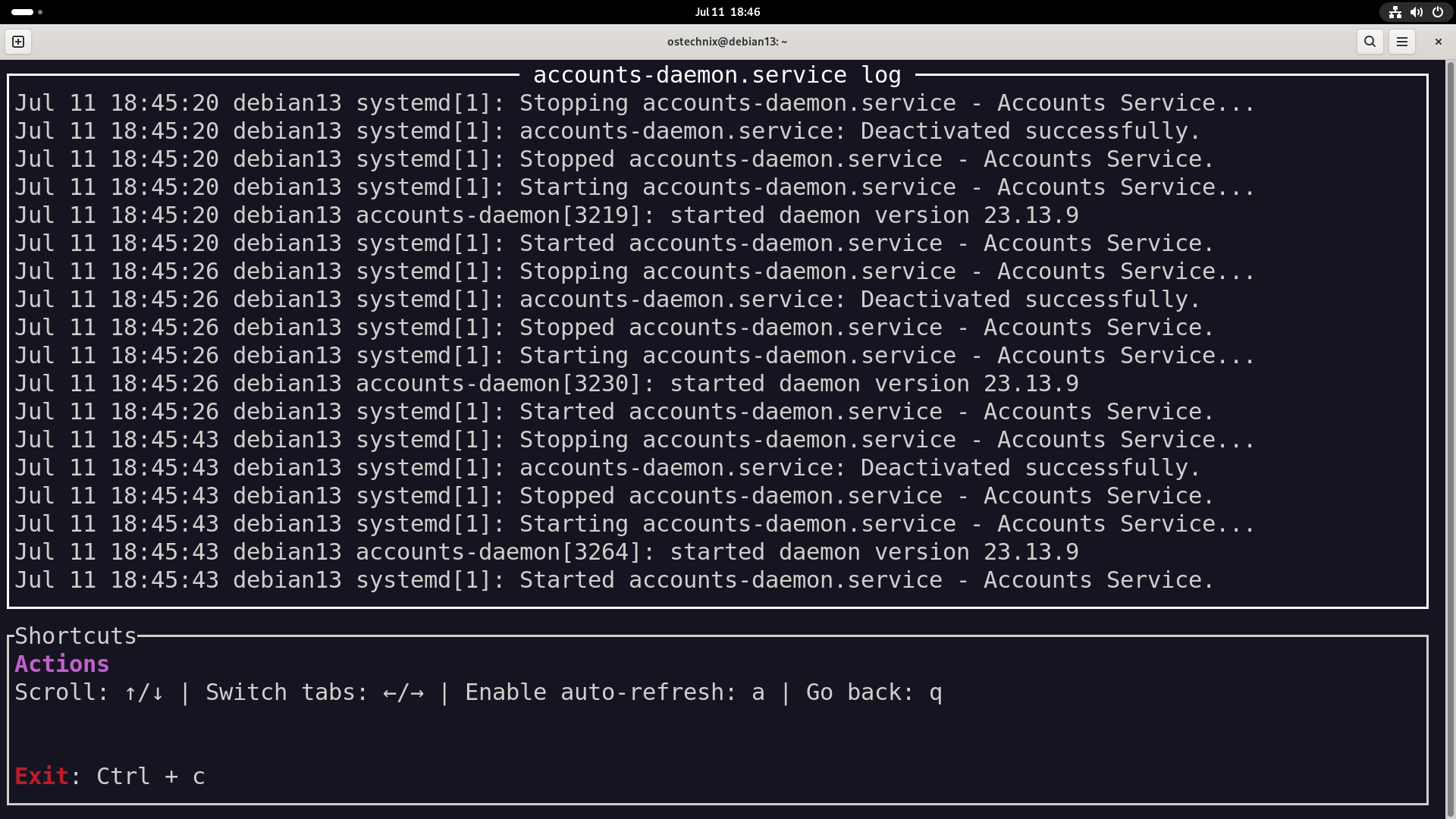
Please note that the services marked as masked can’t be started unless unmasked manually. The static services cannot be enabled directly, because they’re usually dependencies for others.
You need to run the program with sudo to perform most service management tasks.
Conclusion
systemd-manager-tui is ideal if you prefer TUI tools over GUI tools like gnome-system-monitor or systemctl commands. It’s fast and useful for debugging or managing services on servers or headless systems.
Resource:
Related Read:
