
The launch of Ubuntu 25.10 Questing Quokka brought exciting new features. For example, Canonical introduced improved platform security and new system tools written in memory-safe Rust. Unfortunately, many users installing the new operating system ran into a major problem: Flatpak stopped working entirely.
Table of Contents
Flatpak is Not Working in Ubuntu 25.10
Flatpak applications allow users to install software outside of the standard Ubuntu packages. However, this process suddenly stopped working correctly since from Ubuntu 25.10 development images.
For instance, when users tried to install a Flatpak, they often saw an error message like this: "Failed to install org.gnome.Platform: Could not unmount revokefs-fuse filesystem…". Other processes, like Flatpak updates, also broke with similar unmount warnings.
To verify it myself, today (October 11, 2025)) I tried to install the Pika backup tool on my Ubuntu 25.10 desktop from Flathub.
I got the same error message:
Warning: Could not unmount revokefs-fuse filesystem at /var/tmp/flatpak-cache-YJCAE3/org.freedesktop.Platform.GL.default-P4BAE3: Child process exited with code 1
Warning: Could not unmount revokefs-fuse filesystem at /var/tmp/flatpak-cache-YJCAE3/org.freedesktop.Platform.GL.default-NOSVD3: Child process exited with code 1
Warning: Could not unmount revokefs-fuse filesystem at /var/tmp/flatpak-cache-YJCAE3/org.freedesktop.Platform.codecs-extra-L8L3D3: Child process exited with code 1
Warning: Could not unmount revokefs-fuse filesystem at /var/tmp/flatpak-cache-YJCAE3/org.gnome.Platform.Locale-AKZWD3: Child process exited with code 1
Warning: Could not unmount revokefs-fuse filesystem at /var/tmp/flatpak-cache-YJCAE3/org.gnome.World.PikaBackup.Locale-2SC1D3: Child process exited with code 1
Warning: Could not unmount revokefs-fuse filesystem at /var/tmp/flatpak-cache-YJCAE3/org.gtk.Gtk3theme.Yaru-OXT0D3: Child process exited with code 1
error: Failed to install org.gnome.Platform: Could not unmount revokefs-fuse filesystem at /var/tmp/flatpak-cache-YJCAE3/org.gnome.Platform-AFL9D3: Child process exited with code 1
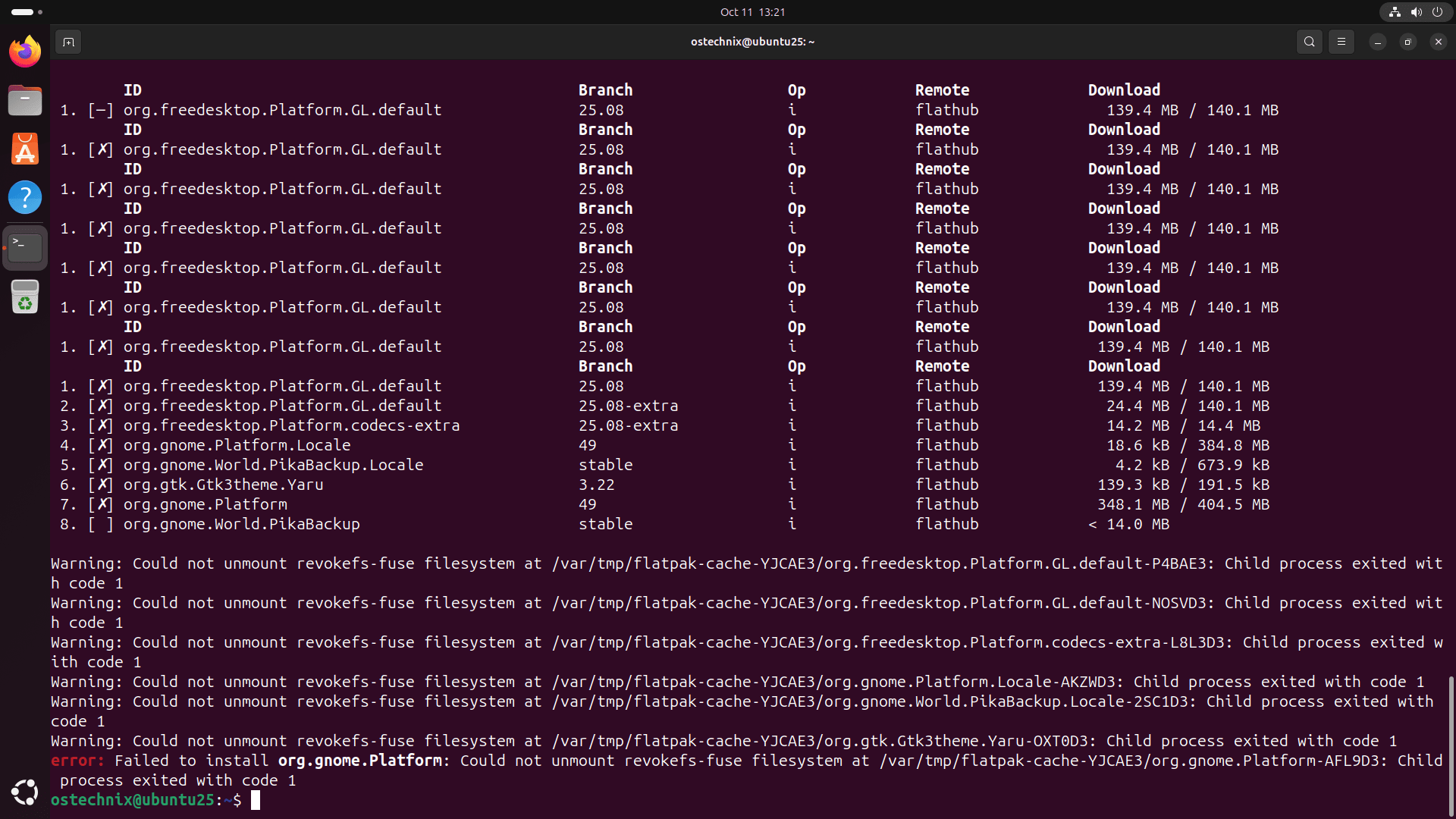
If you try to install a flatpak app, you will probably get this error too. It's not just you or me; this critical bug affected everyone running Ubuntu 25.10.
Why AppArmor Blocked the Flatpak App Installs
The fault lies with AppArmor, Ubuntu's built-in security system. AppArmor is a powerful Linux kernel security module that proactively protects your operating system by strictly defining what each application can do.
AppArmor uses profiles to manage security rules. In this case, the profile for a tool named fusermount3 caused the trouble. Flatpak relies on fusermount3 to mount and, crucially, unmount filesystems during the installation process.
Because the fusermount3 profile lacked the correct permissions in Ubuntu 25.10, AppArmor treated the unmount operation as a threat. Therefore, AppArmor blocked access to necessary system files, like those under /run/mount/utab and related files.
No access means no unmount, and no unmount means the Flatpak installation fails completely.
Ubuntu developers classified this problem as a critical regression affecting the new release.
As per the Bug #2122161, the issue affected the flatpak package, specifically version 1.16.1-2ubuntu1, which ran on the 6.17.0-3.3-generic kernel in the Ubuntu 25.10 development version.
The error is not yet solved even after the final Ubuntu 25.10 has been released a few days ago.
How to Get Flatpak Working Today in Ubuntu 25.10 Questing Quokka
Fortunately, Ubuntu developers confirmed the bug and worked quickly to solve it. While a permanent package is on the way, you can choose between these simple solutions right now.
1. A Temporary Solution to Fix Broken Flatpak Issue in Ubuntu 25.10
You may need an immediate solution if the official fix has not yet landed on your machine. This workaround temporarily disables the problematic security profile.
Important Safety Note: Temporarily disabling an AppArmor profile compromises some of the security safeguards AppArmor provides, but this is a standard debugging step.
A. Disable the AppArmor Profile
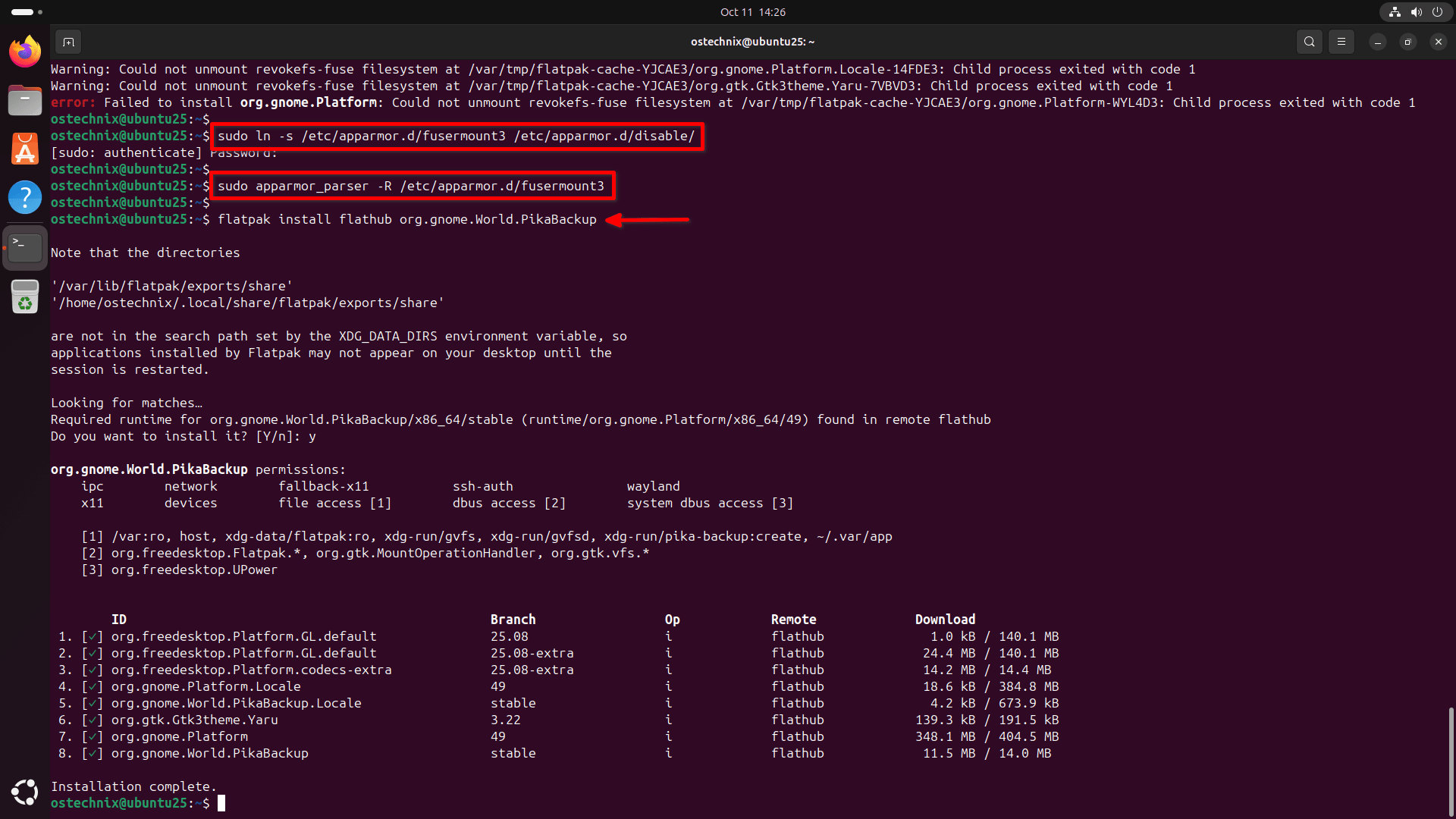
Run these commands to disable the AppArmor profile for fusermount3:
1. Link the profile to the disable directory:
sudo ln -s /etc/apparmor.d/fusermount3 /etc/apparmor.d/disable/
2. Unload the profile from the kernel:
sudo apparmor_parser -R /etc/apparmor.d/fusermount3
After running these two commands, Flatpak installations and updates should work again.
A few minutes before publishing this guide, I verified this fix on my Ubuntu 25.10 VM. Flatpak is working in Ubuntu 25.10!
B. Re-enable the Profile (When the Official Fix Arrives)
Once the official package update arrives on your system (version AppArmor 5.0.0~alpha1-0ubuntu8.1 or newer), you should re-enable the profile using these commands:
1. Remove the link:
sudo rm /etc/apparmor.d/disable/fusermount3
2. Load the fixed profile back into the kernel:
cat /etc/apparmor.d/fusermount3 | sudo apparmor_parser -a
C. Use sudo for Installations
If you prefer avoiding profile management, you can install Flatpaks using sudo via the command line. Using sudo installs everything system-wide, which bypasses the user-level AppArmor restriction causing the issue.
2. The Official Permanent Fix (The Policy Update)
Canonical's developers realized they did not need to grant fusermount3 higher capabilities to fix the issue. Instead, they simply added a new rule to the AppArmor profile: /run/mount/utab.lock rwk,. This small change allows Flatpak installations to finish successfully.
- Fixed Version: The official fix is packaged in AppArmor version 5.0.0~alpha1-0ubuntu8.1.
- Status: Testers successfully verified this package, confirming that it resolved all Flatpak errors, including installations and updates.
- Distribution: Canonical uploaded the fixed package to the testing repository (
questing-proposed). The update will move to the general update channels after verification and a minimum waiting period of seven days. You should keep checking your system updates; the official package is arriving soon.
A Quick Wrap-up
Although this AppArmor conflict was a major frustration in the new Ubuntu 25.10 release, the good news is that Canonical recognized the problem as critical and quickly delivered a verified solution. Flatpak, which continues to grow in importance, will soon work seamlessly again for all "Questing Quokka" users.
Related Read:
