
When Ubuntu 25.10 "Questing Quokka" finally arrived on today (October 9, 2025), I was eager to try it out. I had already been running the Ubuntu 25.10 development builds for months, so I updated right away. Everything worked smoothly at first, until I noticed one annoying issue.
Every time I rebooted my system, the network connection got disabled automatically. My wired interface was off, and my IP settings went back to automatic (DHCP).
To fix this, I had to open Settings → Network, turn the connection on again, and switch from Automatic to Manual IP.
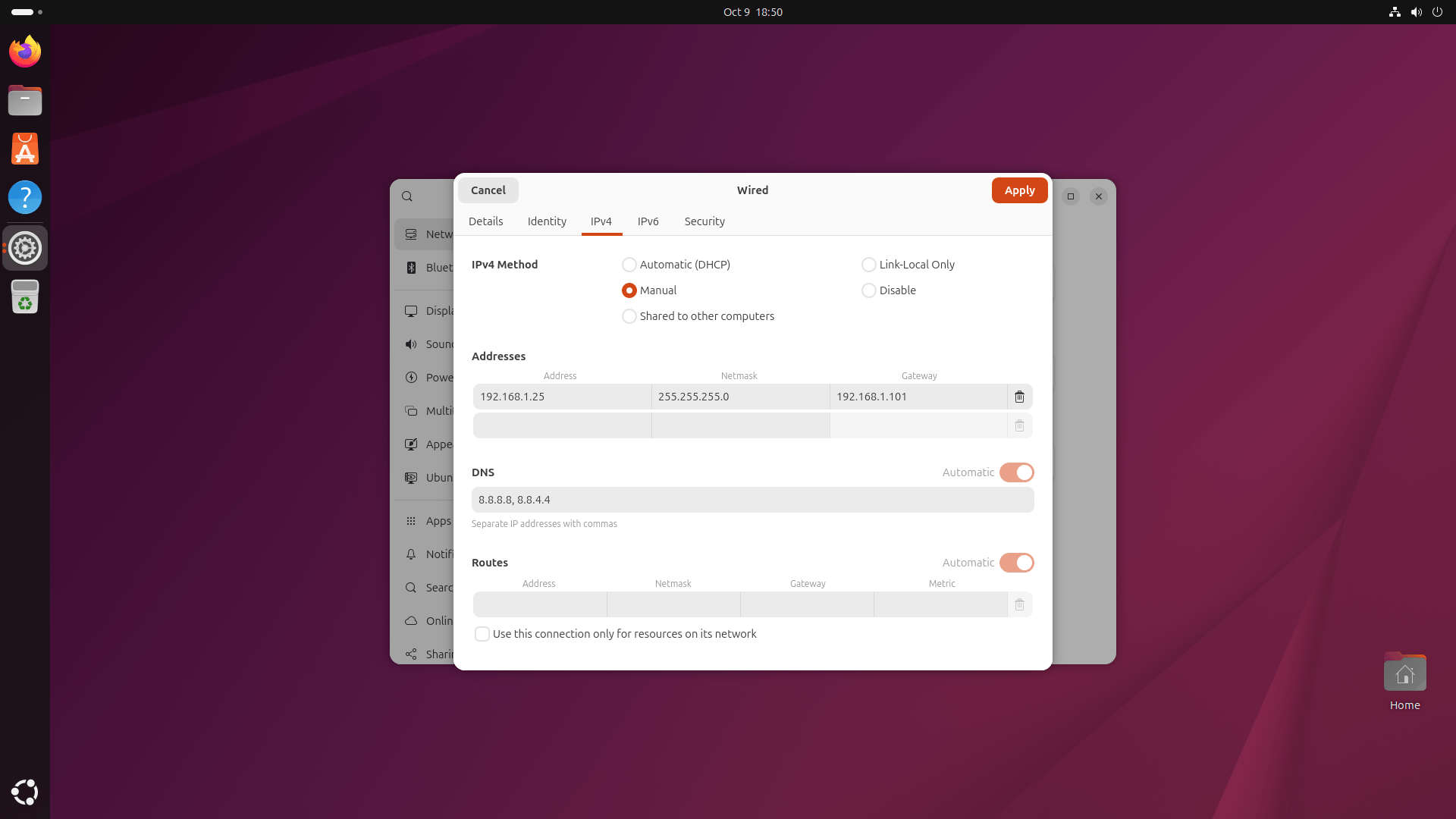
It worked for the current session, but as soon as I restarted, the issue returned.
If you're facing the same thing on Ubuntu 25.10, here’s what caused it and how I fixed it.
Table of Contents
Root Cause of This Issue
As I already stated, I have been using Ubuntu 25.10 starting from the snapshot 1 version.
Since I installed the system during the early development phase, my /etc/netplan directory had two files:
00-installer-config.yaml
90-NM-64002eca-9493-3b7e-be64-07db9f81dd8b.yaml
That second file (90-NM-*) was automatically created by NetworkManager, and it kept overwriting my settings.
Here's what my configuration looked like before the fix:
network:
  version: 2
  ethernets:
    ens18:
      renderer: NetworkManager
      match: {}
      addresses:
      - "192.168.1.25/24"
      nameservers:
        addresses:
        - 8.8.8.8
        - 8.8.4.4
      gateway4: 192.168.1.101
      dhcp6: true
      networkmanager:
        uuid: "64002eca-9493-3b7e-be64-07db9f81dd8b"
        name: "netplan-ens18"
        passthrough:
          connection.timestamp: "1759999098"
          proxy._: ""
This YAML file looks fine at first, but the problem is that it still tells Netplan to request an IP address from a DHCP server (dhcp6: true).
Each time I rebooted, Ubuntu re-read this file, re-enabled DHCP, and disabled my manual network configuration.
Fixing the Network Configuration in Netplan
Fortunately, the fix is quite easy! I only changed two lines to make everything work perfectly.
Step 1: Edit the Netplan Configuration File
Open the file with:
sudo nano /etc/netplan/90-NM-64002eca-9493-3b7e-be64-07db9f81dd8b.yaml
Then find the lines:
dhcp4: true
dhcp6: true
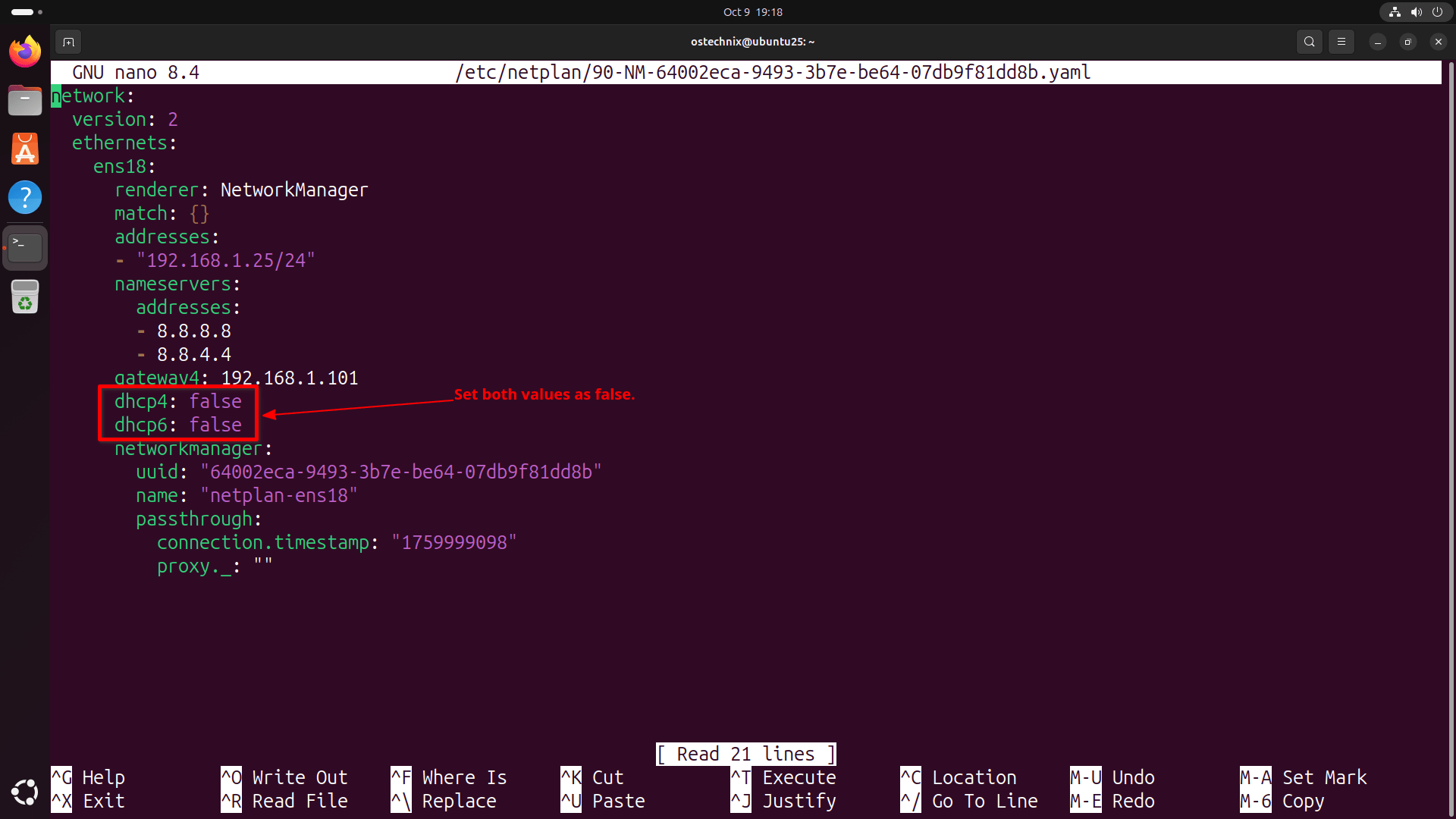
Replace them with:
dhcp4: false
dhcp6: false
The rest of your file can stay exactly the same. After editing, my working configuration looks like this:
network:
  version: 2
  ethernets:
    ens18:
      renderer: NetworkManager
      match: {}
      addresses:
      - "192.168.1.25/24"
      nameservers:
        addresses:
        - 8.8.8.8
        - 8.8.4.4
      gateway4: 192.168.1.101
      dhcp4: false
      dhcp6: false
      networkmanager:
        uuid: "64002eca-9493-3b7e-be64-07db9f81dd8b"
        name: "netplan-ens18"
        passthrough:
          connection.timestamp: "1759999098"
          proxy._: ""
Step 2: Apply the Changes
Save the file, then apply your configuration:
sudo netplan apply
Your network connection should come back instantly.
Step 3: Reboot and Verify
Reboot your system:
sudo reboot
After startup, open Settings → Network or run:
ip addr show ens18
You should now see your static IP (192.168.1.25) active and connected automatically.
2: ens18: <BROADCAST,MULTICAST,UP,LOWER_UP> mtu 1500 qdisc fq_codel state UP group default qlen 1000
    link/ether bc:24:11:fb:7d:6d brd ff:ff:ff:ff:ff:ff
    altname enp6s18
    altname enxbc2411fb7d6d
    inet 192.168.1.25/24 brd 192.168.1.255 scope global noprefixroute ens18
       valid_lft forever preferred_lft forever
    inet6 fe80::be24:11ff:fefb:7d6d/64 scope link proto kernel_ll
       valid_lft forever preferred_lft forever
No more re-enabling the network or resetting the IP each time you reboot.
Why This Fix Works
By setting both dhcp4 and dhcp6 to false, I told Netplan not to automatically request IP addresses from a DHCP server. This prevents the system from replacing my manual IP configuration on reboot.
Essentially, Ubuntu was doing what it thought was correct — fetching a new address each time. Once I disabled DHCP, it respected my manual IP settings and left them untouched.
This issue seems to affect systems that were installed or upgraded from early Ubuntu 25.10 builds. New installations made from the final ISO (released today) should already have this fixed by default.
Conclusion
If you notice that your Ubuntu 25.10 network keeps getting disabled after reboot, don’t panic. It's not a hardware problem or a broken NetworkManager. It's just a leftover configuration from the beta stage. Turning off DHCP for both IPv4 and IPv6 in your Netplan YAML file fixes the issue completely.
After this small fix, my Ubuntu 25.10 "Questing Quokka" setup has been running perfectly!
Related Read:
