
Canonical released the beta version of Ubuntu 26.04 LTS, code-named "Resolute Raccoon," on March 26, 2026. This release starts the final countdown to the full launch on April 23, 2026.
As a Long-Term Support (LTS) version, Ubuntu 26.04 will provide five years of mainstream support right out of the box (or ten years if you're on Ubuntu Pro).
Table of Contents
What Makes Ubuntu 26.04 LTS Resolute Raccoon Different?
This is the most significant Ubuntu LTS release since 20.04 Focal Fossa. It ships a Rust-rewritten sudo. It retires X.org for GNOME, permanently. It ships Linux kernel 7.0. Notably it sets post-quantum cryptography as a default, something almost no mainstream operating system has done.
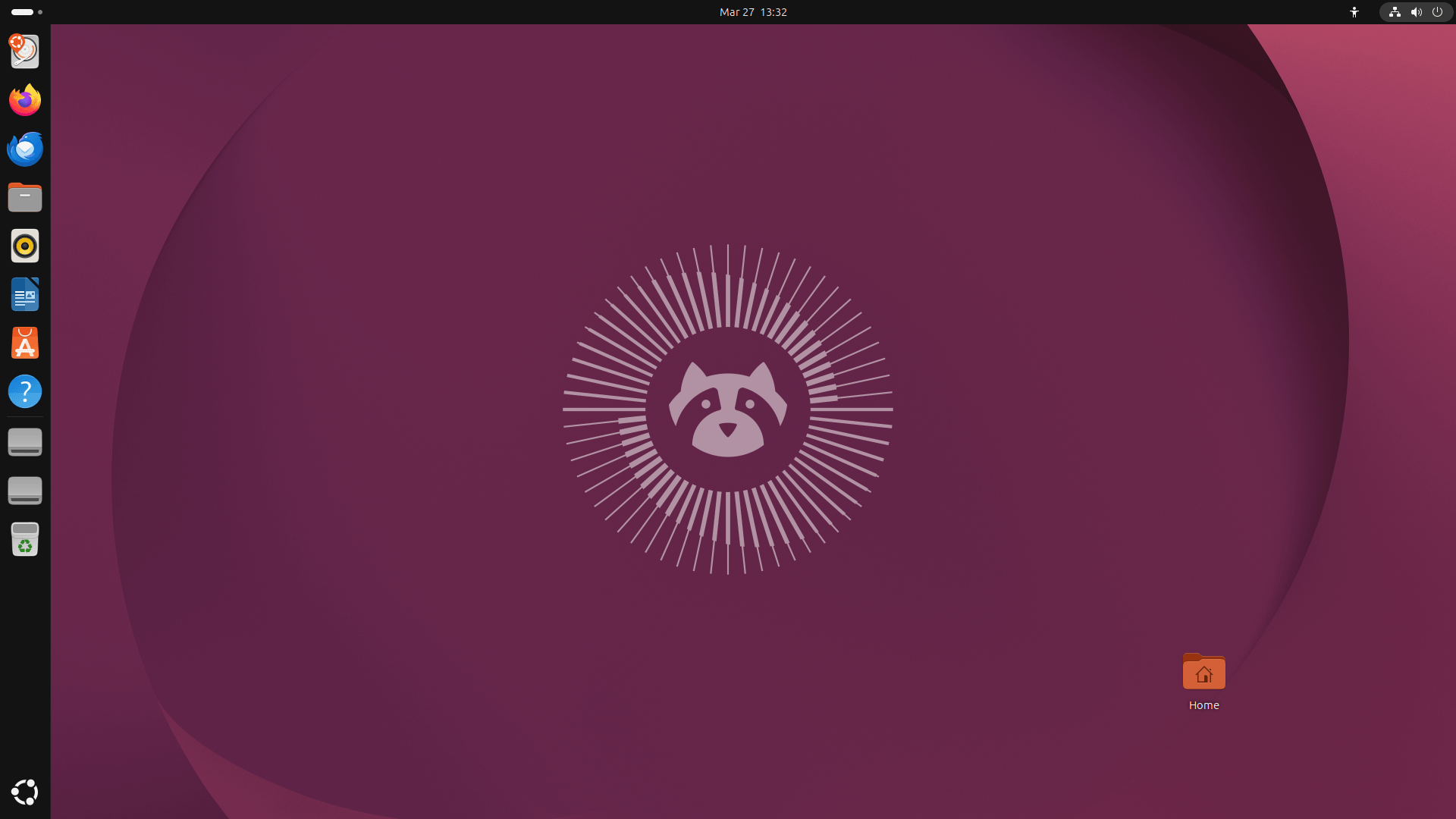
Most LTS releases are consolidations. They take what the interim releases tested and freeze it into something stable. Resolute Raccoon does that too, but the scope of what it's freezing is unusually large.
This release collects improvements from Ubuntu 24.10, 25.04, and 25.10 on top of brand-new changes exclusive to 26.04. For users upgrading from 24.04 LTS, that means two years of accumulated progress lands in one shot.
Five feature themes define this release:
- Memory safety: Core tools rewritten in Rust
- Wayland completion: X.org GNOME session gone for good
- Post-quantum cryptography: Secure defaults ahead of the curve
- Modern defaults: New apps across the board
- AI/ML readiness: ROCm and CUDA in official repos
Now let's get into the specifics.
Powered by Linux Kernel 7.0
Ubuntu 26.04 ships with Linux kernel 7.0.
$ uname -mrs
Linux 7.0.0-10-generic x86_64
As you already know, Linus Torvalds simply reset the minor counter after 6.19 rather than going to 6.20. He's done this before. It's not a radical architectural overhaul.
What it is is the most current upstream kernel available at feature freeze. It brings the latest hardware driver support, scheduler improvements, and years of performance tuning.
Starting with Ubuntu 24.10, Canonical committed to always ship the most recent upstream kernel at the time of feature freeze. Kernel 7.0 is the natural result.
If you're running modern AMD or Intel hardware, you'll notice improved responsiveness and wider device compatibility.
The Rust Revolution: sudo and coreutils Get a Rewrite
sudo-rs: A 50-Year-Old Tool Gets a Safety Upgrade
sudo is the command every Linux user knows. It's also a C program that's been in continuous use, and continuous security scrutiny, for decades. Ubuntu 26.04 replaces it with sudo-rs, a complete rewrite in Rust.
sudo-rs v0.2.12 is now the default /usr/bin/sudo. The traditional C-based sudo package stays in the repositories as a fallback. But the Rust version runs by default.
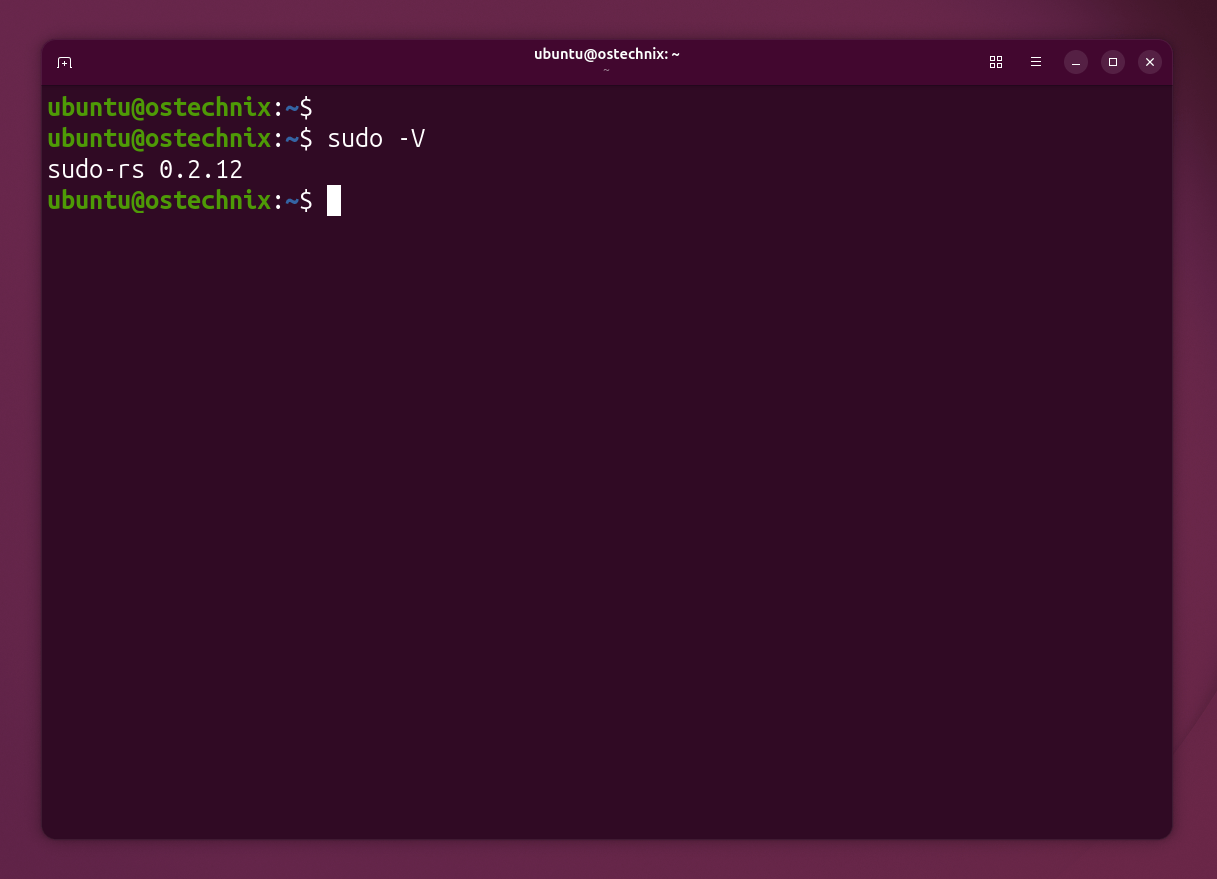
There's one immediately visible change that's caused some debate: password input now shows asterisks.
For 46 years, typing your password at a sudo prompt showed nothing. sudo-rs enables pwfeedback by default, changing that behavior. Now, sudo shows asterisks as you type. This visual feedback helps you know that your keys are working. You can switch back via the alternatives system if you prefer the old behavior.
uutils/coreutils (ls, cp, mv) are Written in Rust Now
This one is also a significant update in Ubuntu 26.04 LTS. The GNU coreutils (the collection that includes ls, cp, mv, cat, date, rm, and dozens of other foundational commands) have been replaced by uutils/coreutils v0.7.0, their Rust equivalents.
The GNU versions remain available and installable. The oxidizr tool lets power users toggle between implementations. But on a fresh install, you're running Rust. Every time you list a directory or copy a file, Rust is doing the work.
The goal here isn't raw performance (though the Rust versions are competitive). It's memory safety at the operating system's foundation.
Rust's memory safety guarantees eliminate whole classes of vulnerabilities (buffer overflows, use-after-free bugs, and similar issues) that have historically plagued C-based system tools.
Wayland Is Now the Default and Only Option
The GNOME desktop on Ubuntu 26.04 runs exclusively on Wayland. The X.org GNOME session, which has coexisted with Wayland since Ubuntu 17.10, is gone.
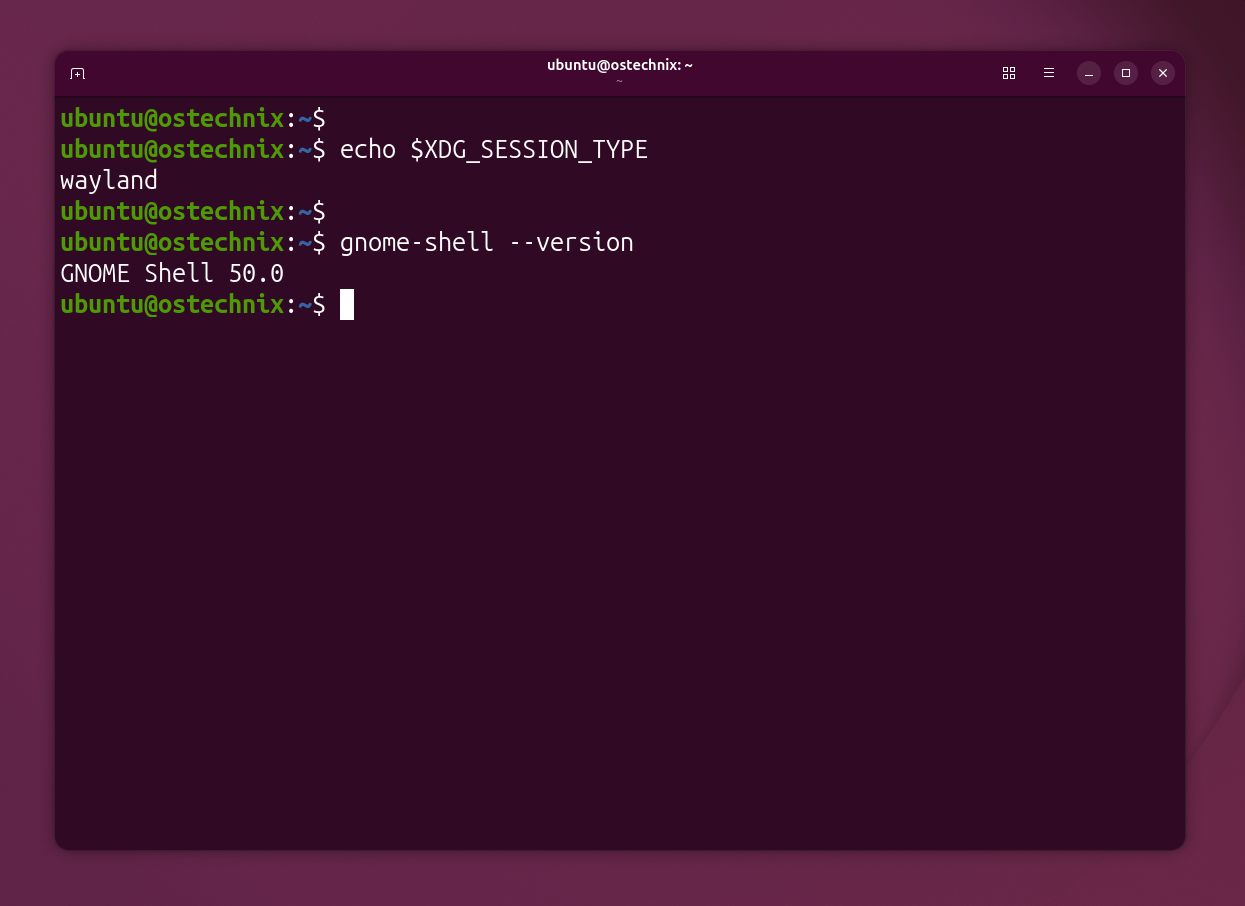
GNOME Shell can no longer run as an X.org session upstream. Canonical followed GNOME's lead. For users, this means one display server, tested more thoroughly, with better security isolation between applications.
What about legacy apps?
XWayland stays. Applications that still rely on X11 protocols continue to work through the compatibility layer. You won't lose anything in practice.
What about NVIDIA?
For years, NVIDIA GPUs were the main reason to keep the X.org session around. That's no longer true. Mutter (GNOME's window manager) received patches that cut blocked frame times from milliseconds to microseconds on NVIDIA hardware.
Wayland on NVIDIA is now fully supported and, for most users, indistinguishable from X.org performance.
The Wayland transition started in Ubuntu 17.10. It's complete in 26.04.
A Fresh Look for Your Desktop with GNOME 50
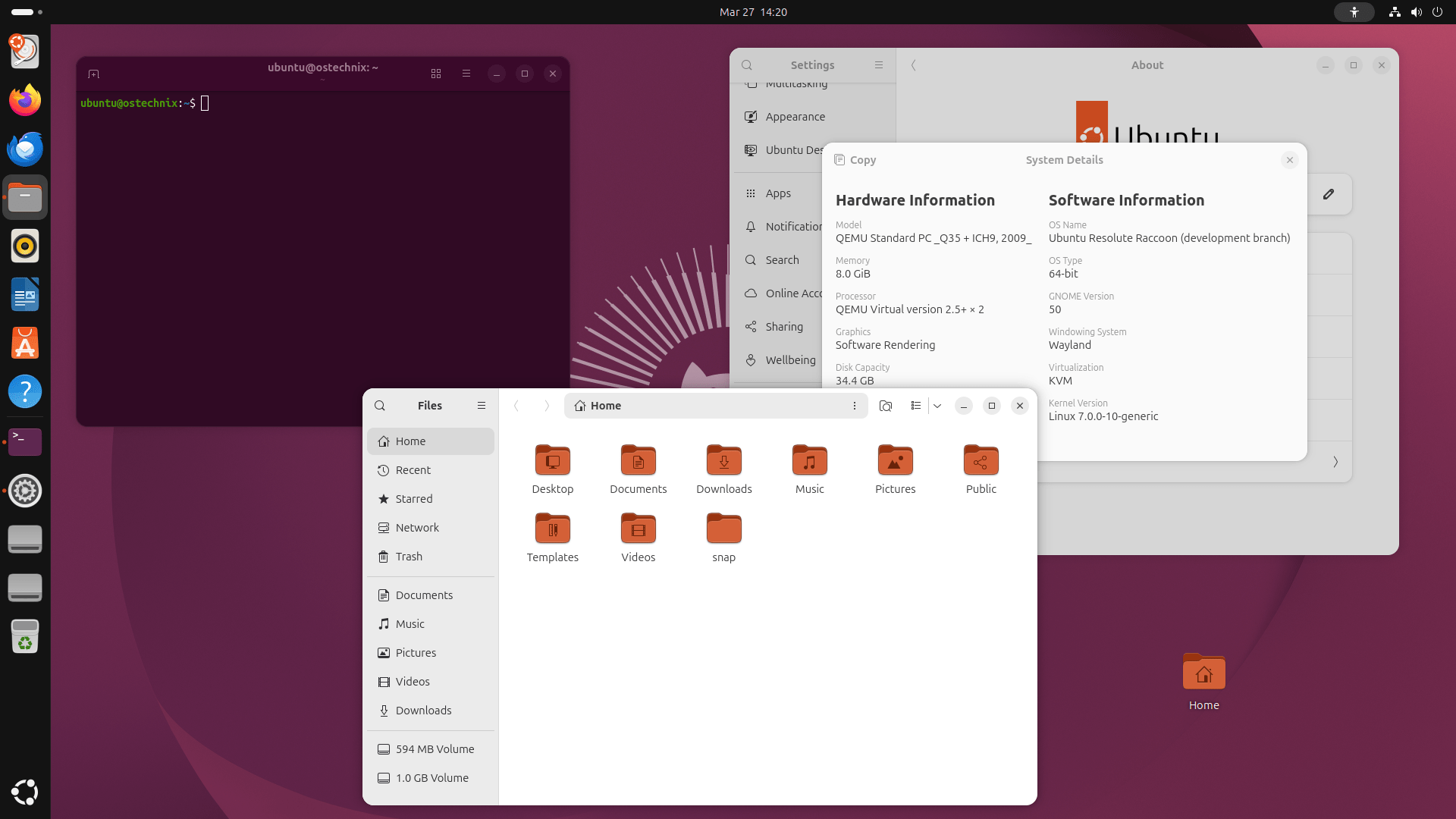
Ubuntu 24.04 shipped GNOME 46. Ubuntu 26.04 ships GNOME 50. LTS users who skipped the interim releases get four GNOME versions in a single upgrade.
The notable improvements in GNOME 50 are:
- App autostart in Settings. You can now set any application to launch automatically after login directly from Settings → Apps. No more manual
.desktopfile editing in hidden directories. - Sharper fractional scaling. Fractional scaling factors are now optimized to minimize blur, a long-standing frustration for HiDPI display users.
- Sysprof pre-installed. The Sysprof system profiling tool ships by default. It makes it easy to discover performance bottlenecks in your apps without reaching for command-line tools.
- Monospace font size fix. The default monospace font (used in terminals and code editors) has been reduced to match the regular UI font size, a small change that makes desktop usage noticeably more consistent.
- Smoother display. If your screen supports it, the refresh rate now adjusts on the fly. Text and icons also look sharper on high-res screens.
- Better remote access. You can share your camera, use faster video, and log in with Kerberos.
- Parental controls. Parents can set screen time, bedtime rules, and app limits for kids.
- Better for all users. The screen reader got a big update. There's also a new "less motion" mode for those who find movement on screen hard to follow.
- Faster file browser. It loads icons quicker and uses less memory.
One heads-up: NVIDIA users may see screen glitches after waking from sleep. A fix is in the works.
For the full picture of what changed across GNOME 47 through 50, the upstream release notes are worth reading separately.
Post-Quantum Cryptography: Ubuntu Gets There First
Ubuntu 26.04 now sets post-quantum cryptography as a default.
OpenSSH now ships with a warning when a connection negotiates a non-post-quantum key agreement algorithm. SHA-1 SSHFP DNS records are deprecated. OpenSSL defaults to post-quantum key exchange algorithms out of the box.
Why does this matter today, before practical quantum computers exist? Because of "harvest now, decrypt later" attacks. Adversaries can capture encrypted traffic today and decrypt it once quantum hardware becomes available.
Sensitive communications encrypted in 2026 with classical algorithms could be exposed in 2030 or 2035. Setting post-quantum defaults now protects data that needs to stay private for years.
Almost no mainstream operating system has made this move as a default setting. Ubuntu 26.04 does. So your data stays safe now and later.
TPM-Backed Full Disk Encryption
Full disk encryption backed by your system's TPM chip graduates from experimental to stable in Ubuntu 26.04.
The experience is designed to match Windows BitLocker and macOS FileVault in simplicity.
Your disk is encrypted, tied to your hardware's TPM, and the installer handles the setup. No manual key management required.
Combined with the new Security Center, which was introduced in Ubuntu 24.10 and continues into 26.04, users can manage encryption and permission settings through a graphical interface rather than the terminal.
Other Security Features
- AppArmor 4.0 adds updated rules for Chrome, Firefox, and VS Code.
- Intel TDX lets you run virtual machines with locked memory that even the host can't read.
- A built-in scan tool checks for known bugs and offers quick fixes.
New Default Applications
Ubuntu 26.04 ships with the most sweeping set of default app replacements in recent memory. Here's the full rundown:
| Old Default | New Default | Notes |
|---|---|---|
| GNOME Terminal | Ptyxis | Container-aware; GTK4; Wayland-native |
| Eye of GNOME | Loupe | Written in Rust; powered by Glycin |
| Evince | Papers | GTK4 + partial Rust rewrite |
| GNOME Videos (Totem) | Showtime | Modern GTK4 design; replaces a 2004-era default |
| GNOME System Monitor | Resources | Cleaner UI; written in Rust |
These replacements happened incrementally across Ubuntu 25.04 and 25.10, and all carry into the 26.04 LTS. The old apps remain available in the repositories, and nothing is forcibly removed from your system.
The common thread is GTK4 and Rust. Canonical is standardizing on the modern GNOME application stack.
One More App Change: No More Pop-Up Update Notifications
This one will make a lot of people happy. The Software Updater window, the one that would pop up uninvited and steal your keyboard focus, no longer does that.
A non-intrusive notification now appears instead, with quick options to install updates or open the Updater. A system tray icon persists as a reminder. The update experience finally feels like a modern OS rather than an interruption.
Under the Hood: Important System Changes
systemd 259: cgroup v1 Is Gone
Ubuntu 26.04 ships systemd 259, which removes cgroup v1 support entirely. Only the unified cgroup v2 hierarchy remains.
If you run containers, Kubernetes, or any process isolation tooling, you need to verify compatibility before upgrading. Docker, Podman, and LXD have all supported cgroup v2 for years, so most users won't hit any issues.
Dracut Replaces initramfs-tools
Dracut becomes the default initramfs generator, replacing initramfs-tools. It brings improved NVMe over Fabric support and tighter systemd integration.
Most users will never notice the change. Boot times stay similar or improve. Administrators with custom initramfs configurations should review their setup before upgrading.
APT 3: apt-key Is Officially Dead
APT 3 ships with Ubuntu 26.04, and with it comes the complete removal of the apt-key command. If you have scripts, CI pipelines, or documentation that uses apt-key add, update them now.
The modern approach (signed-by in your .sources file) has been the recommended practice for years. This is the hard deadline.
/tmp Clears on Reboot
The /tmp folder now lives in RAM. It's faster, but it clears each time you reboot. If your scripts store data there long-term, move them elsewhere.
Optional x86-64-v3 Packages
If your CPU supports the x86-64-v3 microarchitecture (Intel 4th generation or later, AMD Ryzen family), you can install optional amd64v3-optimized package variants.
The average performance gain is modest (~1%), but numeric and scientific workloads can see significantly more.
This is opt-in. Your existing packages stay on the standard build.
For Developers and AI/ML Users: ROCm in Official Repos
One of the most practically significant changes for developers: AMD ROCm is being packaged directly in Ubuntu's official repositories.
The goal is a simple sudo apt install rocm workflow. No third-party PPAs, no manual setup scripts, no dependency wrestling.
ROCm enables GPU-accelerated machine learning workloads on AMD hardware using tools like PyTorch and TensorFlow. Getting it into official repos means security updates flow through the normal system update process.
NVIDIA CUDA is also available through official channels. For teams building AI/ML infrastructure on Ubuntu, 26.04 LTS substantially reduces the friction of setting up GPU compute.
Both get up to 15 years of updates through Ubuntu Pro.
ARM64 Gets a First-Class Desktop Image
Ubuntu 25.04 introduced an official generic ARM64 Desktop ISO, and it carries into 26.04 LTS. It targets virtual machines, ACPI + EFI platforms, and Snapdragon-based Windows-on-ARM devices.
Early hardware enablement work for the Snapdragon X Elite platform is included in the Desktop ISO — relevant for users running Ubuntu on devices like the Surface Pro with Snapdragon X Elite or similar ARM laptops.
Dual Boot Gets Smarter
Dual-booting Ubuntu alongside Windows has been painful on systems with BitLocker enabled. Ubuntu 26.04 addresses this directly.
The installer can now detect and work alongside BitLocker-protected Windows partitions, install Ubuntu in unallocated space or resizable partitions, and offer encrypted Ubuntu installs even in dual-boot scenarios.
The advanced options, previously hidden behind a confusing interface, are now surface-level.
Enterprise and Cloud Integration
If you use Ubuntu for work, you will love the new authd service. This tool is now in the official Ubuntu archive and receives full support from Canonical. It lets you log into your computer using Microsoft Entra ID or Google Cloud IAM accounts.
Additionally, Ubuntu 26.04 supports Microsoft Multi-Factor Authentication (MFA). This feature makes logging into your work account both fast and secure.
Because the team added a new generic "broker" tool, you can even connect to other services like Okta.
Fast Databases and Server Tools
Ubuntu Server users gain a lot of speed in this release. PostgreSQL 18 is now available and runs up to three times faster when reading data from storage. It also makes upgrading to future versions much easier.
Furthermore, you can find these other great tools:
- MariaDB 11.8.6: This database is now a fully supported part of the main Ubuntu archive.
- DocumentDB: This new, scalable database works with MongoDB apps but runs on top of PostgreSQL.
- Valkey 9.0: This update brings faster data migrations and better memory management.
- Samba 4.23: This tool now enables modern Unix extensions by default to make file sharing better.
- Kubernetes 1.32 with auto-scaling and GPU support.
- ZFS has better compression and faster snapshots.
- Btrfs is more stable for RAID setups.
- Intel TDX lets you run encrypted virtual machines in the cloud.
Should You Install the Beta Right Now?
The honest answer depends on what you're doing with your machine.
Install the beta if you:
- Want to report bugs and contribute to a cleaner release day
- Are a developer or sysadmin testing compatibility with your stack
- Run a non-production machine and enjoy living closer to the edge
Wait for April 23 (final release) if you:
- Want a polished, fully supported system
- Rely on this machine for daily work
- Don't want to navigate any pre-release rough edges
Wait for 26.04.1 (August 2026) if you:
- Run production servers where stability is non-negotiable
- Are upgrading from 24.04 LTS (the direct upgrade path opens with .1)
- Prefer a release that has absorbed months of post-launch bug fixes
The official release schedule puts the release candidate at April 16 and the final release at April 23, 2026.
How Long Does Support Last?
| Level | Years | Ends | Cost |
|---|---|---|---|
| Standard | 5 | April 2031 | Free |
| Ubuntu Pro | 10 | April 2036 | Free for up to 5 PCs |
| Legacy add-on | 15 | April 2041 | Paid |
Ubuntu Pro is free for small setups. Community members get up to 50 free machines.
Which Flavors Get LTS?
These do: Kubuntu, Xubuntu, Lubuntu, Ubuntu Budgie, Ubuntu Cinnamon, Ubuntu Studio, Edubuntu, Ubuntu Kylin.
These don't: Ubuntu MATE and Ubuntu Unity. They don't have enough active helpers right now.
Things to Watch Out For
Before you upgrade, keep these in mind:
- NVIDIA users may see screen bugs after sleep.
- Rust tools cover 88% of old test cases. Some rare cases may act different.
- Container users must switch to cgroup v2. The old v1 is gone.
- TPM disk encryption won't work with NVIDIA closed drivers or some ASUS NUC models.
- The installer still has a few gaps in screen reader and language support.
Download Ubuntu 26.04 LTS Beta
If you're ready to test, download the Ubuntu 26.04 LTS beta from the official Ubuntu image server.
Official Releases
| Edition / Flavor | Description | Download Link |
|---|---|---|
| Ubuntu (Desktop/Server/WSL x86) | Main official release | https://releases.ubuntu.com/26.04/ |
| Kubuntu | KDE Plasma desktop | https://cdimage.ubuntu.com/kubuntu/releases/26.04/beta/ |
| Lubuntu | Lightweight LXQt desktop | https://cdimage.ubuntu.com/lubuntu/releases/26.04/beta/ |
| Ubuntu Budgie | Budgie desktop | https://cdimage.ubuntu.com/ubuntu-budgie/releases/26.04/beta/ |
| Ubuntu Studio | Creative/media tools | https://cdimage.ubuntu.com/ubuntustudio/releases/26.04/beta/ |
| Ubuntu Unity | Unity desktop | https://cdimage.ubuntu.com/ubuntu-unity/releases/26.04/beta/ |
| Xubuntu | XFCE desktop | https://cdimage.ubuntu.com/xubuntu/releases/26.04/beta/ |
Additional Images & Builds
| Type | Description | Download Link |
|---|---|---|
| Daily Images | Rolling development builds | https://cdimage.ubuntu.com/ |
| Cloud Image | Cloud/server deployments | https://cloud-images.ubuntu.com/daily/server/resolute/current/ |
| Non-x86 Builds | ARM, Power, other architectures | https://cdimage.ubuntu.com/releases/26.04/beta/ |
Download your preferred edition and install it fresh. You can also use do-release-upgrade -d on an existing 25.10 system to upgrade.
Before you install or upgrade, back up everything. Betas are stable by Canonical's standards, but they're not final.
We will post a detailed article about Ubuntu 26.04 LTS upgrade in a day or two.
Conclusion
Ubuntu 26.04 LTS "Resolute Raccoon" includes many important changes. It moves away from old technology to make your computer faster and safer.
It ships Linux 7.0, Rust-rewritten sudo, and coreutils. It completes the Wayland transition, and sets post-quantum cryptography as a default. It also replaces five major default applications with modern, better alternatives.
Every one of those changes has been tested across two interim release cycles.
Because it offers 15 years of support, Ubuntu 26.04 LTS is a great choice for people who want a reliable system that lasts a long time.
The beta is out now. The final release is four weeks away.
Resources:
