
Table of Contents
Quick Summary
smolBSD builds minimal NetBSD virtual machines that boot in about 10 milliseconds. You get a complete UNIX system with package management, standard tools, and familiar workflows. The entire VM can fit in 10 megabytes.
It works on Linux, macOS, and NetBSD. No special hardware required. You can build images using Dockerfile syntax and run them on QEMU or Firecracker.
smolBSD is not a container. It's not a unikernel. It's a tool that creates actual operating system images, just extremely small and fast ones.
What is smolBSD?
smolBSD is a "meta-operating system" to create minimal, fast-booting NetBSD-based virtual machines (micro-VMs). It allows users to compose custom UNIX environments, ranging from single-purpose microservices to full OS images.
What Problem Does smolBSD Solve?
Most virtual machines take 1-2 seconds to boot. That sounds fast until you need to spin up hundreds of them for serverless workloads or testing.
Containers boot faster but share the host kernel. Sometimes you need real isolation.
Unikernels like MirageOS boot quickly but require you to rewrite applications in specific languages. You lose access to standard UNIX tools and package managers.
smolBSD gives you the speed of containers with the isolation of VMs. You keep the full NetBSD userland. You have access to standard tools, shell scripts, and the pkgin package manager.
This makes it a flexible tool for developers who want the speed of a micro-VM without losing the features of a traditional system.
How It Actually Works
smolBSD builds on NetBSD, a free, fast, secure, and highly portable UNIX operating system. The project uses several specific optimizations to achieve extreme boot speeds.
PVH Boot
Traditional VMs boot through BIOS, then a bootloader, then the kernel. PVH (Para-Virtualized Hardware) boot skips straight to the kernel. The hypervisor loads the kernel directly into memory.
This eliminates seconds of initialization time.
The MICROVM Kernel
smolBSD uses a specialized kernel called netbsd-MICROVM. As of early 2025, most of these features have been merged into NetBSD's main development branch.
The kernel is stripped down to essential drivers and features. No unnecessary subsystems. No bloat.
Minimal Init
Linux systems often use systemd, which can take hundreds of milliseconds to initialize services. smolBSD bypasses heavy init systems entirely.
For services that need instant availability, smolBSD includes a tool called nitro. It starts your service immediately after the kernel loads. No background processes. No service manager overhead.
The result: boot to a running SSH server in 10-14 milliseconds on a mid-range x86 CPU from 2025.
Install Prerequisites on Linux
You need a few packages. On Debian or Ubuntu. install these prerequisites:
sudo apt install curl jq git bmake qemu-system-x86_64 \
  sudo binutils libarchive-tools gdisk socat
Note: In Debian 13, the package name for qemu is qemu-system-x86, not qemu-system-x86_64.
Clone the smolBSD repository and you're ready to build images.
Please be mindful that that bmake is BSD make. Standard GNU make will not work. The package name is usually just "bmake" on most distributions.
Install Prerequisites on macOS
macOS cannot create the filesystem images natively. The ext2 and ffs filesystems used by NetBSD are not supported by macOS.
Install bmake through Homebrew or MacPorts. Install QEMU for your target architecture.
Instead of building the builder image locally, download a prebuilt one:
bmake fetchimg
This is the only difference. Everything else works the same as on Linux.
Building Your First Image with smolBSD
The fastest way to understand smolBSD is to build the minimal rescue image.
git clone https://github.com/NetBSDfr/smolBSD
cd smolBSD
sudo bmake SERVICE=rescue build
This creates a 10 megabyte bootable image. The build process spawns a temporary VM called the builder micro-VM. This builder VM constructs your filesystem, installs packages, and configures the system.
Upon successful build, you would see an output like below:
[...]
🔲 destination architecture: amd64 / x86_64
➡️ creating root filesystem (20M)
/dev/rld0: Partition 1 added: 49f48d5a-b10e-11dc-b99b-0019d1879648 1024 38912
newfs: Warning: changing optimization to space because minfree is less than 5%
/dev/rdk1: 19.0MB (38912 sectors) block size 4096, fragment size 512
    using 4 cylinder groups of 4.75MB, 1216 blks, 2304 inodes.
super-block backups (for fsck_ffs -b #) at:
32, 9760, 19488, 29216,
extracting sets/amd64/rescue.tar.xz.. done
extracting sets/amd64/etc.tar.xz.. done
🧊 system root filesystem will be read-only
✅ image ready: images/rescue-amd64.img
✅ build finished, Ctrl-A X to exit
➡️ killing the builder microvm
qemu-system-x86_64: terminating on signal 15 from pid 939 (<unknown process>)
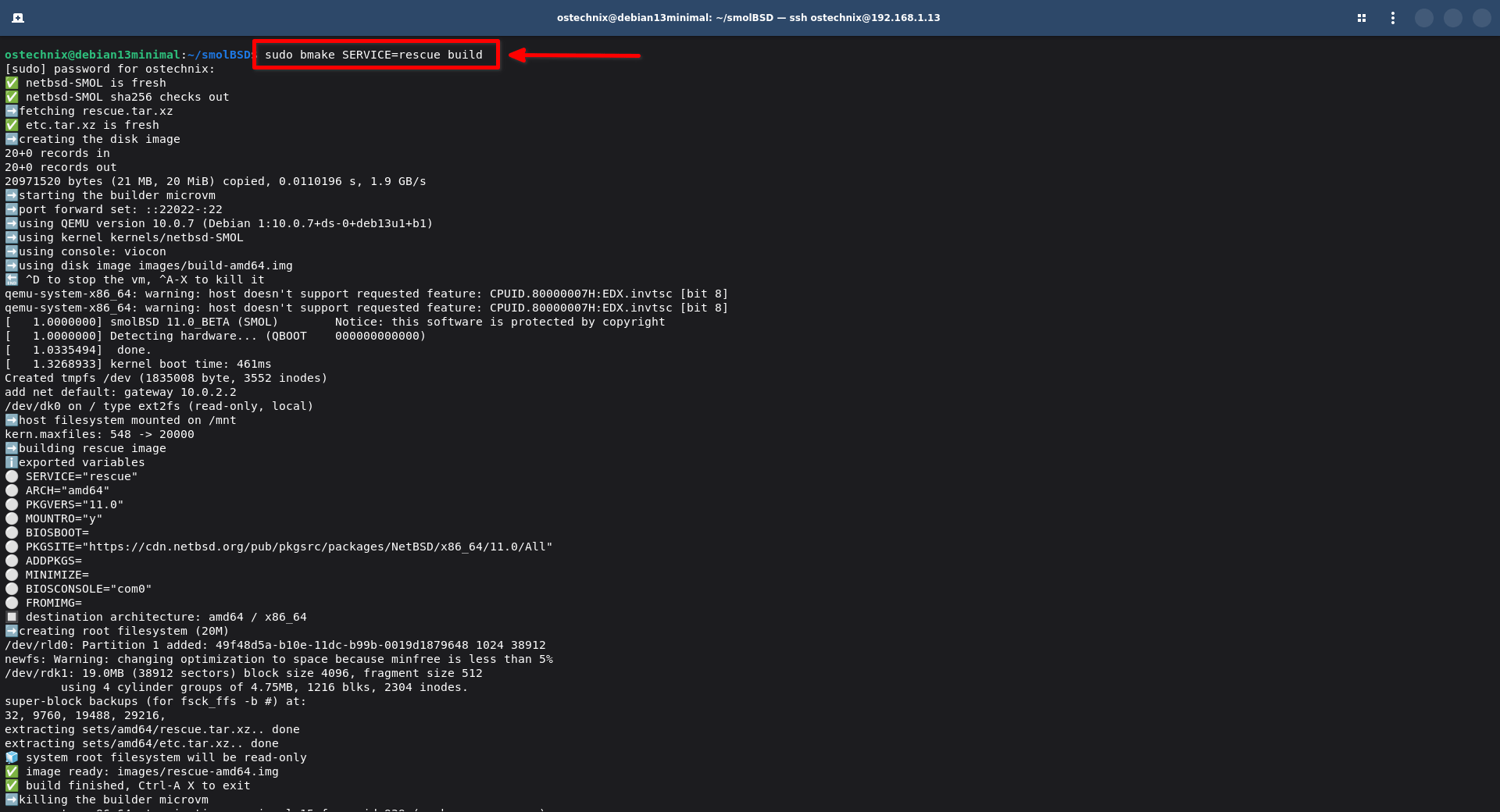
When the build finishes, you get a disk image in the images/ directory.
$ ls images/
build-amd64.img  rescue-amd64.img
Start it:
sudo ./startnb.sh -i images/rescue-amd64.img
You now have a running NetBSD system.
Using Dockerfile Syntax
smolBSD includes a script called docker2svc.sh. It converts Dockerfiles into smolBSD service configurations.
Create a file called Dockerfile.webserver:
FROM base,etc
LABEL smolbsd.service=webserver
LABEL smolbsd.minimize=y
RUN pkgin up && pkgin -y in nginx
CMD ["/usr/pkg/sbin/nginx", "-g", "daemon off;"]
Convert it:
./docker2svc.sh Dockerfile.webserver
Build it:
bmake SERVICE=webserver build
The FROM line specifies which NetBSD "sets" to include. Sets are NetBSD's way of packaging the base system. The base set contains core utilities. The etc set contains configuration files.
The LABEL directives tell smolBSD the service name and whether to minimize the image size.
The RUN command executes during the build inside the builder VM. This is where you install packages.
The CMD specifies what runs when the VM boots.
Understanding Image Size
As I stated already, a minimal smolBSD image is about 10 megabytes. A more complete system with common tools might be 50-100 megabytes.
You control size with the MINIMIZE variable:
bmake SERVICE=myapp MINIMIZE=y build
This shrinks the disk image to actual usage plus 10%. If your filesystem uses 50MB, you get a 55MB image.
You can also set a specific size:
bmake SERVICE=myapp MINIMIZE=+20 build
This creates an image with 20MB of free space beyond what's used.
Or set it permanently in the service's options.mk file:
IMGSIZE=50
The tradeoff: smaller images mean less room for logs, temporary files, or runtime data. Plan accordingly.
Pre-Built Services You Can Use
smolBSD includes several ready-to-use services.
nbakery: A complete development environment with pkgin, doas, and tmux. Build and launch in 5 minutes. Use it for portable development across laptop, cloud, and CI systems.
bozohttpd: A static web server. Serves files from /var/www by default. Build it, map port 80 to your host, and you have instant static hosting.
nitrosshd: An SSH server that starts instantly using the nitro tool. Zero background services. Ideal for SSH jump hosts or secure entry points.
rescue: The minimal 10MB system. Useful for debugging, recovery, or as a base for custom builds.
Networking and Port Mapping
Map ports when starting a VM:
./startnb.sh -f etc/bozohttpd.conf -p ::8080-:80
This maps host port 8080 to VM port 80. The syntax is ::host_port-:vm_port.
Or define it in your Dockerfile:
EXPOSE 8080:80
For bidirectional socket communication between host and guest, use the mport service. The host gets a Unix socket file. The guest gets a device file like /dev/ttyVI01. Send data by echoing to the device.
This is useful for control channels, logging, or custom IPC mechanisms.
Building for Different Architectures
NetBSD runs on so many architectures. smolBSD inherits this portability.
Build for ARM64:
bmake SERVICE=rescue ARCH=evbarm-aarch64 build
The build system downloads the correct kernel and sets automatically. Run it with qemu-system-aarch64.
Note that not all optimizations are available on all architectures. The 10-millisecond boot time is specific to x86 with PVH support. ARM64 boots quickly but not quite as fast.
Using Firecracker
Firecracker is Amazon's microVM hypervisor. It powers AWS Lambda and Fargate.
smolBSD works with Firecracker out of the box. The PVH boot mechanism is exactly what Firecracker expects.
You need:
- A recent Firecracker binary
- An x86 CPU with VT extensions
- The netbsd-MICROVM kernel
Performance is excellent. You can expect 10-14 millisecond boot times on modern hardware.
This makes smolBSD viable for true serverless workloads. Spin up a VM per request. Process it. Tear it down. The overhead is negligible.
How Builder Micro-VM Works
When you run bmake build, smolBSD starts a temporary VM. This is the builder.
The builder mounts your host filesystem read-only. It downloads NetBSD sets if needed. It creates filesystems, installs packages, and configures the target image.
Why use a VM for building? Consistency. Linux and macOS have different filesystem tools. They can't create NetBSD's ffs filesystem natively.
The builder VM provides a standardized environment. Every build happens the same way regardless of host OS.
On Linux, you can build the builder image yourself:
bmake buildimg
On macOS, you must download it:
bmake fetchimg
The builder image is reused across builds. You only create or download it once.
What smolBSD Is Not
1. smolBSd is not a container runtime
smolBSD creates virtual machine images. Each VM has its own kernel. Full isolation.
2. Not a unikernel framework
You get a complete NetBSD userland. Standard shell. Package manager. Normal UNIX tools.
3. Not a replacement for Docker
The workflows are similar but the underlying technology is different. Use smolBSD when you need kernel isolation or when containers don't fit.
4. Not optimized for persistent workloads.
The focus is on fast boot times and minimal size. Long-running services work fine but that's not the primary use case.
Limitations and Risks
- Networking can be complex: Mapping ports and setting up network bridges requires understanding your hypervisor.
- Limited community: As far as I know, NetBSD has a smaller community than Linux (I could be wrong though). Fewer packages. Less documentation. Expect to solve some problems yourself.
- Alpha-quality tooling: smolBSD is relatively new. Expect rough edges. The core functionality works but polish is ongoing.
- Resource overhead still exists: A 10MB VM is tiny compared to traditional VMs. It's still larger than a container. Memory overhead includes the entire kernel.
- Security updates require rebuilds: You can't easily patch a running smolBSD VM. The workflow is to rebuild the image and redeploy. This is by design but different from traditional system administration.
Common Mistakes
1. Using standard make instead of bmake
GNU make will fail with cryptic errors. Always use bmake.
2. Not fetching the builder image on macOS
You cannot build it locally. Run bmake fetchimg first.
3. Forgetting to add SSH keys before building
If you build an SSH service without adding your public key, you can't log in. Add keys to service/sshd/etc/ before running bmake build.
cat ~/.ssh/id_ed25519.pub >> service/sshd/etc/mykey.pub
4. Over-sizing images
The default image size might be larger than needed. Use MINIMIZE=y to shrink images to actual usage.
5. Expecting container-level density
VMs are still VMs. Each one has kernel overhead. You can run hundreds or thousands on a single host but not tens of thousands like containers.
6. Not understanding the boot target
A 10-millisecond boot time is to a running service, not to a login prompt. The service must be configured to start immediately with nitro.
Verification and Testing
After building an image, test the boot time:
time ./startnb.sh -i images/myservice-amd64.img
The output shows real, user, and sys time. The real time includes VM startup and boot.
For nitro-based services, the service should be available within milliseconds. For example, test an SSH service:
./startnb.sh -f etc/nitrosshd.conf -p ::2222-:22 &
sleep 1
ssh -p 2222 root@localhost
If the connection succeeds immediately, nitro is working correctly.
Check the image size:
ls -lh images/
Compare actual size to expected size based on your MINIMIZE settings.
When to Use smolBSD
1. Serverless and edge workloads
The fast boot time makes smolBSD ideal for on-demand execution. Spin up VMs as needed. Minimal cold start penalty.
2. Portable development environments
Build once, run anywhere. Version control the entire environment. Share exact configurations across teams.
3. Testing and CI/CD
Spawn clean environments in milliseconds. Run tests in full isolation. No shared kernel state between runs.
4. Security sandboxing
Run untrusted code in a real VM with minimal overhead. Better isolation than containers.
5. Learning NetBSD
smolBSD provides an easy entry point to NetBSD without installing it on bare metal.
When Not to Use smolBSD
1. Long-running production services
Traditional VMs or containers are better suited. The tooling is more mature. Operational patterns are established.
2. Windows or Linux workloads
smolBSD is NetBSD-based. If you need Linux or Windows, use those.
3. Maximum density
Containers provide better density. If you need to run 10,000 instances on one host, containers are the answer.
4. Stateful applications with large datasets
The minimal design assumes small, ephemeral workloads. Large databases or file storage should run elsewhere.
5. Teams unfamiliar with UNIX
The learning curve exists. If your team knows Docker but not UNIX, the transition might not be worth it.
Fast Boot Times Without Unikernels
smolBSD represents a different approach to the fast-boot problem. Instead of stripping down to bare metal like unikernels, it strips down a full operating system.
You keep the UNIX environment. You keep the package manager. You keep the familiar tools.
The tradeoff is simplicity. No special libraries. No custom build systems. Just NetBSD, stripped to essentials.
So the operations, debugging, and development gets easier. The 10-millisecond boot time is also worth noting.
Conclusion
smolBSD is an excellent choice for serverless workloads, CI/CD pipelines, and edge computing. It offers a predictable and reproducible way to deploy software.
It is not a replacement for a general-purpose Linux or BSD server when you need a wide array of complex background daemons.
Use smolBSD when you need speed and isolation without the complexity of unikernels. Avoid it if you require a full desktop or legacy hardware support. It is a sharp tool for specific jobs.
As stated already, smolBSD won't replace containers. It doesn't need to. It's a different tool for different problems.
Resources:
