
For newbie admins and people who aren’t tech-savvy, managing a server can feel very difficult. There are so many settings, commands, and things to learn. That’s why control panels exist – to make server management easier and less stressful. Control panels, like CloudPanel, give you a simple, visual way to manage your server.
CloudPanel is a free and easy-to-use hosting control panel for your server. It helps you set up websites, manage databases, and handle security without needing deep technical knowledge.
Instead of typing complicated commands, you can use buttons, menus, and wizards to do things like:
- Set up a website
- Manage databases
- Install apps like WordPress
- Secure your server
- Monitor performance
Think of a control panel as a friendly helper that takes care of the hard technical stuff, so you can focus on building and running your website or app. It’s like having a dashboard where everything is organized and easy to understand.
So, if you’re new to servers or just want to make your life easier, using a control panel like CloudPanel is a great idea. It’s designed to be simple, fast, and free, so you don’t need to be a tech expert to get started!
Table of Contents
What is CloudPanel?
CloudPanel is a free and modern server hosting control panel designed for ease of use and high performance in managing web applications and servers.
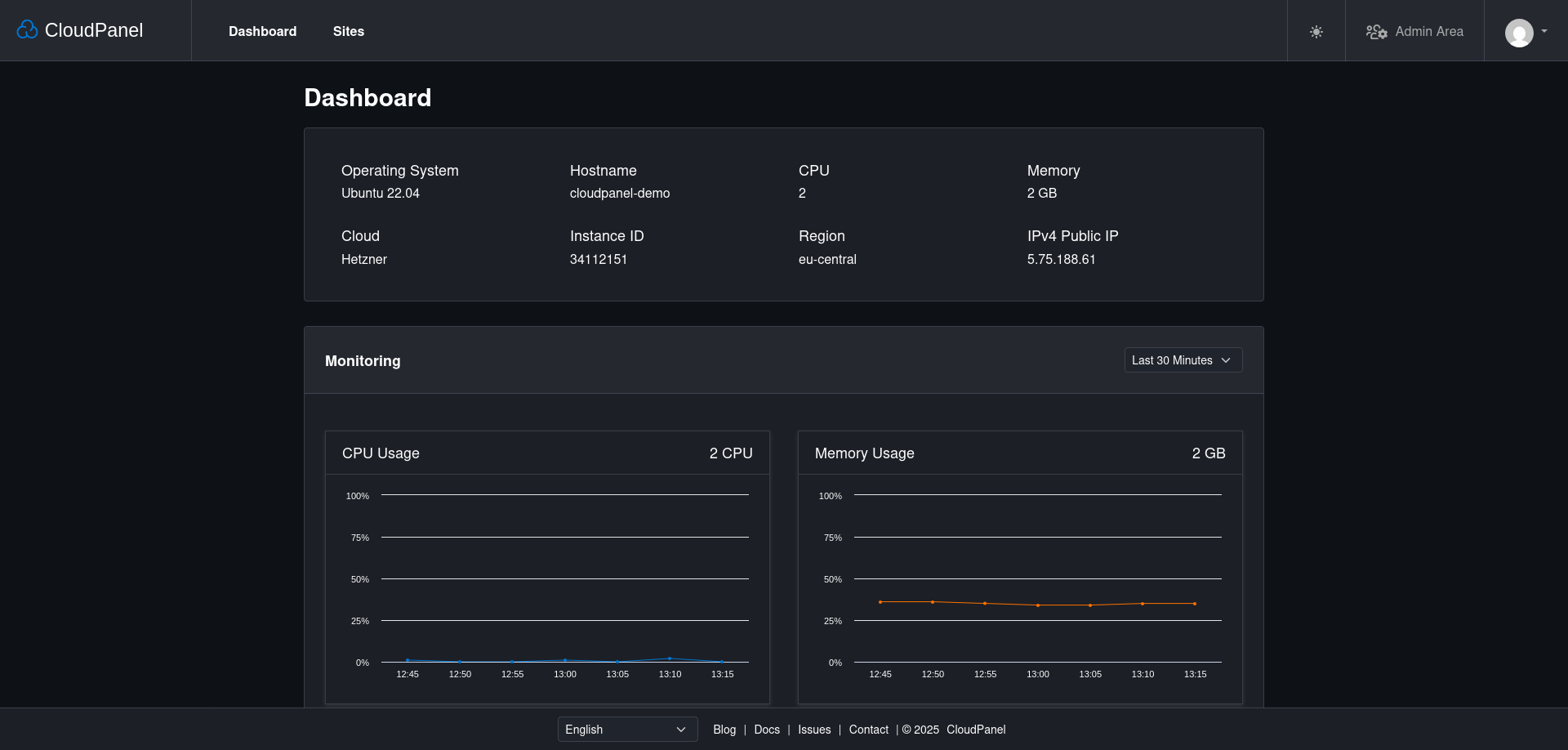
It boasts a lightweight technology stack including NGINX, PHP, and Redis, promising significant speed improvements.
CloudPanel supports a wide range of applications like WordPress, Node.js, and Python, and is compatible with major cloud providers such as AWS, DigitalOcean, and Azure, as well as custom VPS.
CloudPanel offers a comprehensive feature set for site management, security, and automation, including an intuitive interface and a command-line tool.
Setting up CloudPanel is straightforward on supported operating systems like Ubuntu and Debian, making server configuration and management accessible.
CloudPanel Features
Here are some key reasons why people like CloudPanel:
Easy to Set Up
The team behind CloudPanel made it easy to use.
Installing and setting up CloudPanel is simple. You can use it on popular cloud services like:
- Amazon Web Services (AWS),
- Google Cloud,
- DigitalOcean,
- Hetzner Cloud,
- Microsoft Azure.
You can also install it on your own private server. The official CloudPanel documentation provides an easy-to-follow Installation Steps to guide you through setting up your website.
Using CloudPanel, you can quickly install:
- WordPress
- HTML/CSS/JS websites
- PHP, Node.js, or Python applications
Tip: When installing CloudPanel in your own VPS, secure it by only allowing access to port 8443 from your own IP address.
Fast Performance
No one likes a slow website. CloudPanel is designed for speed. It uses NGINX, a web server that is much faster than Apache.
It also supports Varnish Cache, which can make your website load 100 to 250 times faster.
CloudPanel works well with Arm-based servers, which can give you better performance at a lower cost.
Built-in Useful Tools
CloudPanel gives you the features you need without overwhelming you. It includes:
- Database Management (MySQL, MariaDB),
- Free SSL Certificates (Let’s Encrypt),
- FTP & SSH Access for secure file transfer,
- File Manager to edit website files,
- Cron Jobs to schedule automatic tasks.
Example: If bots are attacking your site, CloudPanel lets you block their IP addresses easily.
Strong Security
Security is important. CloudPanel helps protect your websites with:
- Site Isolation – Problems on one website won’t affect others.
- Firewall – Control who can access your server.
- Two-Factor Authentication – Extra security for logging in.
Supports Many Applications
CloudPanel supports a vast range of applications and frameworks out-of-the-box.
It works with:
- PHP, Node.js, and Python applications
- Content Management Systems (WordPress, Joomla, Drupal)
- E-commerce platforms (WooCommerce, Magento)
- PHP frameworks (Laravel, Symfony)
Automation for Efficiency
Some server tasks can be repetitive. CloudPanel helps you automate tasks like creating new websites and deploying apps.
CloudPanel has a Command-Line Interface (CLI), which lets you use text commands to control your server. This is great for automating tasks like adding new sites, certificates, and databases.
Where Can You Use CloudPanel?
CloudPanel works on many hosting services, including:
- AWS, Google Cloud, DigitalOcean, Hetzner, Microsoft Azure, and Vultr.
- Any VPS (Virtual Private Server) that meets the minimum system requirements.
System Requirements
Getting started with CloudPanel is usually easy. You’ll need a server with the following minimum requirements:
- OS: Ubuntu 24.04/22.04 or Debian 12/11
- CPU: 1 core
- RAM: 2 GB
- Storage: 10 GB
Conclusion
CloudPanel is a great choice if you want a free, easy-to-use, and powerful way to manage your server. It helps you set up websites, secure your server, and improve performance without needing advanced skills.
Have you tried CloudPanel? What do you think? Let us know in the comments!
Resources:
