
Collabora has launched a brand-new desktop version of its office suite for Linux. This release brings the fast and modern user experience from Collabora Online directly to your Linux machine. The suite is free to download, easy to install, and built for users who want a clean and modern office suite on Linux.
In this blog post, we will discuss what's new in this release and how to install the Collabora Office Flatpak app in Linux.
Table of Contents
A Modern Look Designed for Linux Users
The new Collabora Office for Linux comes with a simple and modern interface. It is easy to navigate because the layout uses clear toolbars, a tidy tabbed view, and predictable controls.
The interface uses web technologies like JavaScript and CSS. This gives the desktop version the same fresh look that people enjoy in Collabora Online. If you prefer a modern UI similar to Office 365, you will feel at home right away.
Collabora Office is one of the most modern-looking office suites for Linux today!
Built on the Strong LibreOffice Core
Collabora is the largest code contributor to LibreOffice, so this release is built on reliable and well-tested open-source technology.
You get the full office suite:
- Writer for documents (ODT, DOCX).
- Calc for large spreadsheets, up to 16k columns (ODS, XLSX).
- Impress for presentations.
- Draw for graphics, flow charts, and diagrams.
The suite offers excellent file compatibility. It supports ODF and more than 100 other formats, including Microsoft Office formats such as DOCX, XLSX, and PPTX.
If you often switch between Linux and Microsoft Office users, this compatibility is a major advantage.
No Java Dependency
This new release of Collabora Office for Linux removes the Java dependency. The result is a cleaner install and a smaller download.
Privacy is another strong point. The suite is open source, offline-friendly, and designed with digital sovereignty in mind. There is no tracking and no background data uploads. Your files stay on your device unless you choose to share them.
This focus on privacy makes it a safe choice for schools, non-profits, and professionals who work with sensitive documents.
How to Install Collabora Office on Linux
For now, the new Collabora Online desktop version ships as a Flatpak for Linux x86_64.
Below are the steps you need to follow on any Flatpak-supported distro such as Ubuntu, Debian, Fedora, or Arch.
Step 1: Make Sure Flatpak Is Installed
Check if Flatpak is present:
flatpak --version
If not installed, you can install flatpak as shown below depending upon the distribution you use:
Debian / Ubuntu:
sudo apt install flatpak
Fedora:
sudo dnf install flatpak
Arch Linux
sudo pacman -S flatpak
Step 2: Download the Collabora Office Flatpak File
wget https://cdn.collaboraoffice.com/collaboraoffice-v25.04.7.2_final.flatpak
Step 3: Install the Flatpak Package
flatpak install collaboraoffice-v25.04.7.2_final.flatpak
Flatpak will prompt you to install required runtimes. Type y and press ENTER to continue.
Required runtime for com.collabora.Office/x86_64/master (runtime/org.kde.Platform/x86_64/6.9) found in remote flathub
Do you want to install it? [Y/n]:
You will be prompted to enter the sudo password to complete the installation.
How to Run Collabora Office
You can start the suite with:
flatpak run com.collabora.Office
It also appears in your system's application menu.
Here's how the default interface of Collabora office looks like:
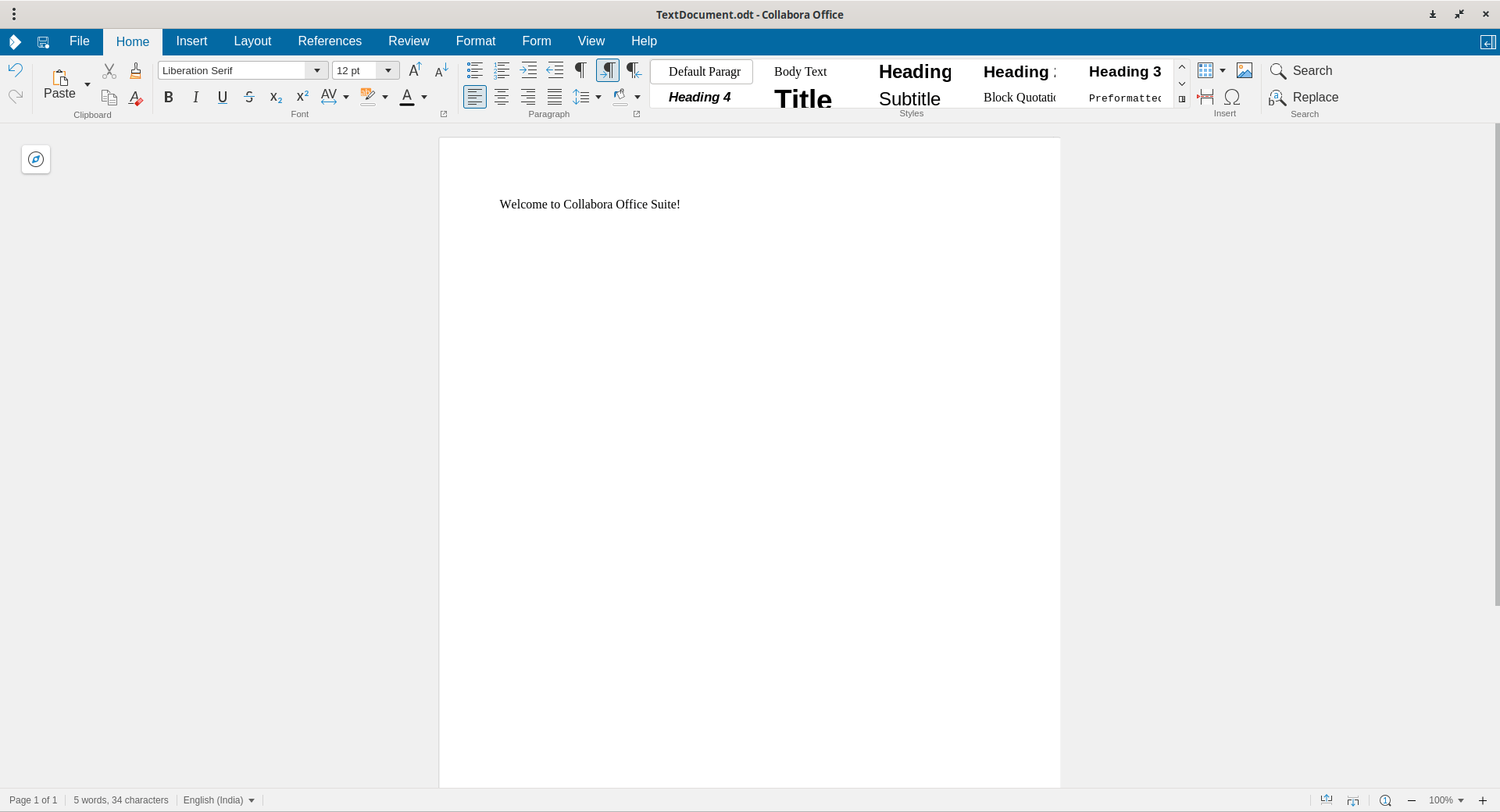
Start making your office documents using the new Collabora office suite for Linux desktop!
Uninstall Collabora Office
To remove the Collabora suite:
flatpak uninstall com.collabora.Office
To delete all leftover data:
flatpak uninstall --delete-data com.collabora.Office
To clean unused Flatpak runtimes:
flatpak uninstall --unused
This gives you a clean system again.
Developers Can Build It Too
The desktop version uses Qt6 WebEngine, and developers can build the suite from source. Collabora provides full build instructions and a Flatpak manifest for users who like to customize their software.
Frequently Asked Questions
A: It is a modern office suite for Linux that delivers the same clean design as Collabora Online but runs locally on your computer.
A: Both share the same core. Collabora Office adds a modern UI, enterprise-grade fixes, and a cleaner installation.
A: Download the Flatpak file and run: flatpak install collaboraoffice-v25.04.7.2_final.flatpak
A: Remove it with: flatpak uninstall com.collabora.Office
Yes. The suite is open source, offline-first, and free of any tracking.
Try the New Collabora Office in your Linux Desktop
Collabora office suite for Linux and brings an impressive mix of clean design, strong privacy, and excellent compatibility. It feels modern, runs fast, and fits well into Linux desktop workflows.
If you want a polished and open-source Linux productivity suite, this release is worth testing. This is the first release of the modern Collabora Office desktop suite, so expect bugs.

2 comments
I’m curious — besides the Java dependency, what are the main differences compared to LibreOffice? Also, I dislike Flatpak. Why don’t the developers offer an AppImage?
To answer your first question, Collabora office features a modern UI with simpler settings and streamlined defaults. In contrast, LibreOffice utilizes a classic, established UX and offers very extensive options, menus & dialogs. Collabora’s products are packaged specifically for enterprise use. The Collabora team provides commercial offerings such as Long Term Support (LTS) (up to 5 years is available), Guaranteed SLA, Signed Security Updates, active directory integration, and access to Consultancy and Engineering Support. These services are important for large-scale, digitally sovereign deployments. The new Collabora Office has no Java dependency. This results in a cleaner install, reduced overall footprint, and a single, self-contained download.
I don’t have a solid answer for your second question. I looked at the official sources but couldn’t find any info about AppImage support.