
Spectacle, the KDE screenshot tool, finally received the new OCR (optical character recognition) functionality. Now you can copy text directly from your screenshots in Linux!
A while ago, we posted about a third-party tool named Spectacle-OCR that does the same job . Now the OCR support is directly built into the Spectacle. No need to install any additional apps.
Table of Contents
Stop Typing, Start Copying
Think about grabbing a quick picture of a document or a terminal error. Before this change, you had to type out that text manually.
Now, you capture the screenshot, and Spectacle lets you grab the actual words. Furthermore, you can even make your screenshots searchable using tools like pdfgrep.
Under the hood, Tesseract OCR engine is used to extract texts from the captured screenshots. The extracted text is automatically copied to your Clipboard, so you can simply paste anywhere, say for example your favorite text editor.
The OCR button is available in all capture modes and viewer. Additionally, Multi-language support has been added. So, users can set multiple languages to do OCR in General Options or select one in the viewer window.
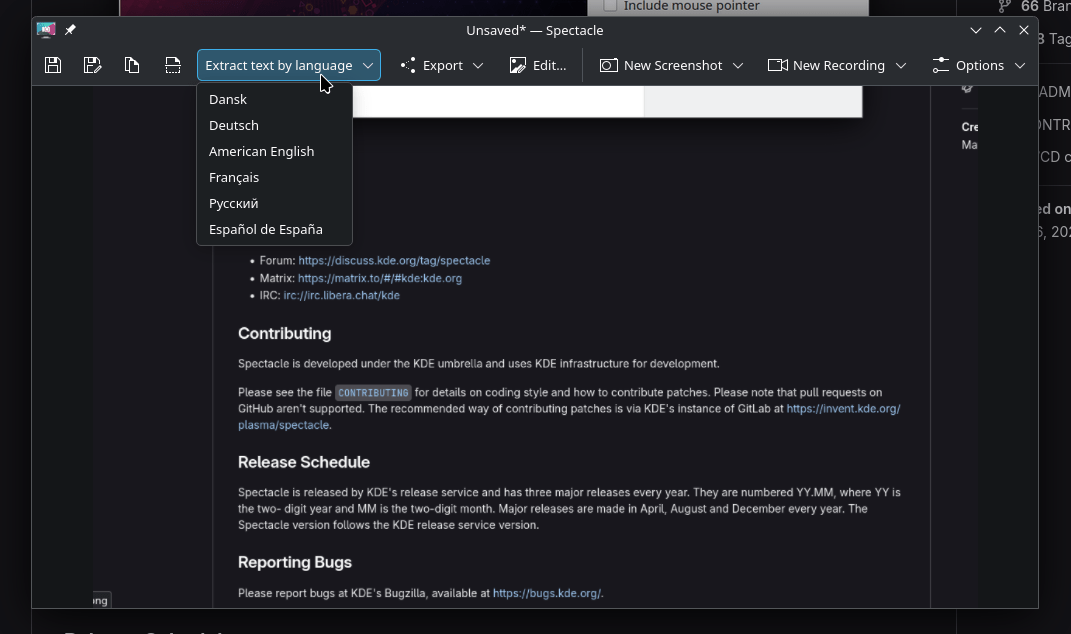
By adding the OCR support, KDE Spectacle tool definitely increases productivity.
A few years ago, users requested this feature so they could copy that text easily. Now it is finally made available!
When Can You Start Reading Images?
You will see the Spectacle OCR functionality when Plasma 6.6 launches. The "Add OCR" feature officially landed around the week of November 15, 2025.
Jhair Paris implemented this fantastic change. This implementation happened in Version 25.12.0.
OCR for All KDE Apps Soon!
The implementation of OCR makes Spectacle a much stronger tool. It converts static images into dynamic information instantly, just like turning a printed page into an editable digital document.
Right now, this OCR support is available only within Spectacle. However, developers are already working hard on the next step. They are moving the OCR code into a shared library.
I hope this change allows more KDE applications to benefit from character recognition later.
