
If you have ever felt tired of managing a collection of complex database clusters, web servers, authentication services, and admin panels just to launch a simple application, you are not alone. Developers often experience immense operational overhead simply to get a new project off the ground. PocketBase provides a clean solution to this common problem.
PocketBase is an open source, all-in-one Go-based backend that stands out from the crowd because it packs all necessary features in 1 file. So, the developers can spend less time on setup and maintenance, focusing instead on building great user experiences.
PocketBase gives you a full data store, user management, and a flexible API. The goal is to handle common requirements, like CRUD operations, authentication, file uploading, and automatic TLS, straight out of the box.
Table of Contents
What is PocketBase?
PocketBase is an innovative, open source backend solution written in GO. It bundles everything a modern application needs into one single, portable file.
This single file combines everything you need: an embedded database (SQLite) with realtime subscriptions, built-in authentication management, a convenient Admin dashboard UI, and a simple REST-ish API.
Using PocketBase, you can build self-contained applications that run entirely on a single server without needing to install anything extra.
What Makes PocketBase Unique? The One-File Advantage
PocketBase runs on Go and delivers a full-featured stack designed for operational simplicity. This approach lets you deploy a complete backend without managing many separate containers or services.
Embedded SQLite Database
PocketBase includes an embedded database called SQLite. It uses SQLite in Write-Ahead Logging (WAL) mode. This specific configuration often outperforms traditional database systems like MySQL, MariaDB, or PostgreSQL, especially when handling read operations.
You also benefit from realtime subscriptions, meaning clients receive immediate updates when data changes.
Seamless Authentication and User Control
The platform features built-in authentication and user management. Its Web APIs are completely stateless, and the tokens are not stored in the database.
PocketBase supports many different ways for users to sign in:
- Traditional Methods: Users can authenticate using passwords or One-Time Passwords (OTP). Using OTP as a standalone method carries security risks, so combining it with other methods, such as Multi-factor authentication (MFA), is recommended for critical applications.
- Social Logins (OAuth2): PocketBase supports over 15+ OAuth2 providers, including giants like Apple, Google, Facebook, Microsoft, GitHub, and GitLab.
For access control, you set up API Rules on your collections. These rules function both as access controls and data filters.
You can decide if an action requires a superuser, allows anyone, or only permits users who satisfy a specific filter expression, such as status = "active". Superusers can access everything because the API Rules ignore them.
PocketBase Use Cases and Extensibility
PocketBase provides a great choice for small and midsize applications, including mobile API backends, internal intranets, or SaaS solutions.
Scaling and Deployment
PocketBase is self-hosted only. You install it by downloading and running a prebuilt executable, like ./pocketbase serve, on your server.
You can use standard VPS providers like Hetzner, Vultr, or Linode. The system even handles automatic TLS using Let's Encrypt when you specify a domain name during startup.
Although PocketBase only scales vertically (on a single server), its performance is impressive. Even without optimizations, it easily handles 10,000+ persistent realtime connections on relatively inexpensive virtual private servers.
Running Custom Business Logic
PocketBase does not use cloud functions like Firebase or Supabase. Instead, developers use it as a Go or JavaScript framework/toolkit. You compile your custom logic directly into the backend executable, which keeps the application portable.
- Go Extension: Developers familiar with Go should choose this path. The Go APIs are better documented and give you deep control, allowing integration with any third-party Go library.
- JavaScript Extension: If you need to write less custom code and want a quicker way to start, the embedded JavaScript engine works well. It acts as a wrapper around the existing Go APIs. This option allows you to test capabilities quickly and move to Go later if you hit a bottleneck.
With either language, you can register custom API routes, bind to event hooks to intercept actions (such as overriding a new record's status to "pending"), or register custom console commands.
Managing Files
PocketBase includes built-in file storage. By default, it stores files locally in the pb_data/storage directory. If you have limited disk space, you can switch to an external S3 compatible storage like AWS S3 or MinIO.
You can set up file fields to manage files for records. Files get stored with a randomized suffix for safety.
You can also mark file fields as Protected in the dashboard. Protected files require a short-lived file token for access, and the access request must satisfy the collection’s View API rule.
Important Considerations Before Using PocketBase
PocketBase offers immense power, but keep in mind the following important points:
- Development Status: PocketBase is a personal, volunteer-developed open source project. It has an intentionally limited scope. Full backward compatibility is not guaranteed before the project reaches version 1.0.0. So, the author recommends against using it for production-critical applications if you are unwilling to read changelogs and apply manual migration steps occasionally.
- Data Migration: The system currently lacks built-in helpers for easy data import or export.
- Support Model: The author stopped accepting donations from individuals. This helps avoid the pressure and expectations often tied to financial contributions. Organizations can inquire about grants or sponsorships, provided they offer no strings attached.
Install and Run Pocketbase on Linux
As stated already, PocketBase is a self-hosted only solution. Its architecture is highly suitable for Linux environments because it operates as a single executable, eliminating the need to install additional components.
Here is how you can install and run PocketBase on your Linux system for testing:
1. Install Golang
Make sure you have installed and configured Golang in your Linux system.
2. Download the PocketBase Executable
PocketBase prebuilt minimal executable files are available for Linux x64 and Linux ARM64 architectures.
Go to the PocketBase GitHub Releases page and download the version suitable for your architecture.
It is also packaged for macOS and Windows platforms.
3. Running the Application
Once you download and extract the archive, you start the application from your terminal by running the executable with the serve command in the extracted directory:
./pocketbase serve
4. Initial Setup and Access
The first time you start the application, it automatically generates an installer link, which should open in your browser, allowing you to set up your initial superuser account.
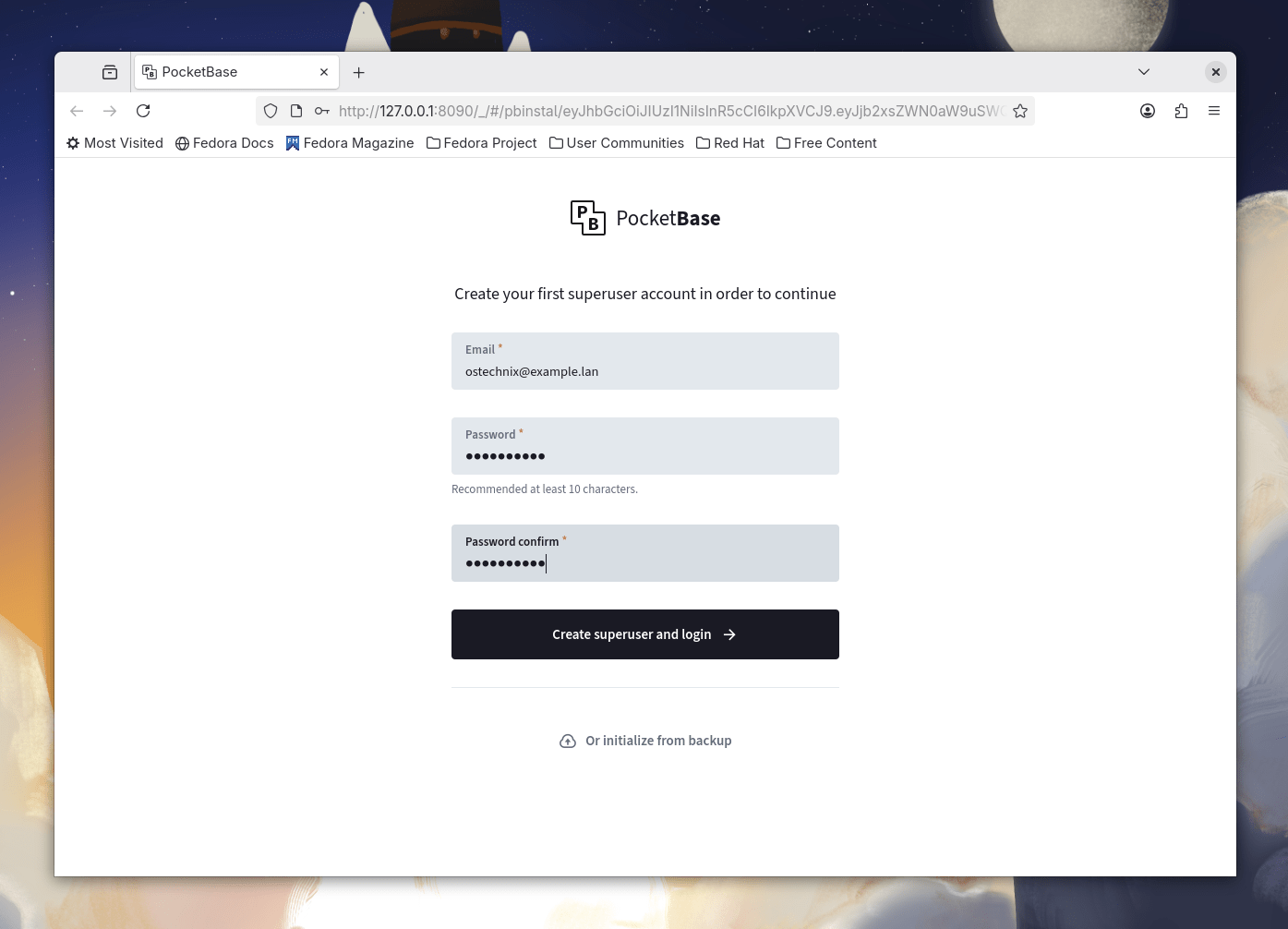
Alternatively, you can create the first superuser manually via the console using ./pocketbase superuser create EMAIL PASS.
Once running, the web server is accessible locally via default routes:
http://127.0.0.1:8090/_/: This is the URL for the superusers dashboard (Admin UI).http://127.0.0.1:8090/api/: This is the endpoint for the REST-ish API.
Here's how the PocketBase admin web interface looks like:

5. Directories Created for Testing
When running the executable, PocketBase automatically creates two directories next to the executable, which are important for testing and development:
pb_data: This directory stores your application data, uploaded files, and other persistent information.pb_migrations: This contains JavaScript (JS) migration files that record your collection changes and can be committed to your version control repository.
For testing purposes, you can use the built-in Admin dashboard UI to manage your collections and data. You can then integrate your application frontend using the official JavaScript SDK or Dart SDK by interacting with the Web APIs.
As an alternative to downloading the prebuilt executable, developers can also build the statically linked executable directly on their Linux system using Go tools.
The supported build targets by the pure Go SQLite driver include many Linux architectures, such as linux amd64 and linux arm64.
Frequently Asked Questions (FAQ)
A: PocketBase is an open source backend that includes four primary components in one file: an embedded SQLite database with realtime subscriptions, built-in authentication and user management, file storage, a convenient Admin dashboard UI, and a simple REST-ish API.
The basic idea is to handle common functionality like CRUD, auth, file uploads, and automatic TLS out of the box, letting you focus on the UI and specific app requirements
A: No, not fully. PocketBase is still under active development, and full backward compatibility is not guaranteed before reaching version 1.0.0. So, it is NOT recommended for production critical applications unless you are willing to read the changelog and manually apply migration steps occasionally.
A: PocketBase is a great choice for small and midsize applications such as SaaS, internal intranets, or mobile API backends. It scales only vertically (on a single server).
Even without advanced optimization, it can easily serve 10,000+ persistent realtime connections on relatively inexpensive virtual private servers (VPS).
A: No, not out of the box. PocketBase exclusively uses an embedded SQLite database operating in Write-Ahead Logging (WAL) mode.
For the majority of queries, SQLite in WAL mode outperforms traditional databases like MySQL, MariaDB, or PostgreSQL, especially when handling read operations.
A: PocketBase does not support running cloud functions like Firebase or Supabase. Instead, you must use it as a Go or JavaScript framework/toolkit. You compile your custom, app-specific business logic directly into the backend executable.
This enables you to register custom routes, bind to event hooks (to intercept and modify requests), and register custom console commands.
A: PocketBase's Web APIs are fully stateless, meaning they rely on a valid Authorization:YOUR_AUTH_TOKEN header, and tokens are not stored in the database.
It currently supports more than 15+ OAuth2 providers, including Apple, Google, Facebook, Microsoft, VK, GitHub, and GitLab. Authentication can also use passwords and One-Time Passwords (OTP).
A: No, PocketBase is self-hosted only. You deploy it as a single prebuilt executable (e.g., ./pocketbase serve) on a VPS provider that offers persistent storage (like Hetzner, Vultr, or Linode).
The application automatically handles the installation of the first superuser. The executable creates two management directories: pb_data (for app data and files) and pb_migrations (for collection schema changes).
A: Access controls are managed through API Rules on each collection, corresponding to five specific API actions (list, view, create, update, delete). A key feature is that these rules also act as record filters.
Rules can be set to "locked" (superuser only), an empty string (anyone can access), or a non-empty string filter expression (only users satisfying the filter can perform the action). Authorized superusers can access everything as API Rules are ignored for them.
Conclusion
PocketBase offers an incredible, unified approach to backend development. It proves that simplicity and power can coexist, making it an excellent choice for developers looking to launch fast and maintain efficiently.
If you're looking for a self-contained backend, download the prebuilt PocketBase executable and run ./pocketbase serve to start building your next application today!
Resources:
