
If you install Fedora, you may notice that it creates both a /boot partition and mounts an EFI System Partition (ESP) at /boot/efi. If you have used Ubuntu or another Linux distribution, this layout may look different. Ever wondered why Fedora creates both /boot and /boot/efi?
The answer is that these two locations serve different purposes during the boot process. The boot process is the sequence of steps that starts your computer and loads the operating system. Although they work together, /boot and /boot/efi store different types of files.
This layout is not unique to Fedora. It is one of several valid ways to organize the files needed to start a Linux system. Different Linux distributions make different design choices based on their default filesystem, bootloader, and installation layout.
In this guide, you will learn what the EFI System Partition is, what /boot and /boot/efi are used for, why Fedora creates both by default, and when a separate /boot partition is actually needed.
Table of Contents
A Quick Look at the Linux Boot Process
When you press the power button, your computer does not start Linux immediately. It follows a series of steps called the boot process. Each step prepares the next one until the operating system is ready to use.
On a modern computer that uses Unified Extensible Firmware Interface (UEFI), the process usually looks like this:
Power On
   ↓
UEFI firmware
   ↓
EFI System Partition (ESP)
   ↓
Bootloader
   ↓
Linux kernel
   ↓
initramfs
   ↓
Root filesystem
   ↓
systemd
   ↓
Login screen or text console
For those unaware, the UEFI firmware is software stored on your computer's motherboard. It initializes the hardware and loads a bootloader from the EFI System Partition (ESP). The bootloader is a program that loads the Linux kernel and the initramfs into memory.
The Linux kernel is the core of the operating system. It manages the hardware and uses the initramfs, which is a temporary root filesystem, to prepare the system before mounting the real root filesystem.
Once the real root filesystem is available, the kernel starts systemd, the default system and service manager in Fedora. Systemd then starts the required services and brings the system to its configured target, such as a graphical login screen or a text console.
For this article, you only need to remember two things. The EFI System Partition (ESP) stores the files that the UEFI firmware uses to start the bootloader. The /boot directory stores the Linux kernel and other files needed during startup. We will explain each one in more detail in the next sections.
What Is the EFI System Partition (ESP)?
The EFI System Partition (ESP) is a special disk partition used by computers that boot in Unified Extensible Firmware Interface (UEFI) mode. It stores the files that the UEFI firmware needs to start an operating system. Most operating systems that support UEFI, including Linux and Windows, use an ESP.
The ESP uses the FAT32 filesystem on almost all modern computers. UEFI firmware is designed to read FAT-formatted partitions before an operating system starts. This allows the firmware to find and launch a bootloader without relying on Linux, Windows, or any other operating system.
On Linux, the ESP is commonly mounted at /boot/efi. A mount point is a directory where a filesystem becomes accessible after it is mounted. Some Linux distributions and system configurations use a different mount point, such as /efi. The exact mount point is a configuration choice. What matters is that the operating system and bootloader are configured to use the same location.
A typical ESP contains one directory for each operating system or bootloader installed on the computer. For example:
EFI/
├── BOOT/
├── fedora/
├── Microsoft/
└── ubuntu/
This layout allows multiple operating systems to share the same ESP. Each operating system stores its own boot files in a separate directory.
The next section explains what Fedora stores in /boot and why those files are kept separate from the ESP.
What Is /boot?
The /boot directory stores the files needed to start Linux. These files are used by the bootloader, which is the program that loads the operating system into memory.
A typical /boot directory contains:
- The Linux kernel, which is the core of the operating system.
- The initramfs, which is a temporary root filesystem used during early startup.
- The GRUB configuration on Fedora, which tells the bootloader how to start installed operating systems.
- Other boot-related files, such as the kernel configuration and the
System.mapfile.
For example:
$ sudo tree /boot
/boot
├── config-6.17.1-300.fc43.x86_64
├── efi
│   ├── EFI
│   │   ├── BOOT
│   │   │   ├── BOOTIA32.EFI
│   │   │   ├── BOOTX64.EFI
│   │   │   ├── fbia32.efi
│   │   │   └── fbx64.efi
│   │   └── fedora
│   │       ├── BOOTIA32.CSV
│   │       ├── BOOTX64.CSV
│   │       ├── gcdia32.efi
│   │       ├── gcdx64.efi
│   │       ├── grub.cfg
│   │       ├── grubia32.efi
│   │       ├── grubx64.efi
│   │       ├── mmia32.efi
│   │       ├── mmx64.efi
│   │       ├── shim.efi
│   │       ├── shimia32.efi
│   │       └── shimx64.efi
│   ├── mach_kernel
│   └── System
│       └── Library
│           └── CoreServices
│               └── SystemVersion.plist
├── grub2
│   ├── earlyboot.cfg
│   ├── fonts
│   │   └── unicode.pf2
│   ├── grub.cfg
│   └── grubenv
├── initramfs-0-rescue-9c1aaf08fa134981ae13a25cb03c7af8.img
├── initramfs-6.17.1-300.fc43.x86_64.img
├── loader
│   └── entries
│       ├── 9c1aaf08fa134981ae13a25cb03c7af8-0-rescue.conf
│       └── 9c1aaf08fa134981ae13a25cb03c7af8-6.17.1-300.fc43.x86_64.conf
├── lost+found
├── symvers-6.17.1-300.fc43.x86_64.xz -> /lib/modules/6.17.1-300.fc43.x86_64/symvers.xz
├── System.map-6.17.1-300.fc43.x86_64
├── vmlinuz-0-rescue-9c1aaf08fa134981ae13a25cb03c7af8
└── vmlinuz-6.17.1-300.fc43.x86_64

13 directories, 31 files
You may notice that the efi directory appears inside /boot. That is because /boot/efi is a mount point. The files shown under efi are stored on the EFI System Partition, not on the /boot filesystem itself.
When you start your computer, the bootloader reads the Linux kernel and the initramfs from /boot and loads them into memory. It then transfers control to the Linux kernel, which continues the boot process.
On Fedora, /boot is stored on a separate ext4 partition by default, while the root filesystem uses Btrfs. This layout provides a consistent boot configuration across a wide range of storage setups.
findmnt /boot
Sample Output from my Fedora system:
TARGET SOURCE    FSTYPE
/boot  /dev/sda2 ext4
This confirms that /boot is mounted from its own filesystem rather than being just another directory inside the root filesystem.
Not every Linux distribution creates a separate /boot partition. Ubuntu, for example, usually stores the /boot directory inside the root filesystem. Both layouts are valid. The difference is a design choice, not a requirement of Linux or UEFI.
What Is /boot/efi?
The /boot/efi directory is the mount point for the EFI System Partition (ESP). It is not a separate partition. Instead, it is the directory where Linux makes the ESP accessible after mounting it.
Unlike /boot, which stores the Linux kernel and other boot files, /boot/efi provides access to the files stored on the ESP. These files are used by the UEFI firmware during the first stage of the boot process.
A typical /boot/efi directory looks like this:
/boot/efi/
├── EFI
│   ├── BOOT
│   │   ├── BOOTIA32.EFI
│   │   ├── BOOTX64.EFI
│   │   ├── fbia32.efi
│   │   └── fbx64.efi
│   └── fedora
│       ├── BOOTIA32.CSV
│       ├── BOOTX64.CSV
│       ├── gcdia32.efi
│       ├── gcdx64.efi
│       ├── grub.cfg
│       ├── grubia32.efi
│       ├── grubx64.efi
│       ├── mmia32.efi
│       ├── mmx64.efi
│       ├── shim.efi
│       ├── shimia32.efi
│       └── shimx64.efi
├── mach_kernel
└── System
    └── Library
        └── CoreServices
            └── SystemVersion.plist

7 directories, 18 files
Each operating system stores its own boot files in a separate directory. This allows multiple operating systems to share the same EFI System Partition without interfering with each other.
The ESP usually contains EFI programs, such as bootloaders, along with other files required for UEFI booting. The Linux kernel and the initramfs are normally stored in /boot, not on the ESP.
You can verify that the EFI System Partition is mounted separately:
sudo findmnt /boot/efi
Sample Output:
TARGET    SOURCE    FSTYPE OPTIONS
/boot/efi /dev/sda1 vfat   rw,relatime,fmask=0077,dmask=0077,codepage=437,iocharset=ascii,shortname=winnt,errors=remount-ro
This confirms that /boot/efi is a separate FAT32 filesystem mounted from its own partition.
Although /boot/efi is the most common mount point on Linux, it is not the only one. Some Linux distributions and system configurations mount the EFI System Partition at /efi instead. The mount point is a configuration choice. What matters is that the operating system and bootloader are configured to use the same location.
Now that you know the purpose of /boot and /boot/efi, the next section explains why Fedora uses both by default.
Why Does Fedora Create Both /boot and /boot/efi?
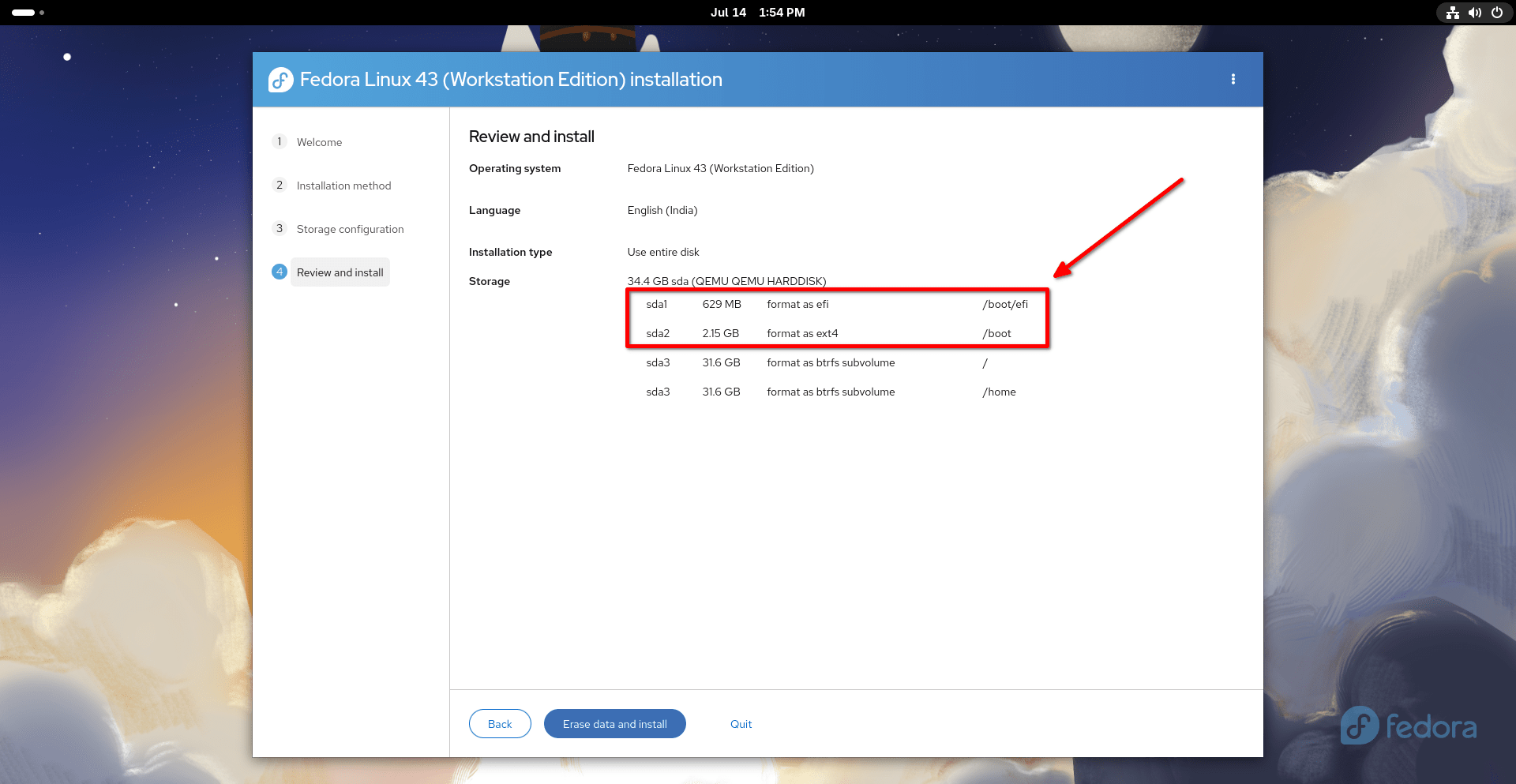
Fedora creates both /boot and /boot/efi because they serve different purposes during the boot process.
You can view Fedora's default partition layout with:
sudo lsblk -f
Sample Output:
NAME   FSTYPE FSVER LABEL  UUID                                 FSAVAIL FSUSE% MOUNTPOINTS
sda
├─sda1 vfat   FAT32        F822-70EF                             579.5M     3% /boot/efi
├─sda2 ext4   1.0          a1dd3397-1af4-44c8-bc6c-6f18001eafb3    1.4G    18% /boot
└─sda3 btrfs        fedora 509e9c4f-9de2-44ca-80dc-1c30d21c5905   25.5G    13% /home
                                                                               /
sr0
zram0  swap   1     zram0  164d2127-d45d-456a-bc23-a1b7b6bae6d9                [SWAP]
The EFI System Partition (ESP), mounted at /boot/efi, stores the EFI programs used by the UEFI firmware to begin the boot process. The /boot partition stores the Linux kernel, the initramfs, and other files that the bootloader uses to start Linux.
On a default Fedora installation, /boot is a separate ext4 partition, while the root filesystem uses Btrfs. This layout provides a consistent and well-tested boot configuration across a wide range of storage setups. It also works well with Fedora's default disk encryption options because the boot files remain outside the encrypted root filesystem.
Ubuntu uses a different default layout. On a typical Ubuntu installation, the /boot directory is part of the root filesystem instead of a separate partition. Both Fedora and Ubuntu follow the UEFI standard. They simply organize their boot files differently.
You may also come across Unified Kernel Images (UKIs). A UKI combines the Linux kernel, the initramfs, and related boot information into a single EFI executable. A UKI can be stored directly on the EFI System Partition, reducing the number of files involved during boot. Fedora is gradually adopting UKIs, but a separate /boot partition remains the default layout at the time of writing this guide.
The UEFI specification does not require a separate /boot partition. Linux distributions are free to choose the partition layout that best fits their design goals and default storage configuration.
Do You Need a Separate /boot Partition?
In many cases, no. A separate /boot partition is not required to install or run Linux. Many Linux distributions, including Ubuntu, store the /boot directory inside the root filesystem by default.
To verify that Ubuntu stores /boot inside /, run:
sudo findmnt /
You will see an output like below:
TARGET SOURCE    FSTYPE OPTIONS
/      /dev/sda2 ext4   rw,relatime
Now run:
sudo findmnt /boot
On a default Ubuntu installation with no separate /boot partition, the above command produces no output. That means /boot is not a separate mount point.
You can also verify using this command:
sudo lsblk -f
You will not see any entries for boot partition in output.
Fedora takes a different approach. Its default installation creates a separate /boot partition because it matches Fedora's recommended partition layout.
For most users, the default partition layout chosen by the installer is the best option.
| Linux distribution | Default /boot layout |
|---|---|
| Fedora Workstation | Separate /boot partition |
| Ubuntu Desktop | /boot directory inside the root filesystem |
Some storage configurations, such as disk encryption, RAID, or Logical Volume Manager (LVM), may also use a separate /boot partition. Whether it is needed depends on the Linux distribution, the bootloader, and the storage configuration.
If you decide to partition the disk manually, follow the recommendations provided by your Linux distribution. Fedora, Ubuntu, and other distributions may recommend different layouts based on their default filesystem, bootloader, and installer.
The most important point is this: a separate /boot partition is not required by Linux or the UEFI specification. It is a design choice that depends on the goals of the Linux distribution and the storage configuration.
Common Misconceptions
Myth 1: /boot and /boot/efi are the same thing.
They are different.
The /boot directory stores the Linux kernel, the initramfs, and other files needed during the Linux boot process.
The /boot/efi directory is the mount point for the EFI System Partition (ESP), which stores the EFI programs used during the first stage of the boot process.
Myth 2: Every Linux distribution creates a separate /boot partition.
Not true. Fedora creates a separate /boot partition by default. Ubuntu usually stores the /boot directory inside the root filesystem. Both layouts are valid.
Myth 3: Each operating system needs its own EFI System Partition.
Not true. A single EFI System Partition can be shared by multiple operating systems. Each operating system typically stores its own EFI files in a separate directory under the EFI directory.
Myth 4: UEFI requires a separate /boot partition.
Not true. The UEFI specification requires an EFI System Partition (ESP), but it does not require a separate /boot partition.
Whether /boot is a separate partition or part of the root filesystem is a design choice made by the Linux distribution or the system administrator.
Frequently Asked Questions (FAQ)
/boot partition?A: No. If your system uses a separate /boot partition, it contains the files needed to start Linux. Deleting or formatting it will usually prevent the system from booting until the required boot files are restored.
A: No. The EFI System Partition (ESP) stores the EFI files used during UEFI boot. Deleting or formatting it will usually prevent installed operating systems from booting until the ESP and its required files are restored.
A: The UEFI specification requires the EFI System Partition to use a FAT filesystem. On almost all modern computers, this is FAT32. Because UEFI firmware can read FAT-formatted partitions, it can locate and start the bootloader before an operating system loads.
A: Yes. A single EFI System Partition can be shared by multiple operating systems. Each operating system typically stores its EFI files in its own directory under the EFI directory. This is the standard layout used by UEFI systems.
/efi instead of /boot/efi?A: Yes. Linux does not require a specific mount point for the EFI System Partition. While /boot/efi is the traditional mount point used by many Linux distributions, some distributions and system configurations use /efi instead. The exact mount point is a configuration choice. What matters is that the operating system and bootloader are configured to use the same location.
Conclusion
Fedora creates both /boot and /boot/efi because they serve different purposes during the boot process.
The EFI System Partition (ESP), which is usually mounted at /boot/efi, stores the EFI programs used during UEFI boot. The /boot directory stores the Linux kernel, the initramfs, and other files needed to start Linux.
Fedora's default installation places /boot on a separate partition. Other Linux distributions may use a different layout. For example, Ubuntu usually stores the /boot directory inside the root filesystem instead.
The UEFI specification requires an EFI System Partition, but it does not require a separate /boot partition. Linux distributions are free to choose the partition layout that best fits their default filesystem, bootloader, and installation design.
Understanding the purpose of /boot, /boot/efi, and the EFI System Partition makes it easier to understand how Linux systems boot and why different Linux distributions use different partition layouts.
Recommended Read:
