
If you've been searching for a faster, simpler, and more efficient way to build and deploy customized AI solutions, Flowise might be exactly what you need. It removes much of the technical complexity involved in connecting large language models, APIs, and data sources. With its clean, visual interface, you can design entire AI workflows without touching much code.
Whether you're a hobbyist experimenting with LLMs or a developer building production-ready AI agents, Flowise makes the process smooth and approachable.
Table of Contents
What is Flowise?
Flowise is an open source generative AI development platform and agentic systems development platform.
Flowise focuses entirely on building AI Agents and LLM workflows using a drag-and-drop UI. This makes it a powerful low-code/no-code solution for creating custom LLM applications, suitable for quick prototyping without coding skills.
To put this in simple terms, "Flowise is like Figma but for backend AI applications".
Flowise provides the modular components needed to construct any agentic system. This includes everything from simple compositional workflows to advanced multi-agent systems with complex orchestration.
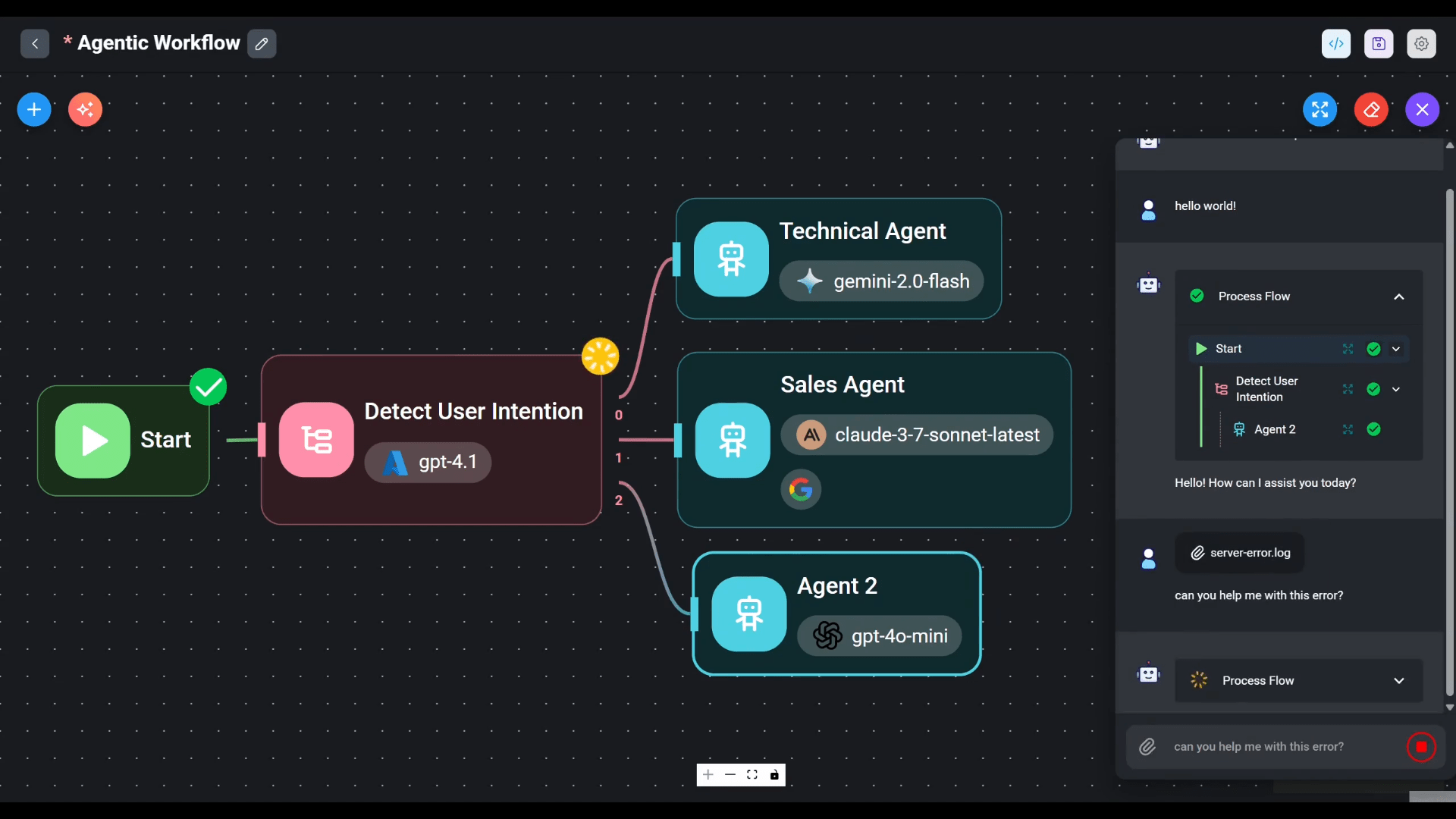
The platform integrates deeply with AI frameworks such as LangChain, LangGraph, and LlamaIndex, and supports essential techniques like Retrieval-Augmented Generation (RAG).
If you want to give it a quick spin, you can start with the Free tier on Flowise Cloud.
Alternatively, since Flowise is open source, you can deploy it yourself on major platforms including AWS, Azure, Digital Ocean, and GCP. It's also enterprise-ready, with support for on-premise and air-gapped environments.
Whether you are an individual developer or a large organization, Flowise allows you to design and test your entire AI stack rapidly and take your solution all the way to production.
Flowise Features
Flowise is built upon modular building blocks that allow users to create any agentic system, ranging from simple compositional workflows to autonomous agents.
Some of the notable features of Flowise are given below:
1. Core Visual Building and Workflow Orchestration
- Visual Editor (Low-Code/No-Code): Flowise utilizes a drag-and-drop UI (User Interface) to help users quickly build custom LLM applications. You can think of it like "Figma but for backend AI applications".
- Modular Building Blocks: The platform provides modular building blocks that allow users to construct any agentic system, from simple compositional workflows to autonomous agents.
- Speed and Prototyping: It is highly valued for enabling quick prototyping without coding skills, allowing ideas to be prototyped in minutes and scaled all the way to production.
- Workflow Logic: The visual editor supports implementing logic such as expressions, custom code, and branching/looping/routing.
- Multi-Agent Capabilities: Flowise supports building complex multi-agent systems with workflow orchestration distributed across multiple coordinated agents.
2. Specialized Visual Builders
Flowise organizes its capabilities around three main visual builders, increasing in complexity and flexibility:
- Assistant: The most beginner-friendly builder, designed to create chat assistants that can follow instructions, use necessary tools, and perform knowledge retrieval (RAG) from uploaded files to answer queries.
- Chatflow: Designed for creating single-agent systems, chatbots, and simple LLM flows. It offers flexibility to use advanced techniques like Graph RAG, Reranker, and Retriever components.
- Agentflow: The most comprehensive builder, acting as a superset of Assistant and Chatflow. It is used for creating chat assistants, single-agent systems, multi-agent systems, and complex workflow orchestration.
3. Extensive Integrations and Technical Backbone
Flowise offers deep integration with popular AI frameworks and a vast library of components:
- Framework Support: It integrates with LangChain, LangGraph, and LlamaIndex. The platform is powered by LangChain.
- LLMs, Embeddings, and Vector DBs: Flowise supports over 100+ LLMs, Embeddings, and Vector DBs.
- Examples of supported components include: Chat Models (e.g., Azure ChatOpenAI, ChatAnthropic, ChatMistralAI, GroqChat), various Vector Stores (e.g., Pinecone, Chroma, Postgres, Weaviate, AstraDB), and different types of Agents (e.g., AutoGPT, Conversational Agent, OpenAI Tool Agent).
- Data Ingestion: It connects to over 100+ data sources, tools, vector databases, and memory types. It supports a wide range of document loaders for files like PDF, CSV, Excel, Docx, as well as services like Notion, Github, Google Drive, and Jira.
- Memory and Tools: It supports various memory optimization techniques and integrations, enabling features like conversational agents that remember. It also utilizes the function-calling capability of LLMs.
- RAG and Data Processing: Flowise supports Retrieval-Augmented Generation (RAG) indexing pipelines, data transforms, filters, and aggregates for robust data processing.
4. Developer Tools and Deployment
- Developer Friendly Access: The platform provides APIs, SDKs (Typescript & Python), and a Command Line Interface (CLI) for extending and integrating applications.
- Embedded Chatbot: Users can generate and customize embeddable chat widgets for integration into their own websites or products.
- Monitoring and Observability: Flowise offers full execution traces and visual debugging. It supports external log streaming and integration with observability tools like Prometheus and OpenTelemetry.
- Flexible Deployment: Flowise supports both a cloud solution (Flowise Cloud) and robust on-premises/self-hosted deployment options. It can be deployed via Docker, Docker Compose, or major cloud providers (AWS, Azure, GCP).
- Enterprise Features: For large organizations, Enterprise tiers offer advanced security controls such as SSO (Single Sign-On) & SAML, LDAP & RBAC (Role-Based Access Control), versioning, audit logs, and support for air-gapped environments.
5. Advanced Operational Features
- Human In the Loop (HITL): This feature allows human operators to review and intervene in tasks performed by agents within the feedback loop, enhancing control and safety.
- Templates and Community: The platform provides a template marketplace and supports an active community, making it easier to jump-start projects.
- Scalability: It is designed for production scale, supporting horizontal scaling with message queues and workers for high throughput.
Flowise vs n8n
Is Flowise similar to n8n? You might wonder. Flowise and n8n are similar in their general approach to workflow automation and their use of visual interfaces, but they are different in their primary focus, specialization, and extensibility.
Both platforms are open source (Flowise) or source-available (n8n) and utilize a visual, low-code/no-code approach.
Here is a comparison of their similarities and differences:
Similarities
| Feature | n8n | Flowise |
|---|---|---|
| Development Style | Uses a drag-n-drop interface and a visual building editor. | Uses a drag-and-drop UI and is a low-code/no-code platform. |
| Core AI Focus | Specializes in AI workflow automation, building AI agents, and creating multi-step agents. | Is an open source generative AI development platform for building AI Agents and LLM workflows. |
| Extensibility/Code | Allows falling back to code (JavaScript or Python) when the UI is limiting. | Supports custom code within the visual editor for advanced logic. |
| Deployment | Supports both on-prem control (self-host) and in-the-cloud convenience. | Supports both Flowise Cloud and robust on-premises/self-hosted deployment options. |
| Scaling & Enterprise | Is Enterprise-ready, supporting features like SSO SAML, LDAP, advanced RBAC permissions, and running air-gapped. | Is Enterprise Ready with support for On-Premise Deployment, Air-gapped Environments, SSO & SAML, and RBAC. |
Key Differences
The main distinction lies in their primary goal: n8n is a general workflow automation platform that includes AI orchestration, while Flowise is a specialized platform focused exclusively on LLM/AI agent construction.
| Aspect | n8n | Flowise |
|---|---|---|
| Primary Use | Flexible AI workflow automation, connecting 500+ apps for IT, security, and lead automation. | LLM app prototyping, visual AI workflow design, and creating custom LLM applications. |
| Core Integration | Primary strength is general workflow automation and connecting 400+ pre-built connectors. | Primary strength is visual workflow building for LLMs, deeply integrating with LangChain, LangGraph, and LlamaIndex. |
| Customization | Highly customizable; users can write JavaScript or Python, add libraries from npm, and paste cURL requests. | Moderate customization; customization centers on integrating specific LLM components (models, vector stores, agents). |
| Target User/Best For | Technical teams and developers needing scalable, production-ready automations. | Quick prototyping without coding skills, especially for LLM-based applications. |
| Complexity Focus | Handles both traditional and AI-powered workflows; described as a "Swiss Army knife for automation". | Focuses on agentic systems and specialized LLM flows like Agentflow (multi-agent systems) and Chatflow (single-agent systems). |
You should choose n8n if you require a highly customizable, scalable automation platform that handles a broad range of traditional integration and workflow tasks alongside AI components. You should choose Flowise if your main objective is to visually prototype and build specialized LLM-based applications and AI Agents quickly using frameworks like LangChain.
Flowise is FREE to Use!
Flowise offers both free and paid plans. Check out their pricing page (link below) for more details.
If you want to give it a test drive, you can absolutely use Flowise for free through two primary methods: self-hosting or using the Flowise Cloud Free tier.
1. Self-Hosted / Open Source (Completely Free)
You can install and run Flowise locally or on your own infrastructure for free, which is referred to as self-hosted deployment. This option requires more technical skill for setup, database backing up, and maintenance.
To self-host Flowise, follow the steps below:
1. Make sure NodeJS v18.15.0 or v20 and above is installed. If not, refer our Nodejs installation guide.
2. Install Flowise globally using NPM:
npm install -g flowise
3. Start Flowise:
npx flowise start
4. The application can then be accessed at http://localhost:3000.
The source code for the repository is made available under the Apache License Version 2.0. The link is given at the end of this article.
2. Flowise Cloud Free Tier
If you prefer not to manage a server, Flowise offers a Free tier in the Flowise Cloud.
The details of the Free tier are:
- Price: $0 /month.
- Flows & Assistants: Limited to 2 Flows & Assistants.
- Predictions: Includes 100 Predictions / month.
- Storage: Includes 5MB Storage.
- Additional Features: Includes Evaluations & Metrics, Custom Embedded Chatbot Branding, and Community Support.
Target Users for Flowise
1. Developers and Technical Teams
Flowise is designed to appeal to developers and technical teams who need to integrate and deploy AI functionality quickly and efficiently.
- Developers: Flowise is Developer Friendly, offering APIs, SDKs (Typescript & Python), and a Command Line Interface (CLI) for extending and integrating applications.
- Users of AI Frameworks: The platform deeply integrates with foundational AI frameworks, including LangChain, LangGraph, and LlamaIndex.
- Backend Prototyping and Deployment: Developers use Flowise to design and test their entire stack in a fraction of the time, allowing them to prototype an idea in minutes and subsequently take it all the way to production. It is useful for building to industrial scale with the exported output.
2. Low-Code/No-Code Users
Flowise's primary strength is its visual, low-code/no-code interface, making it accessible to those who may lack extensive programming experience:
- Non-Coders and Visual Designers: It is ideal for quick prototyping without coding skills. Users can create custom chatbots and LLM applications without a single line of code.
- Beginners: The Assistant visual builder is the most beginner-friendly way of creating an AI Agent.
3. Businesses, Enterprises, and Organizations
Flowise targets businesses seeking to integrate AI features into their products or internal operations, particularly large organizations needing specific security and deployment controls:
- Small and Medium Teams/Businesses: The Starter and Pro tiers are designed for individuals, small teams, and medium-sized businesses, suggesting a focus on structured business use.
- Large Organizations (Enterprise): Flowise is Enterprise Ready. The Enterprise tier provides features essential for large organizations, such as:
- On-Premise Deployment and support for Air-gapped Environments.
- Advanced security controls like SSO (Single Sign-On) & SAML (Security Assertion Markup Language), LDAP & RBAC (Role-Based Access Control).
- Features for production scale, including horizontal scaling with message queues and workers for high throughput.
- Companies Integrating AI Features: Flowise helps customers supercharge existing platforms with built-in AI features. For instance, companies use it to orchestrate AI as part of their proprietary AI brain or enhance new features like copilots.
Flowise is built for anyone needing to visually prototype LLM-based applications quickly, from individual non-coders to corporate development teams who need a robust platform to deploy and scale specialized AI agents.
Related Read:
- OpenCode: An AI Coding Agent Like Claude Code, But For Any LLM
- From Bash Scripts to AI: Evolution of Workflow Automation
Conclusion
Flowise is a highly effective tool for accelerating the development lifecycle of LLM-based applications, positioned as the visual, drag-and-drop layer specifically for agentic systems.
Using Flowise, you can build chatbots, intelligent virtual assistants, and complex AI workflows without writing extensive code. Its drag-and-drop interface allows you to connect large language models, APIs, and data sources quickly.
It is valuable for developers and teams seeking to prototype an idea in minutes and scale it rapidly, as it provides a visual abstraction over powerful frameworks like LangChain, LangGraph, and LlamaIndex.
Core Strengths
- Specialized Focus on AI Agents: Flowise is purpose-built for visual AI workflow design, offering specific builders like Agentflow for complex multi-agent systems and Chatflow for single-agent systems and chatbots. This specialization ensures deep support for LLM-centric features like Retrieval-Augmented Generation (RAG), tool calling, memory management, and advanced retrieval techniques.
- Rapid Development and Accessibility: Its drag-and-drop UI enables quick prototyping without coding skills. This appeals to non-coders and visual designers as well as developers looking to reduce boilerplate code.
- Extensive Component Library: The platform provides broad compatibility, integrating with 100+ LLMs, Embeddings, and Vector DBs, along with numerous document loaders and tools.
- Enterprise and Open Source Flexibility: Flowise offers a Free tier on its cloud service, is completely free for self-hosting, and is Enterprise Ready. Enterprise features include On-Premise Deployment, Air-gapped Environments, SSO & SAML, and high-throughput scaling for production use.
Trade-offs and Considerations
- LLM Concept Learning Curve: While Flowise makes the mechanics of building accessible, users still require familiarity with core LangChain or LLM concepts to effectively use the platform and understand components like Rerankers, Retrievers, and various agent types.
- Customization Scope (Relative): Flowise is optimized for building LLM applications. For highly specialized or performance-critical applications, or those requiring broad, arbitrary external system integration, some tasks may still require code-first approaches. Compared to general workflow automation tools (like n8n), Flowise's customization is focused primarily on its LLM workflow logic.
- Deployment Overhead (Self-Hosted): While self-hosting is free and robust, users must be aware that it requires more technical skill to set up the instance, back up the database, and maintain updates compared to using Flowise Cloud.
In conclusion, Flowise is the go-to open source platform for visually building and scaling specialized AI agents. It successfully removes the coding barrier for LLM development, allowing technical teams to deploy complex multi-agent systems quickly and reliably, while offering the necessary enterprise infrastructure for production workloads.
Resources:
