
Your self-hosted environment probably did not become complex overnight. It may have started with a single PostgreSQL database. Then you added Nextcloud, Grafana, Home Assistant, MinIO, or a few other applications. Each one brought its own database, tables, and configuration. You may have also created test databases for experiments that you never removed.
As your environment grows, simple questions become surprisingly difficult to answer. Which application owns this database? Is this schema still in use? Can you delete this table without breaking something else? The data is still there, but the context is missing.
That is the problem metadata solves. Metadata is data that describes other data. It records information such as ownership, schema, source, and relationships between data assets such as tables, dashboards, and pipelines. Instead of manually tracing databases and applications, you can search a central catalog and understand how your data is organized.
OpenMetadata is an open-source metadata platform. It builds a central catalog by collecting metadata from databases, data warehouses, dashboards, messaging systems, pipelines, and other services. It also tracks data lineage, which records how data moves between systems and helps you understand dependencies across your infrastructure.
In this guide, we will explain how to deploy OpenMetadata on Ubuntu using Docker Compose. We will teach you to configure the required services, start the platform, connect your first data service, and run a metadata ingestion. By the end of the guide, you will have a working OpenMetadata instance that you can expand as your infrastructure grows.
Table of Contents
What is OpenMetadata
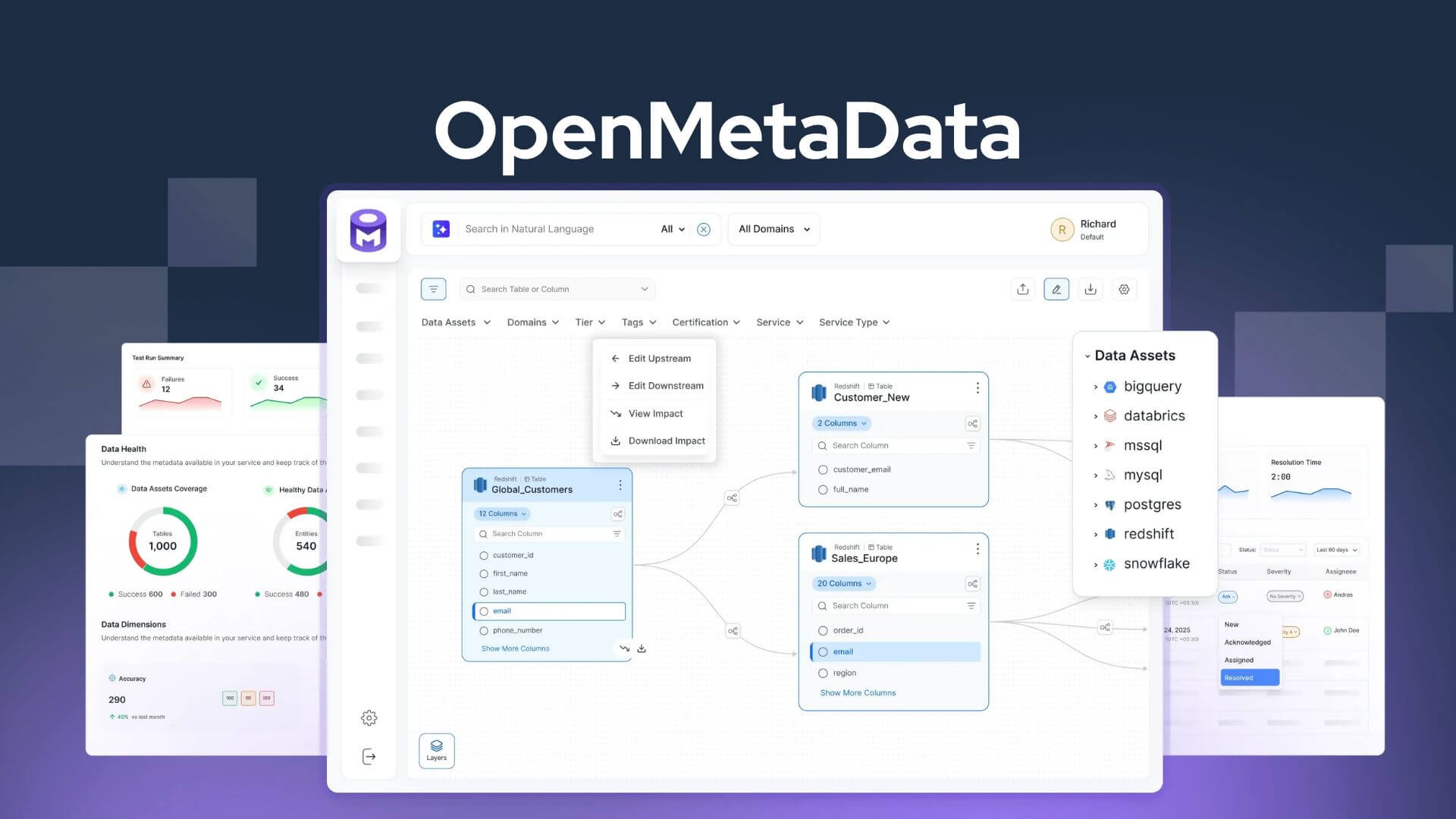
OpenMetadata is an open-source metadata platform that builds a searchable map of your data ecosystem. It doesn't store your business data. Instead, it collects metadata such as schemas, lineage, ownership, documentation, data quality signals, and business context from databases, data warehouses, dashboards, pipelines, and other systems.
It organizes that information into a unified metadata graph so you can discover assets, understand dependencies, and govern data from a single place.
OpenMetadata doesn't manage your data. It manages the context around your data.
Your PostgreSQL databases, dashboards, pipelines, and object storage continue to operate independently. OpenMetadata connects to those systems, extracts their metadata, and reveals how they relate to one another.
That context helps answer questions such as:
- Who owns this dataset?
- Which dashboard depends on this table?
- Which pipeline created this data?
- What downstream assets will be affected if this column changes?
The platform doesn't replace your existing tools. It connects them through metadata, giving you a single, searchable view of your data landscape.
OpenMetadata has evolved beyond a traditional data catalog into a semantic context platform for both people and AI.
Earlier versions of the project focused primarily on metadata management and governance. Recent releases expand that vision by combining technical metadata, business semantics, lineage, ownership, data quality, policies, and organizational knowledge into a unified metadata graph.
The platform also includes capabilities such as semantic search and an MCP (Model Context Protocol) server, allowing AI assistants to query governed metadata using natural language while respecting the relationships and context captured in the catalog.
OpenMetadata doesn't tell you what your data contains. It tells you what your data means, where it came from, who owns it, and what depends on it.
What Does OpenMetadata Actually Do?
OpenMetadata does not store your application data. It stores metadata, which is information about your data assets. It creates a central metadata catalog that helps you discover and understand those assets from one place.
The catalog can include metadata for databases, tables, dashboards, pipelines, messaging topics, machine learning models, and other supported services. For each asset, OpenMetadata records information such as its schema, owner, description, tags, and relationships to other assets.
This information is collected through metadata ingestion. Metadata ingestion is the process of using connectors and workflows to extract metadata from your services and import it into the catalog. Your application data stays in its original database or service. OpenMetadata only collects the metadata needed to describe and organize those assets.
The benefit becomes clear when you need to answer everyday questions. Which table stores customer orders? Which dashboard uses this table? Can you safely rename a column? Instead of checking multiple systems, you search the catalog and view the relationships between assets.
OpenMetadata also captures data lineage. Data lineage shows the upstream and downstream dependencies between assets such as tables, pipelines, and dashboards. It helps you understand how data flows through your environment and identify the impact of changes before they reach production.
OpenMetadata is less about storing data and more about helping you understand it.
Why OpenMetadata?
Several open-source metadata platforms are available. OpenMetadata, DataHub, Apache Atlas, and Amundsen all help you discover and understand your data. They share the same goal, but they differ in architecture, deployment, and the features they emphasize.
| Project | Primary focus |
|---|---|
| OpenMetadata | Metadata management, discovery, governance, and lineage |
| DataHub | Extensible metadata platform and metadata discovery |
| Apache Atlas | Metadata management and governance for Hadoop-centric environments |
| Amundsen | Data discovery and search |
This guide uses OpenMetadata because it is well documented, provides an official Docker Compose deployment, and supports a wide range of services through built-in metadata connectors. It also combines metadata management, lineage, documentation, and governance in a single platform, making it a practical choice for a self-hosted environment.
The other projects are also mature and actively maintained. If you already use DataHub, Apache Atlas, or Amundsen, there is no technical reason to switch.
The deployment steps in this guide focus on OpenMetadata because it offers a straightforward starting point for users who want to build a self-hosted metadata catalog.
Is Self-Hosting OpenMetadata Right for You?
OpenMetadata is an excellent choice for teams that prefer open-source software and want full control over their infrastructure. It's particularly well suited for startups, SMEs, and engineering teams already comfortable managing Linux servers, Docker, or Kubernetes.
Larger organizations, however, often have established data governance frameworks, compliance requirements, and dedicated data teams. In those environments, deploying a metadata platform is only one part of a broader governance initiative that also includes policies, ownership, and operational processes.
If your organization is building or expanding a formal data governance program, outside expertise can help define those processes and avoid common implementation pitfalls. Please do your own research to find a reliable partner that provides Data Governance Services focusing on governance strategy, ownership models, compliance, data quality, metadata management, and organizational workflows that complement platforms such as OpenMetadata rather than replace them.
| Self-Hosted OpenMetadata | Managed Implementation |
|---|---|
| Open source (Apache 2.0) | Consulting-led deployment and implementation |
| Self-managed on Linux, Docker, or Kubernetes | Guided implementation with governance planning |
| Best for startups, SMEs, and engineering teams | Well suited for organizations with complex governance requirements |
| Full control over infrastructure and data | Includes guidance on governance frameworks, compliance, and adoption |
| Lower software costs, but requires in-house expertise | Faster implementation with ongoing expert support |
For teams that prefer an open-source, self-managed approach, the rest of this guide walks you through deploying OpenMetadata on Ubuntu Linux using Docker Compose.
What Do You Need Before You Begin?
OpenMetadata consists of several services that work together. The OpenMetadata Server stores metadata in a backend database such as PostgreSQL. It uses Elasticsearch or OpenSearch to index that metadata for fast search.
Scheduled metadata ingestion is handled by a separate ingestion service, which runs workflows to collect metadata from your databases, dashboards, pipelines, and other supported services. Docker Compose lets you deploy these components together.
For this guide, we will be using Ubuntu 26.04 LTS version with following specification:
| Requirement | Purpose |
|---|---|
| Ubuntu 26.04 LTS | Host operating system |
| Docker Engine 20.10.0 or later | Runs the containers |
| Docker Compose v2.2.3 or later | Deploys and manages the services |
| 8 GB RAM or more | Recommended for learning, testing, and small self-hosted deployments |
| PostgreSQL | Stores OpenMetadata metadata |
| Elasticsearch or OpenSearch | Indexes metadata for search and discovery |
The search engine is the component that usually surprises first-time users. It maintains indexes so you can search metadata quickly, but indexing also increases memory usage. On systems with limited RAM, Elasticsearch or OpenSearch is usually the first service to experience resource pressure. Production deployments typically require substantially more CPU, memory, and storage than a small evaluation environment.
If your system meets these requirements, you're ready to deploy OpenMetadata using Docker Compose.
Install OpenMetadata with Docker Compose on Ubuntu 26.04 LTS
We can easily and quickly deploy OpenMetaData using Docker and Docker Compose on Linux.
1. Install Docker Engine and Docker Compose
Remove any conflicting packages before installing:
sudo apt remove $(dpkg --get-selections docker.io docker-compose docker-compose-v2 docker-doc podman-docker containerd runc | cut -f1)
Set up Docker's apt repository:
sudo apt update
sudo apt install -y ca-certificates curl
sudo install -m 0755 -d /etc/apt/keyrings
sudo curl -fsSL https://download.docker.com/linux/ubuntu/gpg -o /etc/apt/keyrings/docker.asc
sudo chmod a+r /etc/apt/keyrings/docker.asc
sudo tee /etc/apt/sources.list.d/docker.sources <<INNERDOC
Types: deb
URIs: https://download.docker.com/linux/ubuntu
Suites: $(. /etc/os-release && echo "${UBUNTU_CODENAME:-$VERSION_CODENAME}")
Components: stable
Architectures: $(dpkg --print-architecture)
Signed-By: /etc/apt/keyrings/docker.asc
INNERDOC
sudo apt update
Install Docker Engine:
sudo apt install -y docker-ce docker-ce-cli containerd.io docker-buildx-plugin docker-compose-plugin
Confirm the daemon is running:
sudo systemctl status docker
If it's not running, start it:
sudo systemctl start docker
Run Docker without sudo:
sudo usermod -aG docker $USER
newgrp docker
Log out and back in to take effect the changes,
2. Create a Working Directory
Start by creating a dedicated directory for the OpenMetadata deployment.
This directory will hold the Docker Compose files and related deployment files. Keeping everything in one location makes the deployment easier to manage and simplifies future upgrades, backups, and troubleshooting.
Run the following commands:
mkdir openmetadata-docker
cd openmetadata-docker
The official OpenMetadata documentation uses the openmetadata-docker directory name, but you can choose any name you prefer. Many Linux administrators also keep Docker Compose projects under a dedicated location such as ~/docker or /opt to keep services organized.
Docker Compose runs from the current working directory unless you explicitly specify a different Compose file. For that reason, run all remaining commands in this guide from this directory.
3. Download the Official Docker Compose Files
The next step is to download the Docker Compose file maintained by the OpenMetadata project.
A Docker Compose file defines the containers, networks, volumes, ports, and environment variables required to run an application. Using the official Compose file keeps your deployment aligned with the current OpenMetadata release and makes future upgrades much easier.
This guide uses PostgreSQL, so download the docker-compose-postgres.yml file from the latest OpenMetadata release. Visit the OpenMetadata GitHub Releases page to identify the latest release tag, then download the corresponding Compose file.
curl -LO https://github.com/open-metadata/OpenMetadata/releases/download/<release>/docker-compose-postgres.yml
Replace <release> with the latest release tag before running the command. As of writing this guide, the latest version is 1.13.3. Substitute that version in the URL.
curl -LO https://github.com/open-metadata/OpenMetadata/releases/download/1.13.3-release/docker-compose-postgres.yml
After the download completes, confirm that the file is present:
ls -l
You should see a file named docker-compose-postgres.yml in your working directory. Don't start the deployment yet. In the next section, you'll review the Compose file and understand what each service does before launching the containers.
4. Understand What Docker Compose Will Deploy
Before starting the containers, it helps to understand how they work together. OpenMetadata is not a single application. It consists of several services, each responsible for a different part of the platform.
The Quick Start deployment includes the following containers:
| Component | Purpose |
|---|---|
| OpenMetadata Server | Hosts the web interface and REST API that manage metadata |
| PostgreSQL | Stores the metadata managed by OpenMetadata |
| Elasticsearch | Indexes metadata to provide fast search and discovery |
| OpenMetadata Ingestion | Runs metadata ingestion workflows that import metadata from supported services |
Note: The Quick Start deployment uses Elasticsearch by default. Production deployments can use either Elasticsearch or OpenSearch as the search engine.
Docker Compose also creates a dedicated network so the containers can communicate with each other. It creates named Docker volumes for the stateful services, allowing your metadata to persist across container restarts and upgrades.
The overall architecture looks like this:
             Supported Services
 Databases • Dashboards • Pipelines • Messaging
                    │
                    ▼
         OpenMetadata Ingestion
         (Metadata Ingestion Workflows)
                    │
                    ▼
          OpenMetadata Server
          Web UI • REST API
              │         │
              ▼         ▼
         PostgreSQL  Elasticsearch
                      (Search Index)
The metadata always flows through the OpenMetadata Server. The ingestion service extracts metadata from supported services and sends it to the server. The server stores that metadata in PostgreSQL and indexes it in Elasticsearch so you can search and explore it through the web interface.
The good news is that you do not need to manage these containers individually. Docker Compose creates the network, provisions the required volumes, and starts each service with the correct configuration. From your perspective, the entire platform behaves as a single application.
5. Review the Configuration
Before starting the deployment, take a few minutes to review the Compose file. You do not need to understand every line, but a quick overview will help you recognize how the deployment is organized.
Open the file in your preferred text editor:
nano docker-compose-postgres.yml
You will see several familiar sections:
| Section | Purpose |
|---|---|
| services | Defines the containers Docker Compose will create and manage. |
| ports | Exposes selected container ports to the host system. |
| volumes | Creates persistent storage for stateful services. |
| networks | Defines how the containers communicate with each other. |
| environment | Sets configuration values for each service. |
For a first deployment, leave the configuration unchanged. The official Quick Start is designed to work with the default settings, making it the easiest way to verify that your installation is working correctly. (docs.open-metadata.org)
Once the deployment is running, you can return to this file to customize ports, storage, authentication, or other settings to match your environment.
The next section explains how Docker stores OpenMetadata's data and why the default volumes are important.
6. Understand Persistent Storage
Docker containers are temporary. Your metadata is not.
When a container is recreated, everything stored inside the container is replaced. To prevent data loss, OpenMetadata stores its persistent data outside the containers. This allows you to restart, update, or recreate containers without rebuilding your metadata catalog.
The Quick Start deployment persists data for its stateful services.
| Service | Persistent data |
|---|---|
| PostgreSQL | Metadata managed by OpenMetadata |
| Elasticsearch | Search indexes used for discovery |
Docker Compose automatically reconnects new containers to the existing storage. As long as the persistent storage remains intact, your metadata is preserved across container restarts and upgrades.
Commands worth remembering:
docker compose stopstops the containers but preserves all persistent data.docker compose startrestarts the existing containers and continues using the same data.docker compose downremoves the containers and network but leaves the persistent data intact.docker compose down --volumesalso removes the associated volumes, permanently deleting the stored data.
If you plan to use OpenMetadata beyond evaluation, include its persistent storage in your backup strategy. Containers are easy to recreate. Your metadata is not.
The next step is to start the deployment and let Docker Compose create the containers and storage automatically.
7. Start the Deployment
You're now ready to launch the OpenMetadata stack.
The docker compose up command reads the Compose file, creates any required Docker resources, and starts the services defined in the deployment.
During the first run, Docker also downloads the required container images, so the deployment may take several minutes depending on your internet connection and system performance.
Start the deployment by running:
docker compose -f docker-compose-postgres.yml up -d
The command options are straightforward:
| Option | Purpose |
|---|---|
-f | Specifies the Compose file to use. |
-d | Runs the services in detached mode, allowing them to continue running in the background after the command completes. |
During the first deployment, Docker Compose typically:
- Downloads the required container images.
- Creates any networks and volumes defined in the Compose file, if they do not already exist.
- Starts the OpenMetadata services.
Future deployments are usually much faster because Docker reuses the images already stored on your system.
Don't worry if the command returns immediately. Docker Compose exits after starting the containers, but the services continue initializing in the background. Some components, particularly PostgreSQL and Elasticsearch, may need additional time before they are ready to accept connections.
The next step is to verify that every service started successfully before opening the OpenMetadata web interface.
8. Verify the Deployment
Before opening the web interface, confirm that every service started successfully. A container can be running while the application inside it is still initializing, so it is worth verifying the deployment before continuing.
Start by checking the status of the services:
docker compose -f docker-compose-postgres.yml ps
You should see all services in a running (up) state. Depending on your Docker Compose version and the service definition, some containers may also report a healthy status after passing their health checks.
NAME                         IMAGE                                                 COMMAND                  SERVICE               CREATED         STATUS                                 PORTS
openmetadata_elasticsearch   docker.elastic.co/elasticsearch/elasticsearch:9.3.0   "/bin/tini -- /usr/l…"   elasticsearch         3 minutes ago   Up 3 minutes (healthy)                 0.0.0.0:9200->9200/tcp, [::]:9200->9200/tcp, 0.0.0.0:9300->9300/tcp, [::]:9300->9300/tcp
openmetadata_ingestion       docker.getcollate.io/openmetadata/ingestion:1.13.3    "/bin/bash /opt/airf…"   ingestion             3 minutes ago   Up About a minute                      0.0.0.0:8080->8080/tcp, [::]:8080->8080/tcp
openmetadata_postgresql      docker.getcollate.io/openmetadata/postgresql:1.13.3   "docker-entrypoint.s…"   postgresql            3 minutes ago   Up 3 minutes (healthy)                 0.0.0.0:5432->5432/tcp, [::]:5432->5432/tcp
openmetadata_server          docker.getcollate.io/openmetadata/server:1.13.3       "/bin/bash /openmeta…"   openmetadata-server   3 minutes ago   Up About a minute (health: starting)   0.0.0.0:8585-8586->8585-8586/tcp, [::]:8585-8586->8585-8586/tcp
If a service is not running or repeatedly restarts, inspect its logs:
docker compose -f docker-compose-postgres.yml logs -f <service-name>
Replace <service-name> with the service you want to inspect. Watching the logs in real time is usually the fastest way to identify configuration errors, missing dependencies, or startup failures.
Keep in mind that container startup and application readiness are different. Services such as PostgreSQL and Elasticsearch may start quickly, while OpenMetadata continues initializing in the background. Give the deployment a minute or two to finish before opening the web interface.
Once all services are running without errors, you're ready to access the OpenMetadata web interface.
9. Sign In to OpenMetadata
The final step is to confirm that the deployment completed successfully.
Open a web browser and navigate to:
http://localhost:8585
If OpenMetadata is running on a remote server, replace localhost with the server's IP address or hostname.
When the login page appears, sign in with the default administrator account:
| Setting | Value |
|---|---|
| Username | admin@open-metadata.org |
| Password | admin |
These are the default credentials provided by the official Quick Start deployment.
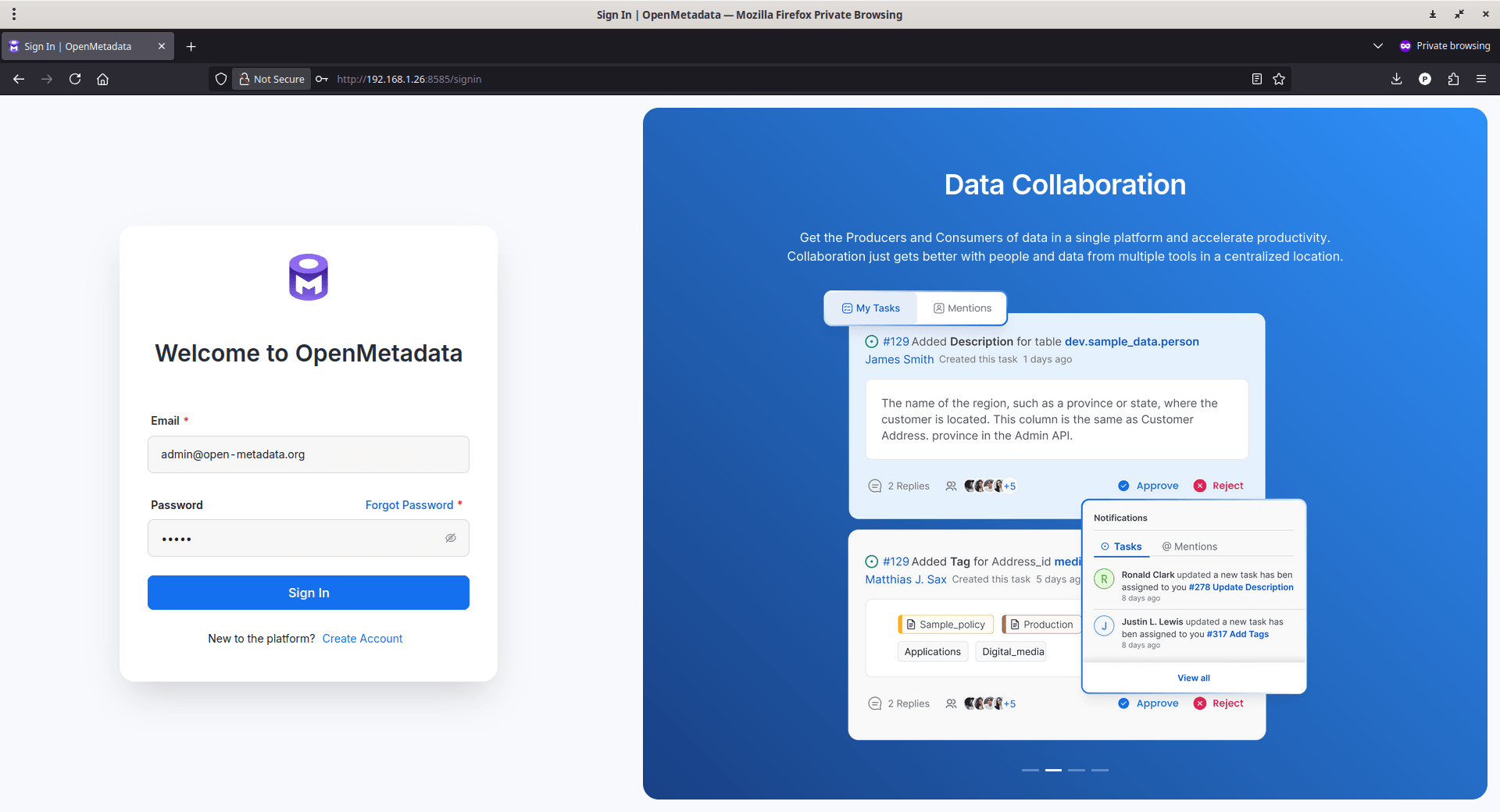
After signing in, you should see the OpenMetadata dashboard. The catalog will be empty, which is expected. OpenMetadata only displays metadata after you connect one or more supported data services and run an ingestion workflow.
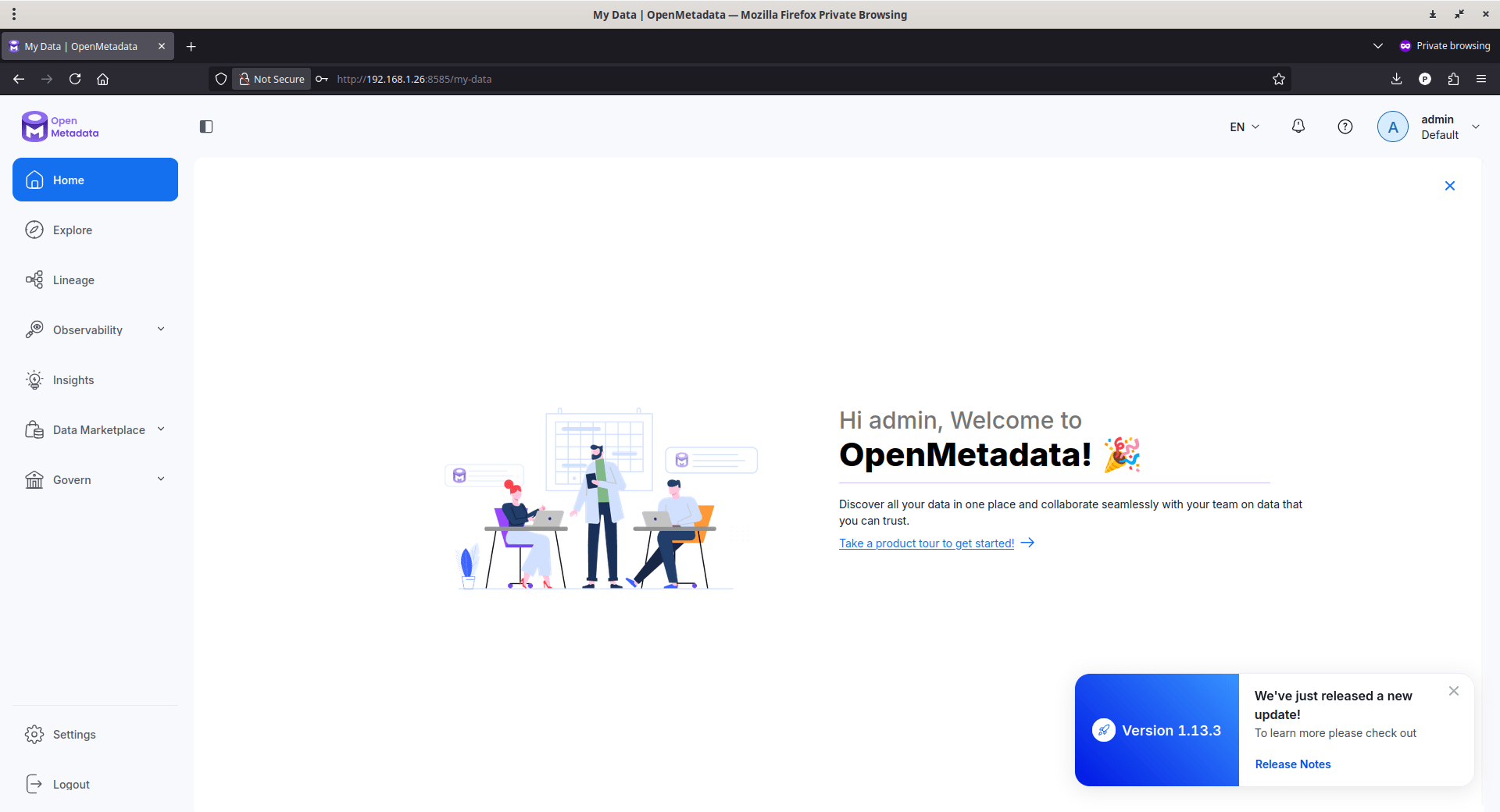
If the login page does not load, wait another minute and repeat the verification steps from the previous section. Some services, particularly Elasticsearch, may still be finishing their initialization.
Your OpenMetadata deployment is now ready. The next step is to connect your first data service and begin ingesting metadata.
Security tip: The default administrator account is intended for evaluation and testing. If you plan to keep this deployment, create your own administrator account and replace or remove the default account as part of your initial setup.
10. Log In to Apache Airflow
The OpenMetadata web interface is where you create and manage metadata ingestion workflows. In the default Docker Compose deployment, those workflows are executed by Apache Airflow, which serves as the orchestration backend. When you deploy an ingestion workflow from the OpenMetadata UI, the platform communicates with Airflow to create, schedule, and monitor the corresponding workflow.
Open your browser and navigate to the following URL to open the Airflow Web Interface:
http://<server-ip>:8080
If OpenMetadata is running on your local machine, use:
http://localhost:8080
The default username and password for Airflow web interface is admin/admin.
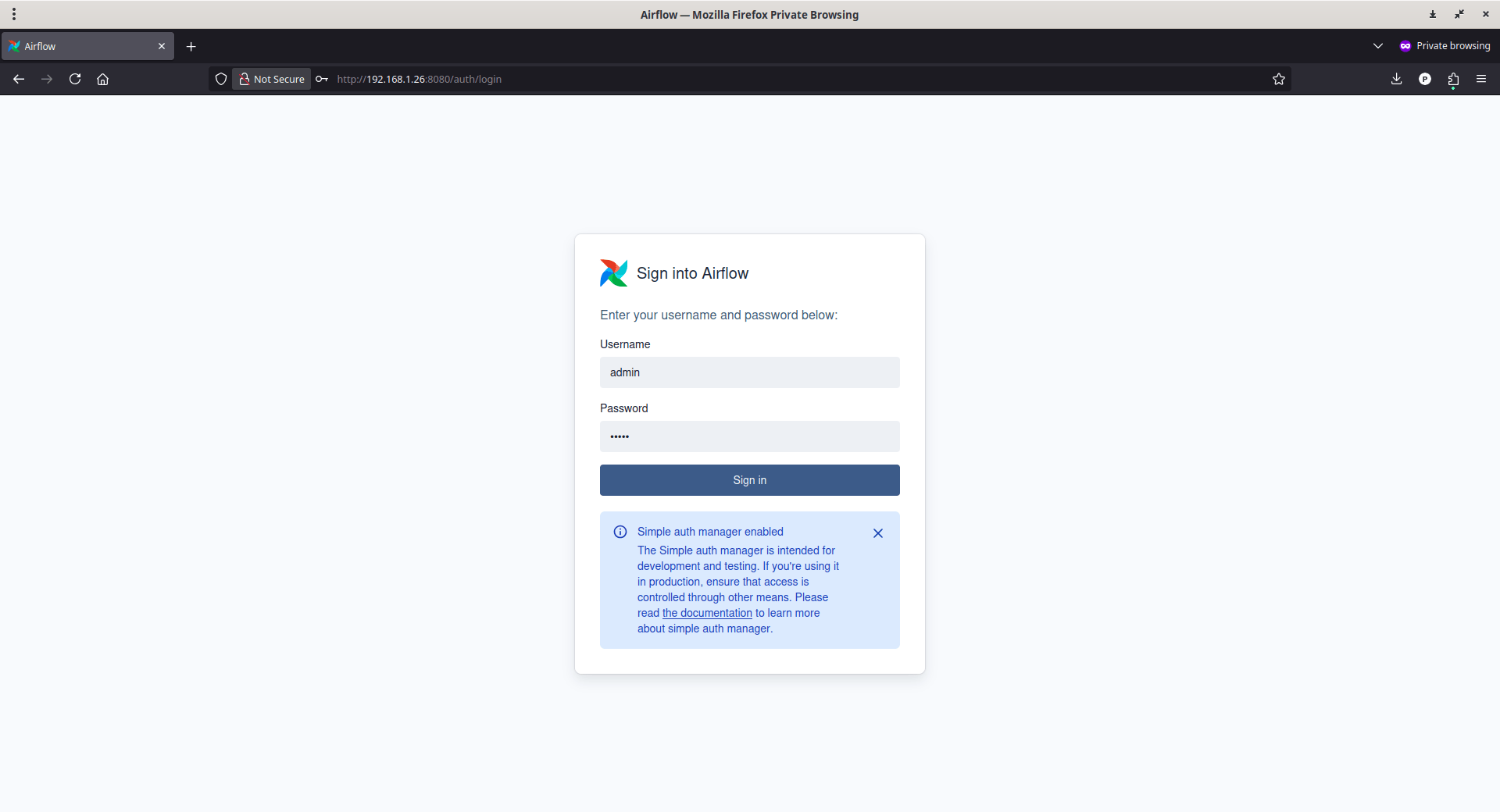
If you changed the AIRFLOW_ADMIN_USER or AIRFLOW_ADMIN_PASSWORD environment variables before deployment, use those credentials instead.
After signing in, confirm that:
- The Airflow dashboard loads successfully.
- The DAGs page is accessible.
- Sample DAGs are present.
The sample DAGs are included with the Quick Start deployment to demonstrate how Airflow orchestrates workflows. They also confirm that the Airflow instance initialized successfully.
11. Load Sample Data into OpenMetaData via Airflow
In the Airflow, you will see some sample DAGs that will ingest sample data and serve as an example.
To import sample data, go to DAGs section of Airflow dashboard, and click the Play button next to the sample_data DAG. This will download and load the prepackaged sample data into OpenMetaData.
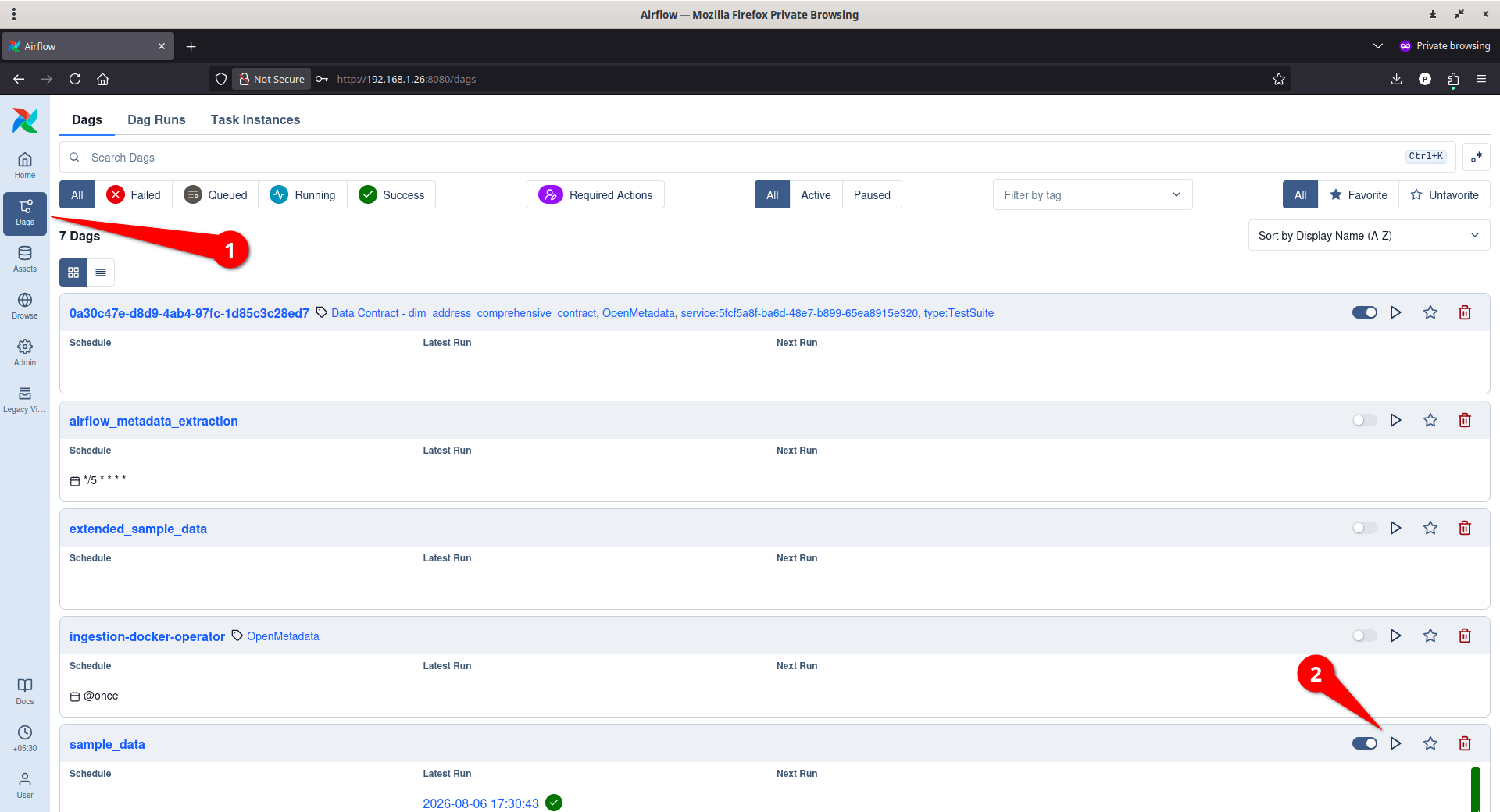
Now go back to your OpenMetaData dashboard to verify the imported sample data.
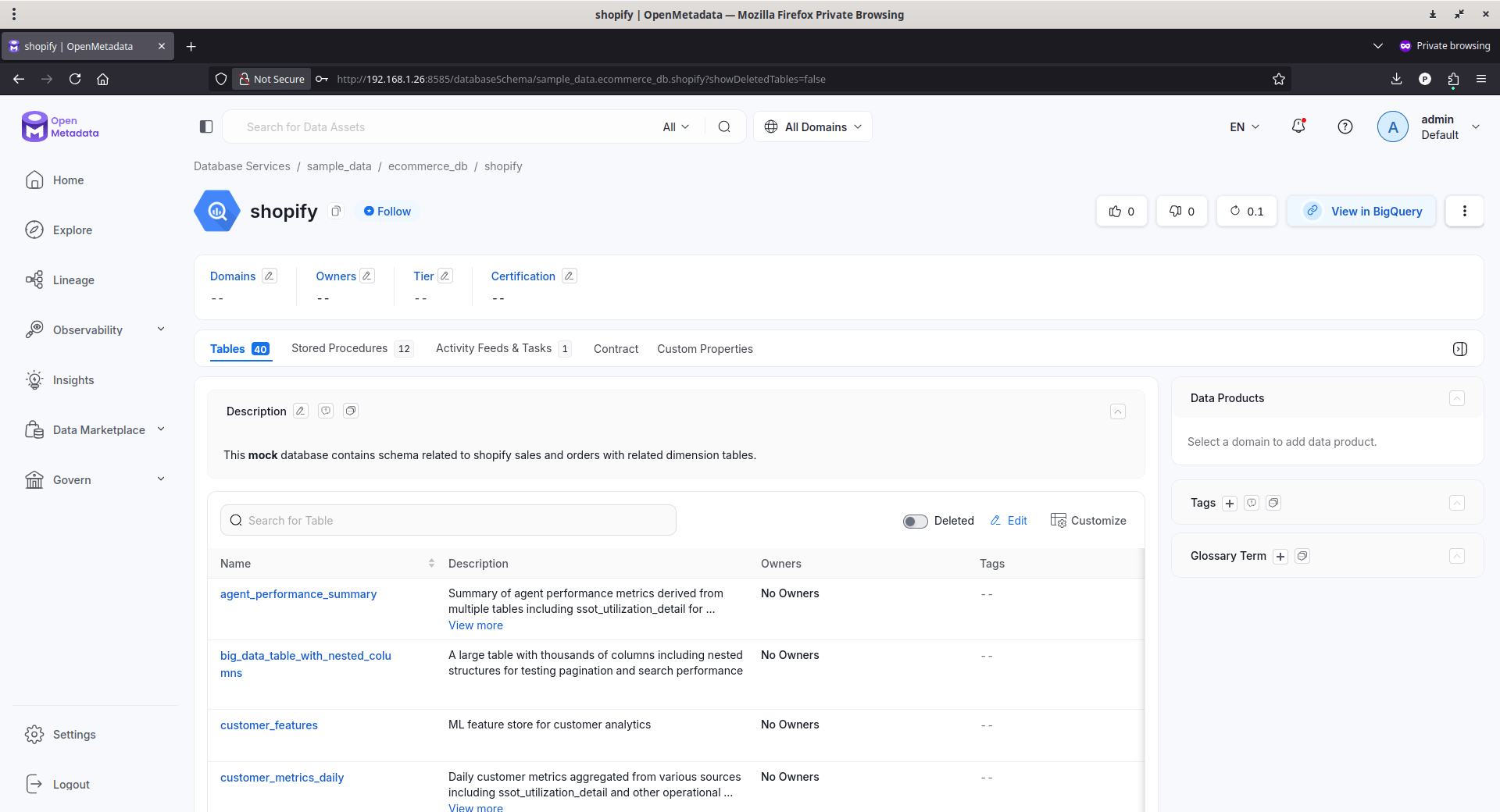
As you can see, there is a mock database contains schema related to Shopify sales.
Explore all options in both OpenMetaData and Airflow and get familiar with. For basic usage, the get started guide is enough. To deep dive into OpenMetaData, we recommend you to read the Admin and Data user guides linked below:
12. Troubleshooting
If you cannot access the Airflow web interface, verify that the Airflow container is running.
docker ps
If the Airflow container is missing or repeatedly restarting, inspect its logs.
docker logs <airflow-container-name>
If the Airflow UI is available but an ingestion workflow does not appear after deployment, review the Airflow logs and the OpenMetadata server logs for errors. Because Airflow is responsible for deploying and executing ingestion workflows in the Docker Compose Quick Start, failures are typically reflected in one or both of these services.
Features That Actually Matter
OpenMetadata includes many capabilities, but you do not need all of them on day one. The features that deliver the most value are the ones that help you find and understand your data more quickly.
1. Finding Things Quickly
Search is the feature you'll probably use the most.
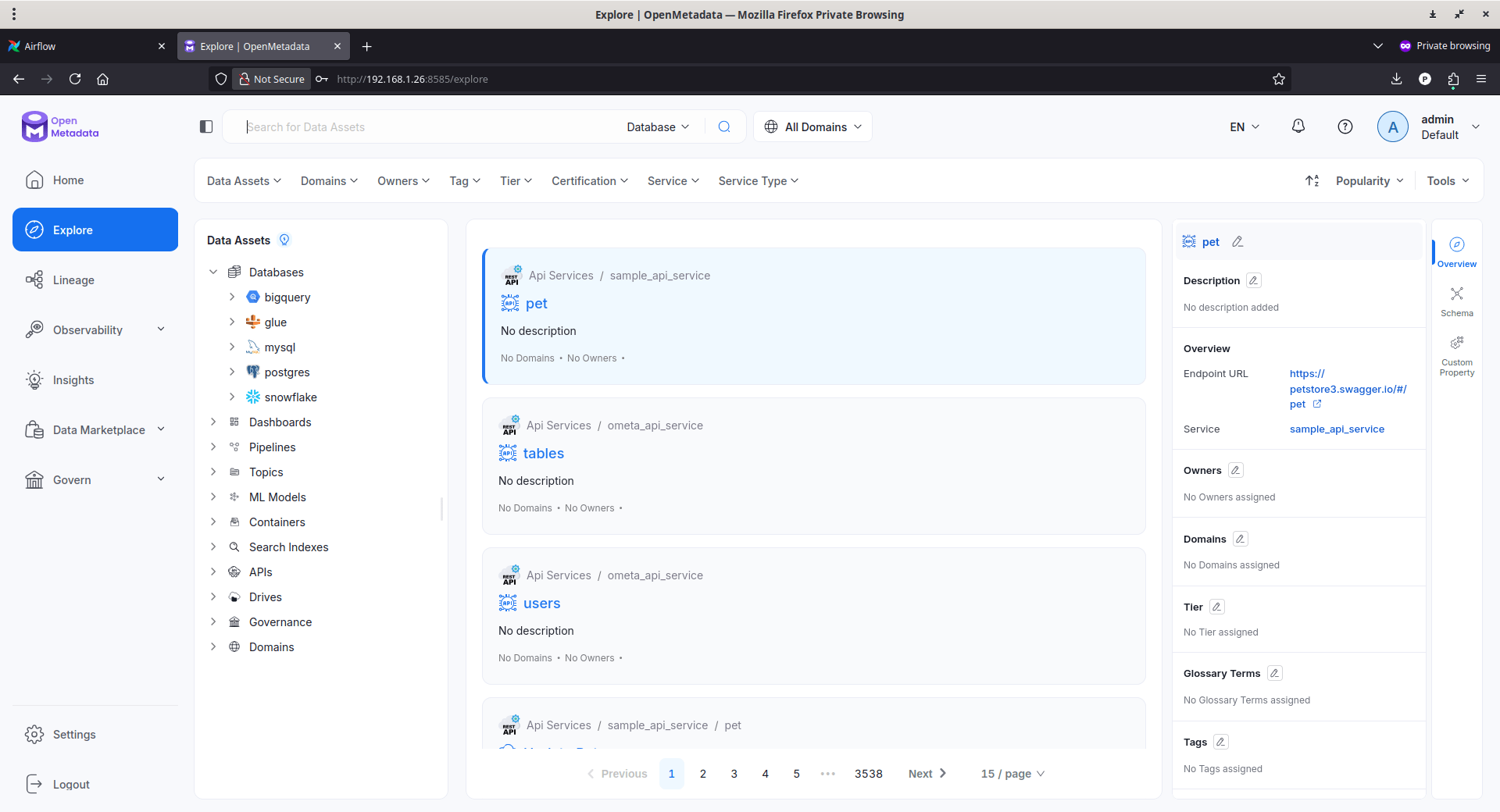
As your environment grows, remembering where a table lives becomes difficult. You may remember part of its name, a column name, or a description, but not the database that contains it.
OpenMetadata indexes metadata so you can search across databases, tables, views, dashboards, pipelines, glossary terms, tags, users, teams, and other supported assets from a single interface. You can also narrow the results using filters such as asset type, service, owner, or tag.
That means less time browsing databases and more time finding the information you need.
2. Organizing Metadata with Tags
Finding an asset is only the first step. You also need a way to organize it.
Tags let you classify assets using labels that fit your environment. For example, you might tag production systems, archived datasets, or assets containing personally identifiable information (PII).
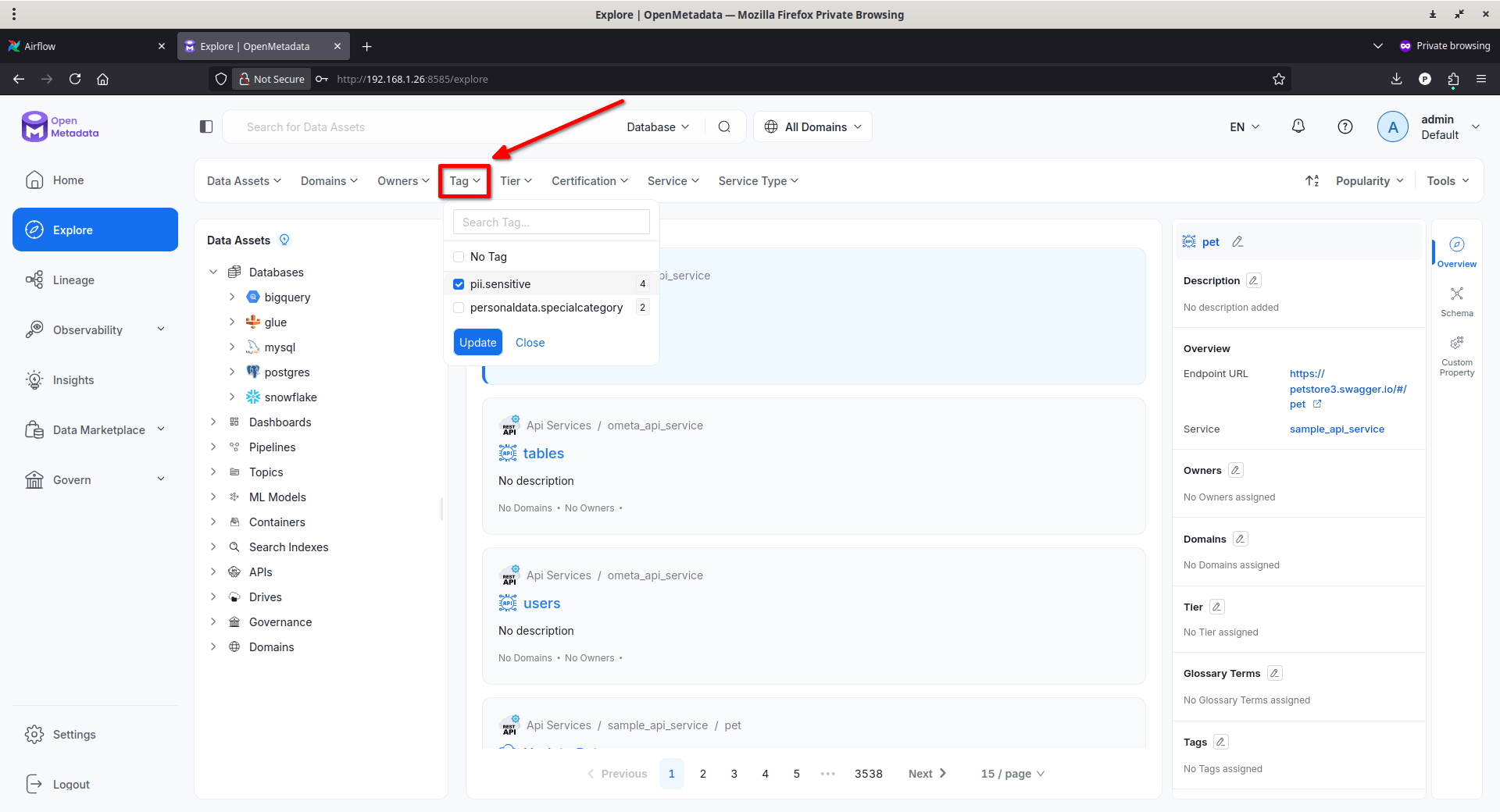
Because tags are indexed, they also improve search and make it easier to group related assets without changing the underlying databases.
3. Understanding Dependencies
Finding a table is only the first step. Before changing it, you need to understand what depends on it.
Data lineage captures the relationships between data assets. It shows where data comes from, how it moves through pipelines, and which downstream tables, dashboards, or other assets depend on it. OpenMetadata supports both table-level and column-level lineage, giving you a clearer picture of how changes flow through your environment.
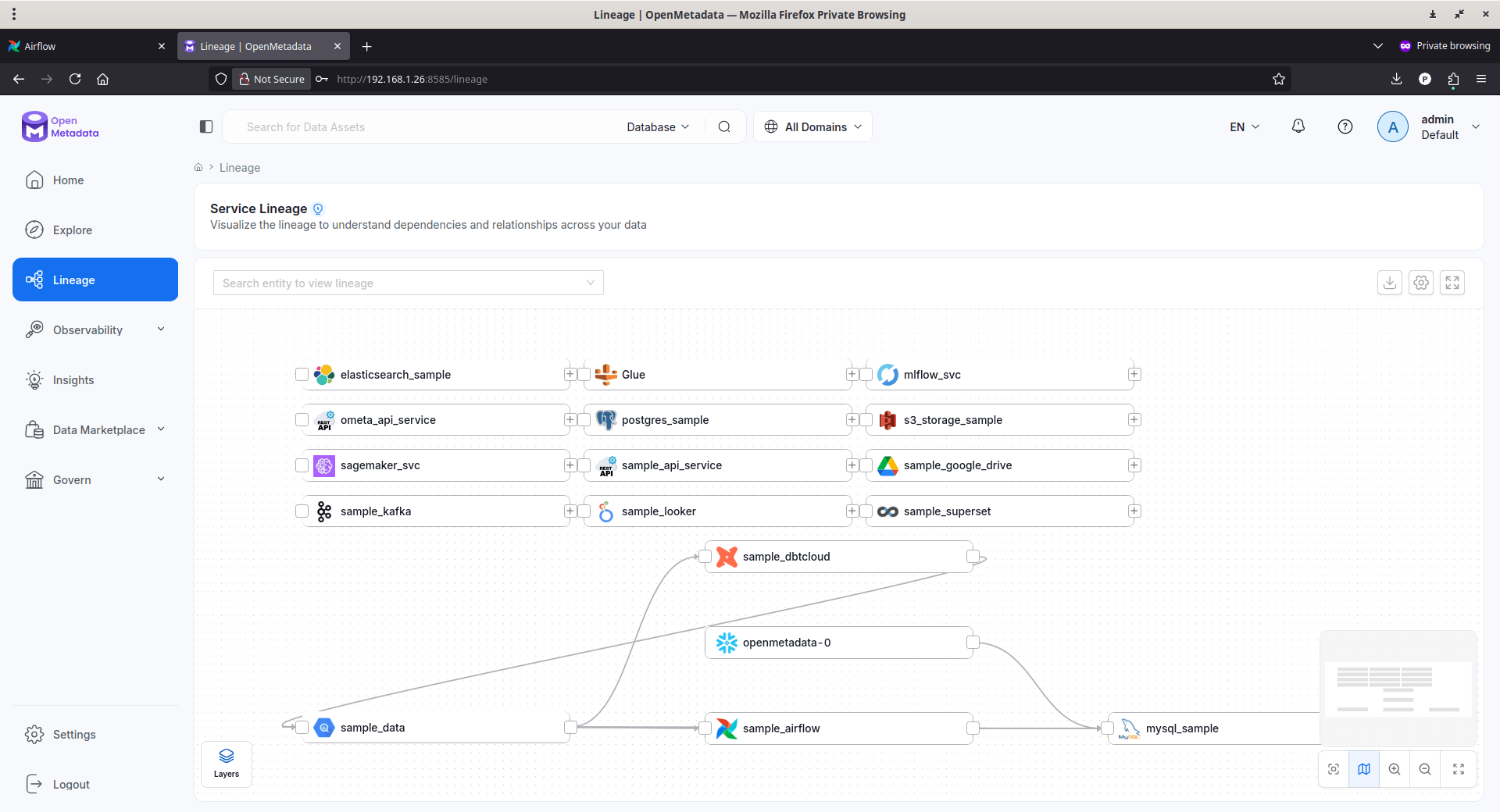
That context makes impact analysis much easier. Before renaming a column, modifying a table, or retiring a pipeline, you can identify the downstream assets that may be affected. Instead of discovering problems after a deployment, you can investigate them before making the change.
OpenMetadata also lets you assign owners to assets. Ownership gives every dataset, dashboard, or pipeline a clear point of contact. When you have a question or need approval for a change, you know who to ask instead of searching through source code or internal chat history.
4. Documenting What Matters
Every long-running system accumulates knowledge that exists only in someone's memory.
OpenMetadata lets you add descriptions to databases, schemas, tables, columns, dashboards, pipelines, and other assets. Those descriptions become part of the metadata catalog and are included in search results, making it easier for others to understand what an asset does and why it exists.
The best documentation is often the simplest. A short description explaining the purpose of a table or the meaning of a column can save someone from reading application code or reverse-engineering a schema.
Together, search, tags, and documentation solve a common problem. They make your data easier to discover, easier to understand, and easier to maintain.
5. Preventing Mistakes
Most production problems are caused by missing context rather than missing data.
A table without a description forces people to guess its purpose. A business term without a shared definition can lead to inconsistent reports. A dataset that has not been updated recently may still appear trustworthy even when it is no longer suitable for decision-making.
OpenMetadata helps reduce that uncertainty.
Descriptions explain the purpose of an asset. A Business Glossary gives business terms a shared definition so everyone uses the same language. Freshness and other reliability signals help you understand whether a dataset is current enough to trust before you use it.
These features do not prevent mistakes automatically. They help people make informed decisions by providing the context that databases alone cannot.
6. Helping Your Future Self
The biggest benefit of a metadata catalog usually appears months after you install it. Six months from now, you may not remember why a table exists, who created it, or which dashboards depend on it. New team members almost certainly will not.
OpenMetadata preserves that knowledge alongside the assets themselves.
Instead of reconstructing information from SQL scripts, Git history, tickets, and chat messages, you can search the catalog, review descriptions, inspect lineage, identify the owner, and understand how an asset fits into the rest of your environment.
This also improves disaster recovery. Restoring a database is only part of the process. You also need to understand how that database connects to applications, pipelines, dashboards, and other systems. A metadata catalog preserves that operational context.
The longer you use OpenMetadata, the more valuable it becomes. Every description, owner assignment, glossary term, and lineage relationship captures knowledge that no longer has to live in someone's memory. Over time, that shared knowledge becomes just as valuable as the data itself.
Common Mistakes to Avoid
Installing OpenMetadata takes minutes. Building a catalog that remains accurate and trustworthy takes consistent maintenance.
Treat the catalog as part of your infrastructure rather than a one-time deployment. The time you invest in ownership, documentation, backups, and regular ingestion will pay for itself as your environment grows.
If I were setting up a new instance today, these are the mistakes I'd avoid.
1. Connecting Every Data Source Immediately
It is tempting to connect every database as soon as the platform is running.
Start with one or two important systems instead.
Learn how services, ingestion workflows, ownership, and documentation work before expanding the catalog. A smaller catalog with accurate metadata is more valuable than a large catalog filled with incomplete information.
2. Leaving Ownership Until Later
Ownership is easy to postpone because the platform works without it.
That usually becomes a problem later.
When a dataset has no owner, simple questions become difficult to answer. Nobody knows who maintains it, who should approve changes, or who to contact when something looks wrong.
Assign owners as you add new assets. It is much easier than documenting everything months later.
3. Skipping Backups
Over time, your metadata catalog becomes a valuable knowledge base.
Descriptions, ownership, glossary terms, and other metadata often represent work that cannot be recreated quickly. Include the OpenMetadata metadata database in your regular backup strategy so you can recover that information if something goes wrong. The search index can be rebuilt from the stored metadata if necessary.
4. Running Without HTTPS
The Docker Compose Quick Start is designed for evaluation.
If other people will access your OpenMetadata instance, place it behind a reverse proxy and enable HTTPS before using it in a shared environment. Encrypting traffic protects credentials and metadata while following standard production security practices.
5. Forgetting to Schedule and Monitor Metadata Ingestion
A metadata catalog is only useful if it reflects your current environment.
Schedule ingestion workflows to run regularly, and check that they continue to succeed. Failed ingestion jobs can leave the catalog outdated even though the OpenMetadata server is running normally.
6. Underestimating Infrastructure Requirements
OpenMetadata is only one part of the deployment.
The metadata database, search engine, and ingestion service also require resources. As the catalog grows, search indexing becomes more demanding, so plan capacity for the entire stack rather than sizing the server for the OpenMetadata application alone. The official production guidance includes separate resource recommendations for the server, database, search engine, and ingestion components.
Running OpenMetadata Long-Term
Deploying OpenMetadata takes only a few minutes. Keeping it reliable requires ongoing maintenance.
As your catalog grows, it becomes part of your infrastructure. Treat it like any other production service by keeping it updated, protecting its data, monitoring its health, and planning for growth.
1. Keep the Platform Updated
OpenMetadata releases new versions that include bug fixes, security updates, connector improvements, and new features.
Before upgrading, review the release notes and confirm that your deployment meets the supported version requirements.
Always back up the metadata database first because OpenMetadata performs database schema migrations during upgrades.
After upgrading, follow any required post-upgrade tasks, such as rebuilding search indexes or redeploying ingestion pipelines, if the release notes require them.
If possible, test upgrades in a non-production environment before applying them to your primary deployment.
2. Protect Your Metadata
Containers are temporary. Your metadata is not.
Persistent Docker volumes ensure that data survives container restarts and recreations, but they do not replace backups. Include the metadata database in your regular backup strategy so you can recover your catalog after hardware failures, accidental deletion, or unsuccessful upgrades.
The metadata database is the source of truth. It stores your catalog, descriptions, ownership, glossary terms, lineage, and other governance information. The search index primarily supports discovery and can generally be rebuilt from the metadata stored in the database.
3. Monitor the Entire Stack
A running container does not always mean a healthy deployment.
Monitor the OpenMetadata server, the metadata database, the search engine, and the ingestion service.
Review scheduled ingestion workflows regularly to confirm they continue completing successfully. A failed ingestion workflow can leave the catalog outdated even though the web interface continues to operate normally.
Also monitor CPU usage, memory consumption, disk space, and application logs. Small issues are much easier to resolve before they affect users.
4. Secure Access
The Docker Compose Quick Start is intended for evaluation.
For a long-term deployment, place OpenMetadata behind a reverse proxy such as Nginx, Apache HTTP Server, or Traefik.
Terminate HTTPS at the reverse proxy using a trusted TLS certificate, and expose only the services that need to be publicly accessible. The official documentation includes an example Nginx reverse proxy configuration.
If the server is accessible over the internet, keep the operating system updated, secure SSH access, and enable a firewall to limit inbound traffic.
5. Plan for Growth
Resource requirements increase as your environment expands.
The OpenMetadata server, metadata database, search engine, and ingestion service all consume CPU, memory, and storage. As you connect more data sources, ingestion workloads increase and the search index grows. Monitor resource usage over time and scale the entire stack, not just the OpenMetadata server.
If you expect long-term production use, consider moving from the bundled Quick Start services to managed or dedicated PostgreSQL/MySQL, Elasticsearch/OpenSearch, and an external ingestion service, as recommended by the official deployment guide.
OpenMetadata becomes more valuable as it accumulates knowledge about your environment. Regular upgrades, reliable backups, healthy ingestion workflows, and routine monitoring ensure that knowledge remains accurate, searchable, and available when you need it most.
Frequently Asked Questions (FAQ)
A: OpenMetadata is an open-source metadata platform used to catalog databases, document schemas, track data lineage, assign ownership, and improve data governance across data platforms.
A: Yes. OpenMetadata provides an official Docker Compose deployment that allows you to self-host the platform on Linux servers such as Ubuntu for development and evaluation, with production deployment options available for larger environments.
A: Yes. The standard deployment uses Elasticsearch for indexing and search. Production deployments may also use supported OpenSearch configurations depending on the version and deployment architecture.
A: The official Quick Start can run on modest hardware for testing, but production deployments require significantly more resources. Memory requirements depend on the number of connected services, metadata volume, and search indexing workload.
A: Yes. OpenMetadata is released as open-source software under the Apache 2.0 license.
Final Thoughts
Installing OpenMetadata will not organize your infrastructure for you. It will not rename tables, remove unused databases, write documentation, or decide who owns a dataset. Those are still your responsibility.
What it does is provide the context that is often missing.
Instead of treating databases, pipelines, dashboards, and services as isolated systems, you can see how they relate to one another. Dependencies become visible. Ownership becomes clearer. Changes become easier to evaluate because they are based on context instead of assumptions.
That is the real value of a metadata catalog.
As your environment grows, it accumulates knowledge. Some of that knowledge lives in documentation. Some lives in source code. Much of it exists only in people's memory. A metadata catalog brings that knowledge together, makes it searchable, and keeps it connected to the systems it describes.
Whether you manage a homelab, a startup, or a large data platform, the goal is the same. Spend less time figuring out how your systems fit together and more time improving them.
The software is only the starting point. The real benefit comes from understanding your environment well enough to make confident decisions as it grows. That understanding is what metadata provides, and it is why maintaining a metadata catalog becomes more valuable every year.
Resources:
