
Some good things take a little longer to arrive! Here is one such good news that will make your daily computer use so much smoother. The Plasma desktop 6.5.0 now has a fantastic new feature: saved clipboard items!
This isn't just any update; this is a feature that people have wanted for 22 long years, making it possibly the oldest request ever implemented in KDE! Wow!
Table of Contents
Say Goodbye to Copy-Paste Frustration!
Think about it. How often do you copy and paste the same bits of text? Maybe it's your email address, your phone number, a shipping address, or even a specific code snippet.
Before this update, these useful items would quickly disappear from your clipboard history as you copied new things. Then, you'd have to find them again, which was a real hassle.
Well, those days are over!
Now, Plasma's clipboard lets you mark your most-used entries as favourites, keeping them safe and sound.
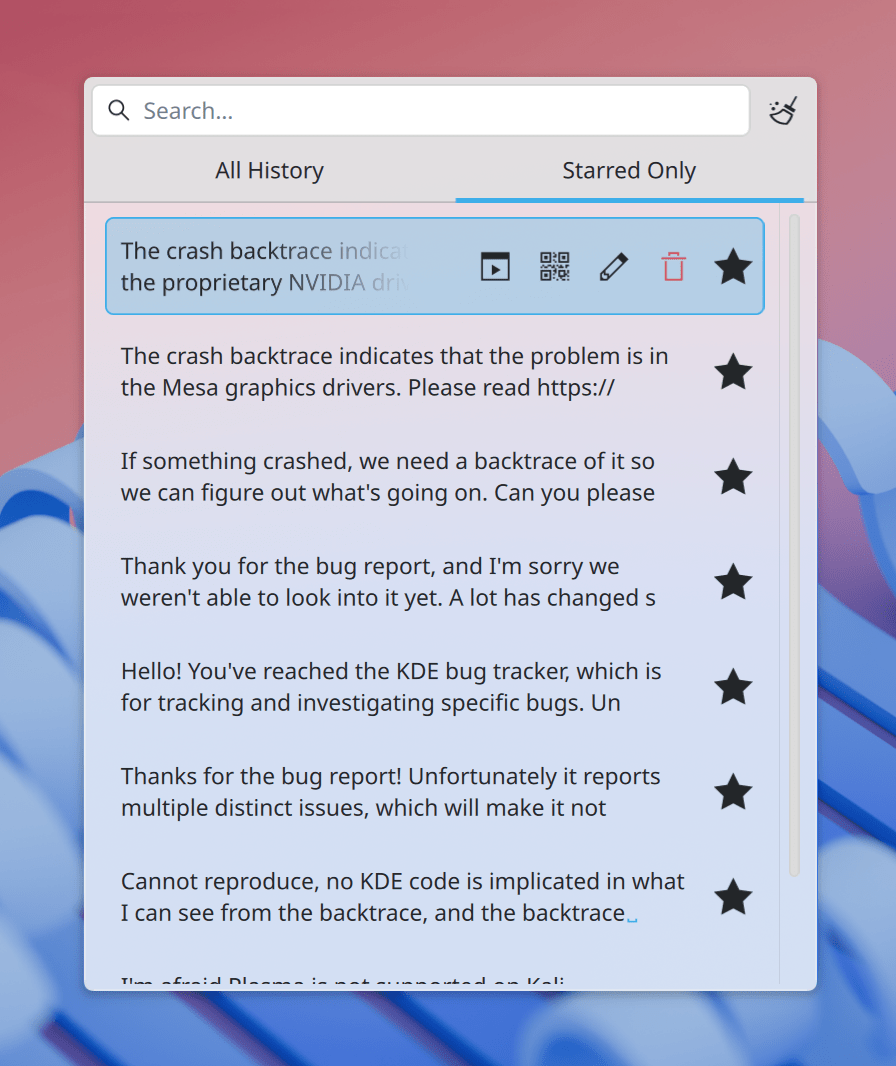
You can permanently save these items, meaning you can always access them easily, whenever you need them.
This feature is a great boost for your productivity!
How Does This Magic Work?
It's super simple! Here's what you'll find with the new saved clipboard items:
- A handy "star" button: Every item in your clipboard history now has a neat star icon, just like in Gmail. You can easily click this star to mark any entry as a favourite or un-star it if you no longer need it.
- Your starred items stay put: What makes these starred items so special? They're protected! Klipper, the clipboard manager, won't automatically clear them away, even when it prunes old history. So, your important snippets stay right where you want them. Don't worry, you can still delete them if you wish, either one by one or in bigger groups, but Plasma will ask you to confirm first, just to be safe.
- A clear, two-tab view: The clipboard's look is updated with a simple two-tab layout. One tab shows "All History", which is your full clipboard history, just like before. The other tab, "Starred Only", displays only the items you've marked as favourites. This makes finding your important bits of text a breeze!
This smart new function builds on ideas like "pinned items" that the community talked about for a long time.
It really gives you a more intuitive and efficient way to manage all your important clipboard content.
A Long Journey to an Amazing Feature
It's incredible to think that the request for this feature, Bug 54212, first appeared way back on February 6, 2003.
Over the years, many people echoed the need for "persistent", "sticky", or "pinned" items. Users wished for ways to freeze items, store frequently used content, and have permanent entries for things like email addresses and bank accounts.
They even suggested ideas like dedicated sections for these items or assigning hotkeys.
This feature finally made its way into Plasma 6.5.0, thanks to the dedicated work of folks like Kendrick Ha and Nate Graham.
It's a wonderful example of how the KDE community listens and keeps working to bring the best features to you, no matter how long it takes!
But Wait, There's More! Even More Features in New Plasma 6.5!
Besides the fantastic clipboard improvements, Plasma 6.5.0 brings a whole bunch of other exciting new features and enhancements. The KDE team really packed a lot into this release!
- Drawing Tablet Superpowers: If you use a drawing tablet, you'll love this! Plasma now lets you configure touch rings on your drawing tablet, making your creative workflow even smoother.
- Easier Driver Installs: Discover, your go-to app store, now helps you even more. It lets you install hardware drivers that your operating system offers directly from its package repositories!
- Smarter Searches with KRunner: KRunner, that handy mini-command line, gets even better. Now, KRunner and its searches can find global shortcuts, so you can quickly remember or discover hotkeys. It also uses fuzzy matching for applications, meaning it understands what you mean even if you don't type the exact name.
- Better Discover Experience: Discover now shows improved, user-friendly error messages, making it easier to understand what's happening. Plus, you can write reviews for apps that don't have any reviews yet, helping others find great software!
- Power Savings with Overlay Planes: On computers with a single screen, Plasma now supports "overlay planes." This fancy tech can significantly reduce your GPU and power usage for compatible apps that show full-screen content. (Just a heads-up: NVIDIA graphics cards aren't included yet due to some driver issues).
- Seamless Drag-and-Drop: You can now drag and drop items to and from popups that come from Firefox extensions and other similar systems. This makes interacting with your web browser and other apps much more fluid.
- Smarter Panels: Panels that use Auto-Hide, Dodge Windows, or Windows Go Below modes will now properly respect your opacity setting, so they look just how you want them to.
- Better Bluetooth Memory: Plasma is now much better at remembering if you wanted Bluetooth on or off when you log in, saving you a small but annoying step.
Give It a Try Today!
Go ahead, update to Plasma 6.5.0, and start enjoying all these fantastic new features, including starring your most important clipboard items!
For more details, please check the official KDE blog post in the link below:
