
Ubuntu is making a big change in how they collect your system's data! Starting with Ubuntu 25.10, Canonical is phasing out the old data collection tool, Ubuntu Report, and replacing it with a modernized system called Ubuntu Insights.
This shift brings greater transparency, flexibility, and control over how you share diagnostic metrics. Ultimately, this entire system helps make Ubuntu better for everyone.
If you want to understand why this data collection exists, what metrics it gathers, and how you manage your consent, read on.
Table of Contents
Why Telemetry is Important for Ubuntu Development
We all know that users deeply value their privacy. At the same time, insights from aggregated data are genuinely useful for developers and publishers.
The main purpose of collecting this information is to help improve Ubuntu.
Data allows developers to focus engineering efforts on what matters most to users. For example, hardware and display specifications guide performance and design optimizations.
Furthermore, data about partition types or encryption use helps developers understand how users implement cryptographic features to stay secure.
The collected information also helps advocate for Ubuntu. It demonstrates to hardware manufacturers that strong demand exists for Linux support.
Canonical always uses this data in aggregate. The process is designed intentionally so that reports cannot link to specific Ubuntu installations.
More importantly, Canonical never uses this information to build personal profiles or for targeted advertising or sales.
The Core Principles of Ubuntu Insights
Canonical's approach to diagnostics data centers on three key principles:
- Informed consent,
- Openness,
- User control.
1. Telemetry is Always Opt-In
Collection is strictly opt-in. You must actively consent to share your system data. If you opt out of data sharing, the system only sends a simple opt-out flag to the servers.
If you used the old Ubuntu Report system, your previous consent decisions do not carry over to the new Ubuntu Insights system. You get asked again so you can make an informed decision about the new tool.
2. You Can Always See the Data
Ubuntu Insights offers maximum transparency. The system stores every report locally on your disk in plain text. Therefore, you can always inspect exactly what data the system plans to send.
For fresh installations, you can preview the initial report during setup. You can generally find both pending reports and copies of uploaded reports at the ~/.cache/ubuntu-insights/ directory.
What's New: Key Changes with Ubuntu Insights
Ubuntu Report was the previous tool, but it became difficult to maintain and lacked flexibility. Its server components were also closed source. Ubuntu Insights fixes these issues and offers several functional improvements.
1. Open Source Server Components
The entire system is much more transparent now. Canonical is open-sourcing the server services used to process incoming information. This increases accountability regarding the pipeline your data goes through.
Canonical also provides a Juju Charm, called the Ubuntu Insights K8s-Operator, used for deploying and managing the server components on Kubernetes.
2. Collection and Upload Are Separate Steps
Ubuntu Insights separates the collection and upload steps into independent events. This provides a grace period of about one week between collection and uploading.
During collection, the report generates and stores locally in a plain-text JSON file. You have time to review this information before it leaves your machine.
Importantly, the system checks your consent status at both the collection time and the upload time. If you revoke consent during this period, your system information will not go to Canonical.
3. Periodic Collection for Better Trends
The frequency of collection has also changed. In the old system, data was generally sent only at initial setup or during an upgrade. Now, in addition to initial setup, collection occurs periodically, once per month.
This new methodology provides more consistent and up-to-date data, which helps developers react faster to trends.
What Information Does Ubuntu Insights Collect?
When you consent, the system collects detailed, non-personally identifiable hardware and software metrics. This data helps developers tailor the Ubuntu experience for typical user setups.
The reports cover several areas, including:
- Hardware: Information about your CPU (name, vendor, cores, architecture), memory size, and details about disks and GPUs. Reports also record details about screens, including physical resolution and refresh rate.
- System Details: Details like the BIOS vendor and version, and OEM Manufacturer information.
- Software and Locale: Your OS distribution and version (e.g., Ubuntu 25.10), language setting (e.g.,
en_US), and timezone (e.g.,EDT). - Platform: Details about your desktop environment (e.g.,
ubuntu:GNOME), session type (e.g.,wayland), and whether the system runs on a platform like WSL.
Managing Your Data Sharing Consent
Consent for Ubuntu Insights is currently handled per user. Although the graphical interface (GUI) prompts you during installation, you can control your consent manually at any time using the command line interface (CLI).
How to Opt In or Out Post-Installation (CLI)
You can use the ubuntu-insights consent command to manage your status.
For example, to explicitly opt in post-installation, you can run commands like this:
ubuntu-insights consent -s=true
ubuntu-insights consent linux ubuntu_desktop_provision -s=true
To opt out, simply replace true with false in those same commands.
If you want to view a freshly generated report without writing it to disk or uploading it, you can use the command:
ubuntu-insights collect -df
Sample Output from my Ubuntu 25.10 system:
{
  "insightsVersion": "0.6.2",
  "collectionTime": 1765885091,
  "systemInfo": {
    "hardware": {
      "product": {
        "family": "",
        "name": "Standard PC (Q35 + ICH9, 2009)",
        "vendor": "QEMU"
      },
      "cpu": {
        "name": "QEMU Virtual CPU version 2.5+",
        "vendor": "GenuineIntel",
        "architecture": "x86_64",
        "cpus": 2,
        "sockets": 1,
        "coresPerSocket": 2,
        "threadsPerCore": 1
      },
      "gpus": [
        {
          "device": "0x0100",
          "vendor": "0x1b36",
          "driver": "qxl"
        }
      ],
      "memory": {
        "size": 7427
      },
      "disks": [
        {
          "size": 51200,
          "type": "disk",
          "children": [
            {
              "size": 1,
              "type": "part"
            },
            {
              "size": 51200,
              "type": "part"
            }
          ]
        }
      ],
      "screens": [
        {
          "physicalResolution": "1920x1080",
          "refreshRate": "60.00"
        }
      ]
    },
    "software": {
      "os": {
        "family": "linux",
        "distribution": "Ubuntu",
        "version": "25.10"
      },
      "timezone": "IST",
      "language": "en_US",
      "bios": {
        "vendor": "SeaBIOS",
        "version": "rel-1.16.3-0-ga6ed6b701f0a-prebuilt.qemu.org"
      }
    },
    "platform": {
      "desktop": {
        "desktopEnvironment": "ubuntu:GNOME",
        "sessionName": "ubuntu",
        "sessionType": "wayland"
      }
    }
  }
}
2025/12/16 17:08:11 WARN Could not get source specific consent state, falling back to default consent state source=linux error="consent file not found\nopen /home/ostechnix/.config/ubuntu-insights/linux-consent.toml: no such file or directory"
2025/12/16 17:08:11 WARN Consent file not found, will not write insights report to disk or upload.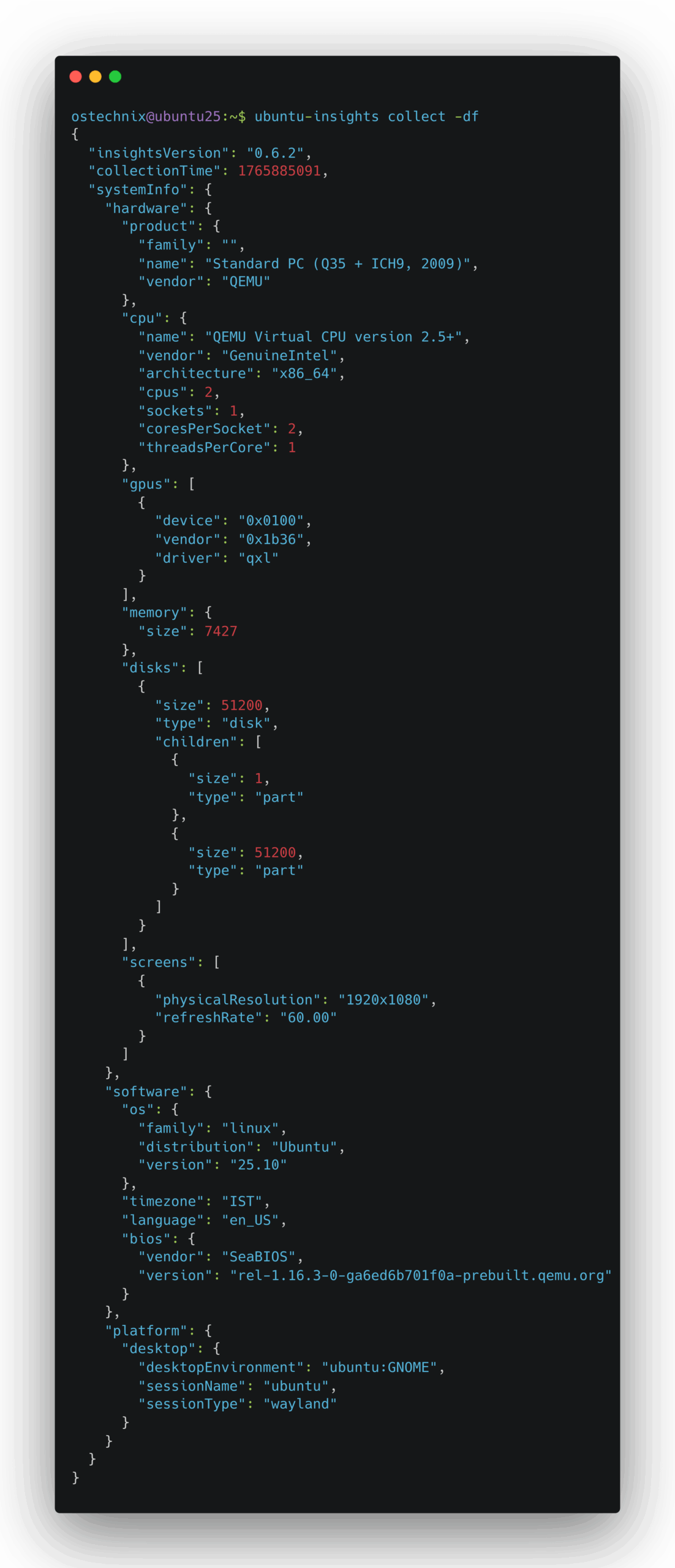
Future Control Plans
Canonical plans to make control even easier in the near future. For the Ubuntu 26.04 LTS release, the goal is to introduce a way to control your consent using simple toggles in the Settings app. This will allow you to manage your consent without ever needing the CLI tool.
For administrators who need to disable telemetry system-wide, it remains safe to simply remove the Ubuntu Insights package.
Conclusion
Ubuntu Insights shows Canonical's commitment to making development decisions based on real-world usage. By offering greater transparency and user control, the new system ensures that improving Ubuntu remains a collaborative, open process.
What do you think the new Ubuntu insights? Would you opt-out or opt-in? Share your thoughts via the comment section below.
Resource:
