
Handlers are just like regular tasks in ansible that only run when notified. Handlers are a very useful as well as important concept in Ansible.
There are two directives involved in running handler tasks.
- Notify directive which will send the trigger signal to the tasks to run.
- Handler directive under which tasks are grouped.
Let’s talk about a practical use case. Let’s say you want to write an SSH hardening playbook where you will be making some changes to the ssh config file.
As you know any configuration changes will need service restart for the changes to be effective. This is where handlers are very effective.
Once the task makes the changes in the sshd configuration file, we can send a signal to a task that will restart the sshd service.
Table of Contents
Ansible Handlers Key Points
Before diving into the hands-on part, let’s understand a few important points with respect to handlers.
- Handler tasks will only run when the parent task makes changes (changed=true).
- Handler tasks will only run at the end of each play, but there are options to run it wherever we want.
- Irrespective of how many times you call the same handler task in the play on a single host, the handler task will run only once.
- Task names should be unique. If two task has the same name, only the first task will run.
- Tasks will be executed in the order they are defined under the handler directive but not in the order called by notify directive.
Syntax
To define a handler task, notify and handler directive should be used. Notify directive will send the signal to the handler task to execute.
Below is the sample playbook. I have two tasks defined under the handler directive. To run these tasks, a notify directive is used and the task name is passed as the value.
- name: Handlers testing
  hosts: ubuntu.anslab.com
  gather_facts: false

  tasks:
    - name: Get the hostname
      shell: hostname -s
      register: hostname
      notify: print hostname
  handlers:
    - name: print hostname
     debug:
       var: hostname.stdout

    - name: print IP
     debug:
       var: IP.stdout
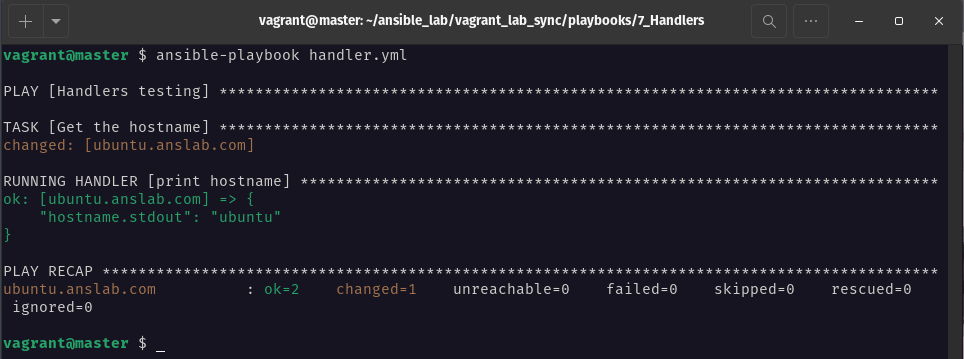
Below is the output from the playbook. Even though I have two tasks in the handler, only one task runs which is called via notify directive.
Calling Multiple Tasks
Under a single notify directive you can call multiple handler tasks. Give the handler tasks name in the YAML list format.
    - name: Get the hostname
      shell: hostname -s
      register: hostname
      notify:
        - print hostname
        - print IP
Python list notation can also be used to call multiple handler tasks.
    - name: Get the hostname
      shell: hostname -s
      register: hostname
      notify: ["print hostname", "print IP"]
Order of Execution
Handler tasks will run only at the end of the play even when it is called before any tasks.
- name: Handlers testing
  hosts: ubuntu.anslab.com
  gather_facts: false

  tasks:

    - name: Get the hostname
      shell: hostname -s
      register: hostname
      notify: print hostname

    - name: Get IP address of the hostname
      shell: hostname -I
      register: IP
      notify: print IP

  handlers:
    - name: print hostname
      debug:
        var: hostname.stdout

    - name: print IP
      debug:
        var: IP.stdout
Take a look at the above playbook. The first task (Get the hostname) is calling the handler task(print hostname). The second task is calling the second handler task(print IP).
When I run the playbook, both tasks will execute first and send the signal to the handler and the handler task will run once all the tasks are completed.
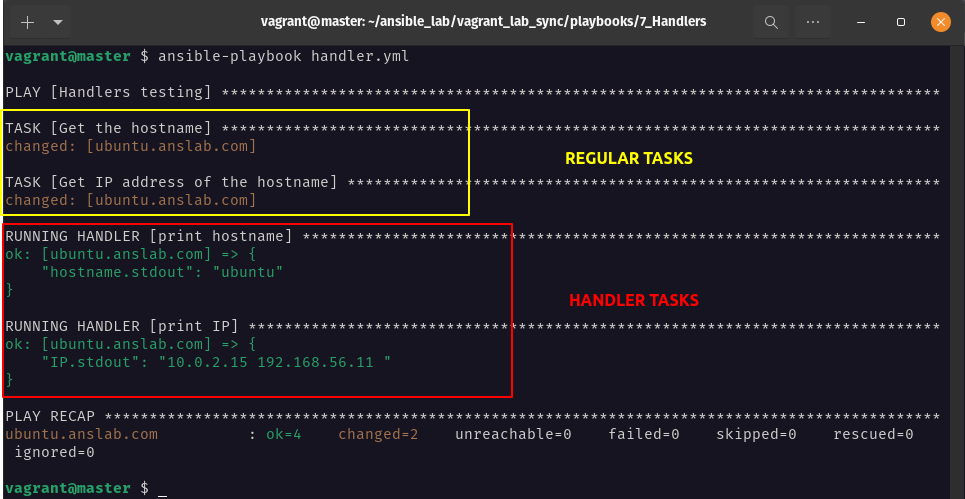
Heads Up: irrespective of how the handler task is called, it will execute in the order it is defined in the handler directive.
Run Only Once
You may call the same handler task multiple times, but the handler task will run only one time.
I am running the same playbook which I used in the previous section but modified the notify directive to call the same handler task (print hostname).
- name: Handlers testing
  hosts: ubuntu.anslab.com
  gather_facts: false

  tasks:
    - name: Get the hostname
      shell: hostname -s
      register: hostname
      notify: print hostname

    - name: Get IP address of the hostname
      shell: hostname -I
      register: IP
      notify: print hostname

  handlers:
    - name: print hostname
      debug:
        var: hostname.stdout

    - name: print IP
      debug:
        var: IP.stdout
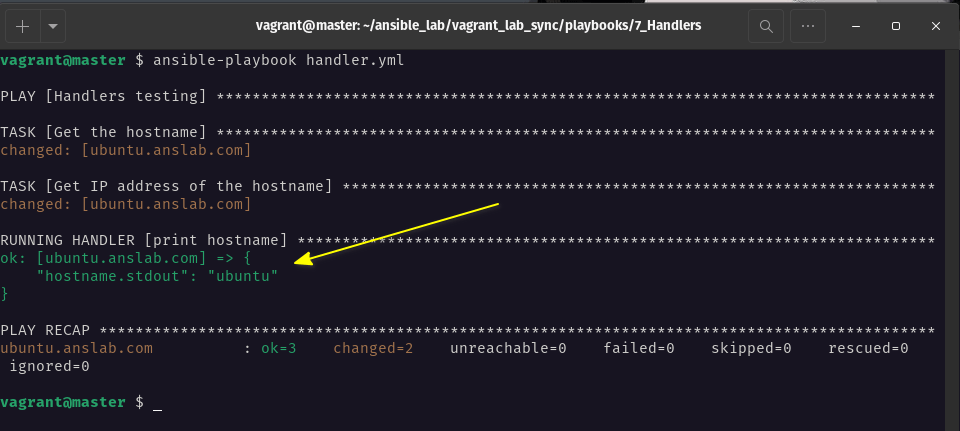
As you can see from the output below, the print hostname handler task ran only once.
Duplicate Tasks
As I said in the introduction section, you should give descriptive and unique names to the tasks. If two or more tasks are defined with the same name only the first task read by ansible will run ignoring all other tasks with the same name.
If you take a look at the below tasks, both the task names are the same. Now when I run the playbook, ansible will run the first handler task and print the IP.
  handlers:
    - name: print hostname
      debug:
        var: IP.stdout
    - name: print hostname
      debug:
       var: hostname.stdout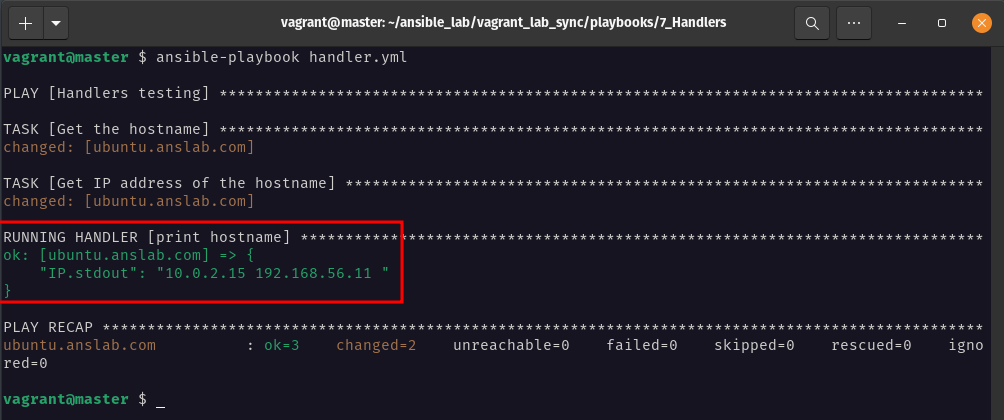
Handling Task Failures
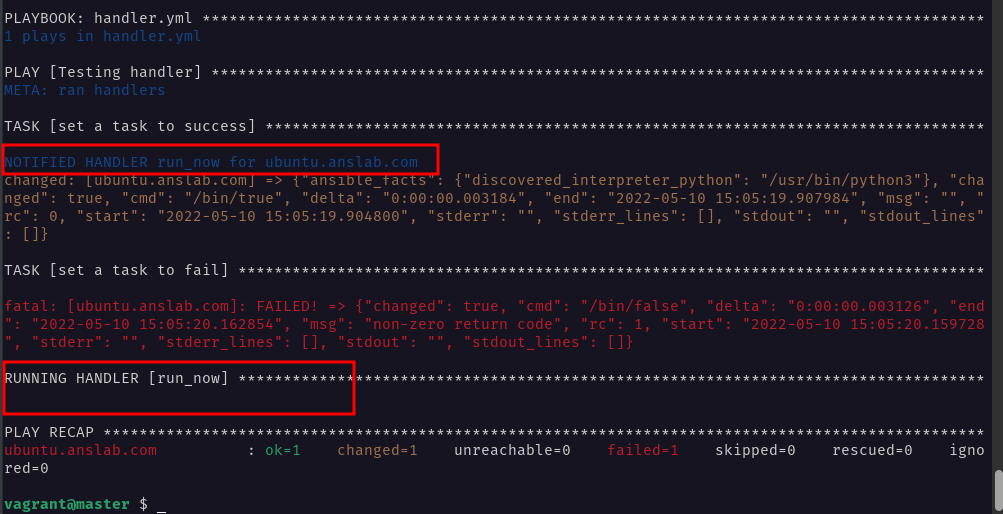
In ansible, if a task fails the subsequent tasks will not run. How handlers handle the failures is, that if any task gets failed in the particular host, then the handler task will not run for that host even if the failed task is not the parent task (notify directive).
If you can take a look at the below playbook, there are two tasks that use the shell module. The first task uses /bin/true and it will always run fine. This task calls the handler task (run_now) which simply prints a message to stdout. The second task is set to fail by using /bin/false.
- name: Testing handler
  hosts: ubuntu.anslab.com
  gather_facts: false

  tasks:
    - name: set a task to success
      shell: /bin/true
      notify: run_now

    - name: set a task to fail
      shell: /bin/false

  handlers:
    - name: run_now
      debug: msg="I am called from [ task 1 ]"
If you can see the below image, the output of the first task runs fine and a signal is sent to the handler task to run but the next task in the same host gets failed so the handler task is not running.
Let’s see how to handle task failures with different options.
1. Force Handlers
You can set the property force_handlers: true in the playbook which will run the handler task even though you have task failures.

You can also set this parameter in different areas.
- Playbook ⇒
force_handlers: true - ansible.cfg file ⇒
force_handlers = true - Command line argument ⇒
--force-handlers
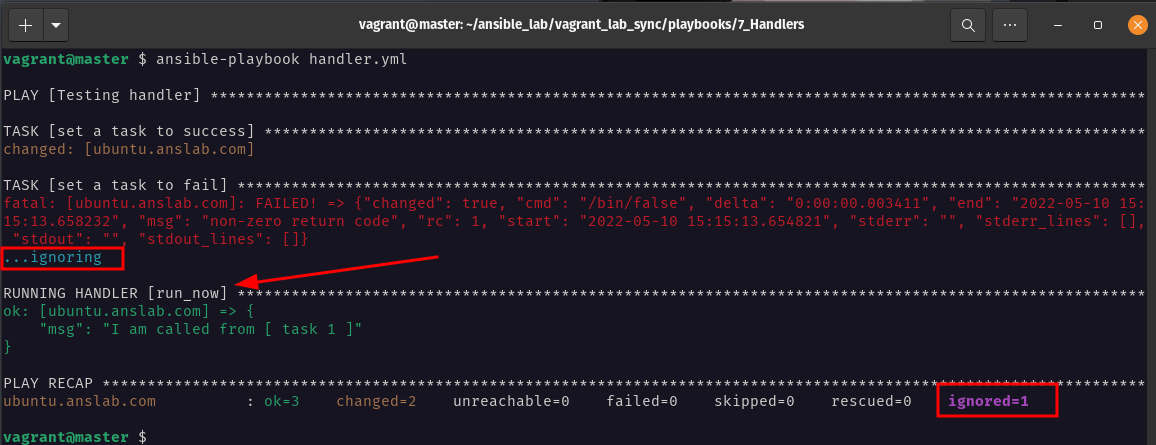
2. Ignore Errors
You can also set the property ignore_errors: true which will ignore the failed task and will execute the handler tasks.
Flushing Handler
By this time you should have understood that the handler task will run only at the end of the play. But there is a way to make it run at any point as we wish. This can be achieved through the meta module flush_handler command.
$ ansible-doc meta
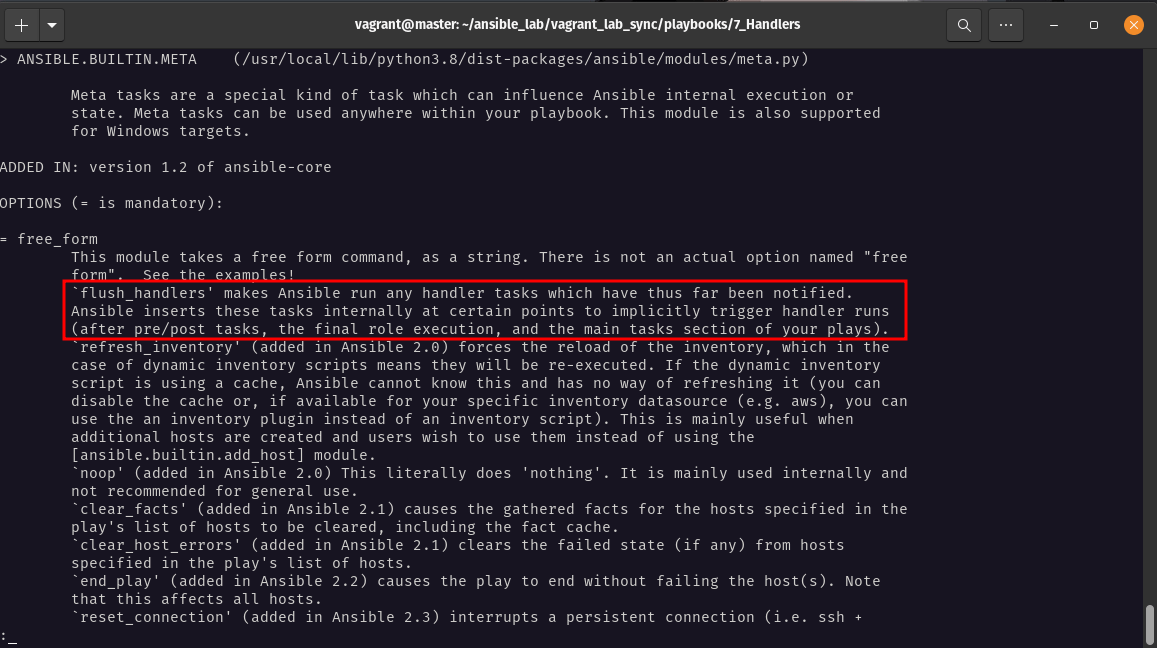
Flush_handlers will run all the tasks which already sent the signal to the notify directive.
- name: Testing handler
  hosts: ubuntu.anslab.com
  gather_facts: false

  tasks:
    - name: set a task to success
      shell: /bin/true
      notify: run_now

    - name: Run handler now
      meta: flush_handlers

    - name: set a task to fail
      shell: /bin/false

  handlers:
    - name: run_now
      debug: msg="I am called from [ task 1 ]"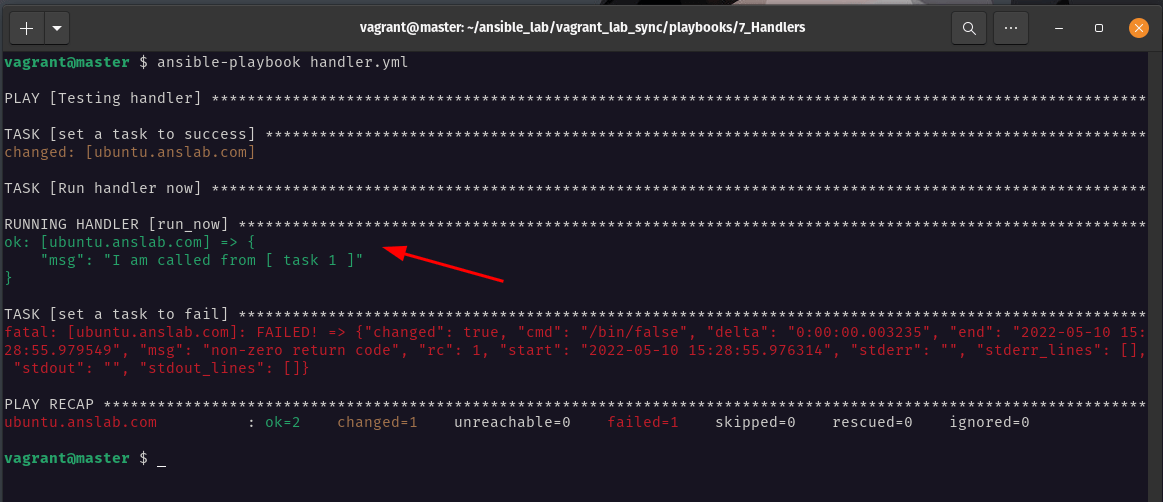
As you can see from the above output the handler task runs as the second task in the play.
Run Handler Task Using "Listen"
Till now we have triggered all the handler tasks using the task name. Using "listen", you can group multiple tasks and run all the tasks through the notify statement. This is a good alternate option for tags when using handlers.
If you see the below playbook, I have set listen to "all task" and calling it through the notify directive.
- name: Testing handler
  hosts: ubuntu.anslab.com
  gather_facts: false

  tasks:

    - name: set a task to success
      shell: /bin/true
      notify: "all task"

  handlers:

    - name: handler task 1
      debug:
        msg: This is handler task 1
      listen: "all task"

    - name: handler task 2
      debug:
        msg: This is handler task 2
      listen: "all task"

    - name: handler task 3
      debug:
        msg: This is handler task 3
      listen: "all task"
Conclusion
In this article we have seen what handlers are and how to use notify and handler directives in the ansible playbook to achieve different objectives.
We have also seen how to handle the task failures with two different options. Finally, we concluded the article with how to trigger multiple tasks using the listen directive.
Resource:
