
Ubuntu 26.04 LTS, code-named "Resolute Raccoon", officially released on April 23, 2026. If you run a desktop, a server, or a cloud workload on Ubuntu, this release is packed with many feature improvements and software updates.
Ubuntu 26.04 LTS Resolute Raccoon brings faster updates, stronger security, a fresher look, and smarter tools. Moreover, as a Long-Term Support (LTS) release, it comes with five years of free security maintenance and up to 10–15 years with Ubuntu Pro.
Whether you are upgrading from Ubuntu 24.04 LTS or exploring Ubuntu 26.04 new features for the first time, this detailed guide provides everything you need to know.
Table of Contents
What Makes Ubuntu 26.04 LTS Different?
Every two years, Canonical ships an LTS release. Unlike the six-monthly interim releases, such as 24.10, 25.04, and 25.10 all came before this one, an LTS version is built for the long haul.
Businesses, developers, and everyday users all rely on LTS releases because they receive the most thorough testing and the longest support windows.
Ubuntu 26.04 LTS is built around one core idea: you should not have to choose between innovation and reliability. The Resolute Raccoon brings modern technology to your system while keeping everything stable and predictable.
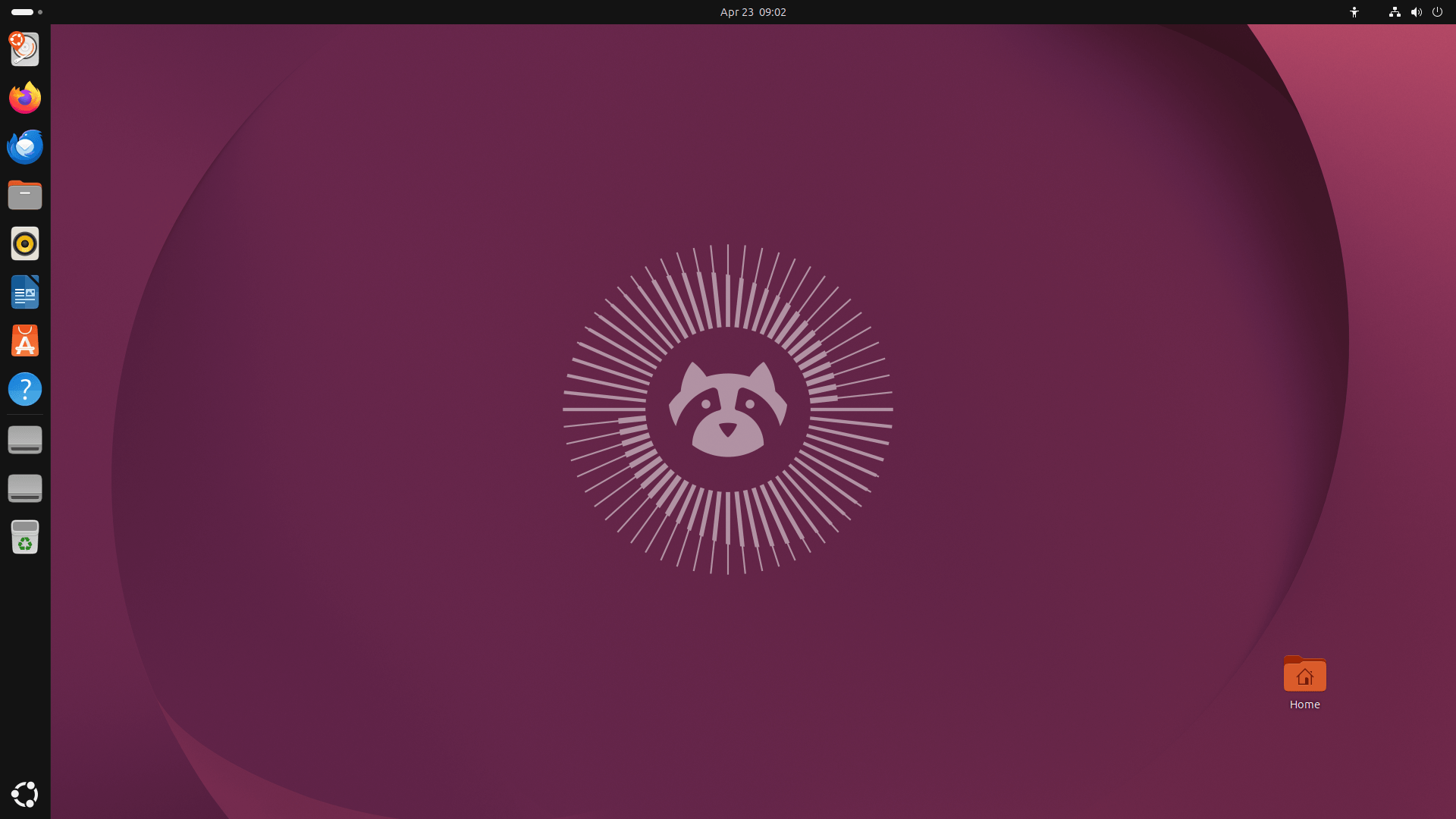
There are four big themes driving this release, and we will explore each one in detail in the following sections.
Ubuntu 26.04 LTS Security Features
Security in past Ubuntu releases often worked like a light switch. You made choices at install time and largely forgot about them. Ubuntu 26.04 LTS changes that model completely. Instead, security is now a continuous, lifecycle-wide responsibility, and the tools to manage it are always at your fingertips.
The New Security Center App
A brand-new Security Center application acts as your system's security control panel.
From this single app, you can manage Full Disk Encryption, check Secure Boot status, handle Ubuntu Pro subscriptions, and experiment with new app permission settings — all from one place.
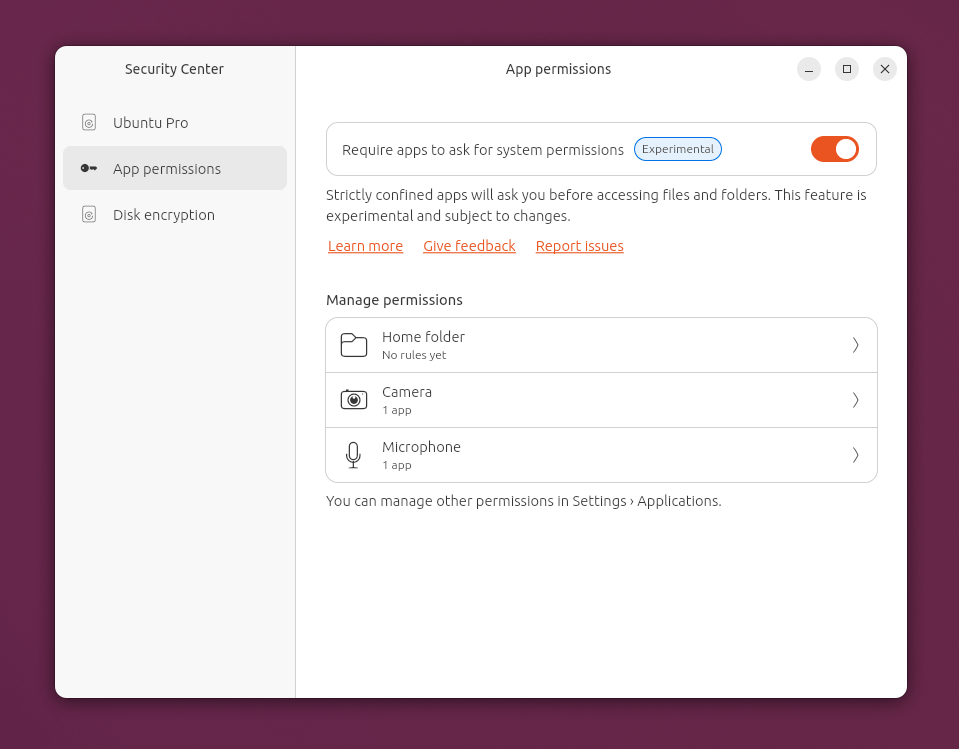
You no longer need to dig through hidden settings or run terminal commands to stay on top of your system's protection.
TPM-Backed Full-Disk Encryption Is Now Ready for Everyone
Full-Disk Encryption (FDE) backed by your computer's Trusted Platform Module (TPM) chip has moved out of the experimental stage and into General Availability in Ubuntu 26.04 LTS.
Here's how it helps:
- Your system will now warn you before a firmware update that could lock you out, and it will prompt for a recovery key at just the right moment.
- You can add, change, or remove a PIN or passphrase after installation. You no longer have to set it all up on day one.
- And, you can regenerate recovery keys whenever you need to.
One known limitation worth mentioning: disk re-encryption is not yet supported, and some NVMe RAID setups may not be compatible. Still, for most users, TPM-backed FDE is now a solid, reliable option in Ubuntu 26.04 LTS.
Post-Quantum Cryptography by Default
Ubuntu developers are thinking ahead of time. Ubuntu 26.04 LTS introduces hybrid post-quantum cryptography (PQC) algorithms, specifically ML-KEM and ML-DSA, as defaults in both OpenSSL and OpenSSH 10.2.
These algorithms are designed to resist attacks from quantum computers, which do not yet exist at scale but will one day threaten older encryption. Additionally, weak legacy algorithms like DSA have been fully removed.
AppArmor Gets Smarter in Ubuntu 26.04 LTS
The AppArmor mandatory access control system now ships with many new application profiles. More importantly, it introduces user-facing permission prompting for snapped applications. Think of it like the permission pop-ups on your smartphone, but for your desktop.
When an app tries to access your files, devices, or network interfaces, Ubuntu 26.04 LTS will ask you first. This feature is currently experimental, but it points clearly to where Ubuntu security is heading.
Other Security Improvements
sudo-rs: Thesudocommand now runs on a memory-safe Rust implementation, eliminating a whole class of memory vulnerabilities.- SSSD (the identity service) no longer runs as root.
- Apache and Nginx now reject legacy TLS 1.0 and 1.1 by default.
- The new
authdframework lets your system connect to cloud identity providers like Google or Microsoft Entra ID using OpenID Connect and MFA. - OpenLDAP now runs in AppArmor enforce mode by default.
The Oxidation Project
Ubuntu 26.04 LTS actively replaces old, security-sensitive C components with Rust equivalents through a process called "Oxidation."
Rust is a modern programming language that prevents entire categories of security bugs found in older C-based code — things like buffer overflows and memory corruption.
Related Read: Oxidizr: Try Modern Rust Alternatives To Legacy Unix Tools In Ubuntu
What Has Changed to Rust in This Release
sudo-rs: Thesudotool is now Rust-based by default.rust-coreutils: Core system utilities likels,cp,mv, and dozens more now run on a Rust implementation.- Resources (the new system monitor): Written entirely in Rust with a GTK 4 and libadwaita interface.
gst-thumbnailers: Video and audio thumbnail generation now uses Rust GStreamer bindings.
This shift does not change how you use these tools day-to-day. However, it makes the system fundamentally more resistant to exploits.
Ubuntu 26.04 LTS Desktop Gets a Fresh New Look with GNOME 50
Ubuntu 26.04 LTS ships with GNOME 50, and the visual refresh is one of the most noticeable changes in this release. From the boot screen to the folder icons, everything feels more polished and cohesive.
All-New Folder Icons
If you have used Ubuntu since 2019, you know the slate-grey folder icons. They are gone now.
The new folders are shorter, wider, and far more colourful, and they genuinely reflect your chosen system accent colour — not just a faint tint, but a full colour match across the entire folder. They also have visual depth, with a soft emboss and a highlight across the top.
The special folders you use every day have been updated too. For instance, Music, Pictures, and Downloads now feature inset, engraved emblems.
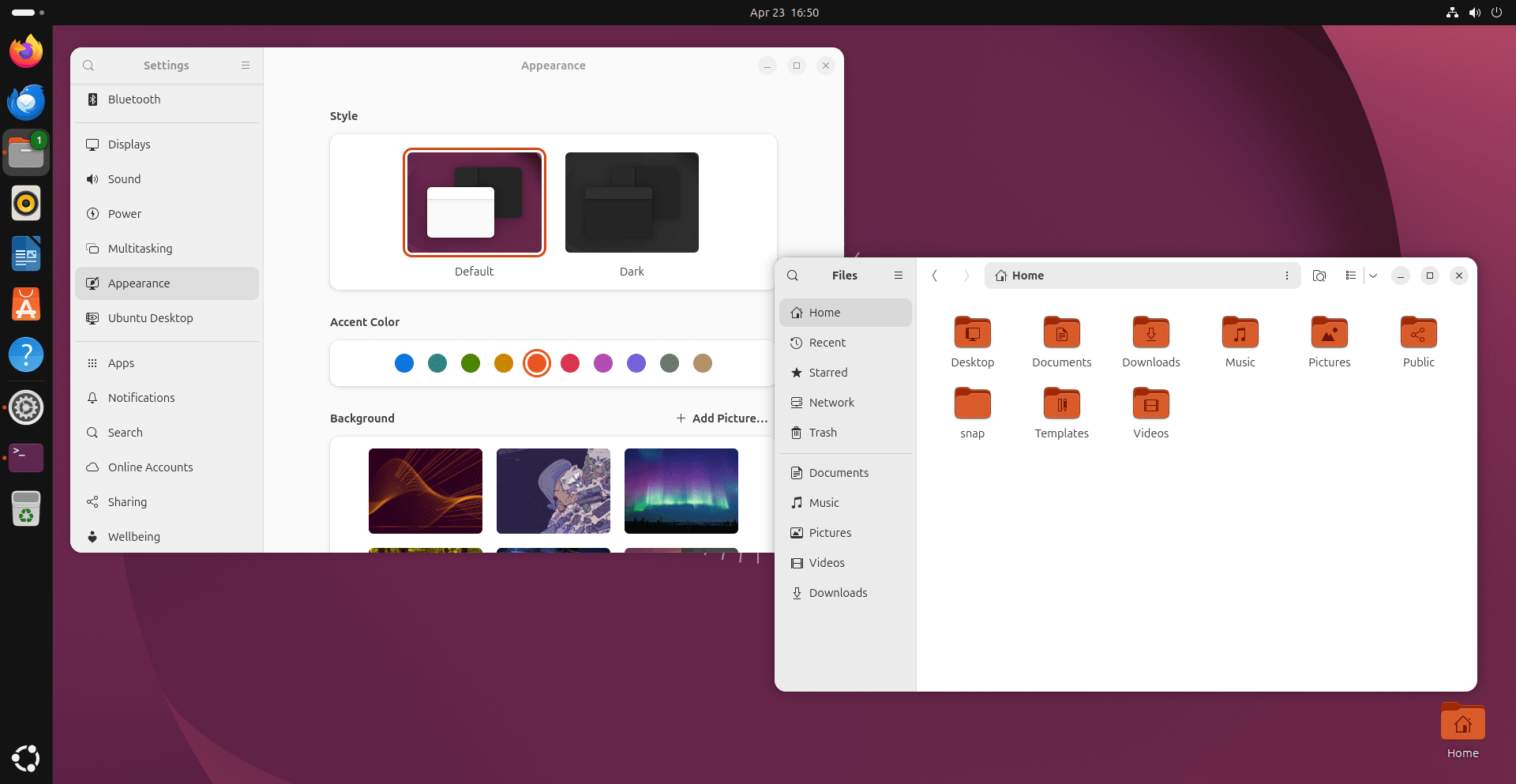
The Desktop folder uses a proper folder icon instead of a desktop pictogram, and the Remote mount folder now shows a cloud emblem instead of a pipe.
The Yaru Theme Gets Leaner and Bolder
The Yaru theme (Ubuntu's signature look) has been rebuilt to sit much closer to upstream GNOME Shell.
Developers removed nearly 5,000 lines of custom code by switching to an override-based approach. The result is a theme that is easier to maintain and more consistent with the broader GNOME ecosystem.
You will notice bolder text in notifications, pop-overs, and dialogs. Quick Settings controls have shifted from pill-shaped pods to cleaner, squared-off rectangles.
The Ubuntu Dock is now opaque by default, which makes it stand out clearly against any wallpaper.
A New Boot Animation
Even the boot screen got an upgrade. The new Plymouth spinner is directly inspired by the sunburst-style tail from the official Resolute Raccoon mascot artwork.
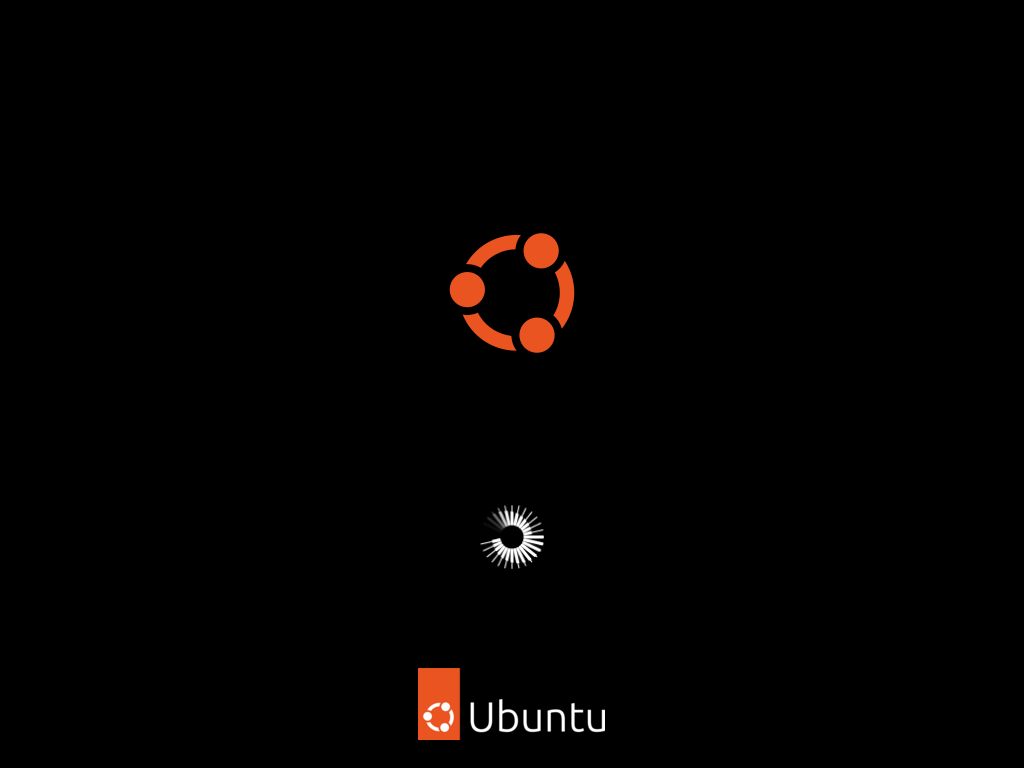
It runs at 60 frames for a smooth, fluid sweep, replacing the blurry animation that shipped in earlier interim releases.
More Visual Details in Ubuntu 26.04 LTS
- The Calculator app icon changes its equals button colour based on your accent choice.
- LibreOffice gets a completely reworked icon set in the Yaru style.
- The Ptyxis terminal: The default terminal emulator in Ubuntu 26.04 LTS, includes an updated colour palette with better contrast and a proper light-theme variant. (See the next section for Ghostty, a new optional alternative.)
- The default monospace font size now matches the standard UI font size for better consistency.
New Default Apps in Ubuntu 26.04 LTS
Wayland Is Now the Only Session (X11 Login Is Gone)
Ubuntu 26.04 LTS completes the switch to Wayland at the display manager level. The GNOME-on-X11 session option has been removed from the GDM login screen. You can no longer select "Ubuntu on X11" from the gear menu on the login screen.
This does not mean X11 apps stop working. The built-in XWayland compatibility layer continues to run legacy X11 applications seamlessly inside a Wayland session.
All major apps, such as Firefox, LibreOffice, GNOME apps, and Chromium, already run natively on Wayland. Only niche tools like certain CAD packages or older screen recorders may need XWayland, and they will continue to work automatically without any changes.
If you use NVIDIA graphics, Ubuntu 26.04 LTS brings significant Wayland-NVIDIA improvements, including proper dynamic power management on multi-GPU laptops. The long-standing black-screen issue on NVIDIA hybrid systems is largely resolved..
Showtime Replaces Totem for Video Playback
Showtime fits naturally into the modern GNOME 50 environment with a clean, easy-to-use interface.
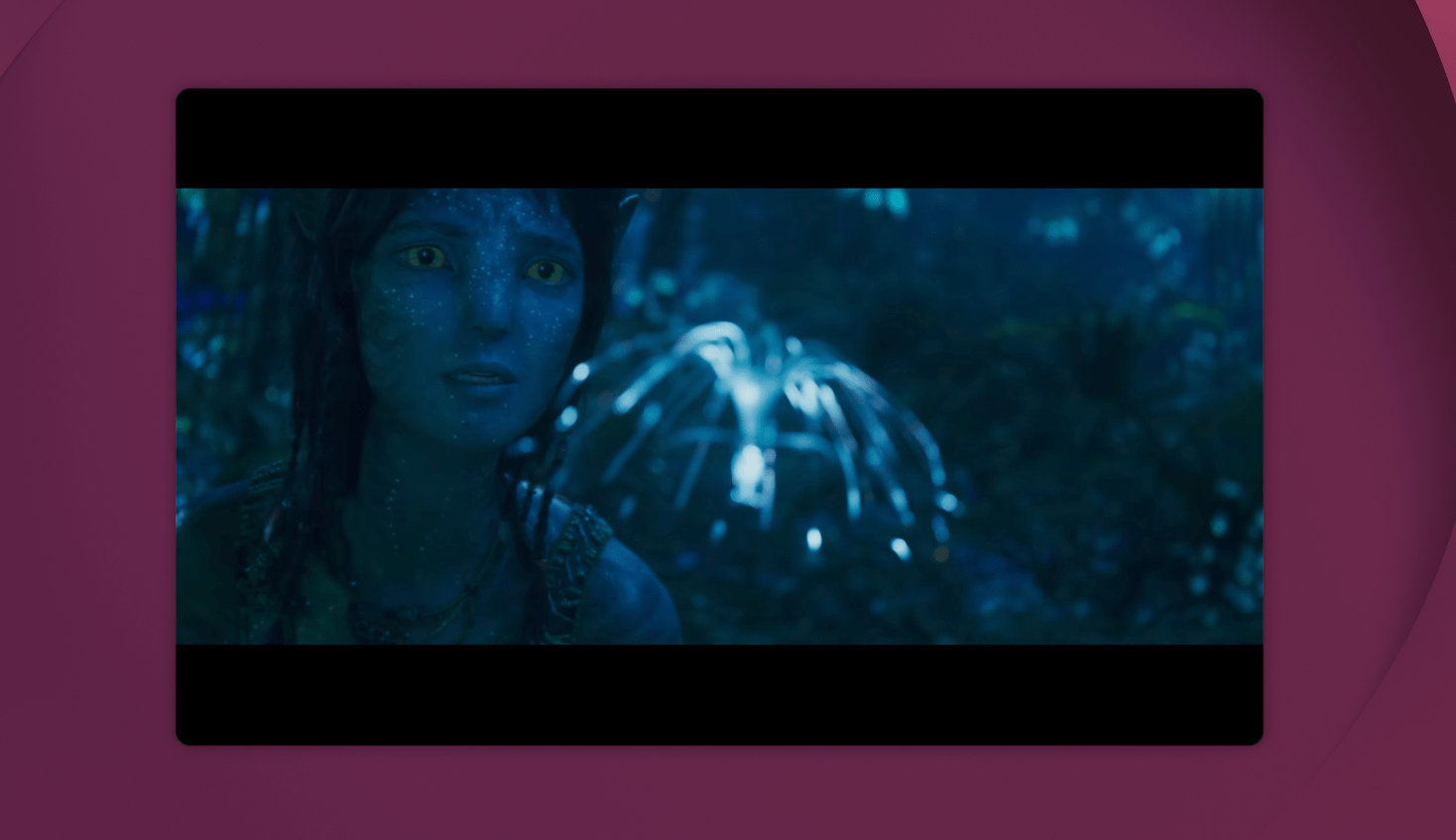
Please note that Showtime is included when you select the "extended selection" option in the Ubuntu installer.
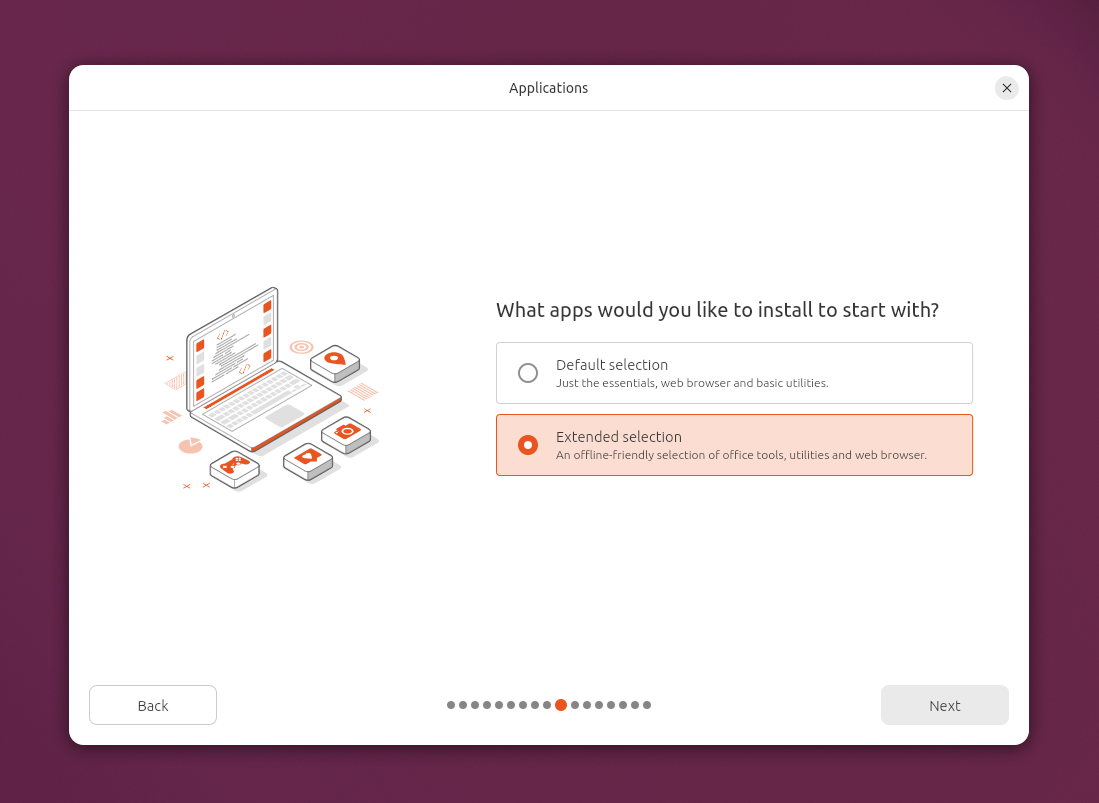
Users who choose the minimal installation can add it any time with sudo apt install showtime or through the App Center.
Resources Replaces System Monitor
The aging System Monitor and Power Statistics apps have been replaced by a single, powerful tool called Resources.
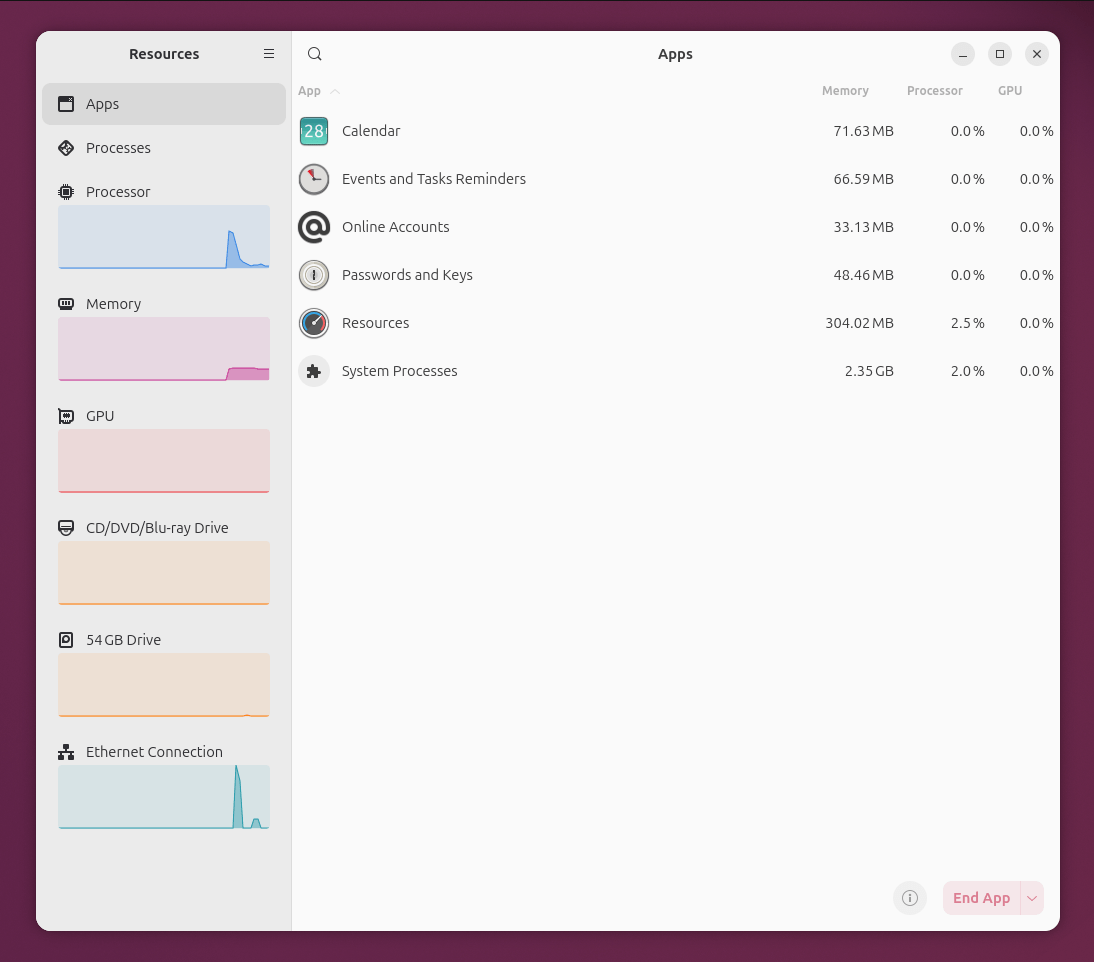
It monitors:
- CPU, memory, GPU, network, storage, and power usage
- GPU encoders and decoders — great for media creators and AI users
- NPU (Neural Processing Unit) usage — increasingly important as AI accelerators become common in consumer hardware
The Ubuntu 26.04 LTS team chose Resources specifically because of its excellent accessibility support, including better keyboard navigation and strong screen reader compatibility. It is built in Rust with GTK 4, so it fits right in with the rest of the refreshed desktop.
More New Default Apps
Beyond Showtime and Resources, Ubuntu 26.04 LTS brings two more notable app replacements:
- Papers replaces Evince as the default PDF viewer. It is built on the Evince codebase but updated to GTK 4 and partially rewritten in Rust for better performance and memory safety.
- Loupe replaces Eye of GNOME (EOG) as the default image viewer. Written entirely in Rust and powered by the Glycin library, it delivers faster and safer image decoding.
Both are pre-installed by default and fit naturally into the refreshed GNOME 50 desktop
Ghostty Arrives in Ubuntu 26.04 LTS
Ptyxis remains the default terminal emulator, but Ubuntu 26.04 LTS also welcomes Ghostty as an installable alternative directly from the official Ubuntu repositories.
Ghostty is a fast, feature-rich terminal emulator built by Mitchell Hashimoto (the creator of Vagrant and HashiCorp). It is written in the Zig programming language and uses GPU-accelerated rendering for a noticeably snappy experience.
Ghostty is available as a universe package on amd64 and arm64 architectures. Installing it takes a single command:
sudo apt install ghostty
Once installed, a Ghostty icon appears in the app launcher automatically. The packaged version is Ghostty 1.3.0, built with Zig 0.15. Note that Canonical considers this a preview release — it is fully usable but not yet a supported default.
One important hardware requirement: Ghostty needs OpenGL 4.3 or higher for GPU acceleration. On systems where that version is unavailable — including some Raspberry Pi configurations — you can still launch it by forcing software rendering:
LIBGL_ALWAYS_SOFTWARE=true ghostty
You can check your current OpenGL version with:
glxinfo | grep "OpenGL version"
Ghostty's arrival shows Canonical's intent to grow the terminal ecosystem in Ubuntu. Future package versions are expected to include libghostty, a library that lets other apps embed a terminal emulator directly, with both Zig and C APIs.
Smarter System Management
The linux-firmware Package Is Now Split Into 17 Pieces
Previously, all hardware firmware lived in one massive package — over 600 MB to download and about 1 GB on disk.
Every time a tiny security fix arrived for, say, a specialised enterprise network card, every Ubuntu user had to download the entire 600 MB blob. Ubuntu 26.04 LTS finally fixes this problem.
The firmware package is now split into 17 vendor-specific sub-packages, covering:
- Graphics: Intel, AMD, NVIDIA, Qualcomm
- Wireless: Intel, Broadcom, Marvell, MediaTek, Realtek, Qualcomm
- Specialised: Mellanox, Netronome, Qlogic, and more
All sub-packages remain pre-installed by default through a meta-package, so your hardware still works out of the box. However, updates in Ubuntu 26.04 LTS are now targeted — an Intel Wireless fix only downloads the Intel Wireless sub-package.
For users on metered connections or slow internet, this can save significant amount of bandwidth.
The App Center Now Handles Everything in Ubuntu 26.04 LTS
Software management is centralised in the App Center, which handles all app formats, including traditional .deb packages. This means you have one place for all your software installs, updates, and firmware.
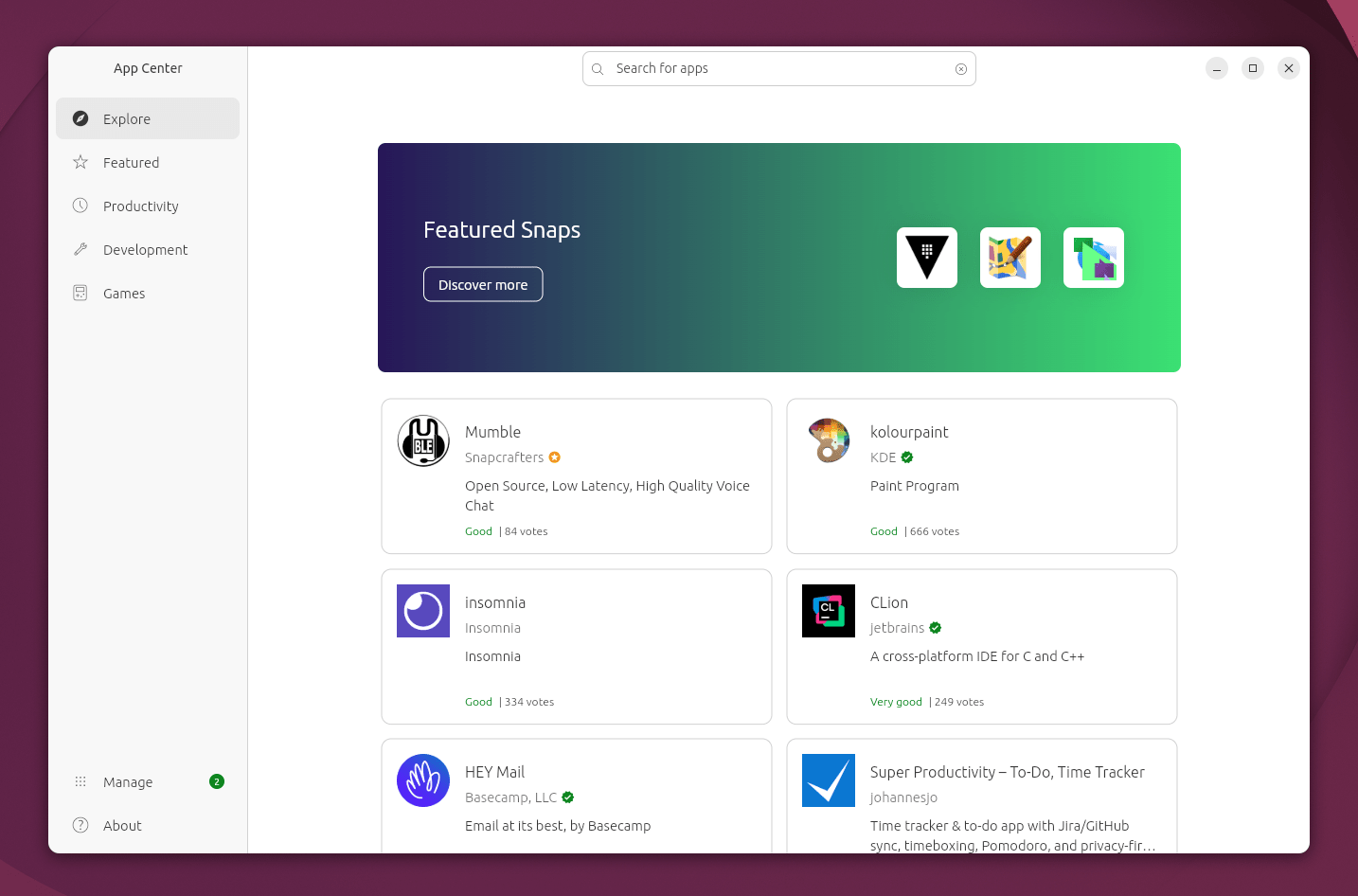
As part of this consolidation, the legacy "Software & Updates" tool has been removed from default desktop installs. Ubuntu Developers flagged it as too risky for most users because its interface could accidentally disable access to main Ubuntu repositories, cutting off security updates.
The Software & Updates tool itself has been updated to use the GTK 4 toolkit and remains available in the official repositories. Users can still install it manually with the following command:
sudo apt install software-properties-gtk
And existing users who upgrade will keep their current installation intact.
The sudo Password Now Shows Asterisks
For 40 years, typing your password after a sudo prompt produced nothing on screen — no dots, no asterisks, no feedback whatsoever. That silent behaviour confused countless new users who thought their keyboard had stopped working.
Ubuntu 26.04 LTS changes this. Asterisks now appear as you type your sudo password, a direct result of switching to sudo-rs.
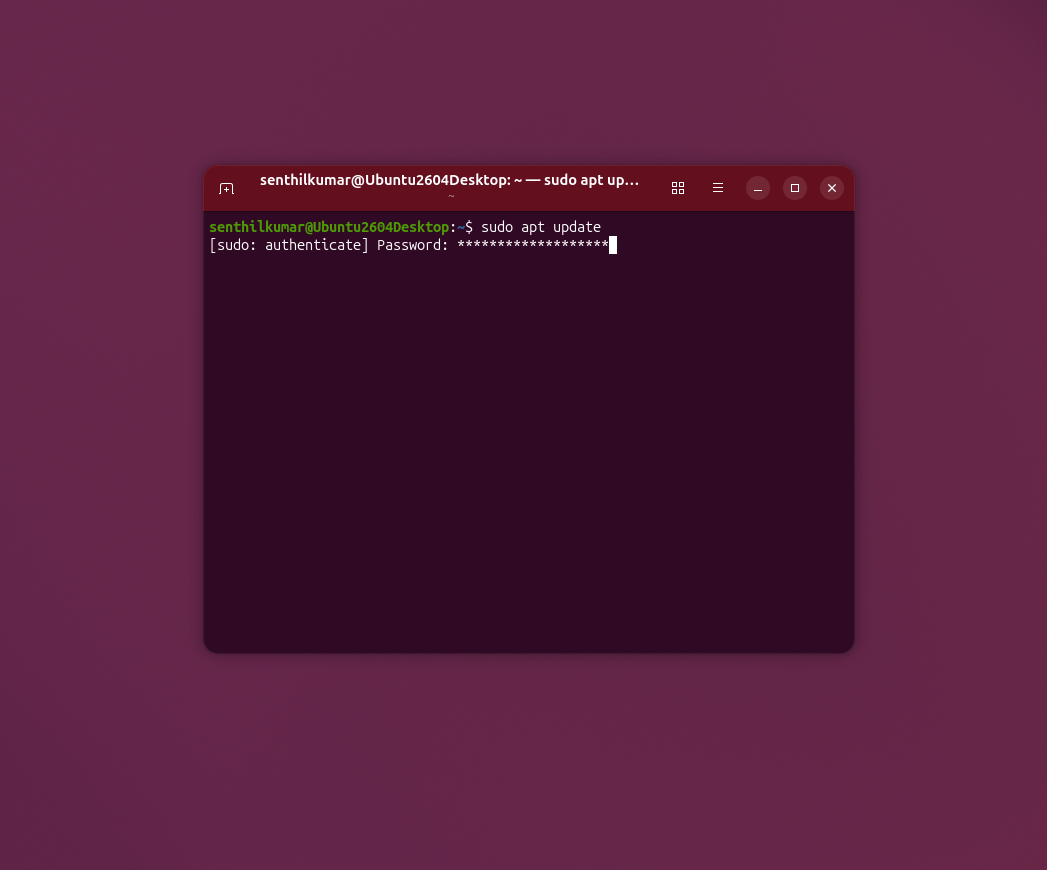
If you are in a public space and do not want to reveal your password length to anyone nearby, press the Tab key during password entry. The terminal will print (no-echo) and immediately stop displaying asterisks. The Tab key is specifically patched so it does not count as a character in your password.
If you want the old silent behaviour permanently, edit your sudoers file using command:
sudo visudo
Add Defaults !pwfeedback to it. Log out and log back in to take effect the changes.
A Privacy-First Web Search in the GNOME Overview
Ubuntu 26.04 LTS includes a new Web Search Provider extension in the GNOME Shell Overview.
When you type in the Overview, it shows a "Search the web" option.
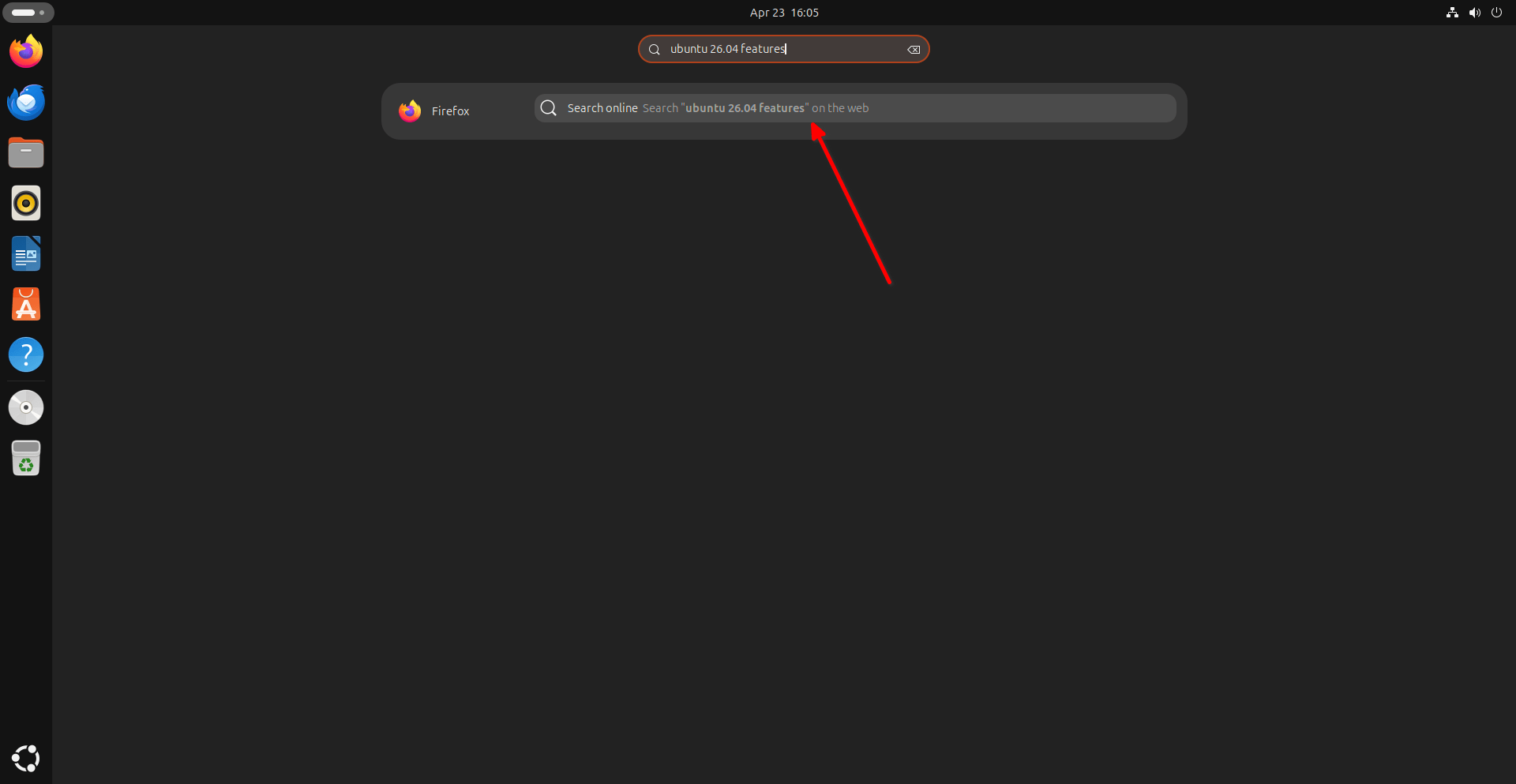
Please note that it sends no data to any server while you type. Only when you explicitly click the result does it open your default browser with the search query — a clean break from the old Amazon Shopping Lens, which sent your local searches to external servers as you typed.
Both the Web Search Provider and the new Snap Search Provider are on by default but can be turned off in the extensions list for a pure GNOME experience.
Ubuntu Pro: Easier Enrollment in Ubuntu 26.04 LTS
Enable Ubuntu Pro From the Very First Screen
The setup wizard that greets you after a fresh Ubuntu 26.04 LTS install now opens with one slide: "Enable Ubuntu Pro." You can start enrollment right then, or skip it and return later through the Security Center.
For home users, enrollment is straightforward. The wizard gives you a unique attach code, lets you copy it, and opens ubuntu.com/pro/attach in your browser. Log into your Ubuntu One account, paste the code, and your device is linked. Enterprise users can enter a pre-generated token directly — no browser needed.
Ubuntu Pro is free for personal use on up to five devices and extends security maintenance to up to 15 years, adds expanded package coverage, and activates features like Livepatch for kernel updates without reboots.
Recommended Read: How To Enable Ubuntu Pro For FREE To Get 10 Years Of Security Updates
Ubuntu 26.04 LTS Server and Cloud Features
Kernel 7.0 and systemd 259
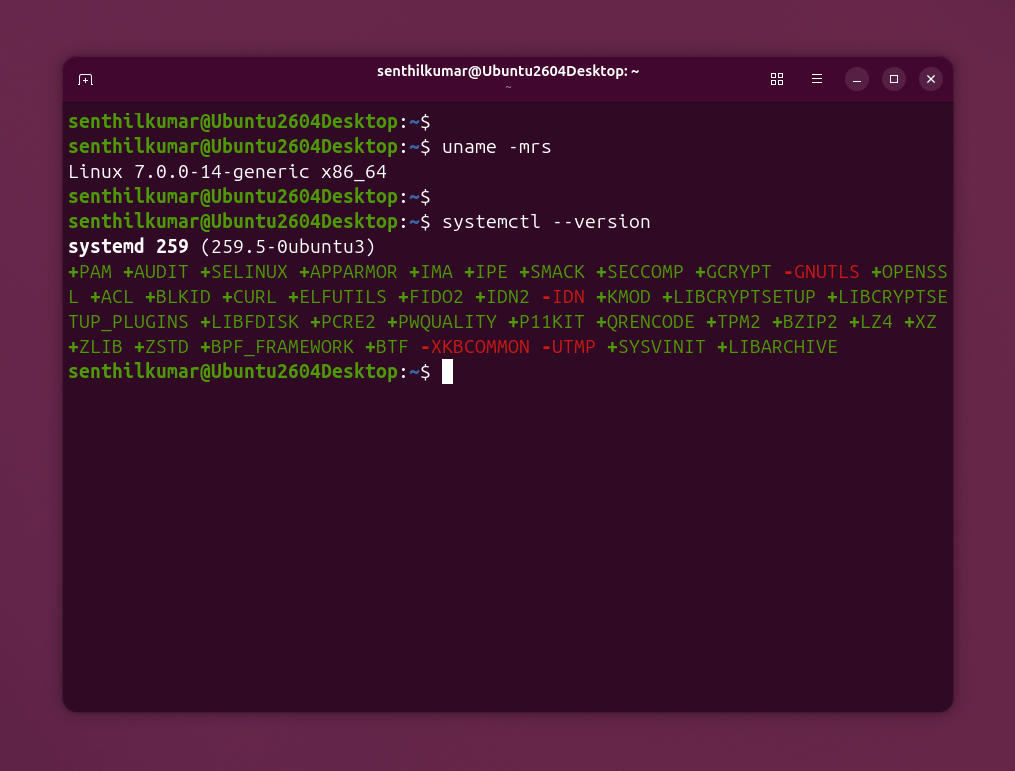
Ubuntu 26.04 LTS ships with Linux kernel 7.0 and systemd 259.5.
$ uname -mrs
Linux 7.0.0-14-generic x86_64
$ systemctl --version
systemd 259 (259.5-0ubuntu3)
[..]
One critical note for server admins: this release completely drops support for cgroup v1. If your containers or workloads depend on the legacy cgroup hierarchy, they will not run on this release. So please plan your migration before upgrading production servers.
A Better Setup for Servers
The Subiquity 26.04 installer brings several "quality of life" fixes. It now creates your user account earlier in the process, which prevents crashes on virtual machines.
Most importantly, Ubuntu Server will now automatically install hardware drivers (OEM and HWE kernels) if your machine needs them. This brings the server experience in line with the desktop, ensuring your hardware works perfectly "out of the box".
Dual-Track Container Stacks
Ubuntu Server 26.04 LTS now offers a two-track system for container runtimes like containerd and runc:
- Application Track - for teams who want regular major feature updates.
- Stable Track - for teams who need locked, predictable versions of core components.
This approach, which Canonical calls "steady paths for agile stacks," ends the old conflict between keeping up with the container ecosystem and maintaining a rock-solid production environment.
A new mechanism called ubuntu-virt-hwe also lets server operators adopt newer virtualisation stacks from future interim releases while staying on the stable Ubuntu 26.04 LTS base.
Confidential Computing for AI Workloads
Ubuntu 26.04 LTS includes full support for Intel TDX and AMD SEV-SNP — two technologies first introduced in Ubuntu 25.10 that encrypt and integrity-protect virtual machine memory at the CPU level.
For teams running sensitive AI workloads, these features represent a major step forward for data sovereignty.
PostgreSQL 18 and DocumentDB
The Ubuntu 26.04 LTS server stack includes PostgreSQL 18 and the new DocumentDB package, providing a modern foundation for both relational and document-based database workloads.
Known Google Cloud Issues in Ubuntu 26.04 LTS
If you deploy Ubuntu 26.04 on Google Cloud, be aware of these release-day issues:
- First-boot delay of up to 30 seconds due to a cloud-init/systemd integration issue (LP: #2148619).
- Dropped support for Intel Ivy Bridge and Sandy Bridge CPUs on N1 machine types. All AMD64 GCP images now require AMD64v3.
- Ubuntu Pro upgrade bug — in-place Pro upgrades on GCP have a known issue. A fix arrives in the first point release (26.04.1).
- Ensure at least one network interface is marked
optional: falsein your Netplan config so cloud-init runs only after the network is fully ready.
Official Ubuntu Flavours are Also Available for Download
All official flavours, including Kubuntu, Xubuntu, Lubuntu, and Ubuntu Budgie, have also been released alongside the main version.
You can read their individual release notes under the Official flavors section:
Ubuntu 26.04 LTS Hardware Requirements
Desktop Hardware Requirements for Ubuntu 26.04 LTS
| Requirement | Minimum Spec |
|---|---|
| Processor | 2 GHz dual-core |
| RAM | 6 GB |
| Storage | 25 GB free disk space |
For machines with only 2 GB of RAM, Canonical recommends lightweight Ubuntu flavours like Xubuntu or Lubuntu instead of the standard Ubuntu 26.04 LTS desktop.
Server Hardware Requirements for Ubuntu 26.04 LTS
| Requirement | Minimum Spec |
|---|---|
| RAM | 1.5 GB |
| Storage | 4 GB |
Architecture Changes in Ubuntu 26.04 LTS
Ubuntu 26.04 LTS raises the bar for several hardware platforms:
- IBM Z (s390x): Requires generation z15 or newer. Generation z14 and older are no longer supported. The installer will block upgrades on this hardware.
- RISC-V: Requires hardware that meets the RVA23S64 ISA profile. Older RVA20-based boards are not supported. Important: as of April 2026, no physical RVA23S64 hardware exists yet. RISC-V support in Ubuntu 26.04 LTS currently applies to QEMU virtualisation only (
-cpu rva23s64profile). - All Cloud Providers (AMD64): All AMD64 cloud images — across Google Cloud, AWS, Azure, and others — are now built with AMD64v3 by default. This means Intel Ivy Bridge and Sandy Bridge processors (typically found on older N1 machine types in Google Cloud) are no longer compatible.
- Raspberry Pi 4: Boot firmware must be dated November 25, 2022 or later.
- Raspberry Pi 5 and 3: All existing firmware versions work fine.
- ARM64: There is now an official generic ARM64 Desktop ISO targeting VMs, ACPI + EFI platforms, and Snapdragon-based Windows on ARM devices, including initial support for the Snapdragon X Elite.
How to Upgrade to Ubuntu 26.04 LTS
Step 1: Prepare Your System
Do these three things before you start the Ubuntu 26.04 LTS upgrade:
1. Back up your data to an external drive.
2. Plug in your laptop to power source. Never run an upgrade on battery power. If you have an UPS connection, it is even better.
3. Fully update your current Ubuntu system with command:
sudo apt update && sudo apt upgrade
Step 2: Check Your Upgrade Path to Ubuntu 26.04 LTS
Ubuntu supports sequential upgrades only:
- From Ubuntu 24.04 LTS → direct upgrade to Ubuntu 26.04 LTS.
- From Ubuntu 25.10 → direct upgrade to Ubuntu 26.04 LTS.
- From Ubuntu 22.04 LTS → must first upgrade to 24.04 LTS, then to 26.04 LTS.
Step 3: Run the Upgrade
Graphical method:
Open the Software Updater app. When it detects a new release, click Upgrade and follow the prompts.
Command line method:
sudo do-release-upgrade
The Ubuntu 26.04 LTS upgrade is interactive and takes up to an hour. You will be asked to confirm removal of obsolete packages and how to handle third-party PPAs. Restart your computer when the process finishes.
We will soon publish a detailed step-by-step guide about Ubuntu 26.04 LTS upgrade with screenshots. Stay tuned.
What If the Ubuntu 26.04 LTS Upgrade Does Not Appear?
- On Ubuntu 24.04 LTS? The LTS-to-LTS upgrade path does not open until Ubuntu 26.04.1, which arrives a few months after today's launch.
- On Ubuntu 25.10? Upgrades typically appear a few days after the official release date.
- Blocked upgrade? Systems running cgroup v1 or IBM Z generation z14 hardware cannot upgrade to Ubuntu 26.04 LTS. Resolve these first.
- Force a check: Run
sudo do-release-upgrademanually at any time.
After the Ubuntu 26.04 LTS Upgrade
Third-party PPAs are usually disabled during the process. Re-enable them through the "Other Software" tab in Software & Updates (if installed). Also note that the removable media mount point has changed from /media to /run/media — update any custom scripts that rely on the old path.
For more details, visit the Ubuntu 26.04 LTS release announcement or read the complete technical notes at documentation.ubuntu.com/release-notes/26.04.
Ubuntu 26.04 LTS New Features: Quick Summary
| Area | What Changed in Ubuntu 26.04 LTS |
|---|---|
| Security | Security Center app, TPM FDE now GA, post-quantum cryptography, sudo-rs |
| Desktop | GNOME 50, new folder icons, refreshed Yaru theme, new boot animation, Wayland-only login |
| New Apps | Showtime replaces Totem; Resources replaces System Monitor; Papers replaces Evince; Loupe replaces EOG; Ghostty available as optional terminal |
| Core | Rust-based sudo and coreutils via the Oxidation project |
| Firmware | linux-firmware split into 17 vendor sub-packages |
| Software Mgmt | App Center handles all formats; Software & Updates removed from defaults |
| Terminal | sudo asterisk feedback on by default; press Tab to hide |
| Ubuntu Pro | First-screen setup wizard; Security Center management hub |
| Server | Linux kernel 7.0, systemd 259, dual-track containers, Intel TDX + AMD SEV-SNP |
| Databases | PostgreSQL 18, DocumentDB |
| Release Date | April 23, 2026 (Beta: March 26, 2026) |
Should You Upgrade to Ubuntu 26.04 LTS?
If you are on Ubuntu 24.04 LTS and running a stable production system, wait for Ubuntu 26.04.1, which is expected a few months from now. That first point release fixes the issues that only surface at scale.
If you are on Ubuntu 25.10, upgrade today. The path is direct, and 25.10 reaches end-of-life in July 2026 anyway.
For fresh installs on desktops, laptops, or servers, Ubuntu 26.04 LTS is absolutely the right choice. It is fast, secure, modern, and supported for years to come. Download Ubuntu 26.04 LTS at ubuntu.com/download right now.
Frequently Asked Questions (FAQ)
Ubuntu 26.04 LTS "Resolute Raccoon" officially released on April 23, 2026. The Beta was released on March 26, 2026. As an LTS release, it receives five years of free standard security support and up to 15 years with Ubuntu Pro.
A: Ubuntu 26.04 LTS new features include:
- the Security Center app,
- TPM-backed Full-Disk Encryption in General Availability,
- post-quantum cryptography by default,
- GNOME 50 with a refreshed Yaru theme,
- two new default apps (Showtime and Resources),
- the Oxidation project replacing key tools with Rust-based implementations,
- a split linux-firmware package,
- and dual-track container stacks for servers.
A: For the Desktop edition, Ubuntu 26.04 LTS requires a 2 GHz dual-core processor, 6 GB RAM, and 25 GB of free disk space. The Server edition starts at 1.5 GB RAM and 4 GB of storage. Note that IBM Z generation z14, RISC-V RVA20 boards, and Intel Ivy Bridge or Sandy Bridge on Google Cloud are no longer supported.
A: First, back up your data and fully update your current system. Then run sudo do-release-upgrade in the terminal, or open the graphical Software Updater app and click Upgrade. Direct upgrades are supported from Ubuntu 24.04 LTS and Ubuntu 25.10. Users on 22.04 LTS must first upgrade to 24.04 LTS.
A: Yes. Ubuntu 26.04 LTS ships with Linux kernel 7.0, systemd 259, dual-track container stacks for containerd and runc, full support for Intel TDX and AMD SEV-SNP confidential computing, PostgreSQL 18, and DocumentDB. However, cgroup v1 support has been fully removed, so plan workload migrations before upgrading.
A: Ubuntu 26.04 LTS receives 5 years of free standard security maintenance (until April 2031). With an Ubuntu Pro subscription (free for personal use on up to five devices) support extends to 10 or 15 years, covering a broader set of packages and the Ubuntu kernel.
Final Thoughts
Ubuntu 26.04 LTS Resolute Raccoon resolves years of accumulated technical debt — memory-unsafe code, bloated firmware packages, confusing installer flows, and fragmented security tools — while delivering a modern desktop.
The Rust-based core, the post-quantum cryptography, the unified Security Center, and the leaner firmware system all show that Canonical is thinking about where computing is going, not just where it has been.
At the same time, the small but useful improvements, such as asterisks in the terminal, smarter search, sharper folder icons, and a smoother boot animation, make everyday use in Ubuntu 26.04 LTS noticeably more pleasant.
Ubuntu 26.04 LTS is available to download at ubuntu.com right now. Go get it.
Resources:
- Ubuntu 26.04 LTS Official Release Notes
- Ubuntu 26.04 LTS Release Schedule
- Ubuntu Release Cycle and Support Windows
- Ubuntu Pro - Free for Personal Use
- Livepatch - Kernel Updates Without Reboots
- Unmasking the Resolute Raccoon
Content last reviewed: April 24, 2026. This page will be updated as point releases and corrections become available.
