
The KDE project team officially unveiled the Alpha release of KDE Linux! It's a new OS, perfect for daily use, which really leverages modern technologies.
KDE team wants it to be the KDE operating system – a free, user-focused platform with the best implementation of everything KDE has to offer.
It is currently in an Alpha release with a "Testing Edition" available for adventurous users, QA testers, and developers, aiming to eventually offer "Enthusiast" and "Stable" editions.
Table of Contents
What Exactly is KDE Linux?
Imagine an operating system built from the ground up to showcase Plasma and all our fantastic KDE software in the best possible way. That's KDE Linux!
KDE Linux, codenamed "Project Banana", is an immutable base OS designed to showcase KDE software using modern technologies like Btrfs, Wayland, and Flatpak.
It is developed with a focus on stability and ease of recovery through atomic, image-based updates and system rollbacks.
KDE Linux is built using Arch packages, but it's not a traditional "Arch-based" distribution. It eschews a system-level package manager in favour of Flatpak, Snap, AppImage, and containerisation via Distrobox or Toolbx for additional software.
A dedicated team, including Harald Sitter, Nate, Hadi Chokr, Lasath Fernando, Justin Zobel, and many others, are working hard to make this dream a reality.
As a major producer of software, KDE naturally needs its own way to distribute its creations. Just like KDE puts its apps on Flathub, Snap, and Microsoft stores, it makes perfect sense for KDE to have its own operating system as a platform for distribution.
Developers Say It's Already Good!
KDE has just released the Testing Edition of KDE Linux. This edition gives you a sneak peek at unreleased KDE software, built directly from the source code.
Nate Graham, one of the KDE Linux developers, shared his personal experience, saying he’s had KDE Linux on his home theater PC for about six months and on his daily laptop for a month.
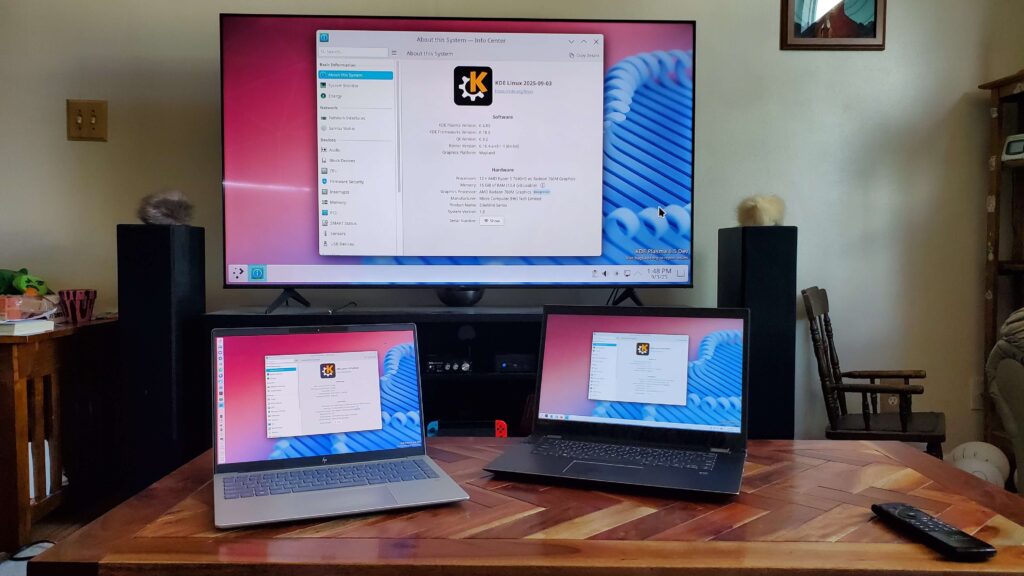
He even does all his KDE development and other laptop tasks on it, and he assured us it genuinely works, calling it "not a toy or a science experiment".
Of course, since it's an Alpha release, you will probably find some bugs if you use it. That's actually the point of this testing edition!
Please report those bugs so the developers can fix them before they reach the stable release.
If you find an issue with the OS design, you can report it on invent.kde.org. For bugs in KDE software like Plasma or Dolphin, use bugs.kde.org.
Why an "Immutable Base OS"? It's All About Stability!
One of the coolest things about KDE Linux is its "immutable base OS" design. This means the core operating system is read-only, making it incredibly safe by default.
Traditional package management, while flexible, can often lead to system instability, especially for non-experts. We've all accidentally broken our systems at least once, haven't we?
With an immutable OS, KDE delivers the entire system as one complete image. If something breaks, you can simply roll back to a previous working version.
KDE Linux actually saves the last few OS images on your disk (up to 5), letting you easily choose an older build from the boot menu if you run into problems.
This makes updates super fast and eliminates worries about "half-applied updates" or "local package conflicts".
Under the Hood: Modern Technologies at Play
KDE Linux uses a lot of cutting-edge tech. Here are some of the highlights:
- It uses Arch Linux packages as its base, but it's not really an "Arch-based distro" because it doesn't even come with the pacman package manager.
- Wayland is the supported display server, and PipeWire handles all the sound.
- For the file system, it uses Btrfs for the main writable part of the OS, while
/usris a read-onlyerofsvolume backed by a single file. - Flatpak is the primary way to get apps, though Snap is also technically supported.
- Systemd is the "glue" that holds everything together, and Systemd-boot is the bootloader, offering a nice themed boot experience.
- Updates are atomic and image-based, making them fast and safe.
KDE is even "cheating" a bit for system-level apps like Dolphin, Konsole, and System Settings. They're shipped directly on the base image instead of as Flatpaks.
This is because Flatpak isn't quite ready for the deep system integration these apps need, and the team wants to provide the best user experience possible.
This project also serves as a test-bed to push new technologies forward for KDE software.
How Do I Install Software in KDE Linux?
You might wonder how you install new software if the base OS is immutable. Don't worry, there are several options!
- The Discover app is your main gateway for installing applications, mostly from Flathub. Snap is also supported, and you can use
snapin a terminal window. - For command-line tools and development libraries, containers offer a modern solution. KDE Linux comes with Distrobox and Toolbox pre-installed. You can install packages from other Linux distributions inside these containers, keeping them separate from your core OS. This is "user-level packaging," which is safer than system-level packaging.
- AppImage apps also work well.
- Homebrew is another option for power users and developers, providing a large library of command-line tools and development libraries. Note that Homebrew packages are not segregated, so this should be considered an experts' tool.
- You can also compile software from source code yourself, using Homebrew or containers for dependencies.
- For developers, systemd-sysext is a really cool tool! It lets you overlay your own built files on top of the base OS for testing, without actually changing the core system. This means no more weird DBus or Polkit errors!
What About KDE neon?
Some of you might be thinking about KDE neon, KDE's first in-house OS. KDE neon is not canceled.
However, it has faced some challenges over the years, losing most of its developers and relying on a few volunteers. So it will be probably dropped at some time in future. It's just my assumption.
KDE Linux represents an evolution, aiming for better reliability and a smoother development process, as neon's Ubuntu LTS base sometimes became unstable when tweaked to build Plasma.
Ready to Try KDE Linux?
KDE is creating the operating system of the future, and you can be a part of it!
- Install KDE Linux on your computers and start using it daily. KDE is looking for more feedback from daily drivers. For more details, please check the KDE Linux installation instructions.
- Test less-common hardware, especially NVIDIA GPUs, and experiment with features like delta updates.
- Report bugs on invent.kde.org (for OS issues) or bugs.kde.org (for KDE software issues).
- Help develop KDE Linux if you're interested in operating systems. There's plenty to do! You can chat with the developers in the #kde-linux:kde.org Matrix room.
This is an incredibly exciting project, and I truly believe many of you will love it once you experience it!
Resource:
